The healthcare industry demands instant and accurate information that dramatically impacts patient treatment. Healthcare professionals collect vast amounts of data from multiple locations, such as medical systems, electronic health records, and patient management systems. Using a real-time healthcare dashboard allows healthcare workers to access the data within a single source of truth.
An investigation often showed that implementing health informatics tools, including real-time dashboards, has led to a 15% reduction in inpatient mortality and a 25% decrease in hospital stay durations. This highlights the importance of shifting to health care dashboards, which transform complex data into insightful information that supports confident decisions.
This blog explores the benefits and real-world examples of how healthcare departments can implement dashboards into their workflow to improve patient care.
Table of Contents
- Key Benefits of Real-Time Healthcare Dashboards
- Core Use Cases for Real-Time Dashboards in Healthcare
- Real-World Examples of Healthcare Dashboards
- Essential Features of Effective Real-Time Dashboards
- How to Successfully Implement Real-Time Dashboards in Healthcare
- Future Trends in Real-Time Healthcare Data Visualization
Key Benefits of Real-Time Healthcare Dashboards
Modern healthcare dashboards are critical tools that translate operational efficiency and improved patient outcomes. Here are a few benefits of implementing the same:
- Leverage Patient Outcomes: When clinicians track live hospital metrics with all the vitals and medical details in a single view, it creates the possibility of improving patient outcomes. By analyzing the patient data, clinicians can identify at-risk patients and predict disease outbreaks by understanding trends and patterns. They can also ensure personalized care plans and reduce delays in critical decisions.
- Faster Emergency Response: Real-time healthcare dashboards provide the latest patient information and instant access to workflow status and resources. This allows healthcare workers to respond to emergencies much more quickly. For example, emergency dashboards highlight the need for bed and staff availability, which can save thousands of lives.
- Enhanced Hospital Operations: The interactive dashboards used in hospitals' operational aspects help streamline operations. By analyzing operational metrics, hospital staff can address bottlenecks and switch to a hassle-free way of serving patients. Administrators can even balance workload to ensure smooth patient flow with the right use of staff capacity.
- Better Revenue Cycle Management: Whether it is claim management or tracking revenue/ expenses of hospital departments, the healthcare dashboard is driven to provide cost-saving opportunities. You get visibility into operational costs, which means you can manage your expenses and resources based on the profits generated.
Core Use Cases for Real-Time Dashboards in Healthcare
These dashboards are data visualization tools that can be applied across multiple areas of healthcare to support strategic decision-making and improved care delivery. Here are the core use cases of real-time healthcare dashboards:
1. ICU Monitoring Dashboards
The intensive care unit facilitates immediate insights into patients' vitals, lab reports, and ventilator data. Using a dashboard wireframing tool, healthcare workers can track live hospital metrics to consolidate all information into a single view. As a result, doctors can detect abnormalities and respond quickly when the thresholds are crossed. Therefore, it contributes to providing continuous patient care by acting on emergencies early.
2. Emergency Department Management
Emergency departments in healthcare organizations suffer from big yet prompt decisions, risking patients' lives. For those high-pressure environments, risk response assessment with real-time healthcare dashboards is the apt approach for treating patients precisely. It shows patient inflow, wait times, triage status, and available beds, helping staff manage overcrowding, optimize resource allocation, and improve patient experience throughput.
4. Surgery & Operating Room Dashboards
Real-time healthcare dashboards also improve the hospital's operational efficiency by tracking staff occupancy rates, equipment utilization, and room usage efficiency. With a live view of real-time patient data, you can ensure better workforce distribution, faster turnaround times, and reduced department bottlenecks. You can even track scheduled surgeries, room availability, sterilization status, and surgical team readiness to minimize delays and optimize the use of costly surgical facilities.
4. Patient Flow & Bed Management
Patient inflow and staff management are other areas where dashboards can be used. The real-time healthcare dashboards can provide up-to-date information regarding discharges, bed availability, and transfers that can help reduce unnecessary delays in room allocation. Additionally, moving patients across departments becomes easier when the data is tracked continuously, contributing to the enhancement of hospital capacity utilization.
Real-World Examples of Healthcare Dashboards
Here are some practical examples from Mokkup.ai’s healthcare dashboards:
1. Patient Imaging Insights
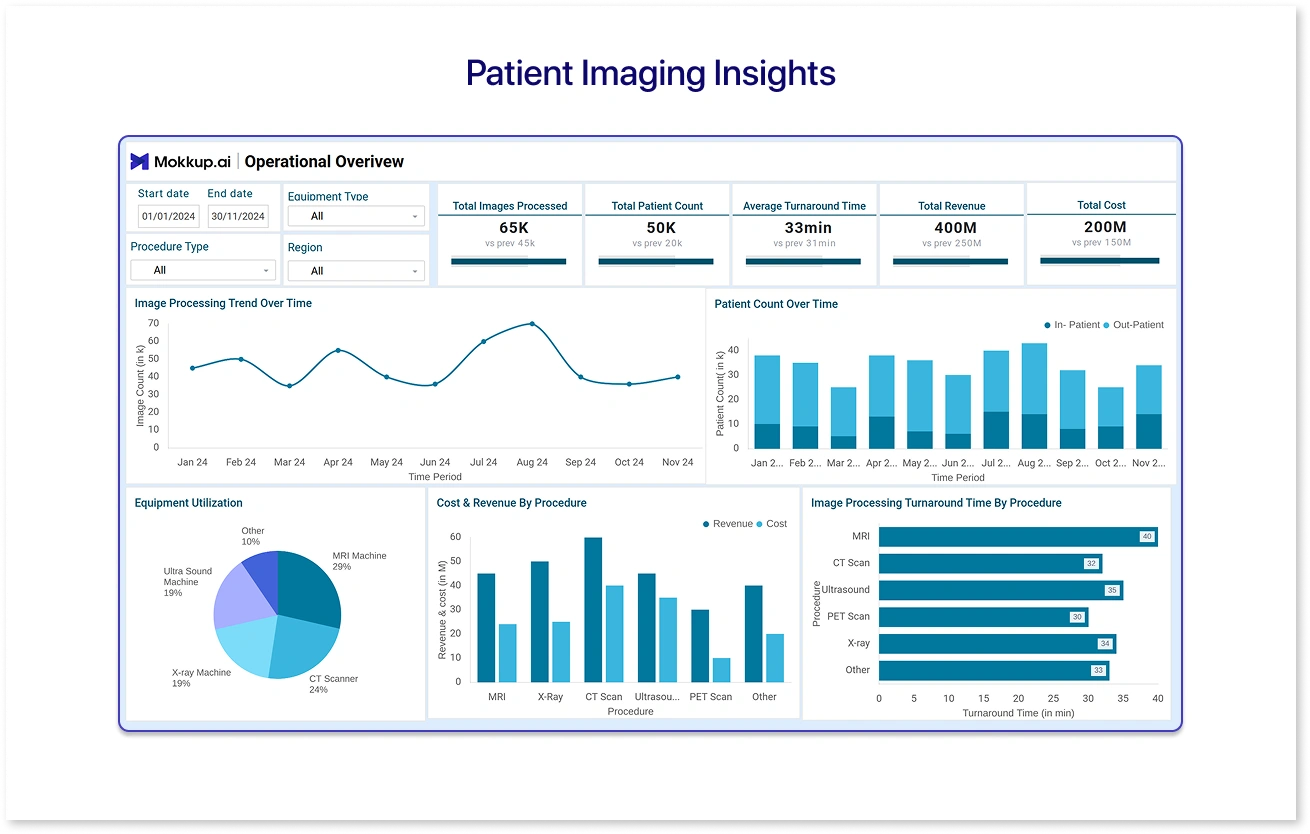
The patient imaging insights dashboard tracks diagnostic imaging KPIs and evaluates lab performance. Hospital departments can use this real-time healthcare dashboard to track trends and ensure diagnostic accuracy by tracking crucial metrics, which are consolidated into a single place. Use this dashboard wireframe to identify imaging inefficiencies, such as wait times or slow processing times, which aid resource planning.
2. Heart Vitality Dashboard
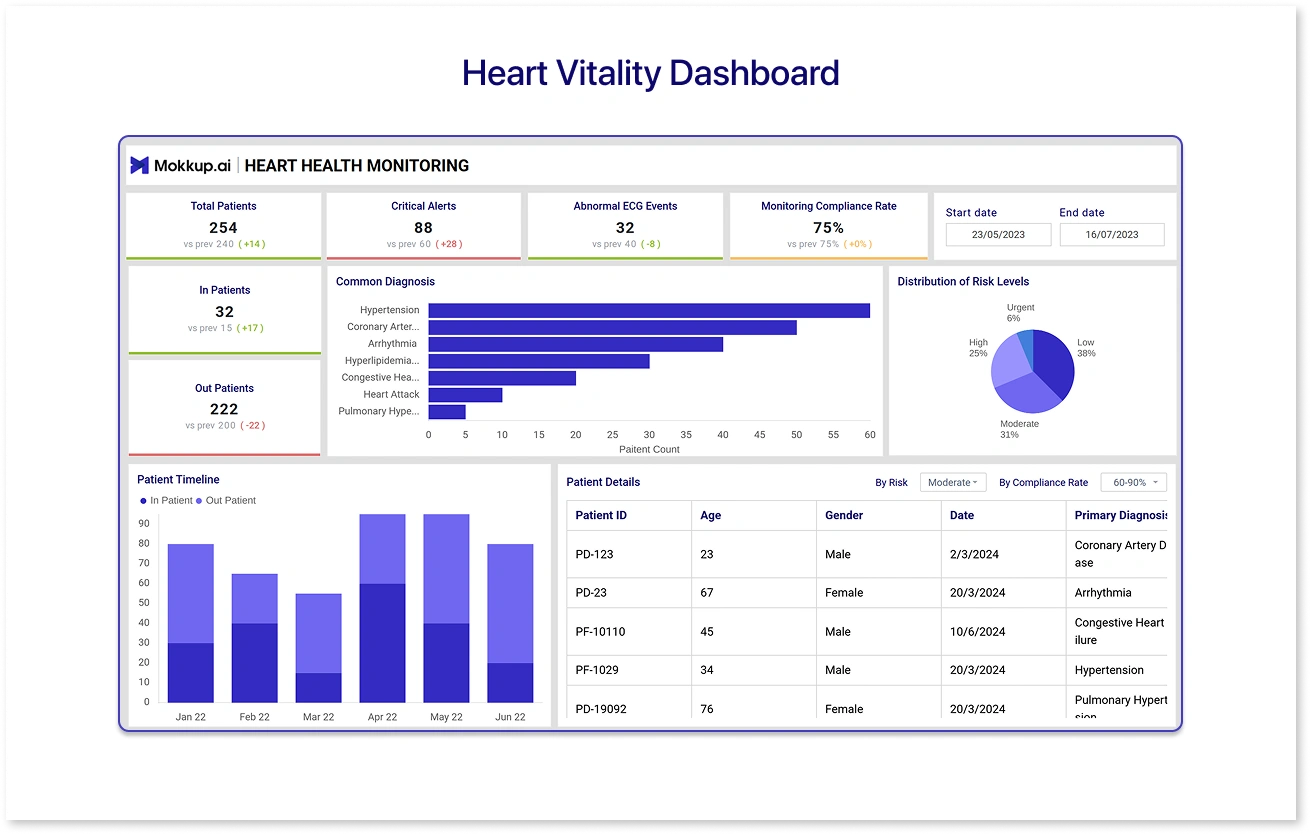
Often used in cardiology clinics, the heart vitality dashboard promotes patients' cardiovascular wellness. It can track primary heart-related KPIs such as heart rate, blood pressure, and cholesterol levels to provide actionable insights for proactive care. By offering both macro and micro views of patient health, heart vitality dashboards improve efficiency, accuracy, and patient outcomes, turning real-time data into better cardiac care.
3. Booking Performance Monitor
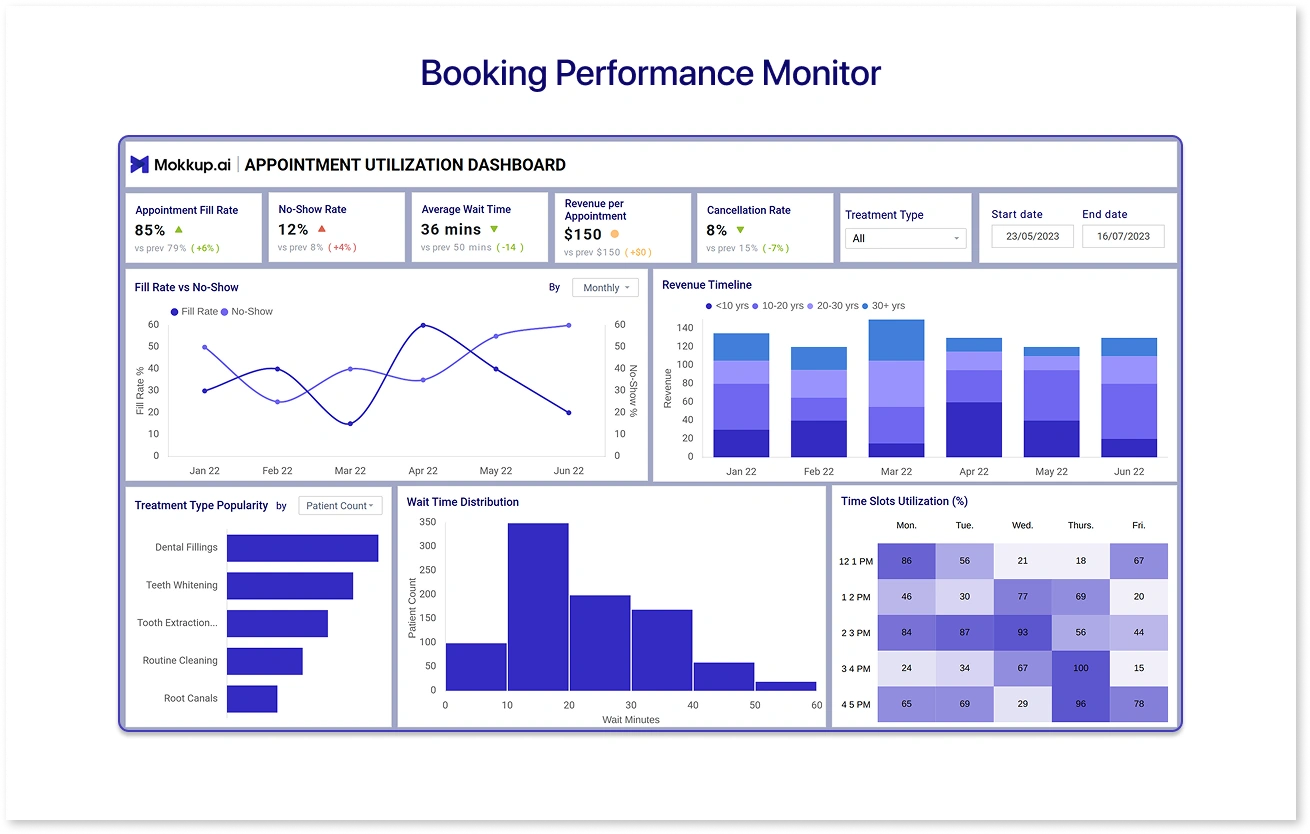
This appointment utilization dashboard is designed to streamline appointments by tracking appointment trends. This can improve the efficiency of the booking process by keeping in mind the user-centric navigation and drill-down filters that give granular insights. All appointment-related data is located in a single place to improve the OPD booking efficiency.
4. Recovery Progress Dashboard
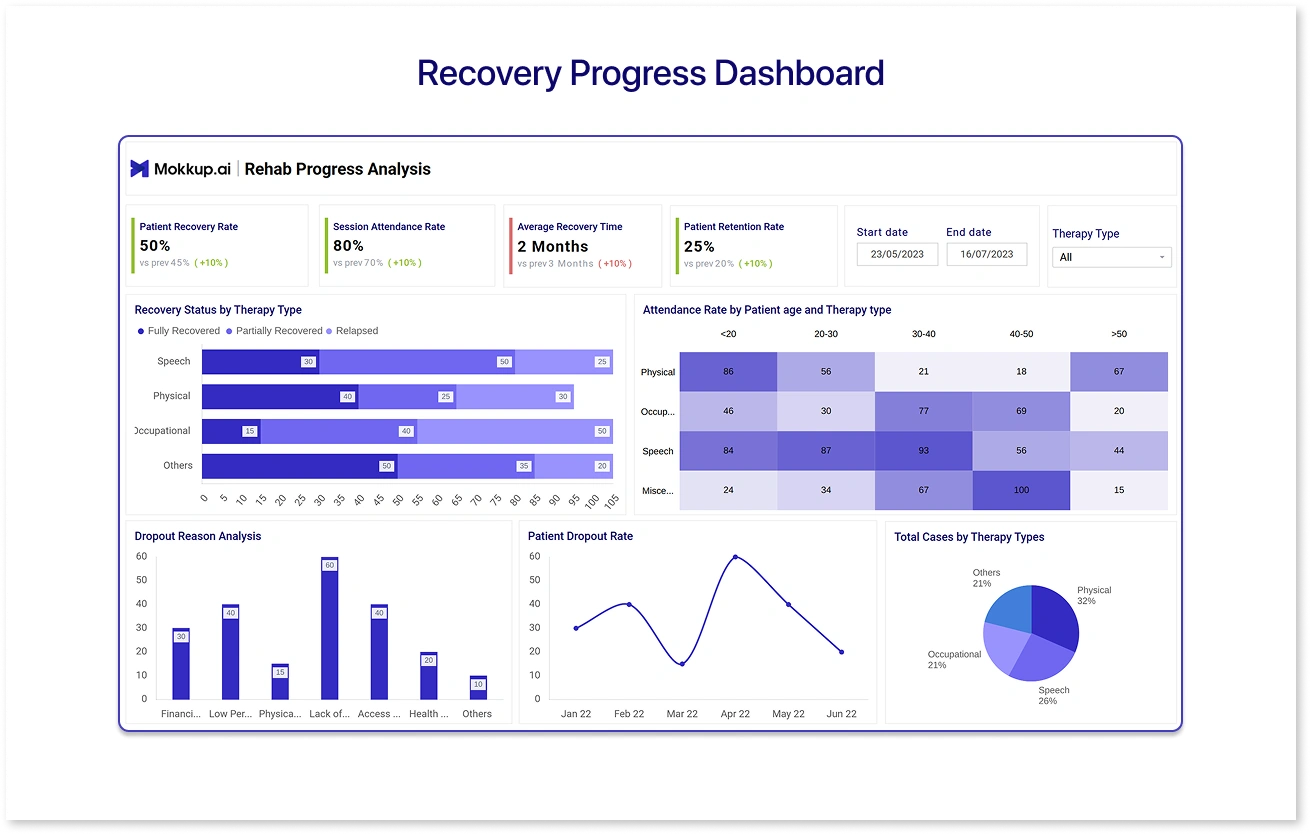
This dashboard can be used to track the patient's progress after surgery. Clinicians can track their patients' long-term and short-term goals. The recovery progress dashboard provides a real-time snapshot of the patients' rehabilitation journey. Thus, healthcare workers can plan better rehabilitation initiatives and undertake proactive interventions to give extra care to patients.
Essential Features of Effective Real-Time Healthcare Dashboards
The following features are nice-to-have in healthcare dashboards to truly support the decision-makers:
- Customizable Views: Different healthcare professional roles have different needs when it comes to insights. Physicians might need patient-level data, while hospital administrators focus on healthcare KPIs. Customization allows different views based on the person's roles and responsibilities.
- Automated Alerts & Notifications: Real-time healthcare dashboards are not just used for displaying key metrics but also for monitoring certain events on a regular basis. A good dashboard will have automated alerts for escalating issues. It can also notify clinicians of medication delays or abnormalities so that proactive interventions can be undertaken.
- Interactive Visuals: The color-coded charts and graphs make data interpretation easy. The drill-down capabilities and clear navigation make the interface more intuitive and allow the staff to focus on the things that matter most.
- Data Security and Compliance: Safeguarding patient data is paramount for healthcare organizations. This is why hospital alert dashboards are needed to comply with privacy & security regulations like HIPAA and GDPR. Under this, role-based access and audit trails can ensure that data is meeting security standards by providing sensitive information to authorized users.
How to Successfully Implement Real-Time Dashboards in Healthcare
Implementing a real-time healthcare dashboard requires strategic planning and stakeholder alignment to provide real-time insights. Here are seven steps to follow:
- Start by setting a clear goal for your dashboard. Determine whether your objective is to monitor patient engagement, reduce wait times, or improve hospital operations.
- Now, key stakeholders like clinicians, hospital administrators, doctors, and nurses should be involved, as their input is vital in developing a dashboard that delivers results.
- Focus on actionable or real-time patient data points such as vitals, treatment timelines, and bed occupancy. Prioritize the ones that matter the most.
- Develop a user-friendly dashboard with clear visual elements, including interactive features like drill-downs and filters for detailed insights.
- Protect your patient’s sensitive information by adhering to regulations.
- Conduct training sessions for the doctors or healthcare professionals and equip them with the proper training to use the dashboards.
- Now that your dashboard is in use, you need to monitor its usage and efficiency and make iterations based on the feedback you receive.
Future Trends in Real-Time Healthcare Data Visualization
The future of real-time healthcare data visualization with AI and machine learning looks promising. This will contribute to more advanced patient care. AI-powered data analytics, integration of wearables and IoT devices, and augmented and immersive visualizations are some of the primary trends that will define the future of patient care.
With predictive analytics, clinicians can predict future health events and understand interventions by looking at historical trends. The real-time visualizations will form a structure to forecast life-threatening conditions and pinpoint the at-risk scores to support high-quality patient care. Factually, Medscape & HIMSS AI Adoption by Health Systems Report 2024 stated that 60% of respondents have leveraged AI and improved their ability to uncover health patterns without human intervention.
Also, health organizations are focused on promoting the ethical use of data, and future strategies will involve transparent and compliant ways to leverage real-time information.
Conclusion
Real-time healthcare dashboards are meant to promote the quality of care. When used correctly, it can encourage the optimum utilization of healthcare staff and unlock transformative insights into complicated diseases that need early intervention. Mokkup.ai’s customizable healthcare dashboards empower clinicians to track critical metrics and optimize clinical operations with appointment scheduling, staff allocation, and room usage efficiency. With their AI feature, you can create your own healthcare dashboard supporting your healthcare management goals.
Frequently Asked Questions (FAQs)
1. What is a real-time hospital dashboard?
A real-time hospital dashboard is a dynamic and analytical tool that gives a transparent report on healthcare KPIs.
2. Can real-time data reduce medical errors?
Yes, real-time patient data can significantly reduce medical errors, as clinicians get up-to-date vitals and lab results, which minimizes the chances of making mistakes.
3. How to build a live ICU monitoring dashboard?
You can build a live ICU monitoring dashboard by putting your data points, visualizing key patient vitals, trends, and alerts on a user-friendly interface with strict compliance and reliability measures.
4. What technologies support real-time health data?
Technologies like HL7/FHIR for interoperability, IoT medical device gateways, streaming platforms (Kafka, MQTT), and time-series databases (InfluxDB, TimescaleDB) support real-time health data.
5. Are real-time dashboards HIPAA compliant?
When the dashboard follows the safety standards, including role-based access controls and continuous encryption, it is meant to be HIPAA compliant.
Prompt it. Wireframe it with Mokkup.ai.
