
Every great digital product begins with a simple outline — and that’s exactly what a wireframe is. Wireframing is the process of creating a visual guide that represents the basic structure of a webpage, app, or dashboard. It’s a crucial step in turning an idea into a full-fledged design.
Whether you're building a landing page or a business dashboard, starting with a wireframe helps you stay focused on function before jumping into aesthetics. It’s the foundation of any good user experience, helping teams align on structure and flow.
As design tools continue to evolve, AI wireframe design is making it easier than ever to create wireframes quickly. From sketching a rough layout to using wireframing software with smart suggestions, there are multiple ways to bring your ideas to life.
In this blog, we'll explore what wireframing is, why it's important, how to get started, and how wireframe design tools can help you go from wireframe to design in a smooth, structured way.
Table of Contents
- What is Wireframe Design?
- Why Wireframing Matters in the Design Process
- Types of Design Wireframes
- What to Look for in a Wireframe Design Tool?
- Choosing the Right Wireframing Software
- Wireframe Design Checklist
- Create & Customize Wireframe Designs with Mokkup
What is Wireframe Design?
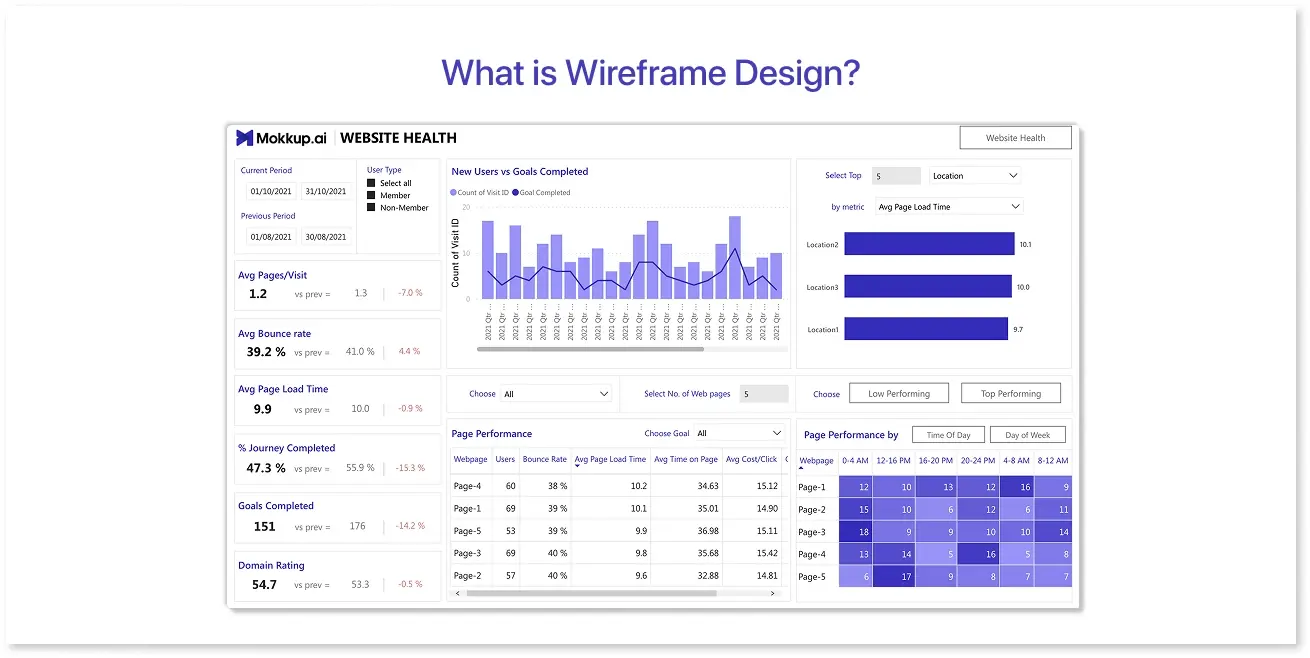
Wireframe design is the process of creating a basic layout that shows the structure and functionality of a digital interface - without focusing on colors, fonts, or detailed visuals. Think of it as a skeleton that outlines where different elements like buttons, menus, charts, or forms will appear on the screen.
Design wireframes are typically black and white, often using boxes and lines to represent content areas. The goal is to map out the user journey and layout clearly so stakeholders and developers can understand how everything connects.
In wireframe design examples, you might block out where KPIs, filters, and graphs should go — long before choosing the final color scheme or chart type. This helps teams focus on usability and layout decisions first.
Wireframing is also useful for aligning different team members, from designers and developers to clients and decision-makers. By keeping things simple at this stage, you’re more likely to gather useful feedback before moving into high-fidelity design.
Whether you're working on a website, mobile app, or business dashboard, creating a wireframe gives your project a strong starting point. And thanks to modern wireframing software, the process is faster and more collaborative than ever.
Why Wireframing Matters in the Design Process
Wireframing isn’t just an optional step - it’s the blueprint that guides your entire design journey. Jumping straight into visual design without a wireframe is like building a house without a floor plan. With wireframes, you can define layout, flow, and functionality early on, which saves time, money, and confusion down the line.
One of the biggest advantages of wireframing is clarity. Design wireframes make it easier to communicate ideas, especially in team settings where designers, developers, and stakeholders might interpret briefs differently. A wireframe acts as a shared reference point for alignment and feedback.
It also speeds up the decision-making process. Instead of getting caught up in colors or typography, wireframes help teams focus on content hierarchy and user experience. For instance, in a dashboard wireframe design, teams can prioritize which metrics need to be visible first and where filters or drill-downs should appear.
Another key benefit is flexibility. It’s far easier to make changes to a wireframe than a finished interface. When everyone agrees on the wireframe, moving from wireframe to design becomes faster and more efficient.
Modern wireframing software, like Figma or Mokkup, helps teams build and revise layouts collaboratively. These tools often use pre-built elements and templates to speed up the early stages. These tools also make it easier to present ideas visually, even without a full design team.
As AI wireframe design tools become more common, platforms like these help you iterate quickly while maintaining structure and usability.
Types of Design Wireframes
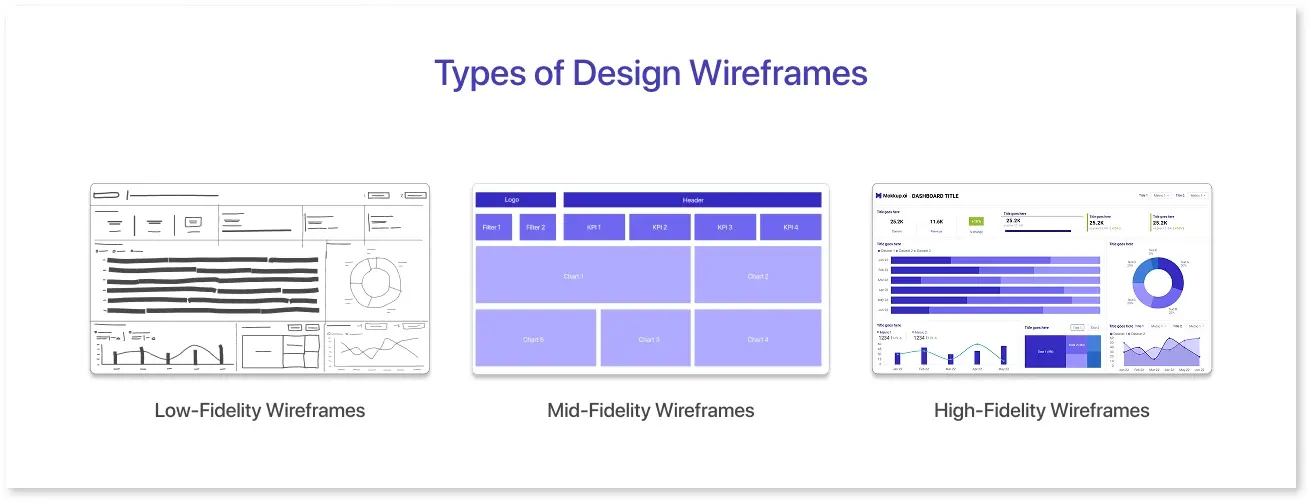
Wireframes come in different forms, depending on how much detail you want to include and what stage of the design process you’re in. Choosing the right type helps you communicate your ideas more clearly — whether you're planning a simple layout or a complex dashboard.
Low-Fidelity Wireframes
These are quick, rough drafts that show layout and structure without any design details. They’re often used in brainstorming sessions or early project stages.
Key features:
- Simple shapes (boxes, lines, placeholders)
- No colors, images, or stylized fonts
- Useful for early feedback and internal discussions
Tools like paper, whiteboards, or digital options like Balsamiq or Mokkup are great for this stage.
Mid-Fidelity Wireframes
These include more refined content placement and basic interaction flow. Still minimal in styling, but slightly more detailed than low-fidelity versions.
Key features:
- Clear layout with labeled elements
- Sample headings, icons, or button names
- Ideal for aligning with stakeholders
Mid-fidelity works well for dashboard wireframe design when you want to define sections like KPIs, filters, and side panels without diving into design.
High-Fidelity Wireframes
These closely mimic the final layout but remain focused on structure. While they may not include full visuals, they use accurate spacing, grid systems, and content placeholders.
Key features:
- Detailed layout and interaction cues
- Often grayscale but pixel-precise
- Good for usability testing and team reviews
When using a wireframing software like Mokkup, you can create mid- or high-fidelity wireframes using pre-built elements and drag-and-drop layouts — especially useful for fast dashboard mockups.
What to Look for in a Wireframe Design Tool?
When choosing the right tool, here are some key features to consider:
- Ease of Use: How intuitive is the interface? Is the tool beginner-friendly, or does it require a steep learning curve?
- Collaboration Features: Does the tool allow real-time collaboration? This is especially important for remote teams.
- Customization: Can you create custom elements or use pre-built templates to save time?
- Functionality: Does the tool allow for simple wireframing, or does it also include prototyping and design features?
- Industry-Specific Focus: If you’re designing dashboards or other specific layouts, does the tool cater to that need (like Mokkup’s focus on dashboard wireframe design)?
Choosing the Right Wireframing Software

Picking the right wireframe design tool is more than a matter of preference — it directly affects how quickly you can turn ideas into structured layouts. From solo creators to cross-functional teams, different tools cater to different needs. Let’s compare some of the most widely used wireframing platforms: Figma, Balsamiq, Mokkup, and AI-based tools.
1. Mokkup
Mokkup strikes a balance between ease of use and powerful features, making it ideal for creating wireframes for dashboards, mobile apps, and websites. The tool’s drag-and-drop elements and customizable templates allow you to design easily, and it’s specifically tailored for dashboard wireframe design. While not as advanced as Figma in terms of full design capabilities, Mokkup excels in simplicity and speed.
Pros:
- Prebuilt templates & drag-and-drop elements make it easy to design structured wireframes - no design background is required.
- Live collaboration allows teams to work together in real-time, review changes instantly, and stay aligned.
- Workspace management helps organize projects, share access, and maintain consistency across teams.
- BI export options streamline the transition from wireframe to tools like Power BI or Tableau, bridging the gap between design and development.
Cons:
- Best for layout planning, not creative UI
- Fewer third-party integrations
Best for: Data teams, product managers, and designers working on dashboard wireframes who want fast results and a clear path from wireframe to design.

2. Figma
Figma is one of the most popular and powerful design tools available today. It’s cloud-based, which means you can collaborate with others in real time, making it perfect for remote teams. Figma is often used for everything from wireframing to prototyping, and its flexibility allows designers to create both low-fidelity wireframes and high-fidelity designs.
Pros:
- Collaborative, cloud-based platform.
- Supports both wireframing and full-fidelity design.
- Advanced prototyping and design features.
Cons:
- Can be overwhelming for beginners.
- Requires an internet connection for full functionality.
Best for: Teams that need both wireframing and high-fidelity design capabilities, especially for interactive prototypes.
3. Balsamiq
Balsamiq is known for its simplicity and low-fidelity approach. It’s designed to help you quickly create wireframes that look like rough sketches, making it ideal for brainstorming and initial layout design. Balsamiq’s interface is straightforward, which means you can focus more on functionality and structure rather than aesthetics.
Pros:
- Simple and intuitive interface.
- Focuses on low-fidelity wireframes, so the design doesn’t distract from layout decisions.
- Great for fast iterations and early-stage designs.
Cons:
- Limited functionality for high-fidelity designs.
- Lacks advanced prototyping and interaction features.
Best for: Quick, low-fidelity wireframing and initial design mockups.
4. AI-Based Platforms
AI-powered wireframing tools are becoming increasingly popular as they can streamline the wireframing process with smart suggestions. These tools use machine learning to predict layout structures based on your input, helping to speed up the design process. While AI tools are still in their early stages, they can help automate repetitive tasks, like adjusting element placements or generating layouts for specific industries.
Pros:
- AI-driven suggestions and automation.
- Can speed up the wireframing process by reducing manual effort.
- Useful for generating multiple layout variations quickly.
Cons:
- Still evolving, with limited customization and flexibility.
- May not yet support complex, industry-specific wireframes like dashboards.
Best for: Designers who want to experiment with faster prototyping and those looking for an innovative, AI-powered solution.
Wireframe Design Checklist
Wireframing isn’t just about rough layouts - it’s how teams stay aligned before the real work begins. But how do you know when your wireframe is actually done? This quick checklist helps you assess whether your wireframe is ready for mockups, development, or handoff to design tools.
Whether you're using Figma, Balsamiq, or specialized wireframing software like Mokkup, a complete wireframe should include the following:
Key Elements to Check in Your Wireframe Design
- Essential screens are covered — Think of login, dashboards, reports, or settings—whatever the user truly needs.
- Clear user flow— Is the journey from the entry point to the goal (e.g., completing a task, accessing a report) logical?
- Functional layout — Have you considered navigation, hierarchy, and spacing to support usability?
- Goals and actions per screen — Does each screen focus on what the user should do next?
- UI components placed appropriately — Placeholders for buttons, charts, filters, and text should reflect actual use.
- Templates make sense — Similar screens should reuse layouts where possible to ensure consistency.
Why This Matters
Skipping proper wireframing often leads to more rework later. A wireframe helps everyone - from stakeholders to developers - see the structure before design polish is added.
With a tool like Mokkup, you can:
- Create and organize multiple screens inside a workspace
- Visualize dashboard flows clearly
- Adjust based on feedback, thanks to live collaboration
- Export layouts for BI tools once the structure is finalized
Embrace the Process
Your final design may evolve a lot from the wireframe - and that’s a good thing. Wireframing gives you the freedom to experiment, catch gaps early, and improve flow before visuals lock things in.
If your wireframe design checks all the key boxes above, you can confidently move forward.
Create & Customize Wireframe Designs with Mokkup
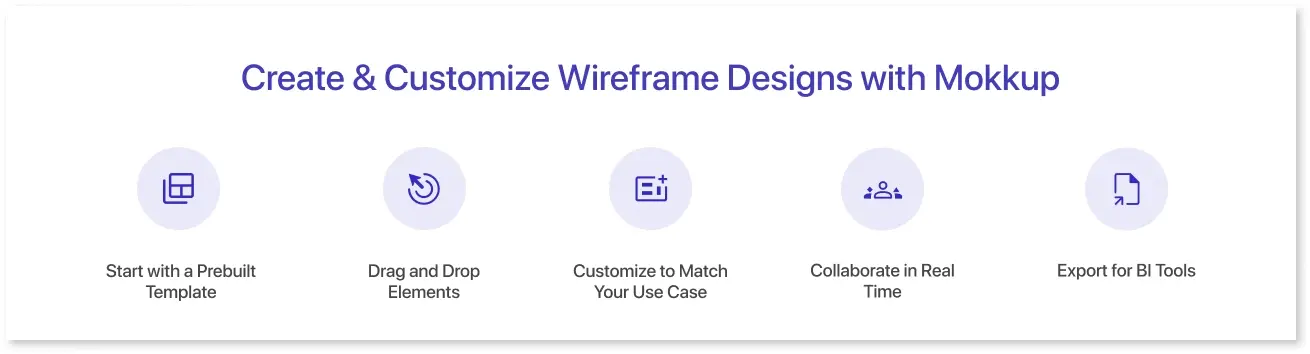
A wireframe isn't just a sketch—it's the blueprint of your user interface. Here’s a practical, step-by-step breakdown to help you move from idea to structured layout, which is especially useful if you're creating dashboards or data-heavy interfaces.
Mokkup is designed to take the hassle out of wireframing - especially when you're working on dashboards or data-heavy screens. Whether you're starting from scratch or customizing a template, Mokkup helps you move fast without sacrificing structure.
1. Start with a Prebuilt Template
Instead of building from a blank canvas, you can choose from Mokkup’s library of dashboard-specific templates. These templates already include common components like KPI blocks, charts, filters, and side panels—so you don’t have to reinvent the wheel.
2. Drag and Drop Elements
Want to add a new chart area? Just drag it in. Mokkup offers a wide range of ready-to-use elements you can place and rearrange as needed. Thanks to smart spacing and alignment guides, layouts stay clean.
3. Customize to Match Your Use Case
You can change labels, tweak sections, or swap out chart placeholders. While Mokkup doesn’t offer full design flexibility, it covers everything you need to create a structured, functional wireframe for dashboards, reports, or portals.
4. Collaborate in Real Time (Coming Soon)
Need input from stakeholders or team members? Mokkup’s upcoming live collaboration features will let everyone participate, leave feedback, and align on the layout - all in one place.
5. Export for BI Tools
Once your wireframe is ready, you can export it in a BI-friendly format, which is ideal for sharing with designers or developers working in Power BI or Tableau. This shortens the feedback loop and keeps everyone on the same page.
Mokkup bridges the gap between idea and execution, especially when you need to move quickly and collaboratively from wireframe to design.
Final Thoughts
Wireframing is a crucial step in the UI/UX and product design process. It allows designers and teams to map out the structure of a digital product, ensuring that user flow, content, and usability are prioritized before diving into detailed design work. Whether you're creating a simple webpage or a complex dashboard, wireframing ensures your design is user-centric from the start.
If you haven’t already, it’s time to try out a wireframe design tool. Whether you’re using well-established platforms like Figma, Balsamiq, or Mokkup, wireframing will help you clarify your design vision and align your team early in the process. With Mokkup, you can start with prebuilt templates and customize them to create efficient wireframes for dashboards, ensuring a streamlined design process.
Don’t hesitate to experiment with traditional wireframing methods and more modern tools. Each approach has its own benefits, and blending them can lead to more refined and user-friendly designs.

Frequently Asked Questions
Wireframe design is a basic layout of a digital product that maps structure, user flow, and content—without final visuals.
Popular tools include Figma, Balsamiq, and Mokkup. Mokkup is ideal for dashboard wireframe design and offers ready-made templates.
Key screens, user flows, content placeholders, and layout logic for navigation and usability.
Yes. Once the wireframe is finalized, you can build high-fidelity designs based on it.
Mokkup offers prebuilt dashboard templates, live collaboration, BI export, and a shared workspace for teams.
Prompt it. Wireframe it with Mokkup.ai.