The demo always goes well. Someone describes the dashboard they want, the AI produces it in under a minute, and the room approves the screenshot. The trouble starts afterwards, when the file reaches a BI developer. It has no measure definitions. No formulas, no data model, no route into Power BI. What everyone signed off on turns out to be a picture, and someone spends the next three weeks rebuilding it by hand.
That is the gap no demo shows you, and it is the real version of the question every BI team is asking this year: can AI build your dashboard, or only something that looks like one?
Stack Overflow's 2025 Developer Survey puts a number on the doubt: 84% of developers now use or plan to use AI tools, yet 46% actively distrust the accuracy of what those tools produce. Adoption is nearly universal. Trust is not.
So here's the honest answer for 2026. AI can build a dashboard, and it can do it fast. Building was never the bottleneck. The difficulty sits in whether the logic behind each number matches how your business actually calculates it, what happens to accuracy and data security once you connect a live warehouse to a model, and whether any of the output can be translated into the BI tool your team works in.
This blog covers where AI genuinely helps in a BI workflow and where it quietly costs you time.
Table of Contents
- What AI Can Genuinely Do Now
- The Three Kinds of "AI Dashboard" Tools
- Where AI Still Falls Short
- The Step That Wins: Wireframe Before You Build
- How Mokkup.ai Approaches It Differently
- A Practical 2026 Workflow
What AI Can Genuinely Do Now
AI's capability here is real, and it's worth being specific about what that capability actually covers.
Prompt-to-dashboard works. Describe a sales view, and you'll get a plausible arrangement of KPI cards, a trend line, and a regional breakdown. Layout is one of AI's genuine strengths; it has seen enough dashboards to arrange one sensibly. Copilots inside the major platforms have matured too. Power BI Copilot writes DAX measures and drafts report pages. Tableau Pulse surfaces metric movements without anyone building a view. Looker paired with Gemini, answers business questions conversationally.
AI is especially useful for writing code. It can create window functions and time-intelligence measures in seconds, and the result is often good enough to review rather than build from scratch.
Natural-language Q&A has quietly improved too. If your model is clean and your columns are named sensibly, a business user can ask "how did the North region do last quarter" and get a defensible answer. None of this is hype anymore. BI teams use it daily.
Answer-first: Can AI create a dashboard? Yes. AI can generate chart layouts, write SQL and DAX, and answer data questions in seconds. What it cannot guarantee is the business logic underneath. Models hallucinate measures that look correct and quietly invent filters nobody asked for. Nothing looks broken. The chart is neat and the number is wrong, so someone has to check every measure by hand, and that takes about as long as building it did. Agree the definitions up front and you skip the whole step. That is what a wireframe is for.
The Three Kinds of "AI Dashboard" Tools
Most confusion in this category comes from treating different products as one thing. There are three kinds of AI dashboard tools, and each has a structural limit built into how it works.
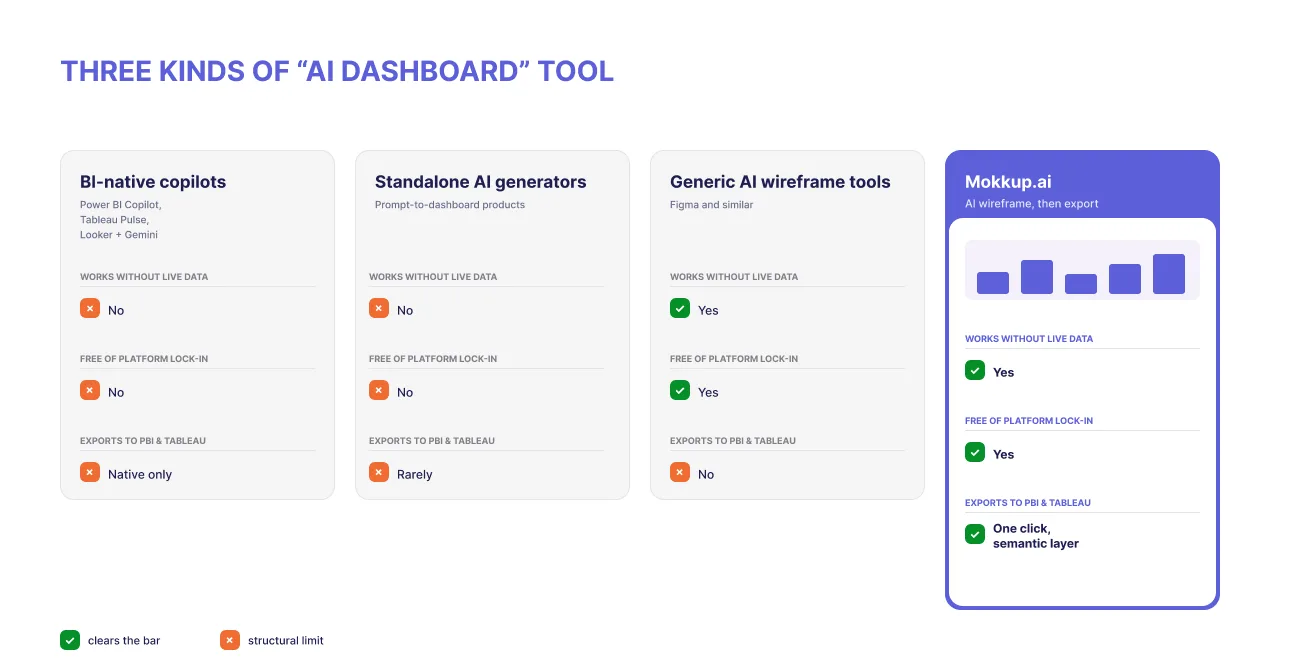
- BI-native copilots live inside Power BI, Tableau, or Looker. They're fast because they already sit on your data. But they need a clean semantic model, they need a live connection, and whatever they produce stays inside that one platform. If your organization is committed to a single BI tool and your model is in good shape, this is a strong option.
- Standalone AI dashboard generators build the real thing in the wrong place. Point one at your data and it returns a working, interactive dashboard inside its own product. It functions properly. It just never leaves. Your data has to sit in their environment to get there, and when your BI lead asks for the same view in Power BI, there's no file to hand over, only a login.
- Generic AI wireframe tools have the opposite problem. Figma's AI features and similar tools produce something you can move around freely, but nothing inside it is functional. A rectangle labelled "Revenue" is a rectangle. No measure, no formula, no data model behind it. The file travels perfectly and arrives meaning nothing, so your developer still starts from zero.
There is another way to use AI in dashboard development: start before the build. It means using AI at the planning stage instead of the build stage. Generate the wireframe, settle the decisions, then hand a structured, exportable plan to whichever BI tool you use. That's where Mokkup.ai sits, and it sidesteps those limits.
See what a dashboard wireframe actually looks like: browse Mokkup's dashboard templates.
Where AI Still Falls Short
Here are the five gaps that cost teams real time:
- It doesn't know your business logic. Ask AI for a marketing dashboard and you'll get impressions, clicks, and conversion rate. Reasonable metrics, drawn from thousands of dashboards it has seen. Ask your CMO and the answer might be pipeline contribution by channel, or cost per qualified lead. AI arranges a screen well. What it can't do is know which questions your business is trying to answer, or how your company defines the numbers that answer them.
- It can't define your metrics. "Revenue" is not one thing. It's gross or net, booked or recognized, ARR or MRR, before or after refunds. AI will happily label a card "Revenue" and move on. Three weeks later, two departments are arguing about a number, and nobody can trace where the definition came from. Sorting out which KPIs to put on a dashboard is worth doing before you prompt anything.
- Connecting live data brings its own risk. A generator that needs a warehouse connection is reading production data to do its job. That raises two questions at once: how accurate is a model interpreting tables it has never seen before, and where does that data travel while it's being interpreted? In regulated industries, the second question usually ends the evaluation before anyone gets to the first.
- It can't fix a broken data model. An AI reading a poorly modeled warehouse produces confident, wrong output. AI-generated dashboards are exactly as accurate as the model underneath them, no more.
- And it often builds something you can't move. This is the failure competitors gloss over. You get a finished dashboard trapped inside a tool your Power BI or Tableau stack can't open. Nothing was wrong with the charts. The work simply doesn't travel, and someone rebuilds it by hand.
The adoption numbers explain why this matters. BARC's research with Eckerson Group found that only about 25% of employees actively use BI and analytics tools, a figure that has barely moved in seven years. Dashboards don't fail because the charts are ugly. They fail because nobody agreed on what to build before building it, and the finished thing answered a question nobody was asking.
Tired of AI dashboards you can't move into Power BI or Tableau? Mokkup wireframes with AI and exports in one click, semantic layer included.
The Step That Wins: Wireframe Before You Build
Here's the part that surprises people. AI didn't make wireframing obsolete. It made wireframing more valuable.
A wireframe is a decision document. It says which metrics appear, how they're defined, what sits at the top of the page, and what got cut. Those are precisely the decisions AI can't make for you. Once they're written down, every AI builder downstream performs better, because a clear wireframe is the best prompt you can hand any AI tool.
Think about how the two approaches actually play out. If you go straight to the AI, you generate something, show it to a stakeholder, get a vague reaction, and generate again. Four rounds later you have four dashboards, and nobody remembers why the third one was rejected.
The wireframe route is slower to start and quicker to finish. You keep changing a cheap mockup until the people who asked for it say yes, and only then does anyone build. Moving a chart on a wireframe is a ten-second job. Moving it in a published Power BI report means going back into the measures and the layout, and sometimes the data model too.
When to wireframe: whenever the stakes are real, more than one stakeholder has an opinion, or rework costs you more than an hour. Prompt-and-go is fine for throwaway exploration.
How Mokkup.ai Approaches It Differently
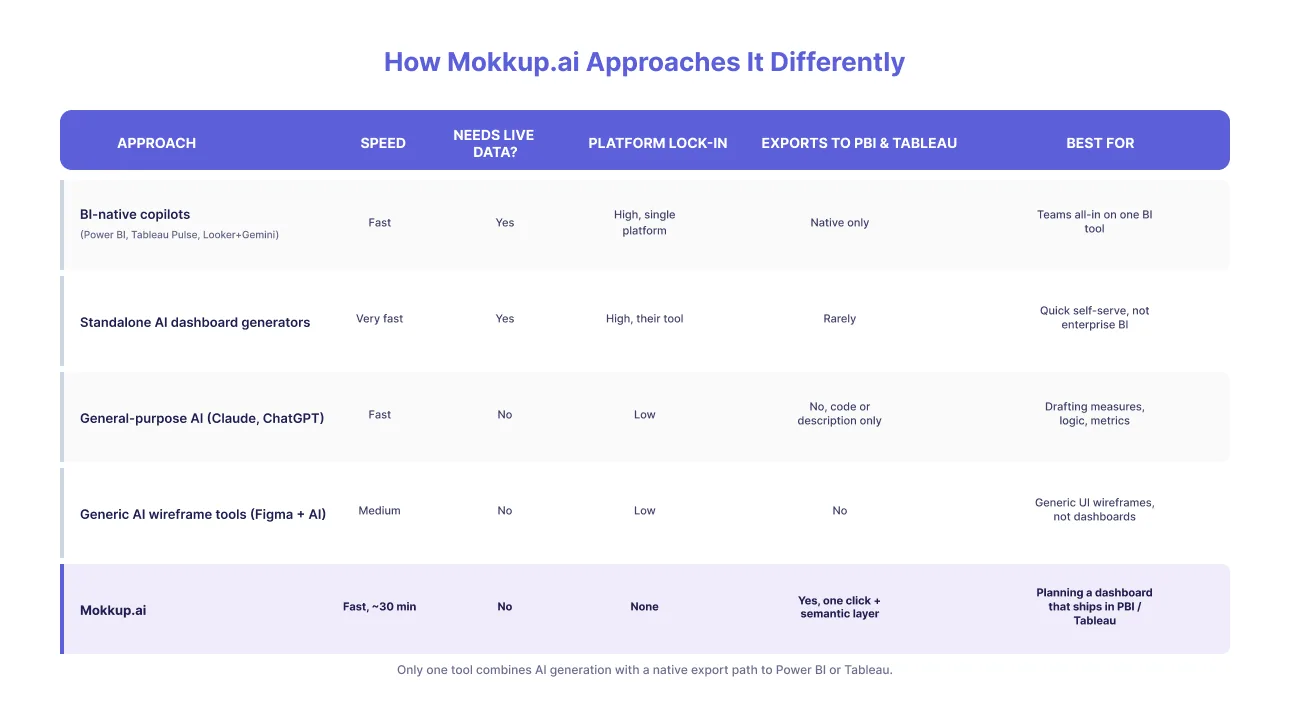
Nearly every tool in this article can produce a dashboard. Almost none of them can hand it to Power BI or Tableau. That one handoff is the problem Mokkup was built around, so it's worth being precise about how it works.
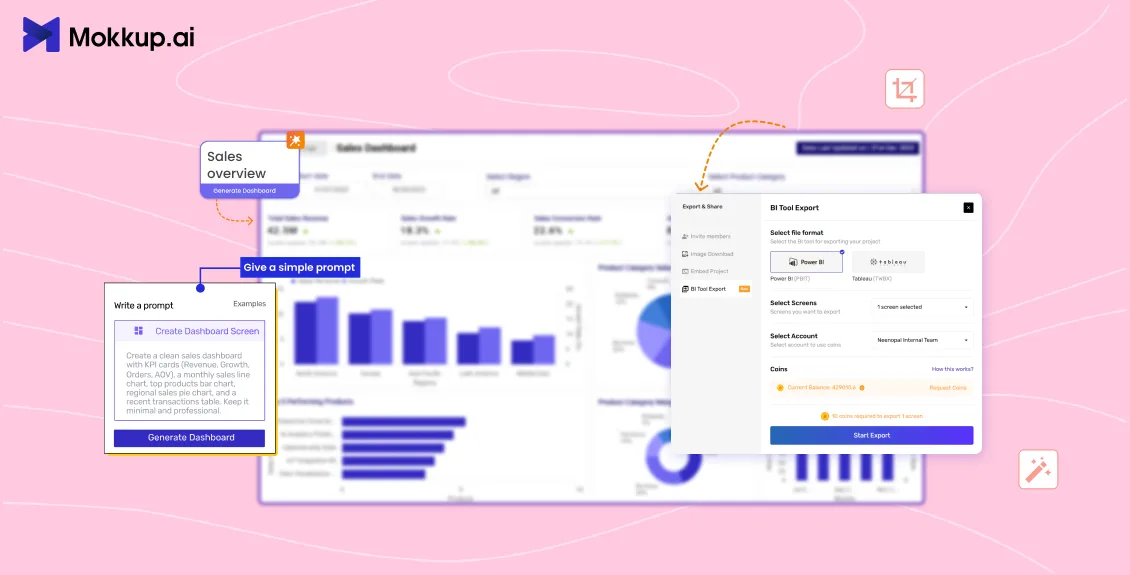
A Mokkup wireframe isn't a picture of a dashboard. It's engineered to become one. You describe the dashboard you need or upload a reference file, and Mokkup generates a structured BI wireframe: charts chosen, layout arranged, and hierarchy applied. Roughly 30 minutes for a fixed-scope dashboard, compared to the days a manual mockup takes.
As you place each chart and define what it measures, Mokkup writes the logic behind it as validated code in a structured format. That structure is what travels at export. Click once and the Power BI or Tableau file arrives with metrics, measures, and formulas already configured, not a screenshot for someone to reverse-engineer. Your developer opens a working starting point and spends the day refining it rather than rebuilding it.
The security model is what regulated teams ask about first. Mokkup never reads your actual data. It works from metadata only: the names and structure of your rows and columns. That's enough to write correct formulas and nowhere near enough to expose a customer record. It also means you can design before the warehouse is ready, because there is no connection to wait for.
You do not have to start from a blank prompt either. There are 50+ prebuilt templates covering marketing, finance, sales, customer insights, and operations, so you can pick one that is close to what you need and change the rest. Feedback happens on the wireframe itself. Stakeholders leave a comment next to the chart they are talking about, which saves the usual hunt through email for whichever version someone meant.
Mokkup is used by 250K+ users across 15,000 organizations. There's a free plan, so testing the claim costs nothing. If you work in Tableau, the Tableau dashboard templates are a reasonable place to start.
A Practical 2026 Workflow
Let's get into five practical steps to get into the workflow:
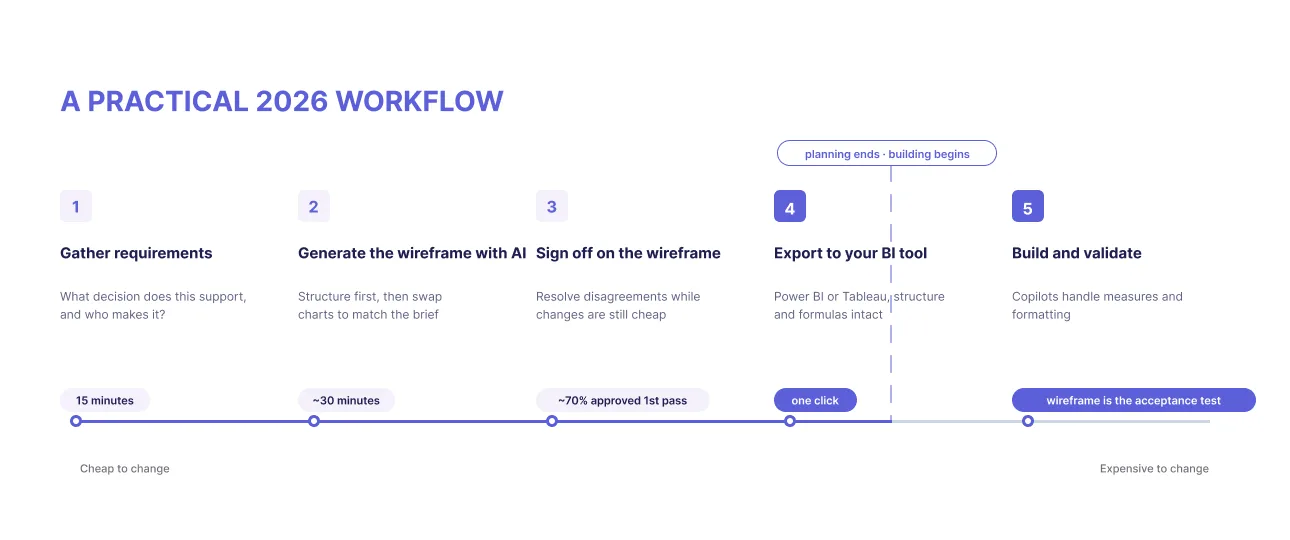
- Gather requirements properly. Ask what decision this dashboard supports and who makes it. Write down every metric definition, including the awkward ones. Fifteen minutes here saves a week later.
- Generate the wireframe with AI. Describe the dashboard in Mokkup and let it produce the structure, then swap charts until it reflects your requirements rather than a generic template. Here's how to create a dashboard wireframe in 30 minutes.
- Get sign-off on the wireframe, not the build. Share it, collect comments in place, and resolve disagreements while changes are still cheap. NeenOpal's delivery teams report around 70% of wireframes are approved in a single iteration at this step.
- Export to your BI tool. One click to Power BI or Tableau, semantic layer included. Your developer inherits structure and formulas rather than a picture.
- Build and validate against the wireframe. Use copilots freely here for measures and formatting. The wireframe is now your acceptance test: every number traces back to an agreed definition.
Teams running this sequence report roughly 80% less development and design time. The reason isn't that anyone types faster. It's that they build once instead of three times.
Rough scoping rule: a fixed-scope dashboard goes from wireframe to approved to export-ready in about 30 minutes. Each additional stakeholder or data source adds a round.
When You Don't Need Any of This
An honest section, because a wireframe-first process is genuinely overkill sometimes.
Skip it when you're exploring data for yourself and will close the tab afterwards. Skip it when you need one chart for one slide, or when a copilot answers your question in a sentence from clean, governed data. Skip it for a personal tracker nobody else will open.
The test is whether anyone else depends on the result. If you are the only person who will ever look at it, speed is all that matters. Once other people are involved, they need to agree on what the dashboard says before someone builds it, and agreeing is much easier when there is something on screen to point at.
The Short Version
Can AI build your dashboard? It can build one in minutes. Whether it builds the right one, with metrics your finance team recognizes, in a tool your company can actually run, is a different question, and the answer usually depends on what you handed it to start with.
Use AI where it pays off. Let it draft the wireframe, let it help you settle structure and metrics, get humans to agree, and then export something your BI stack can open. Then let copilots handle the build.
That sequence is what Mokkup was made for, and it's why the export matters more than the generation.
Start with a wireframe, not a guess. Generate your first AI dashboard wireframe free and export it to Power BI or Tableau in minutes.
Frequently Asked Questions
AI can draft charts and write the underlying queries quickly, but it can't decide which dashboard is worth building or define what your metrics mean. It performs best when it starts from a human-approved wireframe.
Only as accurate as the data model and metric definitions behind them. Validate every measure before anyone decides with it.
Yes, through Power BI Copilot, but it needs a clean semantic model, and the output stays inside Power BI. A tool-agnostic wireframe that exports to Power BI, such as Mokkup, avoids that lock-in.
No. It removes build grunt work and raises the value of judgment: choosing what to build, defining metric semantics, and aligning stakeholders.
Using AI to generate a dashboard's layout, metrics, and structure as a mockup before building it. It's the best prompt you can give any AI builder.
Most standalone generators can't. Mokkup exports in one click with the semantic layer intact.
It depends on the job. Copilots for in-platform speed, generators for quick self-serve views, and Mokkup for planning and exporting into Power BI or Tableau.
Prompt it. Wireframe it with Mokkup.ai.