
What is a Specialized School Parent Engagement Dashboard?
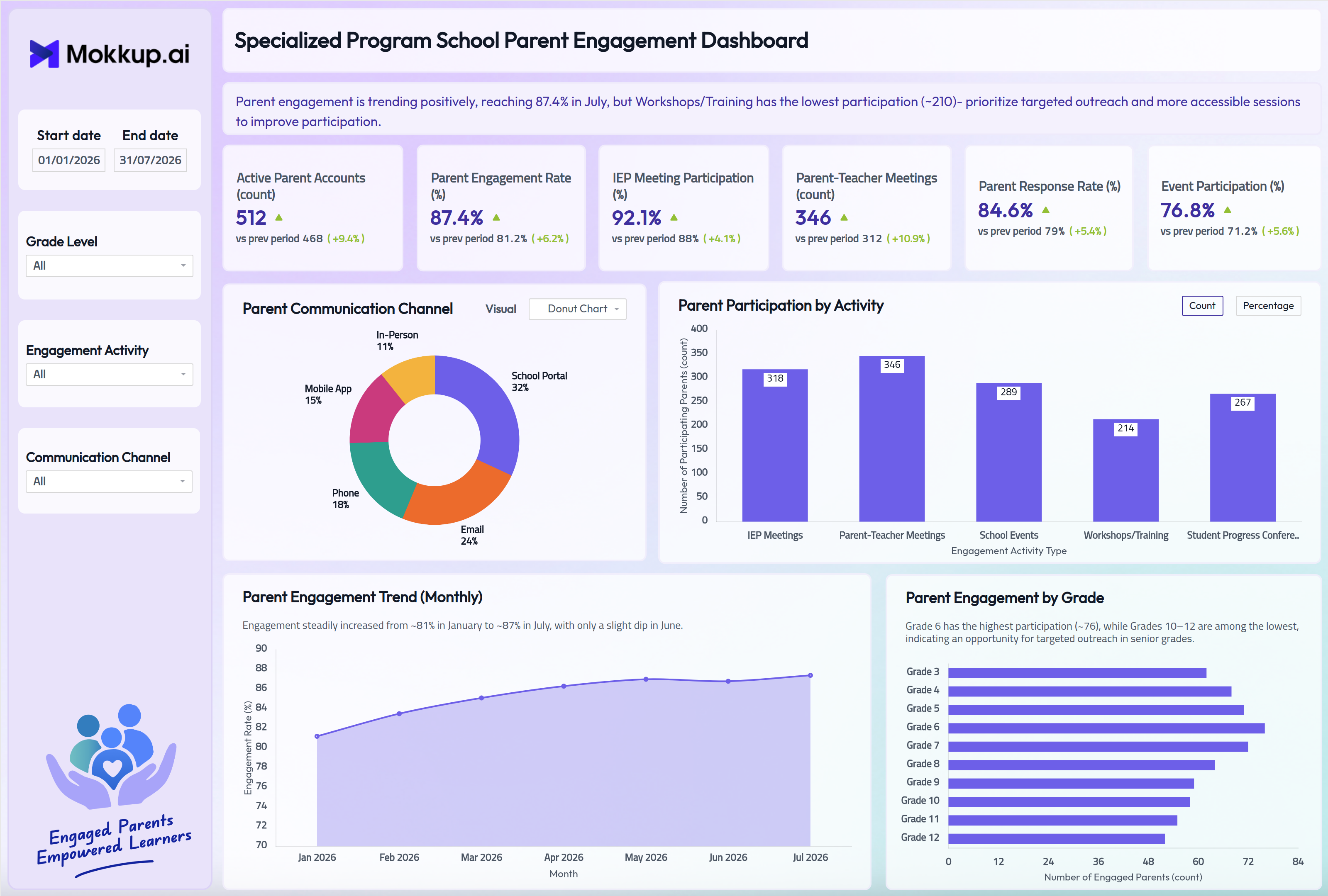
The Specialized School Parent Engagement Dashboard gives specialized school administrators, special education coordinators, and family engagement teams a consolidated view of how parents are connecting with their child’s school experience. Built as a specialized school parent engagement dashboard, it tracks active parent accounts, overall engagement rate, and participation across IEP meetings, parent-teacher meetings, school events, workshops, and student progress conferences. An insight banner at the top sums up the main trend and where to act. Each KPI card compares the current value with the previous period.
Because specialized schools depend on a dependable parent-teacher meeting participation dashboard view to support individualized education plans, the template also breaks engagement down by grade level and communication channel. Staff can see exactly where families are most and least connected. Date range, grade level, engagement activity, and communication channel filters let teams focus the view on the population or timeframe that matters most.
How to Create a Specialized School Parent Engagement Dashboard
You don't need to build your report from scratch; just start with a ready-to-use dashboard template from Mokkup. Add in your data and export it however you like. Here's how to do it:
1. Create or Log in to Your Mokkup Account
Start by signing up on Mokkup.ai using your email. If you already have an account, just log in, and you'll be good to go.
2. Choose and Customize Your Dashboard Template
Find the Specialized School Parent Engagement Dashboard template in the Templates section. Use the drag-and-drop editor to adjust KPIs, edit filters, or add elements based on your data.
3. Export to Your BI Tool
Once your dashboard wireframe is ready, use the BI Tool Export feature to send it directly to Power BI or Tableau for further analysis and enhancements. You can also download the dashboard as a PDF, PNG, or JPEG, embed it on a platform, or invite your team to collaborate.
Note: This is a Pro template. You'll need a Pro subscription on Mokkup to use and customize this dashboard wireframe. Upgrade anytime to unlock full access.
Specialized School Parent Engagement Dashboard Example
A family engagement coordinator at a specialized school opens this dashboard at the start of a review cycle to check whether parent involvement is trending in the right direction ahead of an upcoming compliance check. The insight banner flags the main issue first, such as an activity type with low participation. The KPI cards then show whether active parent accounts, engagement rate, and IEP meeting participation have improved since the last period.
From there, the coordinator reviews the Parent Engagement Trend (Monthly) chart, the core of this parent engagement rate tracking dashboard, to see whether engagement is holding steady or slipping month over month. The Parent Communication Channel chart supports a parent communication channel analysis. If phone or in-person contact looks underused compared with the school portal and email, staff can rebalance how they reach families who don’t respond well to digital channels alone. Parent Engagement by Grade then shows where involvement drops off, often flagging senior grades for a targeted follow-up campaign.
Parent Participation by Activity, viewed by count or percentage, shows which formats draw parents in, from IEP meetings to student progress conferences, and which ones, such as workshops, need to be redesigned or rescheduled. Instead of piecing together attendance sheets and email logs, school leadership gets one place to see which families need more direct outreach, which channels are working, and where limited staff time should go next.
How to Analyze Data in a Specialized School Parent Engagement Dashboard
Here is how you can analyze data from this dashboard:
- Start with the Insight Banner: Read the banner at the top for the main engagement trend and the activity that needs attention.
- Read Period-over-Period KPI Changes: Check the “vs prev period” value and % change on each KPI card to see which engagement metrics are improving.
- Filter by Grade Level: Isolate parent engagement for a specific grade before a review meeting.
- Filter by Communication Channel: See which outreach method is driving the strongest parent response.
- Monitor the Monthly Trend: Use the Parent Engagement Trend (Monthly) chart to catch early dips in engagement rate.
- Analyze Communication Channels: Review the Parent Communication Channel chart, which can switch visuals through its dropdown, as part of a regular parent communication channel analysis.
- Compare Grades: Use the Parent Engagement by Grade chart to see parent engagement by grade level from Grade 3 to Grade 12.
- Find Low-Participation Activities: Use the Parent Participation by Activity chart, and switch between Count and Percentage to find which activity types draw the fewest parents.
- Check IEP Participation: Filter by Engagement Activity to run a focused IEP meeting participation tracking dashboard check before a compliance review.
Benefits of a Specialized School Parent Engagement Dashboard
The following are the benefits of using this dashboard:
- Centralized Engagement View: Brings parent engagement rate, account activity and meeting participation together in one specialized school parent engagement dashboard.
- Clear Performance Direction: Previous-period comparisons on every KPI show at a glance whether parent engagement is improving.
- Built-In Insights: The insight banner and chart notes highlight the key takeaway without extra analysis.
- Channel Analysis: Supports ongoing parent communication channel analysis across school portal, email, phone, in-person, and mobile app touchpoints.
- Less Manual Compilation: Cuts down on compiling attendance sheets and outreach logs for IEP and parent-teacher meetings by hand.
- Grade-Level Targeting: Enables parent engagement by grade-level analysis to guide where family outreach staff should focus next.
- Smarter Activity Planning: An activity-type breakdown of participation supports planning future workshops, conferences, progress meetings, and school events.
- IEP Compliance Support: Helps special education coordinators keep IEP meeting participation in line with compliance requirements.
- Shared Leadership View: Gives school leadership and family engagement teams a shared, structured view of parent involvement trends.
KPIs to Track in a Specialized School Parent Engagement Dashboard
The following key KPIs can be tracked by using this dashboard:
- Active Parent Accounts (count): Tracks how many parent accounts are engaging with the school portal and communication tools over the selected period.
- Parent Engagement Rate (%): Measures the share of families participating in school communication and activities, the core metric behind this parent engagement rate tracking dashboard.
- IEP Meeting Participation (%): Quantifies how consistently parents of students with individualized education plans attend required IEP meetings, supporting an IEP meeting participation tracking dashboard view.
- Parent-Teacher Meetings (count): Tracks the total number of parent-teacher meetings held, a key input for any parent-teacher meeting participation dashboard review.
- Parent Response Rate (%): Evaluates how often parents respond to school outreach, feeding directly into parent communication channel analysis.
- Event Participation (%): Measures the share of parents attending school events, workshops, and volunteer activities, useful when read alongside parent engagement by grade level to plan outreach.
Frequently Asked Questions
1. What industries benefit most from this Specialized School Parent Engagement Dashboard?
Specialized schools, special education programs, and K-12 institutions focused on individualized learning plans benefit most, along with family engagement coordinators and special education administrators who need to track parent involvement closely.
2. Can this dashboard track IEP meeting participation separately from general parent engagement?
Yes. The IEP Meeting Participation KPI and the Parent Participation by Activity chart isolate IEP-specific attendance from parent-teacher meetings, school events, and workshops, so teams can run an IEP meeting participation tracking dashboard check without mixing it into overall engagement numbers.
3. Can I see participation as a count or a percentage?
Yes. The Parent Participation by Activity chart has a Count / Percentage toggle, so teams can compare activities by the number of participating parents or by their share of total participation.