
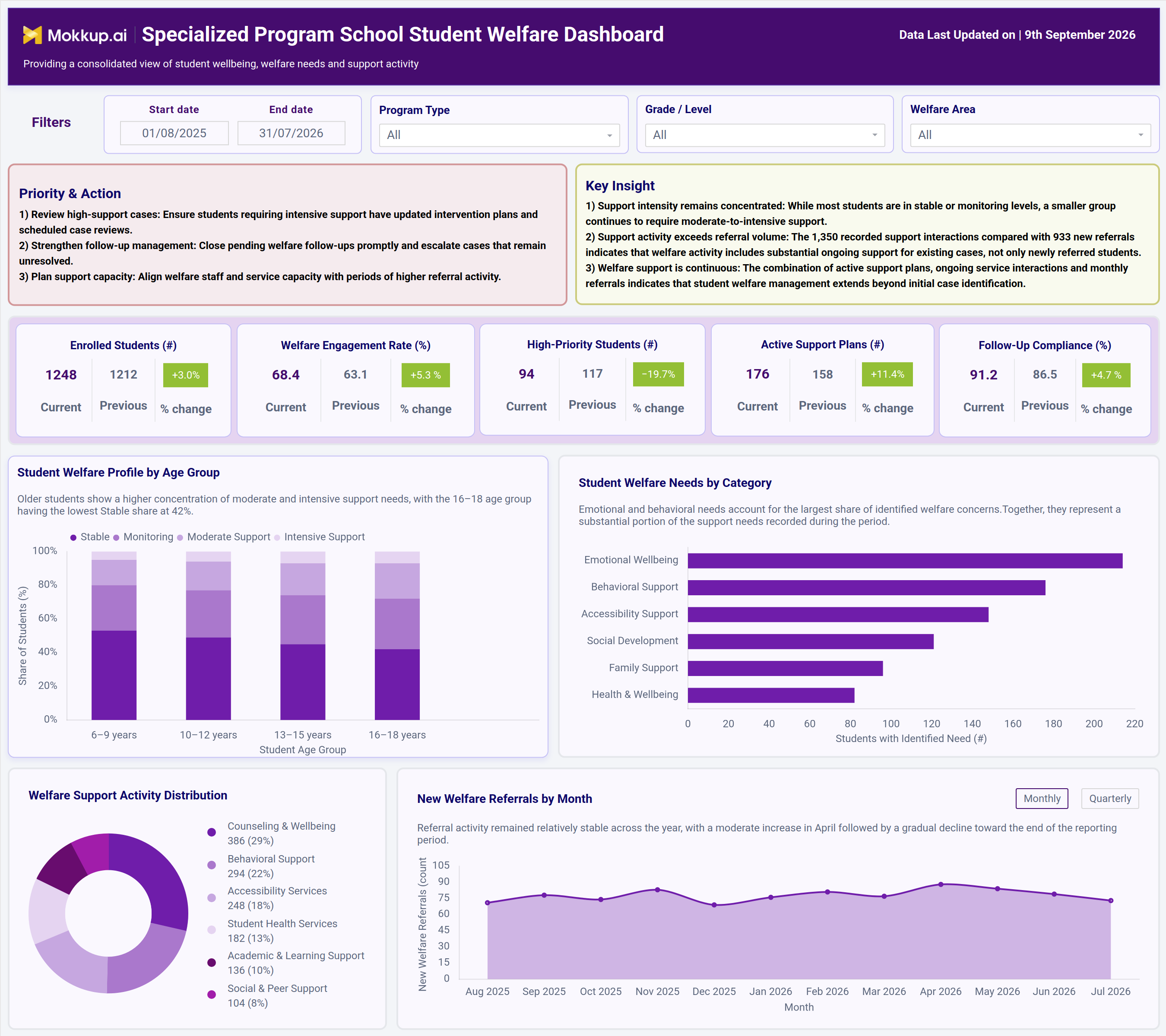
What is a Specialized Program School Student Welfare Dashboard?
The Specialized Program School Student Welfare Dashboard is a student welfare support dashboard for specialized program schools. It helps administrators, counselors and welfare coordinators track student wellbeing, welfare needs and support activity in one view. It shows enrollment, welfare engagement, high-priority students, active support plans and follow-up compliance together. Each KPI shows the current value, the previous period's value and the % change, so teams can see which way things are moving without comparing reports by hand.
The Priority & Action panel lists the next steps for the welfare team. The Key Insight panel explains the main pattern, such as whether support activity is keeping up with new referrals. Filters for date range, program type, grade or level, and welfare area narrow the view to the exact group under review.
As a school student wellbeing tracking system, it is built for specialized schools where students often need layered, ongoing support rather than a single intervention. For teams doing at-risk student monitoring for special education programs, it turns scattered case notes into one clear view of welfare activity.
How to Create a Specialized Program School Student Welfare Dashboard
You don't need to build your report from scratch; just start with a ready-to-use dashboard template from Mokkup. Add in your data and export it however you like. Here's how to do it:
1. Create or Log in to Your Mokkup Account
Start by signing up on Mokkup.ai using your email. If you already have an account, just log in, and you'll be good to go.
2. Choose and Customize Your Dashboard Template
Find the Specialized Program School Student Welfare Dashboard template in the Templates section. Use the drag-and-drop editor to adjust KPIs, edit filters or age bands, rename welfare categories, or add elements based on your data.
3. Export to Your BI Tool
Once your dashboard wireframe is ready, use the BI Tool Export feature to send it directly to Power BI or Tableau for further analysis and enhancements. You can also download the dashboard as a PDF, PNG, or JPEG, embed it on a platform, or invite your team to collaborate.
Note: This is a Pro template. You'll need a Pro subscription on Mokkup to use and customize this dashboard wireframe. Upgrade anytime to unlock full access.
Specialized Program School Student Welfare Dashboard Example
A welfare coordinator at a specialized program school opens this dashboard at the start of each review cycle, usually with the date range set to the full academic year. First, they want to know two things: are high-priority cases being handled on time, and are new referrals coming in faster than the team can respond? The Priority & Action panel shows what needs attention now. The Key Insight panel adds context, for example, that total support interactions are well above new referrals, which means much of the team's work is ongoing support for existing cases.
Next, the coordinator checks the KPI cards. Because each card shows current, previous, and % change, it is easy to see if high-priority student numbers are falling, if more support plans are active, and if follow-up compliance is improving. From there, the team moves to the charts:
- Student Welfare Profile by Age Group splits each age band into Stable, Monitoring, Moderate Support, and Intensive Support. This shows which groups, often older students, need the most intensive support.
- Student Welfare Needs by Category compares emotional, behavioral, accessibility, social, family, and health needs, so planners can decide where to add counseling or specialist resources.
- Welfare Support Activity Distribution breaks down delivered services, including counseling, behavioral support, accessibility services, student health, academic and learning support, and social and peer support. The team can check whether the service mix matches what students actually need.
- New Welfare Referrals by Month can switch between Monthly and Quarterly views, so administrators can spot busy periods and plan staff cover in advance.
The result is a welfare program guided by evidence rather than anecdote. Coordinators come back to the dashboard every review cycle instead of rebuilding the analysis, which makes it easier to close overdue follow-ups and show school leadership that welfare resources are going where they matter most.
How to Analyze Data in a Specialized Program School Student Welfare Dashboard
Here is how you can analyze data from this dashboard:
- Apply Filters First: Set the date range and choose a Program Type, Grade/Level and Welfare Area to focus on the exact student group under review.
- Start with Priority & Action and Key Insight: Read these two panels first. They show the immediate next steps and the main welfare pattern before you open any chart.
- Read Period-over-Period KPI Changes: Compare the current, previous, and % change values on each KPI card to see whether engagement, support plans, and compliance are improving.
- Assess Support Intensity by Age Group: Use the Student Welfare Profile by Age Group to see which age bands have more students at Moderate or Intensive Support.
- Prioritize Resources by Need Category: Use Student Welfare Needs by Category to see which areas, such as emotional or behavioral, need extra counseling or specialist staff.
- Validate the Service Mix: Check Welfare Support Activity Distribution to confirm that counseling, behavioral, accessibility, health, academic and peer support services match student needs.
- Track Referral Trends Over Time: Switch New Welfare Referrals between Monthly and Quarterly views for student welfare referral trend analysis and to plan staff capacity.
- Check Coverage Gaps: Compare Active Support Plans with High-Priority Students to make sure every high-need student has a plan.
- Monitor Follow-Up Discipline: Watch Follow-Up Compliance to keep welfare case reviews and closures on schedule.
Benefits of a Specialized Program School Student Welfare Dashboard
The following are the benefits of using this dashboard:
- Consolidated Welfare View: Brings enrollment, welfare engagement, and support activity together in one student welfare support dashboard for specialized program schools.
- Clear Performance Direction: Shows period-over-period change on every KPI, so teams know at a glance whether welfare outcomes are improving.
- Early At-Risk Identification: Shows support levels by age band so teams can quickly spot student groups that need intervention.
- Stronger Accountability: Makes follow-up compliance visible, so overdue cases are caught before they slip through.
- Structured Needs Tracking: Supports behavioral and emotional support tracking for schools by grouping needs into clear categories instead of scattered case files.
- Workload Clarity: Shows whether support activity is keeping up with new referrals and ongoing cases, so teams understand their real workload.
- Proactive Capacity Planning: Surfaces referral trends early so welfare teams can plan staff and services before demand rises.
- Leadership-Ready Insights: Gives school leadership ready-made insights and action points that show how well the welfare program is working.
KPIs to Track in a Specialized Program School Student Welfare Dashboard
The following key KPIs can be tracked by using this dashboard:
- Enrolled Students (#): total students in the selected program, grade, welfare area and date range, compared with the previous period.
- Welfare Engagement Rate (%): share of enrolled students actively engaged in welfare support.
- High-Priority Students (#): number of students needing moderate-to-intensive welfare support; a fall here is a positive sign.
- Active Support Plans (#): number of welfare support plans currently in effect.
- Follow-Up Compliance (%): share of scheduled welfare follow-ups completed on time.
- Student Welfare Profile by Age Group: share of students at Stable, Monitoring, Moderate Support and Intensive Support levels in each age band
- Welfare Needs by Category: number of students with identified needs across emotional wellbeing, behavioral, accessibility, social development, family and health areas, used in school welfare case management reporting.
- Welfare Support Activity: delivered services across counseling and wellbeing, behavioral support, accessibility, student health, academic and learning support, and social and peer support, also used in school welfare case management reporting.
- New Welfare Referrals: monthly or quarterly count of students newly referred for welfare support.
Frequently Asked Questions
1. Who should use the Specialized Program School Student Welfare Dashboard?
Welfare coordinators, school counselors, special education administrators, and program leads use this dashboard to track student well-being across specialized programs. It is built for teams doing ongoing at-risk student monitoring for special education programs, not for tracking one-off incidents.
2. Can this dashboard template be customized for a different school or program structure?
Yes. With Mokkup's drag-and-drop editor, you can change the filters, KPIs, age bands, support levels, and welfare categories to match your school's programs and grade structure before exporting the wireframe.
3. What is the difference between Welfare Engagement Rate and Follow-Up Compliance?
Welfare Engagement Rate shows how many enrolled students are actively receiving welfare support. Follow-Up Compliance shows whether scheduled follow-ups for those cases are completed on time. Together they show both how many students take part and how consistent their care is.
4. Why are support interactions higher than new referrals?
Referrals only count students newly entering welfare support. Support activity includes every service delivered, including ongoing help for existing cases. A gap between the two means welfare management continues well beyond the first time a case is identified.