
What is an International School Student Welfare Dashboard
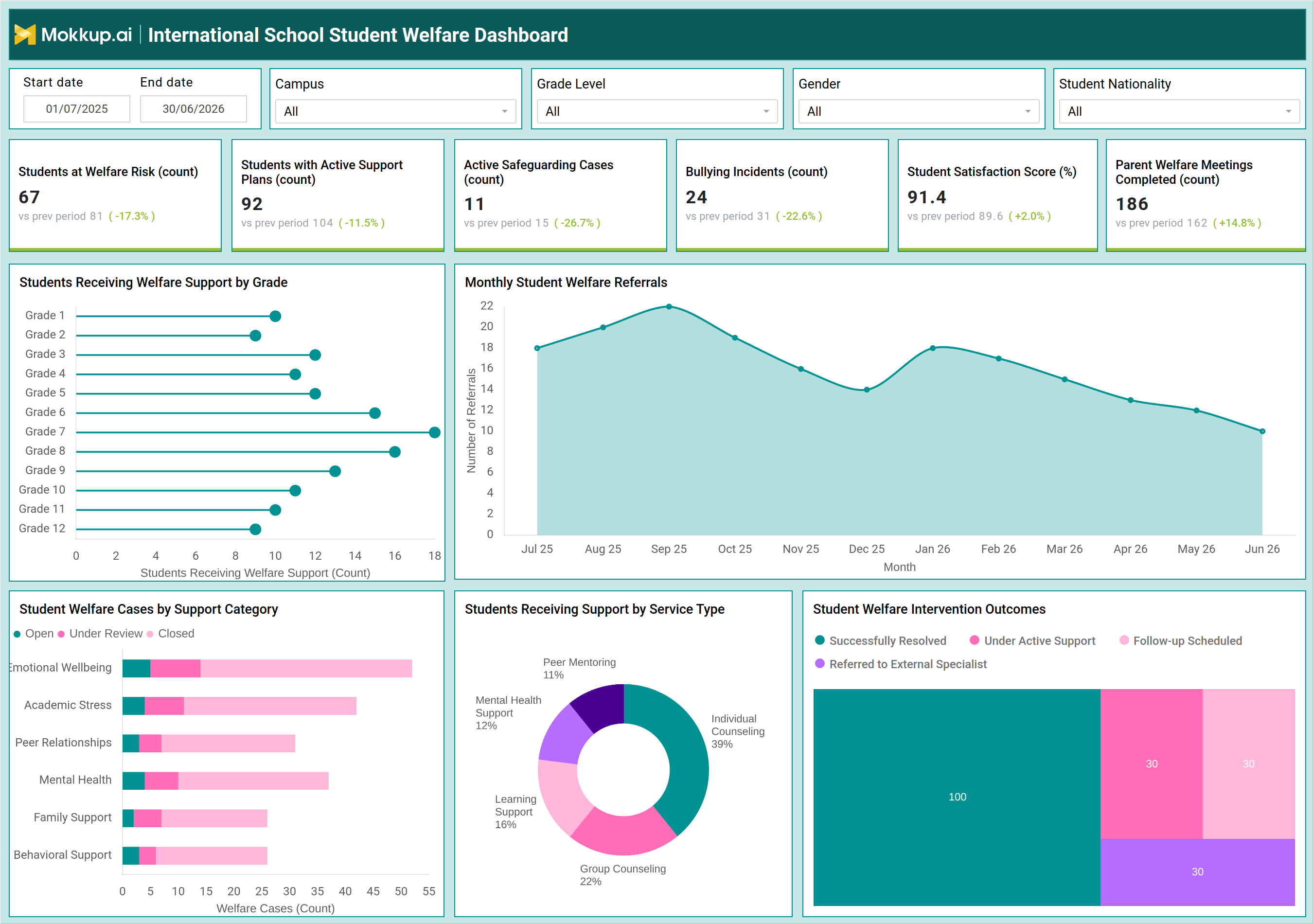
The International School Student Welfare Dashboard is a student welfare dashboard for international schools that consolidates safeguarding, wellbeing, and support data into a single view for pastoral care teams and school leadership. It brings together welfare risk indicators, active support plans, safeguarding case status, and bullying incident records so administrators no longer need to pull data from separate systems to understand how student well-being is trending across a campus. Built for multi-campus international school networks, the dashboard filters by campus, grade level, gender, and student nationality, letting welfare officers narrow their view to the exact student population they are responsible for.
Because welfare data changes constantly as new referrals arrive and cases move through review, the dashboard gives designated safeguarding leads a consistent way to run student welfare risk analysis across the reporting period without manually reconciling spreadsheets. Whether the goal is an inspection readiness review or a routine pastoral care meeting, this dashboard gives every stakeholder the same source of truth on how welfare support is being delivered.
How to Create an International School Student Welfare Dashboard
You don't need to build your report from scratch-just start with a ready-to-use dashboard template from Mokkup. Add your data and export it as needed. Here's how to do it:
1. Create or Log in to Your Mokkup Account
Start by signing up on Mokkup.ai using your email. If you already have an account, just log in, and you'll be good to go.
2. Choose and Customize Your Dashboard Template
Find the International School Student Welfare Dashboard Template in the Templates section. Use the drag-and-drop editor to adjust KPIs, edit filters, or add elements based on your data.
3. Export to Your BI Tool
Once your dashboard wireframe is ready, use the BI Tool Export feature to send it directly to Power BI or Tableau for further analysis and enhancements. You can also download the dashboard as a PDF, PNG, or JPEG, embed it on a platform, or invite your team to collaborate.
Note: This is a Pro template. You'll need a Pro subscription on Mokkup to use and customize this dashboard wireframe. Upgrade anytime to unlock full access.
International School Student Welfare Dashboard Example
A designated safeguarding lead or head of pastoral care typically opens this dashboard at the start of a term or ahead of a leadership review, trying to answer a simple question: is student welfare improving or worsening across the school? Rather than requesting updates from individual counselors or house heads, the safeguarding team can look at one screen and see where support activity is picking up and where cases are stalling.
From this view, welfare officers can identify which grade levels are generating the most referrals and decide where additional counseling capacity is needed before caseloads become unmanageable. Teams can run student welfare risk analysis across campuses to spot whether risk is concentrated in a particular nationality group, gender, or grade band, prompting a more targeted response. When bullying incidents rise in a given period, staff can trace how quickly those cases move from open to resolved through school bullying incident tracking. Pastoral leads can also review how welfare cases are distributed across categories such as emotional wellbeing, academic stress, or family support, helping them decide whether to reallocate counselors toward the areas generating the heaviest caseloads.
Because active safeguarding cases and support plans are tracked side by side, administrators can judge whether student support plan monitoring is translating into fewer escalations over time, and whether parent engagement through welfare meetings is strong enough to reinforce interventions happening at school. The overall outcome is a pastoral care team that can prioritize its limited counseling and safeguarding resources with confidence, respond faster to emerging risk patterns, and demonstrate to school leadership and accreditation bodies that student wellbeing is being actively managed rather than reactively handled.
How to Analyze Data in an International School Student Welfare Dashboard
Here is how you can analyze data from this dashboard:
- Filter by Campus / Grade Level: Compare student welfare risks across different parts of the school network.
- Review Welfare Caseloads: Identify grade levels with higher support needs and determine where additional counseling capacity may be required.
- Track Active Safeguarding Cases: Compare current cases with prior periods to see whether more cases are being resolved than opened.
- Compare Satisfaction vs. Bullying Incidents: Assess whether improvements in school climate are reflected in student satisfaction scores and bullying trends.
- Analyze Welfare Cases by Support Category: Monitor open, under-review, and closed cases to identify changes in resolution speed.
- Use Nationality / Gender Filters: Check whether any student group is disproportionately represented in welfare risk data.
- Monitor Support Plan Progress: Track plans moving from active to resolved to assess how effectively student support needs are being addressed.
- Compare Parent Meetings vs. Active Cases: Determine whether family engagement is keeping pace with the current welfare caseload.
Benefits of an International School Student Welfare Dashboard
The following are the benefits of using this dashboard:
- Centralizes Student Welfare Data: Gives pastoral care teams one student welfare dashboard combining risk, safeguarding, and support data.
- Supports Inspection Readiness: Helps leadership demonstrate accountability during inspections and accreditation reviews.
- Tracks Bullying Trends: Highlights changes in bullying incidents early so teams can intervene before issues escalate.
- Guides Resource Allocation: Helps leaders make evidence-based decisions about where counseling and safeguarding resources are needed most.
- Improves Parent Transparency: Tracks welfare meeting completion alongside case outcomes to show how family engagement is progressing.
- Reduces Safeguarding Reporting Effort: Simplifies reporting for safeguarding leads preparing leadership and board updates.
KPIs to Track in an International School Student Welfare Dashboard
The following key KPIs can be tracked by using this dashboard:
- Students at Welfare Risk (count): measures how many students are currently flagged as at risk, helping teams prioritize early intervention.
- Students with Active Support Plans (count): tracks how many students have a formal support plan in place at any given time.
- Active Safeguarding Cases (count): a core measure for school safeguarding case tracking, showing the current safeguarding caseload requiring attention.
- Bullying Incidents (count): tracks reported bullying cases as an indicator of school climate and peer relationship health.
- Student Satisfaction Score (%): measures overall student sentiment toward the school's welfare and support services.
- Parent Welfare Meetings Completed (count): tracks completed welfare meetings with parents, reflecting family engagement in student support.
- Welfare Support by Grade Level: shows how welfare caseloads are distributed across grades to guide counseling capacity planning.
- Welfare Case Status by Support Category: breaks down open, under review, and closed cases across categories such as emotional wellbeing, academic stress, peer relationships, mental health, family support, and behavioral support.
- School Counseling Intervention Outcomes: tracks the share of cases successfully resolved, under active support, awaiting follow-up, or referred to an external specialist.
Frequently Asked Questions
1. What does the International School Student Welfare Dashboard track?
It tracks welfare risk, active support plans, safeguarding cases, bullying incidents, student satisfaction, and parent welfare meeting completion, plus how cases are distributed by grade and support category.
2. Who should use this dashboard?
Safeguarding leads, pastoral care teams, and school leadership use it to run student welfare risk analysis and prioritize intervention resources across campuses.
3. How does the dashboard support safeguarding accountability?
By tracking school counseling intervention outcomes alongside active safeguarding cases, it gives leadership documented evidence that welfare concerns are being addressed and resolved.