
What is a Specialized Program School Regulatory Compliance Dashboard?
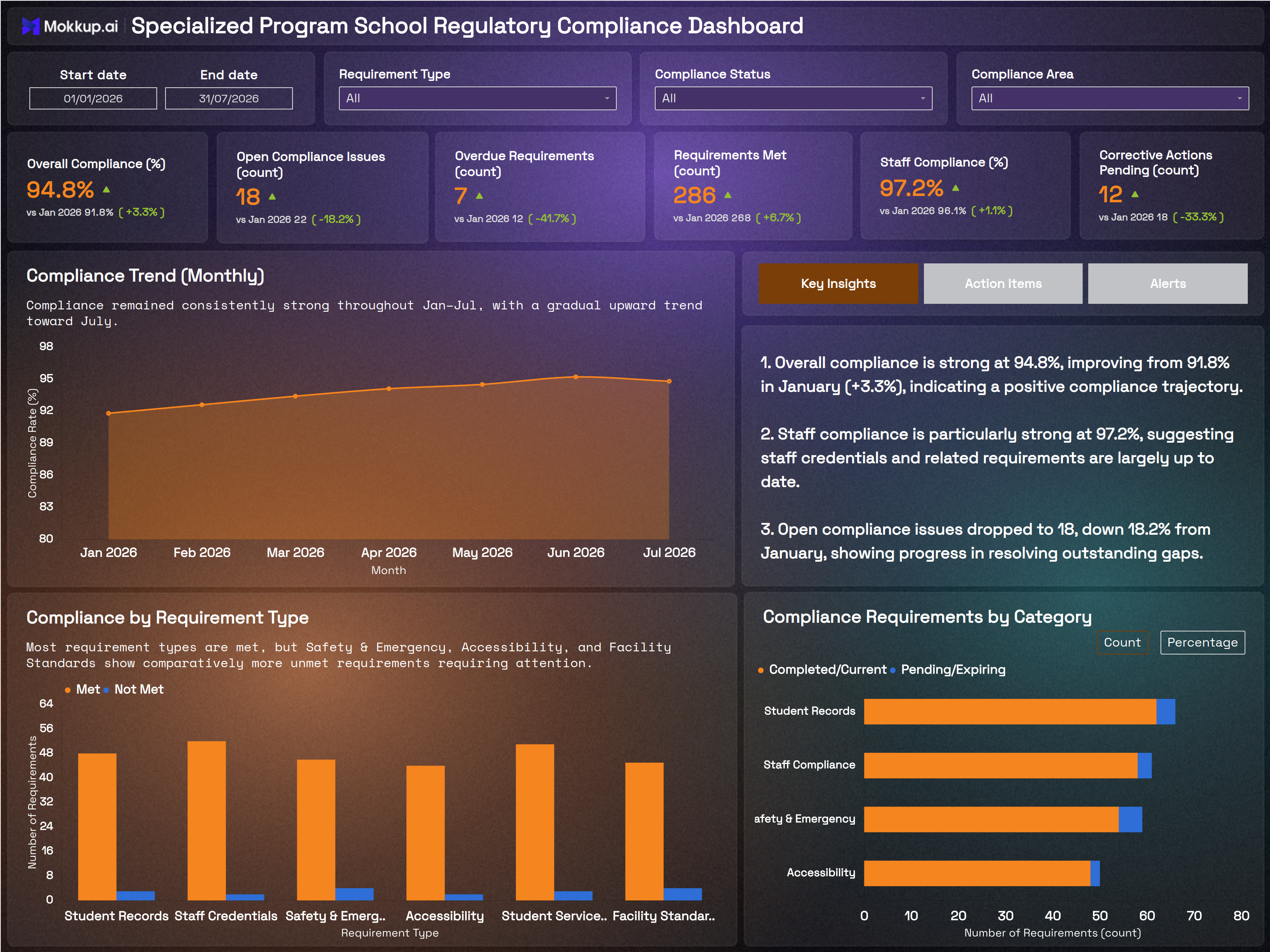
The Specialized Program School Regulatory Compliance Dashboard helps program administrators, compliance officers, and school leadership monitor how well a specialized program school is meeting regulatory and licensing requirements. As a specialized program school regulatory compliance dashboard, it brings overall compliance rate tracking metrics, staff credentialing status, and requirement-level detail into one place, rather than scattered across spreadsheets and audit binders. Teams use it to see where corrective actions and pending tracking dashboard items still need attention and which requirement categories are falling behind before an audit exposes the gap. The result is a clearer, faster way to judge regulatory health across a specialized program school without cross-checking multiple compliance logs separately.
How to Create a Specialized Program School Regulatory Compliance Dashboard
You don’t need to build your report from scratch; just start with a ready-to-use dashboard template from Mokkup. Add in your data and export it however you like. Here’s how to do it:
1. Create or Log in to Your Mokkup Account
Start by signing up on Mokkup.ai using your email. If you already have an account, just log in, and you'll be good to go.
2. Choose and Customize Your Dashboard Template
Find the Specialized Program School Regulatory Compliance Dashboard template in the Templates section. Use the drag-and-drop editor to adjust KPIs, edit filters, or add elements based on your data.
3. Export to Your BI Tool
Once your dashboard wireframe is ready, use the BI Tool Export feature to send it directly to Power BI or Tableau for further analysis and enhancements. You can also download the dashboard as a PDF, PNG, or JPEG, embed it on a platform, or invite your team to collaborate.
Note: This is a Pro template. You'll need a Pro subscription on Mokkup to use and customize this dashboard wireframe. Upgrade anytime to unlock full access.
Specialized Program School Regulatory Compliance Dashboard Example
A compliance officer at a specialized program school opens this dashboard ahead of a scheduled audit or board review to answer one question: is the school on track to meet every regulatory requirement, or are gaps building up unnoticed?
Filtering by requirement type, compliance status, or compliance area narrows the view to the specific set of standards they are responsible for, whether that is a single regulation area such as Safety & Emergency or the full compliance program at once. From there, the officer can run an overall compliance rate tracking dashboard check against the prior period to judge whether the school's compliance trajectory is improving or slipping, using the monthly trend to spot momentum shifts early.
Reviewing a compliance by requirement type analysis lets them compare how categories such as Student Records, Staff Credentials, Safety & Emergency, Accessibility, Student Services, and Facility Standards are performing against each other, so leadership can prioritize the categories with the most unmet requirements first. Running an open compliance issues tracking tool review alongside overdue requirements helps the team distinguish issues still within a normal review window from ones that have already missed their deadline and need immediate escalation. Ultimately, this dashboard helps specialized program school teams move from reactive audit scrambles toward a steady, ongoing compliance rhythm, giving administrators, compliance officers, and program leadership a shared, current view of regulatory standing they can act on together before small gaps become audit findings.
How to Analyze Data in a Specialized Program School Regulatory Compliance Dashboard
Here is how you can analyze data from this dashboard:
- Filter by Requirement Type to run a compliance by requirement type analysis across categories.
- Use the Compliance Status filter to isolate items that are open, met, or pending before drawing conclusions.
- Apply the Compliance Area filter to focus the review on one regulatory domain at a time.
- Monitor the Compliance Trend (Monthly) chart to catch a slipping overall compliance rate trend early.
- Review the Compliance by Requirement Type bar chart to see which categories carry the most unmet requirements.
- Compare the Compliance Requirements by Category chart, toggled between Count and Percentage, to judge scale versus share.
- Track Open Compliance Issues with an open compliance issues tracking tool mindset to prioritize what needs action first.
- Watch Overdue Requirements alongside Corrective Actions Pending to separate in-progress items from ones past deadline.
Benefits of a Specialized Program School Regulatory Compliance Dashboard
The following are the benefits of using this dashboard:
- Centralizes compliance rate, requirement status, and staff credentialing in one specialized program school regulatory compliance dashboard.
- Supports compliance by requirement type analysis so leadership sees exactly where standards are falling short.
- Reduces manual audit prep by combining requirement, staff, and corrective-action data in pre-built KPI tiles.
- Enables area-level analysis of compliance area performance to guide where oversight is needed most.
- Provides a category breakdown of completed versus pending requirements for planning corrective action priorities.
- Functions as a staff compliance rate monitoring dashboard that flags credentialing gaps before they affect operations.
- Gives compliance officers and school leadership a shared view of regulatory standing and audit readiness.
KPIs to Track in a Specialized Program School Regulatory Compliance Dashboard
The following key KPIs can be tracked by using this dashboard:
- Overall Compliance (%): The core metric behind this overall compliance rate tracking dashboard view, showing the share of requirements currently met school-wide.
- Open Compliance Issues (count): Tracks unresolved requirements still awaiting action, the basis for the open compliance issues tracking tool view.
- Overdue Requirements (count): Flags requirements that have already passed their due date and need immediate escalation.
- Requirements Met (count): Quantifies the total number of requirements the school has successfully satisfied.
- Staff Compliance (%): Measures the share of staff credentialing requirements currently met, feeding directly into a compliance by requirement type analysis.
- Corrective Actions Pending (count): Tracks corrective actions still in progress, the basis for corrective actions pending tracking dashboard reviews.
Frequently Asked Questions
1. What industries benefit most from this Specialized Program School Regulatory Compliance Dashboard?
Specialized program schools, compliance officers, and school administrative leadership benefit most. It also supports program coordinators preparing for state or accreditation audits.
2. Can this dashboard track corrective actions that are still in progress?
Yes. The Corrective Actions Pending KPI works as a corrective actions pending tracking dashboard view, flagging outstanding items before they age into overdue status.
3. Is this dashboard suitable for tracking overdue regulatory requirements?
Yes. The Overdue Requirements KPI, paired with the Compliance by Requirement Type chart, shows exactly which categories have missed-deadline items needing escalation.
4. How does the Compliance Requirements by Category chart work?
It compares Completed/Current requirements against Pending/Expiring ones across categories such as Student Records, Staff Compliance, Safety & Emergency, and Accessibility, toggling between count and percentage for a compliance by requirement type analysis.
5. What does the Staff Compliance metric measure?
It measures the percentage of staff credentialing and personnel requirements currently met, supporting a staff compliance rate monitoring dashboard view of personnel readiness.