
What is a Boarding School Faculty & Residential Staff Dashboard?
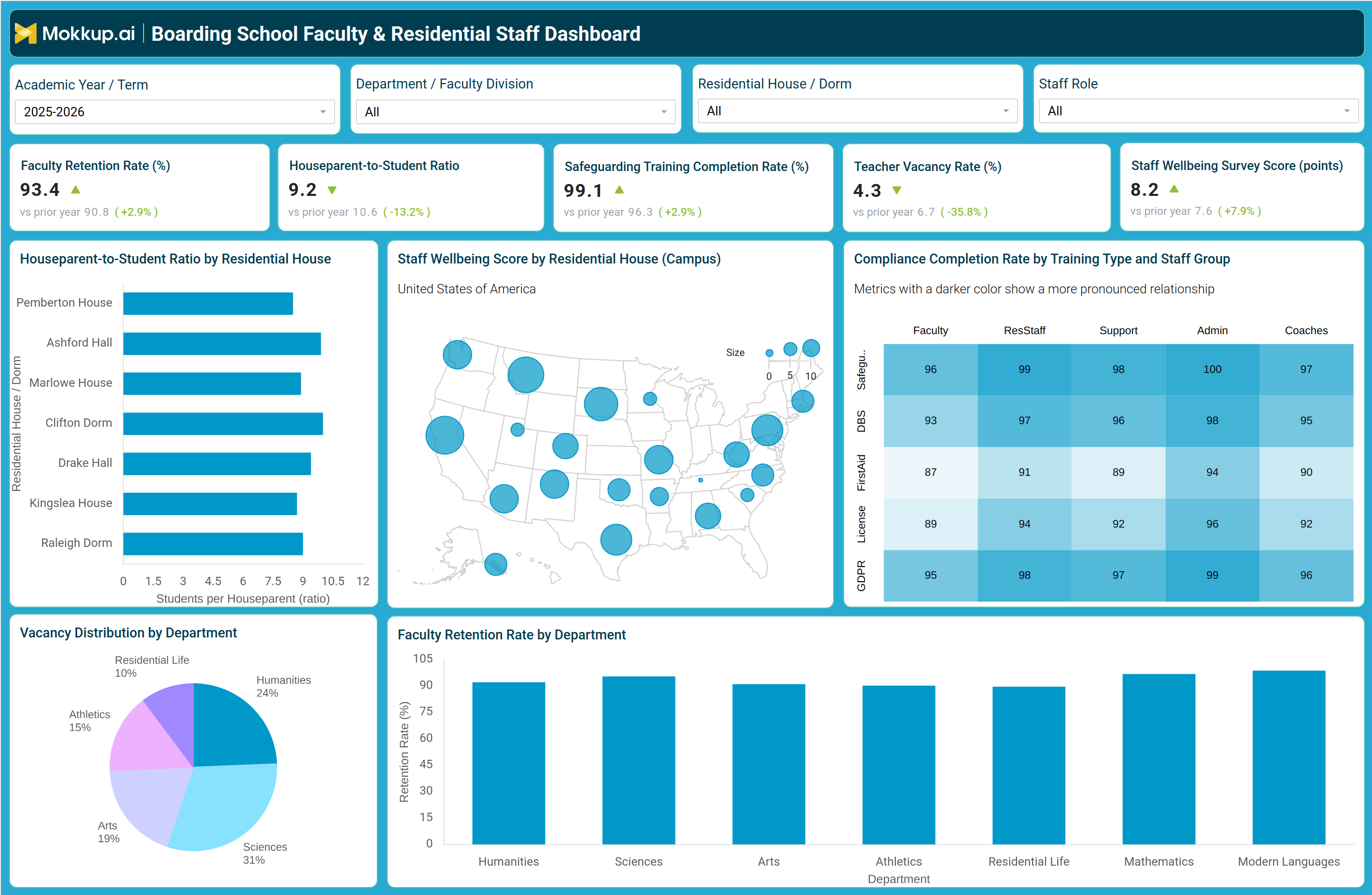
The Boarding School Faculty & Residential Staff Dashboard is a workforce analytics template built for boarding school administrators, HR leaders, and residential life directors who need one place to see how faculty and residential staff are performing across departments and houses. As a boarding school faculty and residential staff dashboard, it brings staffing stability, safeguarding compliance, and staff wellbeing into a single filtered view by academic year, department or faculty division, residential house, and staff role, replacing scattered HR spreadsheets with one consolidated report. Because boarding schools run around the clock with faculty who often double as houseparents, understanding workforce health takes more than one attendance figure; it takes visibility into vacancy pressure, compliance training, and how staff experiences their workload. Any boarding school faculty and residential staff dashboard should surface these signals side by side, and this template does exactly that so leadership never has to build the report from scratch.
How to Create a Boarding School Faculty & Residential Staff Dashboard
You don't need to build your report from scratch; just start with a ready-to-use dashboard template from Mokkup. Add in your data and export it however you like. Here's how to do it:
1. Create or Log in to Your Mokkup Account
Start by signing up on Mokkup.ai using your email. If you already have an account, just log in, and you'll be good to go.
2. Choose and Customize Your Dashboard Template
Find the Boarding School Faculty & Residential Staff Dashboard template in the Templates section. Use the drag-and-drop editor to adjust KPIs, edit filters, or add elements based on your data.
3. Export to Your BI Tool
Once your dashboard wireframe is ready, use the BI Tool Export feature to send it directly to Power BI or Tableau for further analysis and enhancements. You can also download the dashboard as a PDF, PNG, or JPEG, embed it on a platform, or invite your team to collaborate.
Note: This is a Pro template. You'll need a Pro subscription on Mokkup to use and customize this dashboard wireframe. Upgrade anytime to unlock full access.
Boarding School Faculty & Residential Staff Dashboard Example
A head of school or director of residential life typically opens this dashboard at the start of a term to understand whether staffing is stable enough to support both classroom teaching and dorm supervision. Their starting question is usually simple: are we adequately staffed across every house and department, and are our people compliant with the training boarding schools are required to run for anyone working directly with students? From the overview, department heads can compare retention against vacancy pressure to decide where hiring should be prioritized before the next term begins.
Residential life directors can compare houseparent-to-student ratios across houses to identify where a house is understaffed relative to its student population, and pair that with staff wellbeing scores to judge whether a house is at risk of burnout rather than simply understaffed. HR and compliance leads can drill into training completion by staff group to confirm that safeguarding, background checks, first aid, licensing, and data protection training are current for every role that works with students, and can prioritize outreach to whichever group is lagging. Academic leadership can compare retention and vacancy patterns by department to decide where recruitment budget or retention incentives will have the greatest impact. Taken together, the dashboard helps boarding school leadership move from reactive staffing fixes to a proactive view of workforce health, one where compliance gaps, houseparent strain, and department-level attrition risk are visible early enough to act on before they affect student welfare or the academic calendar.
How to Analyze Data in a Boarding School Faculty & Residential Staff Dashboard
Here is how you can analyze data from this dashboard:
- Filter by Academic Year/Term to compare current staffing against the prior year at a glance
- Segment by Department/Faculty Division to spot where vacancy and retention pressure concentrate
- Use houseparent-to-student ratio monitoring for boarding schools to compare workload across residential houses
- Apply the Staff Role filter to isolate faculty, residential staff, support, admin, or coaching trends
- Read the compliance heatmap by training type and staff group to catch lagging certifications early
- Cross-check houseparent ratio against staff wellbeing score by house to separate workload strain from staffing gaps
- Compare department-level retention bars against the vacancy distribution pie to prioritize hiring
Benefits of a Boarding School Faculty & Residential Staff Dashboard
The following are the benefits of using this dashboard:
- Centralizes faculty and residential staff metrics into one boarding school workforce view
- Flags houseparent understaffing before it affects dorm supervision quality
- Strengthens safeguarding training completion rate tracking across faculty, residential staff, and support roles
- Surfaces department-level attrition risk early enough to act on before term start
- Makes teacher vacancy rate analysis for boarding schools straightforward by department, not just school-wide
- Doubles as a staff wellbeing survey score monitoring tool for residential life leaders
- Reduces manual HR reporting work across departments and residential houses
KPIs to Track in a Boarding School Faculty & Residential Staff Dashboard
The following key KPIs can be tracked by using this dashboard:
- Faculty Retention Rate (%): the metric behind any faculty retention rate tracking tool, showing the share of teaching staff retained year over year as a signal of morale and workload sustainability
- Houseparent-to-Student Ratio: the basis for houseparent-to-student ratio monitoring for boarding schools, showing students supervised per houseparent to catch residential understaffing early
- Safeguarding Training Completion Rate (%): the central measure in safeguarding training completion rate tracking, showing the share of staff current on a non-negotiable compliance requirement
- Teacher Vacancy Rate (%): the core figure in teacher vacancy rate analysis for boarding schools, showing open teaching positions as a share of total roles
- Staff Wellbeing Survey Score (points): a self-reported measure of morale and workload strain across faculty and residential staff
Frequently Asked Questions
1. What is a Boarding School Faculty & Residential Staff Dashboard used for?
It is used to monitor faculty retention, residential staffing levels, safeguarding compliance, and staff wellbeing in one workforce view, functioning as both a faculty retention rate tracking tool and a staff wellbeing survey score monitoring tool. School leaders use it to catch staffing risk and compliance gaps before they affect student welfare.
2. How often should this dashboard be reviewed?
Most boarding schools review it at least once a term alongside the Academic Year/Term filter, with compliance metrics such as safeguarding training checked more often. Reviewing it regularly keeps a faculty retention rate tracking tool useful for early intervention rather than year-end reporting.
3. Can this dashboard template be customized for a specific school's departments or houses?
Yes, the Department/Faculty Division, Residential House/Dorm, and Staff Role filters can all be edited to match a school's own structure. As a Pro template on Mokkup, it can be customized with the drag-and-drop editor and exported to Power BI, Tableau, PDF, or image formats.