
What is a Boarding School Regulatory Compliance Dashboard
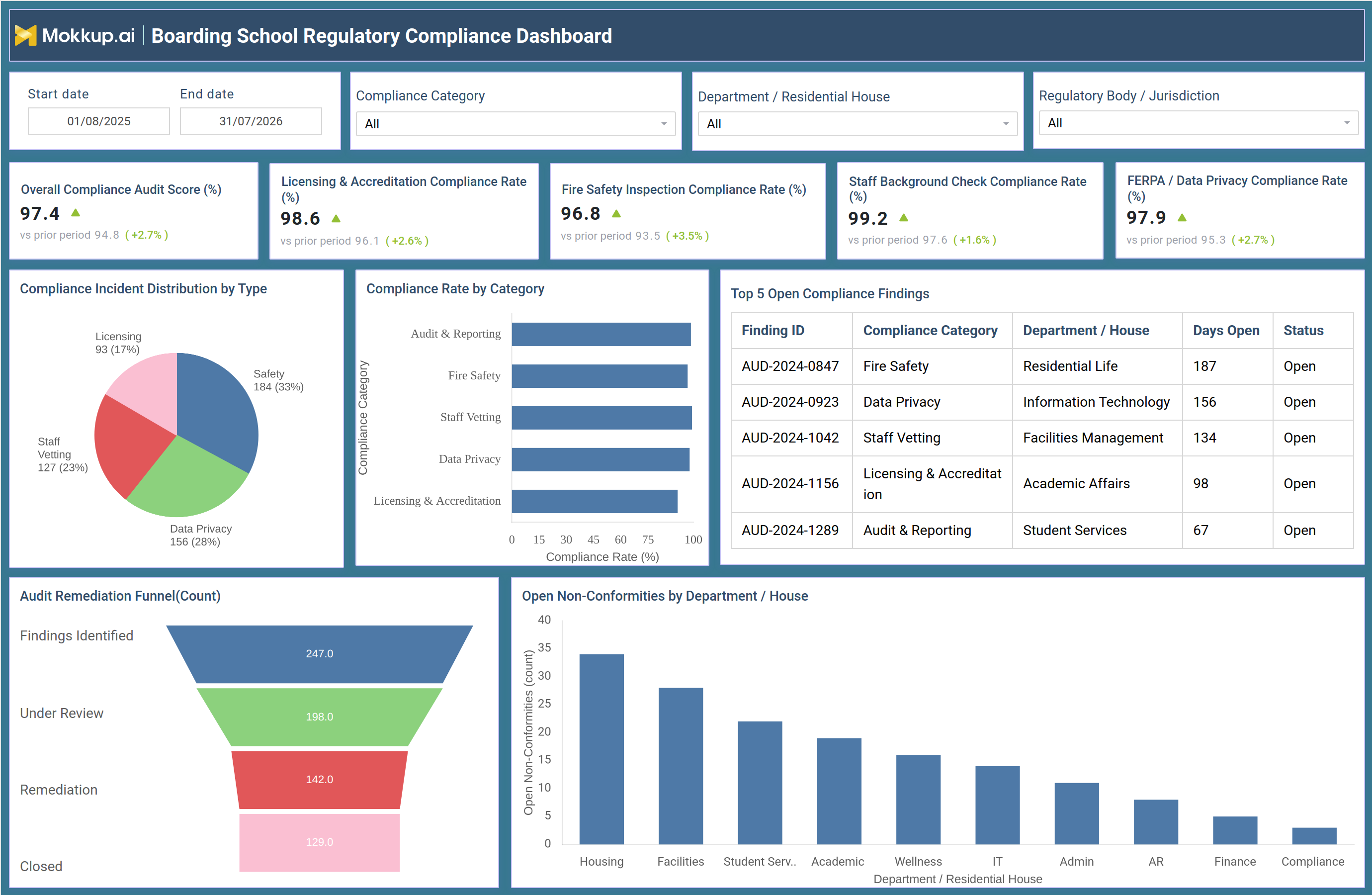
The Boarding School Regulatory Compliance Dashboard is a wireframe template built for compliance officers, boarding school administrators, and residential life directors who need one view of how well a campus is meeting licensing, safety, and privacy regulations. Instead of pulling audit logs from separate departments before every review, this boarding school regulatory compliance dashboard consolidates compliance rate tracking across fire safety, staff vetting, data privacy, and licensing and accreditation into a single screen. Filters for compliance category, department, residential house, and regulatory body or jurisdiction let teams narrow the view to the exact area they own. Built on Mokkup.ai, the dashboard gives schools a structured way to demonstrate accountability to boards and accreditation bodies while giving internal teams a shared reference point for where compliance gaps exist and how quickly they are being closed.
How to Create a Boarding School Regulatory Compliance Dashboard
You don't need to build your report from scratch—just start with a ready-to-use dashboard template from Mokkup. Add in your data and export it however you like. Here's how to do it:
1. Create or Log in to Your Mokkup Account
Start by signing up on Mokkup.ai using your email. If you already have an account, just log in, and you'll be good to go.
2. Choose and Customize Your Dashboard Template
Find the Boarding School Regulatory Compliance Dashboard template in the Templates section. Use the drag-and-drop editor to adjust KPIs, edit filters, or add elements based on your data.
3. Export to Your BI Tool
Once your dashboard wireframe is ready, use the BI Tool Export feature to send it directly to Power BI or Tableau for further analysis and enhancements. You can also download the dashboard as a PDF, PNG, or JPEG, embed it on a platform, or invite your team to collaborate.
Note: This is a Pro template. You'll need a Pro subscription on Mokkup to use and customize this dashboard wireframe. Upgrade anytime to unlock full access.
Boarding School Regulatory Compliance Dashboard Example
A compliance officer at a boarding school opens this dashboard ahead of a board meeting or a scheduled regulatory audit, looking for a clear answer to one question: is the campus in good standing across every category a regulator cares about? The overview signals whether overall compliance is trending in the right direction and which specific areas, including fire safety inspection compliance rate tracking and staff vetting, need closer attention before an external reviewer raises them first. From there, the officer can compare compliance rates side by side across categories such as audit and reporting, staff vetting, data privacy, and licensing and accreditation to prioritize where a corrective action plan is most urgent.
When one category shows a disproportionate share of incidents, the team can trace it back to the underlying findings to determine whether the issue sits within a single department or spreads across several residential houses. Reviewing how long individual findings have stayed open helps the team decide where to escalate ownership before a deadline set by a regulatory body or jurisdiction arrives. Watching how findings move from identification through review, remediation, and closure lets administrators judge whether the compliance team is keeping pace with new issues, and comparing open non-conformities across departments or residential houses shows leadership where to direct additional oversight.
Altogether, the dashboard helps school leadership move from reactive audit scrambles to a steady, documented compliance posture that satisfies regulators and gives the board confidence heading into the next accreditation cycle.
How to Analyze Data in a Boarding School Regulatory Compliance Dashboard
Here is how you can analyze data from this dashboard:
- Filter by Compliance Category to isolate fire safety, staff vetting, data privacy, or licensing and accreditation performance.
- Use the Department / Residential House filter to compare compliance across specific houses or teams.
- Apply the Regulatory Body / Jurisdiction filter to review status against a specific regulator's requirements.
- Adjust the Start date and End date range to review audit performance over a defined period.
- Cross-reference the Compliance Incident Distribution by Type chart against the Compliance Rate by Category chart to spot high-incident, low-compliance areas.
- Use the open compliance findings by department tracking table to identify findings that need escalation.
- Track movement through the Audit Remediation Funnel to see where findings stall between identification and closure.
- Compare the Open Non-Conformities by Department / House chart to identify teams needing additional support.
Benefits of a Boarding School Regulatory Compliance Dashboard
The following are the benefits of using this dashboard:
- Centralizes fire safety, staff vetting, data privacy, and licensing compliance rate tracking in a single dashboard.
- Reduces time spent pulling audit data from multiple departments before a review.
- Surfaces aging open compliance findings before they turn into regulatory citations.
- Gives boards and accreditation bodies a clear, presentable view of the school's compliance posture.
- Helps leadership prioritize remediation resources toward departments or houses with the most open non-conformities.
- Supports the staff background check compliance monitoring tool used to verify residential and academic staff clearances.
- Strengthens licensing and accreditation compliance rate monitoring ahead of renewal deadlines.
- Makes it easier to demonstrate audit remediation funnel tracking dashboard progress during external reviews.
KPIs to Track in a Boarding School Regulatory Compliance Dashboard
Key Performance Indicators (KPIs) are measurable values that show how effectively a school is meeting its regulatory compliance obligations.
- Overall Compliance Audit Score (%): a blended score reflecting performance across every regulatory area combined.
- Licensing & Accreditation Compliance Rate (%): part of ongoing licensing and accreditation compliance rate monitoring across renewal cycles.
- Fire Safety Inspection Compliance Rate (%): reflects fire safety inspection compliance rate tracking outcomes against required codes.
- Staff Background Check Compliance Rate (%): reflects staff with current checks, supporting the staff background check compliance monitoring tool.
- FERPA / Data Privacy Compliance Rate (%): measures how well student data handling aligns with FERPA and privacy regulations.
Frequently Asked Questions
1. What is a Boarding School Regulatory Compliance Dashboard used for?
It tracks a school's compliance status across fire safety, staff vetting, data privacy, and licensing and accreditation requirements. Compliance officers rely on a boarding school regulatory compliance dashboard to spot open findings early and prepare for audits without pulling data from multiple systems.
2. Which compliance areas does the dashboard cover?
It covers licensing and accreditation, fire safety inspections, staff background checks, data privacy under FERPA, audit and reporting, and staff vetting, each with its own compliance rate.
3. How does the dashboard help during a regulatory audit?
It gives auditors a single view of open findings, how long they have been open, and where remediation stands from identification to closure. This makes it easier to demonstrate ongoing compliance during a review.