
What is a Specialized Program School Financial Performance Dashboard?
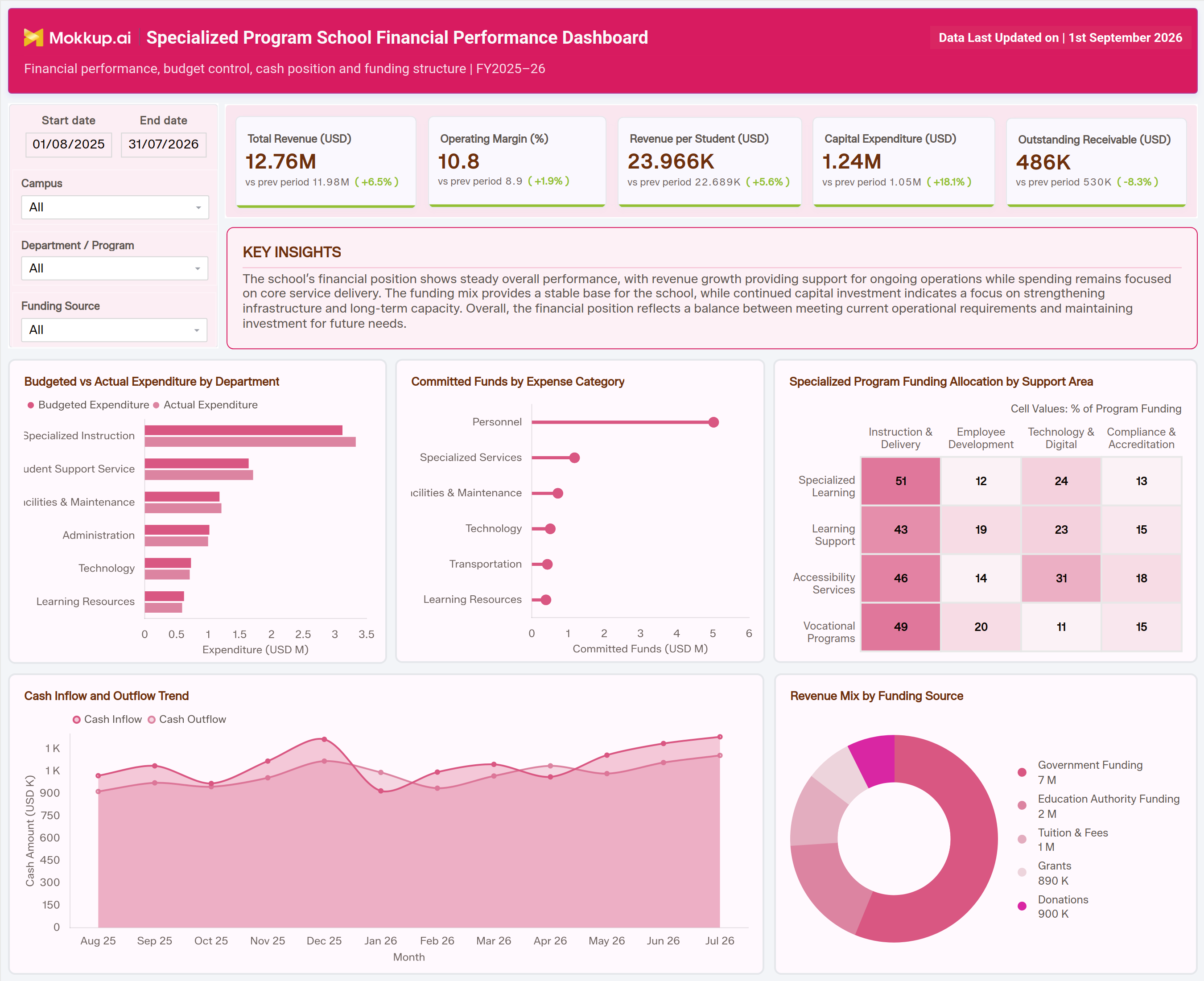
The Specialized Program School Financial Performance Dashboard is a dashboard template for business officers and program administrators who manage budgets, funding, and cash flow across specialized education programs. It puts total revenue, operating margin, revenue per student, capital expenditure, and outstanding receivables in one view and compares each KPI with the previous period. That replaces scattered spreadsheets with one filterable dashboard.
Finance teams can set a custom start and end date, then filter by campus, department or program, and funding source. From there, they can run a school revenue per student analysis to see how efficiently the program turns funding into outcomes. A Key Insights panel sums up the school's overall financial position in plain language. A Specialized Program Funding Allocation by Support Area matrix supports special education program funding allocation, and the template is built for school financial performance KPI tracking, so leadership has a current picture of financial health without waiting on manual reports.
How to Create a Specialized Program School Financial Performance Dashboard
You don't need to build your report from scratch; just start with a ready-to-use dashboard template from Mokkup. Add in your data and export it however you like. Here's how to do it:
1. Create or Log in to Your Mokkup Account
Start by signing up on Mokkup.ai using your email. If you already have an account, just log in, and you'll be good to go.
2. Choose and Customize Your Dashboard Template
Find the Specialized Program School Financial Performance Dashboard template in the Templates section. Use the drag-and-drop editor to adjust KPIs, edit the date range and filters, update the Key Insights summary, or add elements based on your data.
3. Export to Your BI Tool
Once your dashboard wireframe is ready, use the BI Tool Export feature to send it directly to Power BI or Tableau for further analysis and enhancements. You can also download the dashboard as a PDF, PNG, or JPEG, embed it on a platform, or invite your team to collaborate.
Note: This is a Pro template. You'll need a Pro subscription on Mokkup to use and customize this dashboard wireframe. Upgrade anytime to unlock full access.
Specialized Program School Financial Performance Dashboard Example
A school business officer typically opens this dashboard at the start of a reporting cycle to check whether the specialized program's finances are on track for the fiscal year. The header shows the fiscal year and when the data was last updated, so they know how current the numbers are. They set the reporting window with the start and end date filters, then narrow the view by campus, department, program, and funding source to focus on the segment they own. Next, they scan the KPI row. Each card compares the current value with the previous period and shows the percentage change, which tells them at once whether revenue, margin, and spending are moving in a healthy direction. The Key Insights panel below adds a short written summary of the overall financial position, which is useful for briefing leadership or the school board.
Working through the dashboard, finance leads compare budgeted and actual expenditure across Specialized Instruction, Student Support Services, Facilities & Maintenance, Administration, Technology, and Learning Resources for school budget vs. actual expenditure tracking. They pair this with committed funds by expense category, covering Personnel, Specialized Services, Facilities & Maintenance, Technology, Transportation, and Learning Resources, to see how much of the remaining budget is already obligated.
Program directors use the Specialized Program Funding Allocation by Support Area matrix for special education program funding allocation. It shows the % of program funding each support area gives to Instruction & Delivery, Employee Development, Technology & Digital, and Compliance & Accreditation. The support areas are Specialized Learning, Learning Support, Accessibility Services, and Vocational Programs. When one area's allocation drifts from its intended purpose, the matrix prompts a reallocation conversation.
Meanwhile, the finance team follows the monthly cash inflow and outflow trend for ongoing school cash flow monitoring, so they can anticipate months where outflows might strain short-term liquidity. They also check the revenue mix across Government Funding, Education Authority Funding, Tuition & Fees, Grants, and Donations to see how reliant the program is on any single funding stream. Together, these views help a specialized program school move from reactive bookkeeping to proactive financial oversight. Administrators can defend budget requests with confidence, correct overspending before it compounds, and show accountability to funders and school boards.
How to Analyze Data in a Specialized Program School Financial Performance Dashboard
Here is how you can analyze data from this dashboard:
- Define the Reporting Window: Set the start and end date to define the reporting window, then filter by campus, department or program, and funding source to isolate the segment you want to evaluate.
- Read Period-over-Period Changes: Read the prior-period comparison and percentage change on each KPI card to judge whether revenue, margin, spend and receivables are trending favorably.
- Start with Key Insights: Use the Key Insights panel for a quick narrative summary of the school's financial position before going into the details.
- Compare Budget vs Actual: Use budgeted vs actual expenditure by department to flag departments running over or under plan. This is central to school budget vs actual expenditure tracking.
- Review Committed Funds: Review committed funds by expense category to see how much budget is already locked in before the period closes.
- Check Funding Allocation: Check the Specialized Program Funding Allocation by Support Area matrix, the core view for special education program funding allocation, to confirm each support area's split across instruction, employee development, technology and compliance matches its intended purpose.
- Monitor Cash Flow: Track the monthly cash inflow and outflow trend for school cash flow monitoring and to anticipate short-term liquidity gaps.
- Assess Funding Dependency: Examine revenue mix by funding source to assess dependency risk on government, education authority, tuition, grant or donation funding.
Benefits of a Specialized Program School Financial Performance Dashboard
The following are the benefits of using this dashboard:
- Centralized Financial View: Centralizes revenue, expenditure and cash position for specialized programs in one dashboard template.
- Visible Trends: Shows period-over-period movement on every KPI, so trends are visible without extra calculations.
- Ready-Made Narrative: Gives leadership a ready-made narrative through the Key Insights panel for board and funder updates.
- Better Allocation Decisions: Improves special education program funding allocation decisions with a single support-area matrix.
- Less Manual Reconciliation: Reduces manual reconciliation by replacing static spreadsheets with a date-filterable dashboard.
- Multi-Level KPI Tracking: Supports school financial performance KPI tracking across campuses, departments and funding sources.
- Stronger Budget Requests: Helps finance teams justify budget requests with clear department-level expenditure comparisons.
- Early Risk Detection: Surfaces funding source concentration risk before it affects program sustainability.
KPIs to Track in a Specialized Program School Financial Performance Dashboard
The following key KPIs can be tracked by using this dashboard. A Key Performance Indicator (KPI) is a measurable value that shows how effectively a school or program is achieving its financial objectives.
- Total Revenue (USD): total income the specialized program generates across all funding sources for the period, compared with the previous period.
- Operating Margin (%): share of revenue left after operating expenses, which indicates overall financial health.
- Revenue per Student (USD): total revenue divided by enrolled students. This is the core metric for school revenue per student analysis across programs.
- Capital Expenditure (USD): funds invested in long-term assets and infrastructure that support the specialized program.
- Outstanding Receivable (USD): funding or payments owed to the school that have not yet been collected, tracked against the prior period to monitor collection progress. A decrease compared with the previous period means collections are improving.
Frequently Asked Questions
1. What is a Specialized Program School Financial Performance Dashboard used for?
It is used to track revenue, expenditure, cash position, and funding structure for specialized education programs in one place. Finance teams rely on it for school financial performance KPI tracking, comparing budgeted and actual spend by department, and monitoring funding allocation across support areas.
2. How does the dashboard support school revenue per student analysis?
The dashboard tracks revenue per student alongside total revenue and operating margin, and compares each with the previous period. Administrators can see how efficiently the program turns funding into per-student outcomes and whether that efficiency is improving, without manual calculation.
3. Can I customize this dashboard for my own school data?
Yes. In Mokkup you can edit KPIs, date filters, the Key Insights summary, and chart elements before adding your own data. Once configured, it can be exported to Power BI or Tableau, or downloaded as a PDF, PNG, or JPEG.