
What is a Specialized Program School Faculty & Workforce Dashboard?
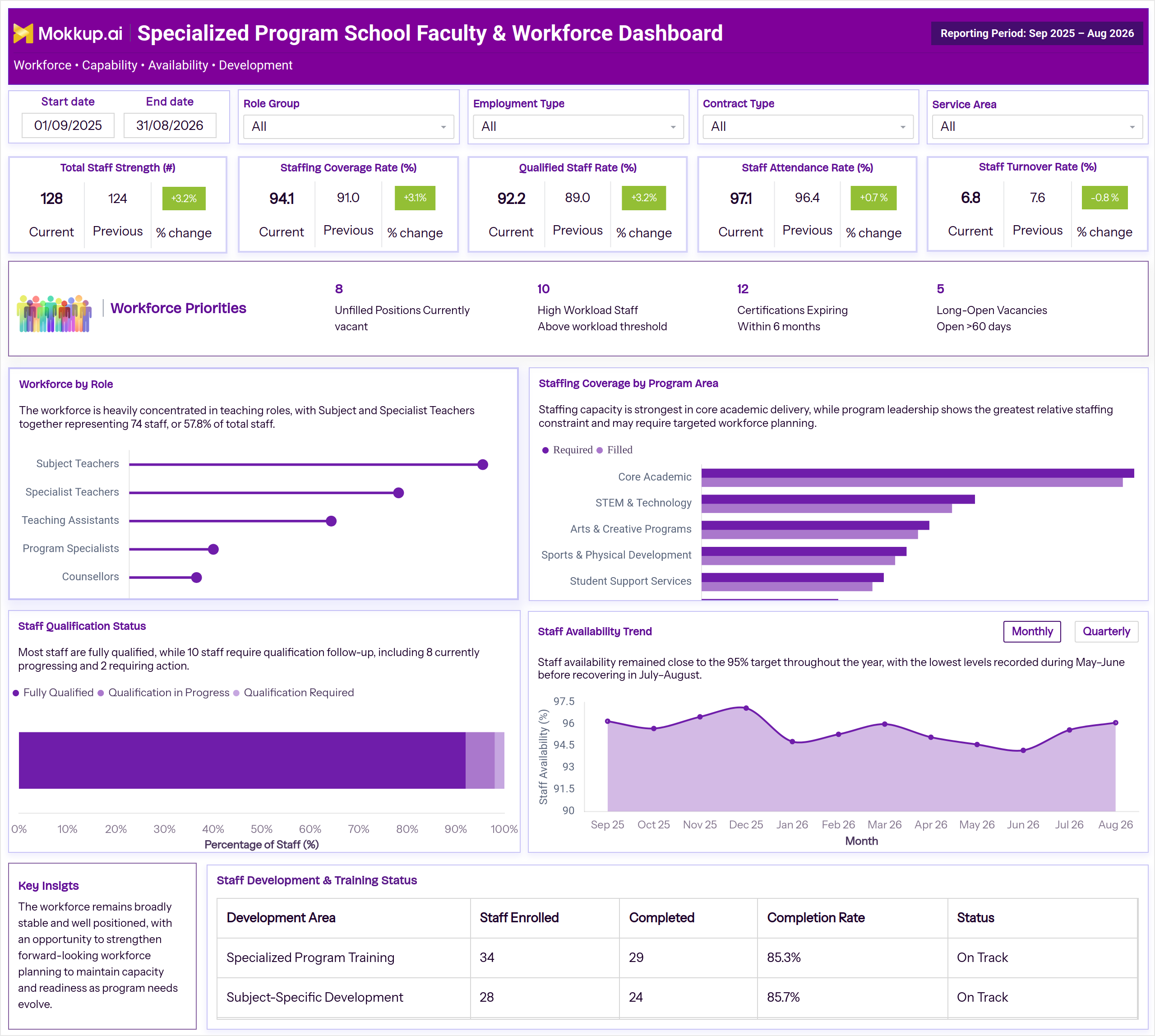
The Specialized Program School Faculty & Workforce Dashboard is a ready-to-use dashboard template that gives school administrators and program leaders one workspace to track how faculty are staffed, qualified, and retained across specialized academic programs. Built as a specialized program school faculty & workforce dashboard, it consolidates staffing coverage, qualification status, attendance, and turnover so leaders stop pulling headcount reports from separate HR and program systems. The layout supports faculty staffing coverage tracking by comparing required staffing against filled positions across program areas such as Core Academic, STEM & Technology, Arts & Creative Programs, Sports & Physical Development, Student Support Services, and Program Leadership, while workforce priorities like unfilled positions and long-open vacancies keep recruitment gaps visible in the same view.
How to Create a Specialized Program School Faculty & Workforce Dashboard
You don't need to start from scratch. Just begin with a ready-to-use dashboard template from Mokkup. Here's how:
1. Create or Log in to Your Mokkup Account
Start by signing up on Mokkup.ai using your email. If you already have an account, just log in, and you'll be good to go.
2. Choose and Customize Your Dashboard Template
Find the Specialized Program School Faculty & Workforce Dashboard template in the Templates section. Use the drag-and-drop editor to adjust KPIs, edit filters, or add elements based on your data.
3. Export to Your BI Tool
Once your dashboard wireframe is ready, use the BI Tool Export feature to send it directly to Power BI or Tableau for further analysis and enhancements. You can also download the dashboard as a PDF, PNG, or JPEG, embed it on a platform, or invite your team to collaborate.
Note: This is a Pro template. You'll need a Pro subscription on Mokkup to use and customize this dashboard wireframe. Upgrade anytime to unlock full access.
Specialized Program School Faculty & Workforce Dashboard Example
A school operations leader opens this specialized program school faculty & workforce dashboard at the start of a term to check whether faculty strength can support planned program activity. By setting the reporting period and filtering by role group, employment type, contract type, and service area, program leaders compare required staffing against filled positions. This makes faculty staffing coverage tracking simple and helps HR focus recruitment where gaps put program delivery at risk.
The monthly Staff Availability Trend, measured against a target, supports faculty attendance monitoring for schools, and qualification status enables teacher certification tracking for schools before deadlines pass. Together, these views move leadership toward specialized program workforce planning, which supports school staff turnover monitoring and keeps programs staffed all year.
How to Analyze Data in a Specialized Program School Faculty & Workforce Dashboard
Here is how you can analyze data from this dashboard:
- Set the Start Date and End Date to define the reporting period for your review.
- Filter by Role Group, Employment Type, Contract Type, or Service Area to focus on the segment relevant to your review.
- Compare the Current, Previous, and % Change values on each KPI card to see how staff strength, coverage, qualification, attendance, and turnover have shifted.
- Compare Required vs. Filled bars in the Staffing Coverage by Program Area chart to support faculty staffing coverage tracking across program areas and spot where gaps are widest.
- Review the Workforce by Role chart to see how staff are distributed across subject teachers, specialist teachers, teaching assistants, program specialists, and counsellors.
- Check the Staff Qualification Status bar for the split between Fully Qualified, Qualification in Progress, and Qualification Required staff as part of teacher certification tracking for schools to flag staff needing follow-up.
- Track the Staff Availability Trend against the target for faculty attendance monitoring for schools and catch seasonal dips early.
- Scan the Workforce Priorities row for unfilled positions, high workload staff, expiring certifications, and long-open vacancies.
- Review the Staff Development & Training Status table to confirm enrollment, completion, and status across development programs.
- Toggle the Staff Availability Trend between Monthly and Quarterly views to match your reporting cadence.
- Read the Key Insights panel for a quick summary of overall workforce stability and planning needs.
Benefits of a Specialized Program School Faculty & Workforce Dashboard
The following are the benefits of using this dashboard:
- Centralizes faculty staffing coverage tracking across role groups and program areas in one view.
- Supports specialized program workforce planning by comparing required staffing against filled positions.
- Improves teacher certification tracking for schools with a clear view of qualification follow-up needs.
- Strengthens school staff turnover monitoring by comparing the current turnover rate against the previous period.
- Extends faculty attendance monitoring for schools to catch availability dips before they affect coverage.
- Highlights workforce priorities like unfilled positions and long-open vacancies before they escalate.
- Connects staffing data to training and development completion in a single wireframe.
- Reduces reliance on manual headcount reports pulled from multiple systems.
KPIs to Track in a Specialized Program School Faculty & Workforce Dashboard
The following key KPIs can be tracked by using this dashboard:
- Total Staff Strength - the total number of faculty and staff currently employed across all roles.
- Staffing Coverage Rate - measures how well filled positions meet required staffing levels for program delivery.
- Qualified Staff Rate - the proportion of staff who meet certification and qualification requirements for their role.
- Staff Attendance Rate - tracks how consistently faculty and staff are present against expected work days.
- Staff Turnover Rate - a core input for school staff turnover monitoring, showing how often staff leave and need replacement.
- Unfilled Positions - the number of vacant roles that currently need to be filled.
- High Workload Staff - the count of staff operating above the defined workload threshold.
- Certifications Expiring - the number of staff certifications set to lapse within the next six months, relevant to teacher certification tracking for schools.
- Long-Open Vacancies - positions that have remained open beyond 60 days, indicating recruitment bottlenecks.
Frequently Asked Questions
1. What does the Specialized Program School Faculty & Workforce Dashboard track?
It tracks faculty staffing coverage, qualification status, attendance, turnover, and workforce priorities such as unfilled positions and expiring certifications across specialized program areas. Every metric in the dashboard supports specialized program workforce planning without pulling data from separate HR systems.
2. Who should use this dashboard?
School administrators, HR teams, and specialized program coordinators use this dashboard for faculty staffing coverage tracking and workforce planning across role groups and service areas. It also supports leadership reviewing staffing gaps before they affect program delivery.
3. Can I customize this dashboard template for my school?
Yes, the template can be customized in Mokkup using the drag-and-drop editor to adjust KPIs, filters, and layout to match your data. Once ready, it can be exported to Power BI, Tableau, or downloaded as PDF, PNG, or JPEG.