
What is an HR Time & Attendance Management Dashboard?
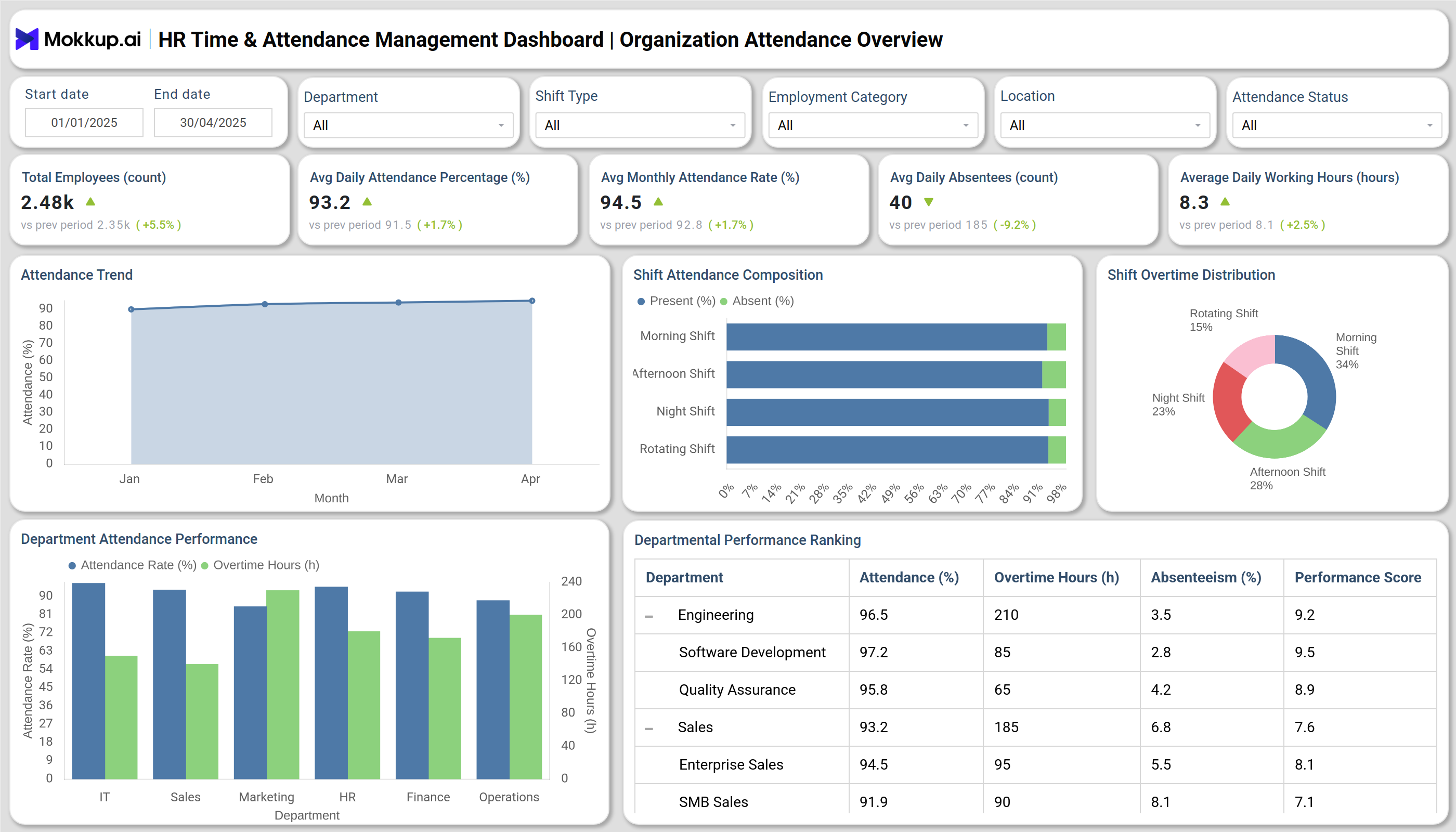
A HR Time & Attendance Management Dashboard is a centralized analytics solution designed to track employee attendance, absenteeism, shift compliance, and working-hour efficiency in real time. It helps HR and operations teams monitor workforce behavior across multiple locations, departments, and shifts. By using a workforce time & attendance dashboard, organizations can automate attendance tracking, identify punctuality issues, and optimize employee utilization. This time attendance management platform also improves transparency, reduces manual reporting, and ensures compliance with labor policies and work-hour regulations.
How to Create an HR Time & Attendance Management Dashboard
You don’t need to build your report from scratch—just start with a ready-to-use dashboard template from Mokkup. Add in your data and export it however you like. Here’s how to do it:
1. Create or Log in to Your Mokkup Account
Start by signing up on Mokkup.ai using your email. If you already have an account, just log in, and you’ll be good to go.
2. Choose and Customize Your Dashboard Template
Find the HR Time & Attendance Management Dashboard template in the Templates section. Use the drag-and-drop editor to adjust KPIs, edit filters, or add elements based on your data.
3. Export to Your BI Tool
Once your dashboard wireframe is ready, use the BI Tool Export feature to send it directly to Power BI or Tableau for further analysis and enhancements. You can also download the dashboard as a PDF, PNG, or JPEG, embed it on a platform, or invite your team to collaborate.
Note: This is a Pro template. You’ll need a Pro subscription on Mokkup to use and customize this dashboard wireframe. Upgrade anytime to unlock full access.
HR Time & Attendance Management Dashboard Example
You can create your own HR Time & Attendance Management Dashboard that combines modules for attendance performance, leave management, and shift compliance analytics. The attendance overview module monitors organization-wide attendance rates, absenteeism, and department-level performance metrics such as average attendance percentage and overtime hours. The leave and absence module analyzes planned and unplanned leave trends, enabling HR teams to identify patterns like frequent Monday absences or high sick leave occurrences. Finally, the shift compliance dashboard evaluates punctuality, adherence to scheduled shifts, and working-hour distribution across departments. Together, these insights provide a unified employee attendance tracking dashboard that enhances workforce planning, ensures fairness in scheduling, and improves overall operational efficiency.
How to Analyze Data in HR Time & Attendance Management Dashboard
Here is how you can analyze data from this dashboard:
- Track Attendance Trends: Use line charts to monitor monthly or yearly attendance fluctuations and identify patterns during holidays or peak business periods.
- Compare Departmental Attendance: Evaluate attendance rates across departments to detect low-performing or highly consistent teams.
- Review Absenteeism Patterns: Analyze leave data by type and day of the week to address recurring absenteeism and plan better coverage.
- Measure Shift Compliance: Identify how well teams adhere to their assigned shifts and working hours through compliance rate analysis.
- Evaluate Overtime Distribution: Track which shifts or departments have the highest overtime hours to balance workload.
- Monitor Employee Punctuality: Use average check-in and check-out times to assess employee discipline and detect chronic lateness.
- Optimize Workforce Planning: Combine attendance and leave data to make data-driven staffing and scheduling decisions.
Benefits of HR Time & Attendance Management Dashboard
Here are benefits of using this dashboard:
- Centralized Workforce Visibility: Get a complete picture of attendance, absenteeism, and shift compliance in one platform.
- Reduced Administrative Effort: Automate attendance and leave reporting, eliminating manual data entry.
- Enhanced Shift Planning: Use the shift recording & attendance dashboard to manage complex shift schedules efficiently.
- Improved Compliance: Ensure adherence to labor laws and internal attendance policies through data-backed monitoring.
- Proactive Decision-Making: Identify absentee trends early to prevent dips in workforce productivity.
- Optimized Productivity: Correlate attendance with department performance to improve workforce utilization.
- Accurate Payroll Support: Align attendance and working-hour data with payroll systems for seamless salary processing.
- Data-Driven HR Strategy: Leverage the time and attendance analytics tool to set benchmarks and enhance workforce engagement.
KPIs to Track in HR Time & Attendance Management Dashboard
- Attendance Rate (%): Measures the percentage of employees present daily or monthly.
- Absenteeism Rate (%): Tracks the frequency of absences to highlight attendance issues.
- Average Working Hours: Monitors productivity and ensures employees stay within legal work limits.
- Overtime Hours: Shows total overtime worked, helping identify overburdened teams.
- Shift Compliance Rate (%): Evaluates adherence to scheduled shift timings.
- Leave Utilization Rate: Reflects how employees are using their planned and unplanned leaves.
- Department Attendance Comparison: Highlights departments with the best and worst attendance performance.
Frequently Asked Questions
1. What is the main purpose of a time & attendance dashboard?
It helps HR and managers monitor attendance, punctuality, and absenteeism in real time, improving workforce accountability.
2. How does the dashboard improve compliance?
It ensures adherence to company policies and labor regulations by tracking working hours, overtime, and rest periods accurately.
3. Who benefits most from this dashboard?
HR departments, operations teams, and line managers benefit by gaining better control over attendance data and workforce productivity.
4. Is it suitable for multi-location organizations?
Absolutely. A workforce time & attendance dashboard supports multiple sites and departments, providing unified visibility across all units.