
What is a Secondary Schools Curriculum Delivery Dashboard
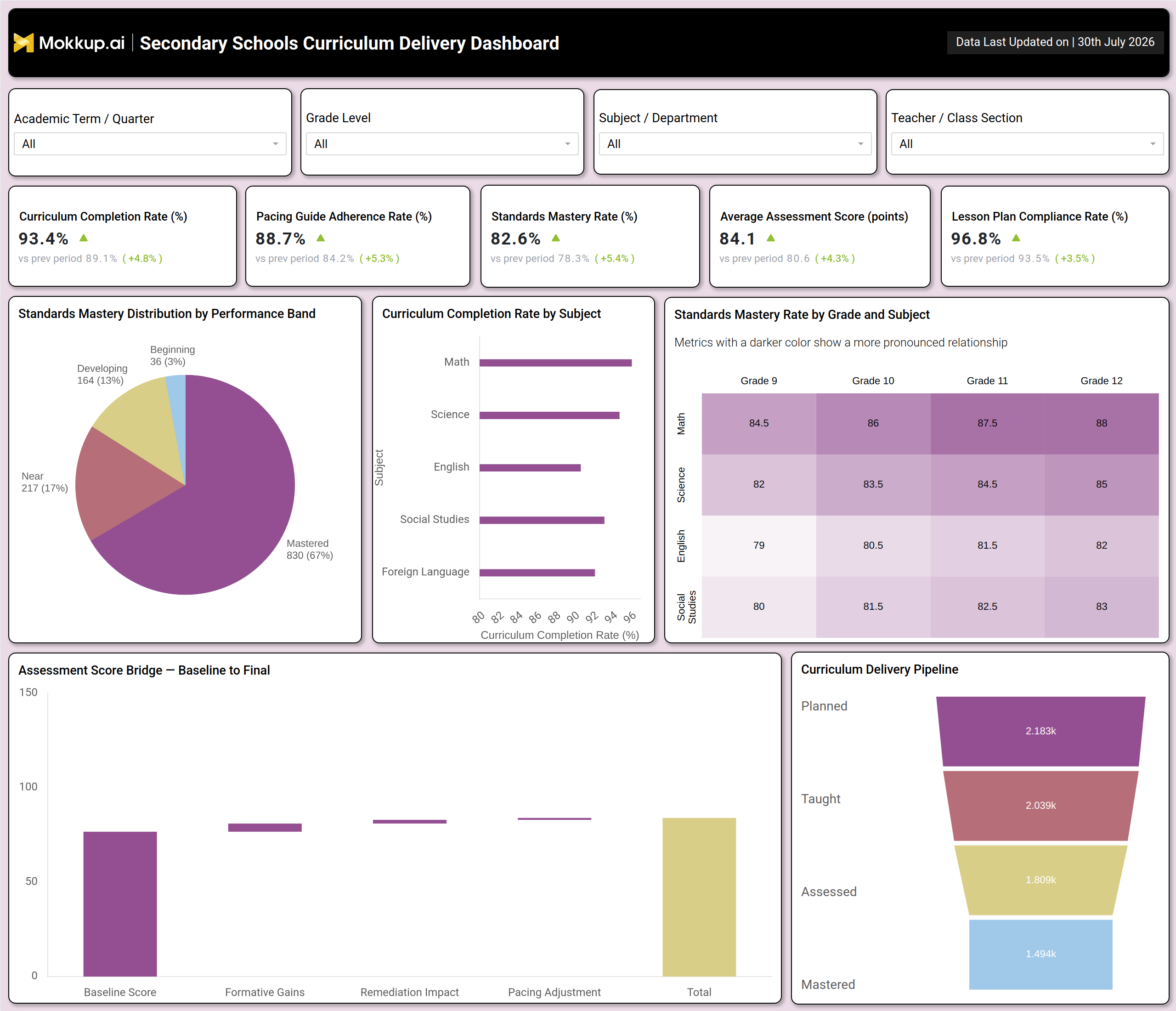
The Secondary Schools Curriculum Delivery Dashboard is a single-screen reporting template built for academic leaders, instructional coaches, and department heads who need a clear view of how curriculum is being planned, taught, and mastered across a secondary school. It consolidates curriculum completion rate, pacing guide adherence rate, standards mastery rate, average assessment score, and lesson plan compliance rate into one view, so instructional leaders no longer have to stitch together separate spreadsheets from different departments. The secondary school curriculum delivery dashboard also breaks performance down by subject, grade level, and teacher or class section, letting academic teams compare how Math, Science, English, Social Studies, and Foreign Language departments are progressing against the same pacing guide. Because the filters allow slicing by academic term or quarter, this dashboard works equally well for a mid-year pacing check or an end-of-year mastery review, giving school administrators a shared reference point for curriculum conversations with staff and a starting point for any standards mastery rate tracking tool effort across the building.
How to Create a Secondary Schools Curriculum Delivery Dashboard
You don't need to build your report from scratch; just start with a ready-to-use dashboard template from Mokkup. Add in your data and export it however you like. Here's how to do it:
1. Create or Log in to Your Mokkup Account
Start by signing up on Mokkup.ai using your email. If you already have an account, just log in, and you'll be good to go.
2. Choose and Customize Your Dashboard Template
Find the Secondary Schools Curriculum Delivery Dashboard template in the Templates section. Use the drag-and-drop editor to adjust KPIs, edit filters, or add elements based on your data.
3. Export to Your BI Tool
Once your dashboard wireframe is ready, use the BI Tool Export feature to send it directly to Power BI or Tableau for further analysis and enhancements. You can also download the dashboard as a PDF, PNG, or JPEG, embed it on a platform, or invite your team to collaborate.
Note: This is a Pro template. You'll need a Pro subscription on Mokkup to use and customize this dashboard wireframe. Upgrade anytime to unlock full access.
Secondary Schools Curriculum Delivery Dashboard Example
A department head or vice principal for curriculum opens this dashboard at the start of a review cycle to understand whether instruction is on pace with the academic calendar and whether students are actually mastering what has been taught. The question driving that first look is simple: are teachers teaching what was planned, and is it working for students? From the overview, instructional leaders gauge whether pacing guides are being followed closely enough across departments and whether lesson plans are being submitted and reviewed on schedule. When a subject area lags its pacing guide, department chairs filter down to that subject and grade level to see whether the gap is isolated to a single teacher or class section or reflects a broader curriculum design issue.
Comparing standards mastery across grade and subject combinations helps academic leaders prioritize coaching support toward the classrooms furthest from proficiency, rather than spreading professional development resources evenly regardless of need. Reviewing how assessment scores move from baseline through formative gains, remediation, and pacing adjustments also shows which interventions are contributing to growth, supporting focused assessment score improvement tracking for schools' effort district-wide. Taken together, the dashboard helps curriculum teams move from reactive, end-of-term surprises to ongoing, evidence-based adjustments, closing pacing gaps earlier, directing coaching where it matters most, and giving school leadership confidence that curriculum delivery is translating into real student mastery.
How to Analyze Data in a Secondary Schools Curriculum Delivery Dashboard
Here is how you can analyze data from this dashboard:
- Compare academic progress: Filter by Academic Term/Quarter to evaluate pacing and mastery trends across a semester or school year.
- Analyze grade-level performance: Use the Grade Level filter to review standards mastery for a specific grade before exploring individual subjects.
- Evaluate subject performance: Apply the Subject/Department filter to monitor pacing guide adherence one department at a time.
- Review classroom outcomes: Segment data by Teacher/Class Section to identify classrooms that may benefit from instructional coaching.
- Identify mastery gaps: Review the Standards Mastery Rate by Grade and Subject heatmap to pinpoint grade-subject combinations performing below target.
- Track curriculum progress: Analyze curriculum completion rates by subject to identify departments falling behind their pacing schedule.
- Monitor curriculum delivery: Review the Curriculum Delivery Pipeline funnel to identify where content is delayed between planning, teaching, assessment, and mastery.
- Interpret assessment results: Use the Assessment Score Bridge to distinguish genuine learning gains from changes caused by pacing adjustments.
Benefits of a Secondary Schools Curriculum Delivery Dashboard
The following are the benefits of using this dashboard:
- Centralize curriculum data: Combine curriculum completion, pacing, and mastery metrics into a single lesson plan compliance dashboard.
- Identify pacing issues early: Give academic leaders early visibility into subjects or grade levels falling behind pacing guides.
- Support instructional coaching: Identify classrooms and subjects that need targeted teaching support.
- Simplify curriculum reporting: Replace manual end-of-term reports with a continuously updated view of curriculum delivery.
- Compare academic performance: Evaluate departments and grade levels using a consistent standards mastery framework.
- Enable data-driven reviews: Support productive discussions between administrators and teachers with shared performance insights.
- Reduce reporting effort: Eliminate manual compilation of curriculum status updates for school leadership meetings.
- Speed up curriculum analysis: Turn curriculum completion reviews by subject into a quick, filter-based analysis instead of manual data extraction.
KPIs to Track in a Secondary Schools Curriculum Delivery Dashboard
The following key KPIs can be tracked by using this curriculum completion rate by subject analysis dashboard:
- Curriculum Completion Rate (%) - measures how much of the planned curriculum has been delivered against the academic calendar.
- Pacing Guide Adherence Rate (%) - the core metric behind any pacing guide adherence monitoring for schools effort, showing how closely teachers follow the prescribed pacing guide for each subject.
- Standards Mastery Rate (%) - reflects the share of students who have mastered grade-level standards, the core output of any standards mastery rate tracking tool.
- Average Assessment Score (points) - tracks overall student performance on assessments tied to the curriculum.
- Lesson Plan Compliance Rate (%) - the metric any lesson plan compliance rate tracking dashboard should surface first, measuring how consistently lesson plans are submitted and reviewed on schedule.
Frequently Asked Questions
1. What is the Secondary Schools Curriculum Delivery Dashboard used for?
It helps academic leaders monitor how curriculum is planned, taught, and mastered across departments, grades, and class sections. Instead of reviewing separate reports, teams use one secondary school curriculum delivery dashboard to track pacing, compliance, and mastery in a single view.
2. Which teams typically use this dashboard?
Department heads, instructional coaches, vice principals, and curriculum directors use it most, since it surfaces pacing and mastery data by subject and grade. It is also useful during staff review meetings when comparing classroom-level performance.
3. How often should curriculum delivery data be reviewed?
Most schools review it at least once per academic term or quarter to catch pacing gaps early, then again at year-end for a full assessment score improvement tracking for schools review. Frequent review helps leaders adjust instructional support before gaps widen.