
What is an International School Curriculum Dashboard
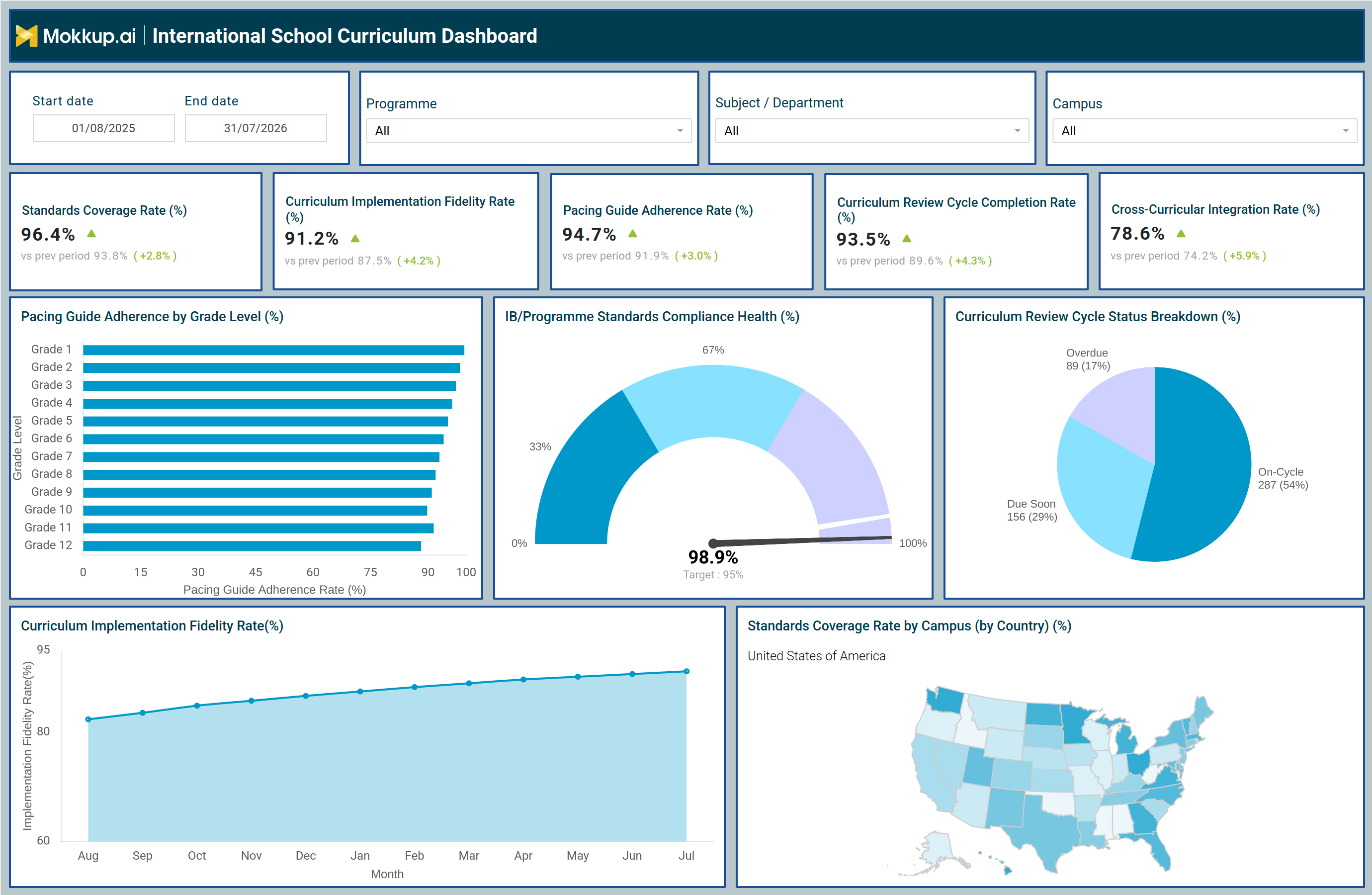
The International School Curriculum Dashboard is a curriculum management dashboard template built for international school networks and IB or Programme coordinators who need visibility into how consistently curriculum delivery is executed across grade levels, campuses, and programmes. It consolidates standards alignment, pacing guide adherence, and review cycle status into a single view so academic leaders can monitor curriculum health without pulling data from separate campus systems.
Because the dashboard functions as a standards coverage rate tracking tool, curriculum directors can see which campuses are ahead of or behind their required coverage targets before a review cycle closes and can act on gaps early rather than after a term ends. It also supports cross-curricular integration rate analysis for schools that want to confirm subjects are being taught with meaningful interdisciplinary connections, rather than in isolation. Curriculum directors, IB coordinators, and academic quality teams use this international school curriculum dashboard to replace scattered campus reports with one consistent view of curriculum health across an entire network, including schools operating in different countries.
How to Create an International School Curriculum Dashboard
You don't need to build your report from scratch-just start with a ready-to-use dashboard template from Mokkup. Add your data and export it as needed. Here's how to do it:
1. Create or Log in to Your Mokkup Account
Start by signing up on Mokkup.ai using your email. If you already have an account, just log in, and you'll be good to go.
2. Choose and Customize Your Dashboard Template
Find the International School Curriculum Dashboard template in the Templates section. Use the drag-and-drop editor to adjust KPIs, edit filters, or add elements based on your data.
3. Export to Your BI Tool
Once your dashboard wireframe is ready, use the BI Tool Export feature to send it directly to Power BI or Tableau for further analysis and enhancements. You can also download the dashboard as a PDF, PNG, or JPEG, embed it on a platform, or invite your team to collaborate.
Note: This is a Pro template. You'll need a Pro subscription on Mokkup to use and customize this dashboard wireframe. Upgrade anytime to unlock full access.
International School Curriculum Dashboard Example
A curriculum director at an international school network opens this dashboard at the start of a review cycle to check whether pacing and standards alignment are on track across every campus before the next checkpoint. They arrive with a specific question in mind: which grade levels or subjects are falling behind their pacing guides, and which campuses need intervention before the next accreditation review? Filtering by programme, subject or department, or campus narrows the view instantly, from a network-wide picture down to a single grade level or department.
From the top KPI row, the director can gauge whether curriculum delivery is holding steady or slipping compared to the prior period and whether cross-curricular integration is keeping pace with standalone subject teaching. Moving into the grade-level breakdown, they can identify which grades are lagging behind pacing targets and prioritize coaching or resource support for those specific bands. The program compliance view lets teams confirm the network is meeting its internal standards target. In contrast, the review cycle status view helps academic teams flag reviews that are overdue or coming due soon so nothing slips through unnoticed. The campus map lets leadership compare coverage of standards across countries and quickly identify which regions need additional support before the next accreditation cycle.
Altogether, this dashboard helps international school leadership move from reactive, end-of-term curriculum audits toward ongoing oversight, so pacing gaps, standards deviations, and overdue reviews get caught and corrected while there is still time to act within the academic year.
How to Analyze Data in an International School Curriculum Dashboard
Here is how you can analyze data from this dashboard:
- Analyze specific segments: Filter by Programme, Subject/Department, or Campus to evaluate curriculum performance for a targeted group.
- Compare standards coverage: Review the Standards Coverage Rate against the previous period to determine whether curriculum coverage gaps are improving or widening.
- Monitor pacing by grade: Analyze the Pacing Guide Adherence Rate by Grade Level chart to identify grades that are falling behind schedule.
- Track compliance: Check the IB/Programme Standards Compliance Health gauge against its target to assess organization-wide curriculum compliance.
- Manage curriculum reviews: Review the Curriculum Review Cycle Status Breakdown to identify overdue curriculum reviews before deadlines are missed.
- Measure implementation consistency: Monitor curriculum implementation fidelity throughout the academic year to evaluate improvements in delivery consistency.
- Compare campus performance: Use the Standards Coverage Rate by Campus map to identify campuses with lower curriculum coverage performance.
Benefits of an International School Curriculum Dashboard
The following are the benefits of using this dashboard:
- Centralize curriculum oversight: Replace manual end-of-term curriculum audits with continuous visibility into pacing and standards alignment.
- Unify campus reporting: Give curriculum directors a single view across all campuses instead of managing separate spreadsheets for each school.
- Track review cycles: Monitor curriculum review completion and automatically identify overdue review cycles.
- Compare curriculum delivery: Evaluate delivery consistency across grade levels, subjects, and campuses from one dashboard.
- Monitor implementation fidelity: Track curriculum implementation fidelity to identify delivery gaps before they affect learning outcomes.
- Identify coverage gaps: Monitor standards coverage by campus to detect gaps before compliance and accreditation reviews.
- Support accreditation readiness: Demonstrate curriculum standards compliance for IB programs and other accreditation evaluations through centralized reporting.
KPIs to Track in an International School Curriculum Dashboard
The following key KPIs can be tracked by using this curriculum implementation fidelity rate monitoring dashboard:
- Standards Coverage Rate: the percentage of required curriculum standards taught and documented across a defined period.
- Curriculum Implementation Fidelity Rate: how closely actual classroom delivery matches the planned curriculum.
- Pacing Guide Adherence Rate by Grade Level: how closely each grade level is following its assigned pacing schedule.
- Curriculum Review Cycle Completion Rate: the core metric behind this curriculum review cycle completion tracking dashboard, measuring the percentage of scheduled reviews completed within their designated cycle.
- Cross-Curricular Integration Rate: the degree to which subjects are being taught with connections across disciplines.
Frequently Asked Questions
1. What is the International School Curriculum Dashboard used for?
It is used to monitor curriculum pacing, standards coverage, and review cycle status across grade levels and campuses in an international school network. It gives curriculum leaders a single view for spotting delivery gaps before they affect accreditation or standards compliance.
2. Who should use this dashboard?
Curriculum directors, IB or programme coordinators, and academic quality teams responsible for standards compliance across multiple campuses should use it. It is built for teams running cross-curricular integration rate analysis for schools alongside pacing consistency checks by grade level.
3. Can I customize the International School Curriculum Dashboard template?
Yes. The template can be customized in Mokkup's drag-and-drop editor to adjust KPIs, filters, and layout before exporting to Power BI, Tableau, PDF, PNG, or JPEG.