
What is a Secondary School Regulatory Compliance Dashboard?
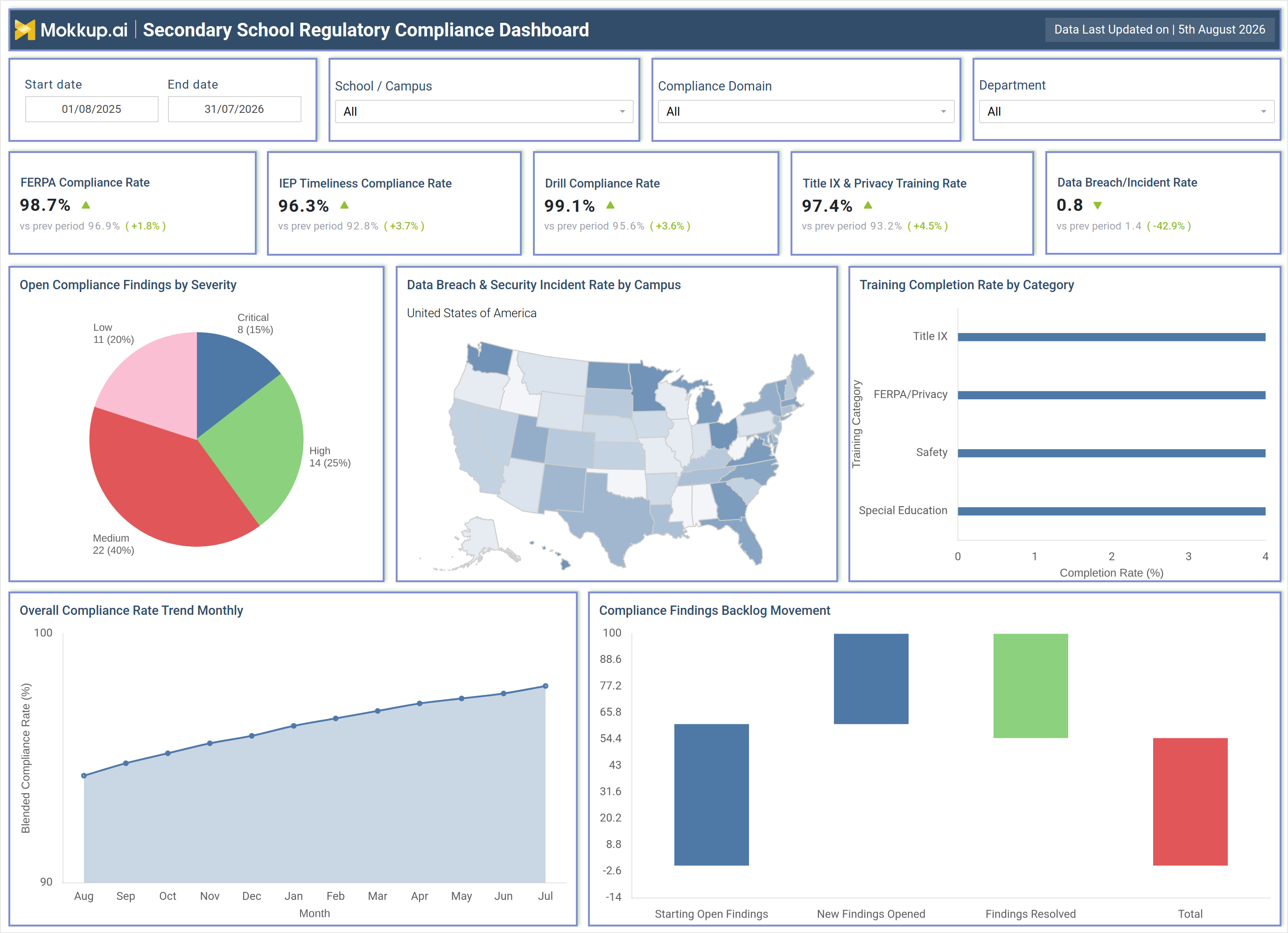
The Secondary School Regulatory Compliance Dashboard is a single-screen reporting template built for compliance officers, administrators, and district leadership who need one place to confirm that a secondary school system is meeting its regulatory obligations. Instead of pulling separate reports from student records systems, safety logs, and training platforms, this secondary school regulatory compliance dashboard consolidates FERPA, IEP, safety drill, and Title IX obligations into a single wireframe that can be filtered by school, compliance domain, and department. Built on Mokkup's dashboard template library, it gives compliance teams a structured starting point for monitoring adherence across student privacy law, special education timelines, emergency preparedness, and staff training completion.
Because student data privacy and safety incidents carry legal and reputational consequences, the dashboard also functions as a FERPA compliance rate tracking tool alongside a data breach incident rate monitoring view for schools, so leadership can see where privacy safeguards are holding and where security exposure is rising before an audit or incident review. The result is a wireframe that turns scattered compliance recordkeeping into one navigable view any district can adapt to their own reporting calendar.
How to Create a Secondary School Regulatory Compliance Dashboard
You don't need to build your report from scratch; just start with a ready-to-use dashboard template from Mokkup. Add in your data and export it however you like. Here's how to do it:
1. Create or Log in to Your Mokkup Account
Start by signing up on Mokkup.ai using your email. If you already have an account, just log in, and you'll be good to go.
2. Choose and Customize Your Dashboard Template
Find the Secondary School Regulatory Compliance Dashboard template in the Templates section. Use the drag-and-drop editor to adjust KPIs, edit filters, or add elements based on your data.
3. Export to Your BI Tool
Once your dashboard wireframe is ready, use the BI Tool Export feature to send it directly to Power BI or Tableau for further analysis and enhancements. You can also download the dashboard as a PDF, PNG, or JPEG, embed it on a platform, or invite your team to collaborate.
Note: This is a Pro template. You'll need a Pro subscription on Mokkup to use and customize this dashboard wireframe. Upgrade anytime to unlock full access.
Secondary School Regulatory Compliance Dashboard Example
A compliance officer preparing for a scheduled state or district audit opens the Secondary School Regulatory Compliance Dashboard to get a defensible answer to one question: is the school currently in good standing across every regulatory domain it is accountable for? Rather than requesting spreadsheets from separate departments, they scan the top of the screen to confirm whether FERPA recordkeeping, IEP timelines, safety drills, and Title IX training are trending in the right direction, then narrow the view by school, compliance domain, or department to isolate any campus that needs closer attention.
From there, the officer can identify which compliance domain is generating the most open findings and whether those findings skew toward higher-severity issues that require immediate remediation plans. Reviewing findings by severity alongside the monthly compliance trend lets the team judge whether recent corrective actions are actually closing gaps or whether the backlog is quietly growing. When a particular campus shows an unusual pattern in data breaches or security incidents, the officer can trace that signal geographically to decide where to prioritize a security review before it escalates into a formal violation. Beyond a single audit cycle, this consistent view helps compliance and administrative teams build a repeatable rhythm for tracking regulatory health, prioritizing training refreshers where completion is lagging, and demonstrating to school boards and regulators that the district manages student privacy, safety, and civil rights obligations as an ongoing discipline rather than a once-a-year scramble.
How to Analyze Data in a Secondary School Regulatory Compliance Dashboard
Here is how you can analyze data from this dashboard:
- Filter by School/Campus to isolate which location is driving compliance risk
- Narrow by Compliance Domain to separate FERPA, safety, and Title IX performance
- Segment by Department to see which team owns outstanding findings
- Adjust the Start/End date range to compare compliance performance across terms
- Review the Overall Compliance Rate Trend Monthly to confirm sustained improvement
- Cross-reference Open Compliance Findings by Severity against the backlog movement view, effectively a compliance findings backlog tracking dashboard for remediation prioritization
- Use the dashboard for IEP timeliness compliance monitoring for schools to catch special education deadline risk early
Benefits of a Secondary School Regulatory Compliance Dashboard
The following are the benefits of using this dashboard:
- Centralizes FERPA, IEP, safety, and Title IX compliance in one wireframe
- Reduces manual report-pulling before audits and board reviews
- Flags rising-severity findings before they become violations
- Functions as a compliance findings backlog tracking dashboard for remediation planning
- Surfaces Title IX training completion rate analysis and other category gaps before deadlines pass
- Gives leadership a defensible, exportable record of regulatory posture
- Adapts to any school's own filters without rebuilding the report from scratch
KPIs to Track in a Secondary School Regulatory Compliance Dashboard
The following key KPIs can be tracked by using this dashboard:
- FERPA Compliance Rate - anchors this FERPA compliance rate tracking tool by measuring how consistently student education records are handled under federal privacy law
- IEP Timeliness Compliance Rate - powers IEP timeliness compliance monitoring for schools by tracking whether special education plans and reviews are completed within required deadlines
- Drill Compliance Rate - measures adherence to mandated safety and emergency drill schedules
- Title IX & Privacy Training Rate - tracks staff completion of required civil rights and privacy training
- Data Breach/Incident Rate - measures the frequency of security incidents affecting student or staff records
Frequently Asked Questions
1. What is a Secondary School Regulatory Compliance Dashboard used for?
It gives compliance officers and administrators one screen to monitor FERPA, IEP, safety drill, and Title IX obligations across a school or district. Teams can filter by campus, compliance domain, or department to see where regulatory risk is concentrated.
2. Which compliance areas does this dashboard track?
It tracks FERPA recordkeeping, IEP timeliness, safety drill compliance, and Title IX and privacy training, alongside data breach incident rate monitoring for schools, open findings by severity, and backlog movement.
3. How can a district customize this dashboard for its own reporting needs?
Because it is a Mokkup template, districts can adjust filters, KPI tiles, and chart labels to match their own compliance calendar and terminology. Once customized, the wireframe can be exported to Power BI or Tableau, or shared as a PDF for board and regulator reviews.