
What is a Pediatric Nutritional Status Monitoring Dashboard?
A Pediatric Nutritional Status Monitoring Dashboard is a data-driven tool designed to help orthopedic hospitals and institutions monitor, assess, and improve nutrition and growth outcomes in children. It collects, visualizes, and analyzes multiple aspects of child nutrition, including caloric intake, growth rates, trends in malnutrition, and regional variations in dietary habits. This dashboard uses automated charts, KPI summaries, and heatmaps to support clinicians, nutritionists, and hospital administrators in making evidence-based decisions to enhance pediatric patient care and optimize dietary management.
How to Create a Pediatric Nutritional Status Monitoring Dashboard
You don’t need to build your report from scratch—just start with a ready-to-use dashboard template from Mokkup. Add your data and export it as needed. Here’s how to do it:
1. Create or Log in to Your Mokkup Account
Start by signing up on Mokkup.ai using your email. If you already have an account, log in, and you’ll be all set.
2. Choose and Customize Your Dashboard Template
Find the Pediatric Nutritional Status Monitoring Dashboard template in the Templates section. Use the drag-and-drop editor to adjust KPIs, edit filters, or add elements based on your data.
3. Export to Your BI Tool
Once your dashboard wireframe is ready, use the BI Tool Export feature to send it directly to Power BI or Tableau for further analysis and enhancements. You can also download the dashboard as a PDF, PNG, or JPEG, embed it on a platform, or invite your team to collaborate.
Note: This is a Pro template. You’ll need a Pro subscription on Mokkup to use and customize this dashboard wireframe. Upgrade anytime to unlock full access.
Pediatric Nutritional Status Monitoring Dashboard Example
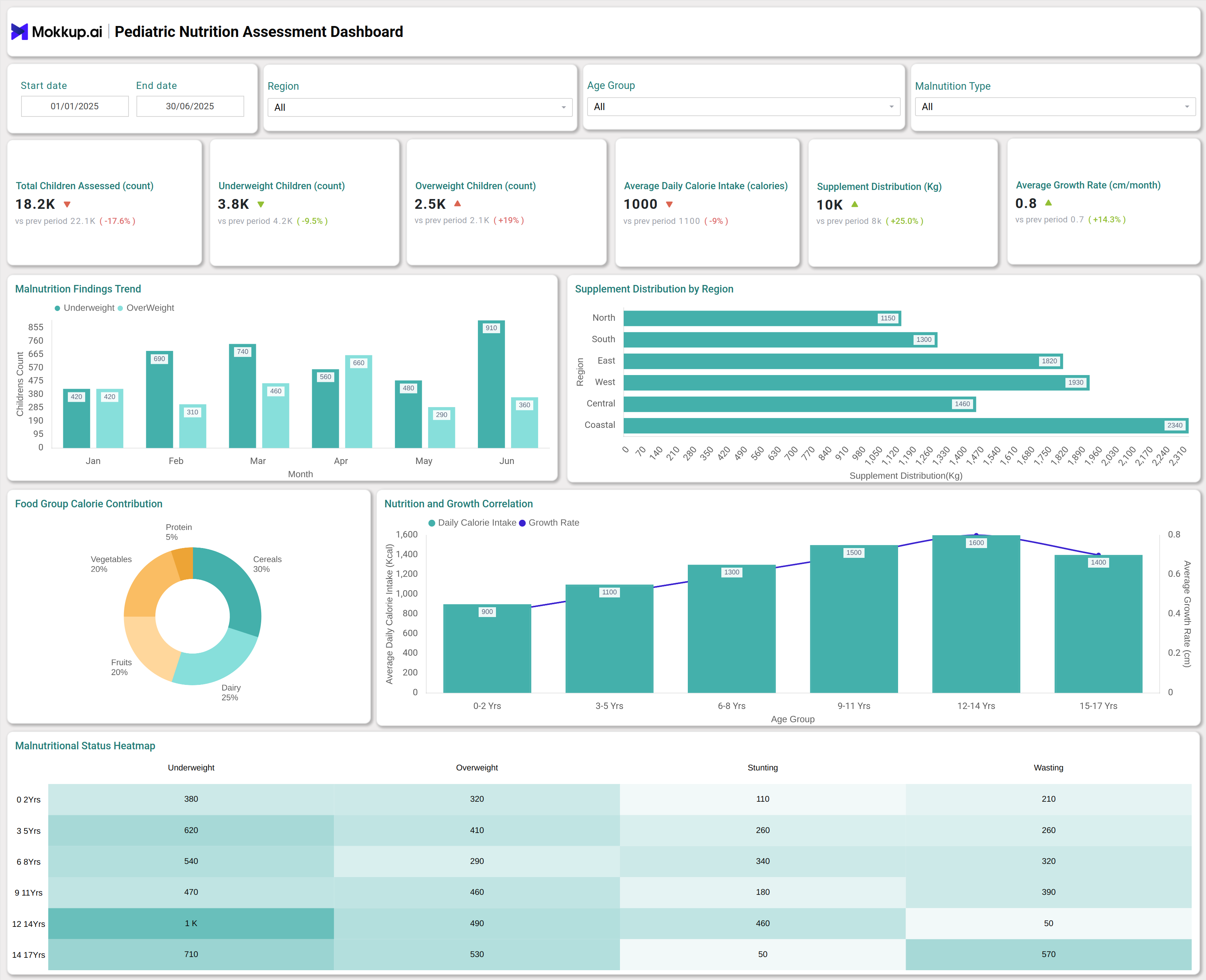
For orthopedic settings, this dashboard provides a full view of the nutritional well-being of pediatric patients receiving orthopedic treatments. The dashboard integrates data from routine assessments, allowing clinicians to quickly identify children at risk of malnutrition, undernutrition, or obesity. For example, the dashboard highlights the number of underweight and overweight children, tracks daily calorie intake, monitors supplement distribution across regions, and provides growth rate metrics by age group. Visual heatmaps and trend charts support rapid detection of nutritional concerns, making it easier to tailor interventions for children undergoing orthopedic procedures.
How to Analyze Data in Pediatric Nutritional Status Monitoring Dashboards
Here is how you can analyze data in the Pediatric Nutritional Status Monitoring Dashboard:
- Use filters for time period, location, age group, and malnutrition type to drill down into specific patient segments.
- Examine trend charts to detect seasonal or monthly patterns in child malnutrition and obesity rates.
- Review KPI tiles to quickly check key statistics such as the number of children assessed, average daily calorie intake, and supplement distribution.
- Analyze heatmaps to explore the distribution of malnutrition across age groups and types, including stunting, wasting, underweight, and overweight.
- Leverage regional and location-specific charts to identify geographic areas needing targeted nutrition interventions.
- Cross-reference food group calorie contributions to evaluate dietary composition and risk factors for poor nutrition.
- Monitor growth rate and BMI range metrics to identify outliers who may require specialized care during orthopedic management early.
Benefits of Pediatric Nutritional Status Monitoring Dashboards
These are the benefits of using the Pediatric Nutritional Status Monitoring:
- Provides real-time, actionable insights into pediatric nutrition trends.
- Supports early detection and intervention for malnutrition or obesity in orthopedic patient populations.
- Improves efficiency by automating nutritional assessment and reporting processes for healthcare teams.
- Facilitates targeted distribution of resources, such as supplements, by region or population segment.
- Enables comprehensive auditing of child diet, growth performance, and feeding habits over time.
- Enhances patient outcomes by informing individualized nutrition plans alongside orthopedic treatment.
KPIs to Track in Pediatric Nutritional Status Monitoring Dashboards
- Total Children Assessed: Number of children evaluated for nutritional status in a given time frame.
- Underweight Children: Count of children identified as underweight during assessments.
- Overweight Children: Count of children found to be overweight, supporting obesity tracking.
- Average Daily Calorie Intake: Mean daily caloric consumption recorded across all assessed children.
- Supplement Distribution (Kg): Total amount of nutritional supplements distributed for pediatric patients.
- Average Growth Rate (cm): Mean change in growth rate (in centimeters) across age cohorts.
Frequently Asked Questions
1. What makes this dashboard suitable for pediatric hospitals?
It tailors pediatric nutrition data for children undergoing procedures, enabling nutrition-focused care as part of the inpatient and outpatient management plan.
2. Can the dashboard be customized for other hospital departments?
Yes, the template supports customization for varying age groups, conditions, and nutritional objectives.
3. How does this dashboard help in reducing pediatric malnutrition?
It provides instant visibility into risk profiles and unmet nutritional needs, enabling faster interventions.