
What is a Natural Gas Storage Efficiency & Boil-Off Control Dashboard
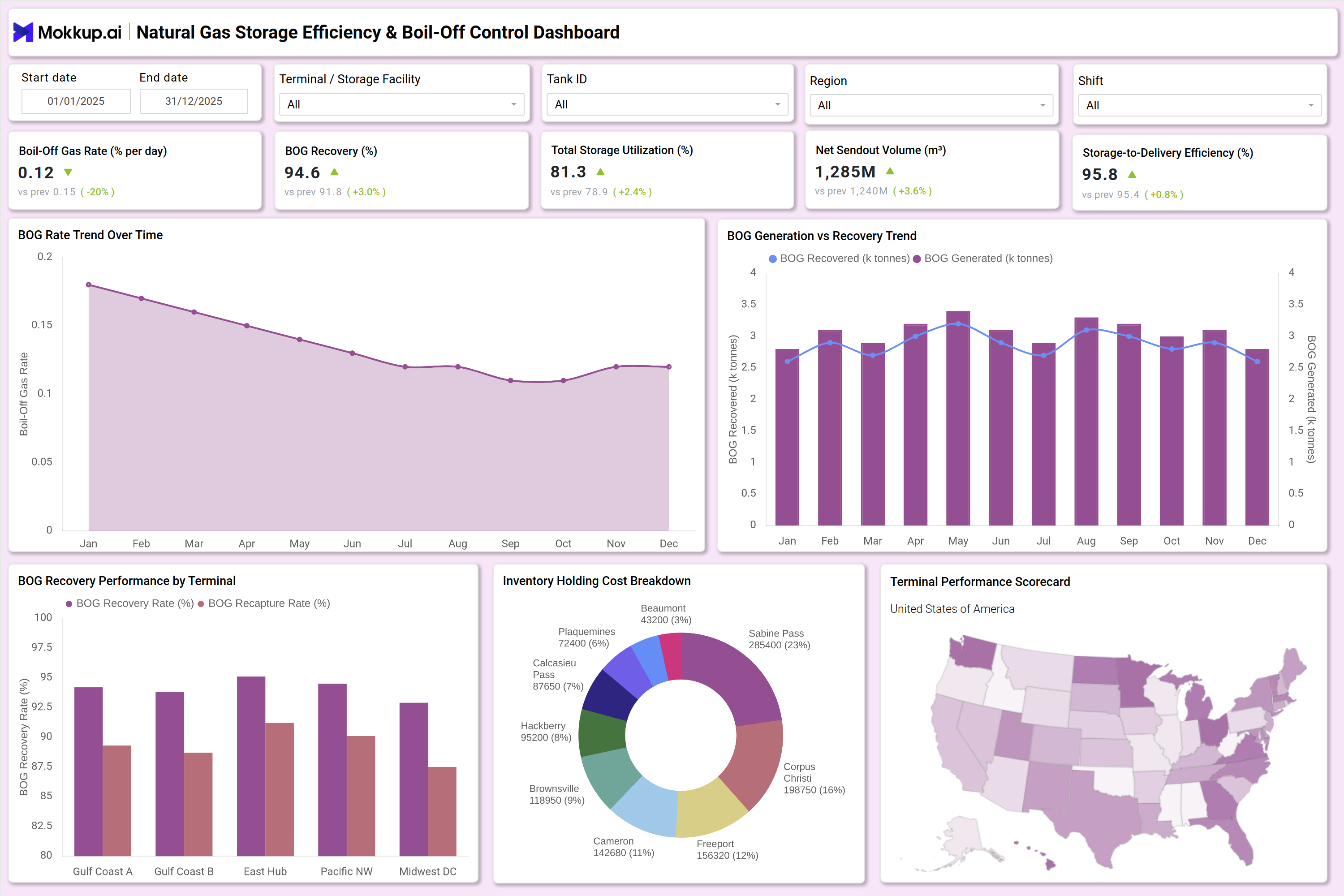
A Natural Gas Storage Efficiency & Boil-Off Control Dashboard is an analytics solution designed to monitor LNG tank performance, boil-off gas (BOG) rates, storage utilization, and recovery efficiency across terminals. It functions as a natural gas storage efficiency monitoring dashboard that provides real-time visibility into operational losses, recovery systems, and asset productivity.
In LNG storage facilities, boil-off gas is generated due to heat ingress and pressure variation. If not monitored properly, it leads to product losses, safety risks, and higher operational costs. This dashboard acts as a natural gas storage boil-off rate tracking system, helping operators measure daily BOG rates, recovery percentages, and storage-to-delivery efficiency.
The solution also supports inventory control and capacity planning. As a natural gas inventory and storage optimization dashboard, it enables terminal managers to optimize tank utilization, reduce holding costs, and improve send-out performance. The dashboard is built for LNG operators, midstream companies, storage asset owners, and enterprise energy analytics teams.
How to Create a Natural Gas Storage Efficiency & Boil-Off Control Dashboard
You don't need to build your report from scratch; just start with a ready-to-use dashboard template from Mokkup. Add in your data and export it however you like. Here's how to do it:
1. Create or Log in to Your Mokkup Account
Start by signing up on Mokkup.ai using your email. If you already have an account, just log in, and you'll be good to go.
2. Choose and Customize Your Dashboard Template
Find the Natural Gas Storage Efficiency & Boil-Off Control Dashboard template in the Templates section. Use the drag-and-drop editor to adjust KPIs, edit filters, or add elements based on your data.
3. Export to Your BI Tool
Once your dashboard wireframe is ready, use the BI Tool Export feature to send it directly to Power BI or Tableau for further analysis and enhancements. You can also download the dashboard as a PDF, PNG, or JPEG, embed it on a platform, or invite your team to collaborate.
Note: This is a Pro template. You'll need a Pro subscription on Mokkup to use and customize this dashboard wireframe. Upgrade anytime to unlock full access.
Natural Gas Storage Efficiency & Boil-Off Control Dashboard Example
A typical dashboard layout includes global filters for start date, terminal, tank ID, region, and shift. This allows operators to analyze performance at the enterprise, terminal, or tank level. A trend visualization shows monthly boil-off rate movement, forming an LNG boil-off gas trend analysis dashboard. This helps identify seasonal heat impact, insulation issues, or operational inefficiencies. Another section compares the BOG generated versus the BOG recovered. This highlights recovery gaps and compressor performance issues.
Terminal-level comparison charts act as an LNG storage performance benchmarking dashboard, allowing management to compare recovery rates and recapture efficiency across Gulf Coast, East Hub, Pacific Northwest, and Midwest regions. An inventory holding cost breakdown visual identifies high-cost storage terminals, while a regional performance map shows asset contribution across states. Together, these components create a structured LNG storage capacity utilization monitoring dashboard that links operational efficiency with financial impact.
How to Analyze Data in a Natural Gas Storage Efficiency & Boil-Off Control Dashboard
Here is how you can analyze data from this dashboard:
- Review Boil-Off Gas Rate trend monthly to detect abnormal increases above baseline thresholds.
- Compare BOG Generated vs BOG Recovered to identify system inefficiencies.
- Monitor Storage Utilization (%) to ensure optimal tank loading levels.
- Analyze Net Sendout Volume against storage levels to prevent overstocking.
- Evaluate Storage-to-Delivery Efficiency to measure operational conversion effectiveness.
- Use terminal comparison charts for cross-location benchmarking.
- Track inventory holding cost breakdown to identify high-cost facilities.
- Filter by Tank ID to detect specific insulation or pressure management issues.
- Assess recovery percentage stability across shifts to detect operational inconsistencies.
- Identify seasonal or regional trends using map-based performance insights.
Benefits of a Natural Gas Storage Efficiency & Boil-Off Control Dashboard
The following are the benefits of using this dashboard:
- Reduces LNG losses by monitoring boil-off gas rates in real time.
- Improves recovery system efficiency using measurable BOG recovery metrics.
- Enhances capacity planning with structured storage utilization tracking.
- Supports data-driven decisions using an integrated natural gas storage asset utilization dashboard.
- Optimizes working capital through inventory holding cost analysis.
- Enables cross-terminal benchmarking with standardized KPIs.
- Improves safety by detecting pressure and temperature-related deviations early.
- Increases operational transparency for executives and plant managers.
- Aligns operational metrics with financial performance indicators.
- Strengthens enterprise reporting across multi-terminal LNG networks.
KPIs to Track in a Natural Gas Storage Efficiency & Boil-Off Control Dashboard
The following key KPIs can be tracked by using this dashboard:
- Boil-Off Gas Rate (% per day): Measures daily evaporation percentage of stored LNG. Lower rates indicate better insulation and storage efficiency.
- BOG Generated (k tonnes): Total volume of boil-off gas produced within a defined period. Indicates heat ingress impact.
- BOG Recovered (k tonnes): Volume of boil-off gas successfully recaptured and reused. Reflects recovery system effectiveness.
- BOG Recovery Rate (%): Percentage of generated BOG that is recovered. Higher percentage improves operational efficiency.
- Total Storage Utilization (%): Ratio of used storage capacity to total available capacity. Critical for optimizing tank loading levels.
- Net Sendout Volume (m³): Volume of LNG delivered from storage to downstream operations. Reflects throughput performance.
- Storage-to-Delivery Efficiency (%): Measures how efficiently stored LNG is converted into deliverable output with minimal loss.
- Inventory Holding Cost ($): Total cost associated with storing LNG inventory. Helps in financial optimization.
- Capacity Utilization by Region (%): Shows how effectively storage assets are used across geographic locations.
Frequently Asked Questions
1. Why is boil-off gas monitoring important in LNG storage?
Boil-off gas represents evaporative losses caused by heat ingress. Monitoring reduces financial losses and improves recovery efficiency.
2. What is an ideal boil-off gas rate?
Typical LNG storage facilities aim for 0.05%–0.15% per day depending on tank design and insulation quality.
3. How does this dashboard support capacity planning?
By tracking storage utilization and sendout volume, operators can balance inflow and outflow to avoid overstocking or shortages.
4. Who should use this dashboard?
LNG terminal managers, storage operators, midstream companies, and enterprise energy analytics teams.
5. Can this dashboard support multi-terminal benchmarking?
Yes. It functions as an LNG storage performance benchmarking dashboard, allowing comparison of recovery efficiency and asset utilization across regions.
6. How does it improve cost control?
It tracks inventory holding costs, storage inefficiencies, and recovery gaps, directly linking operational metrics to financial impact.