
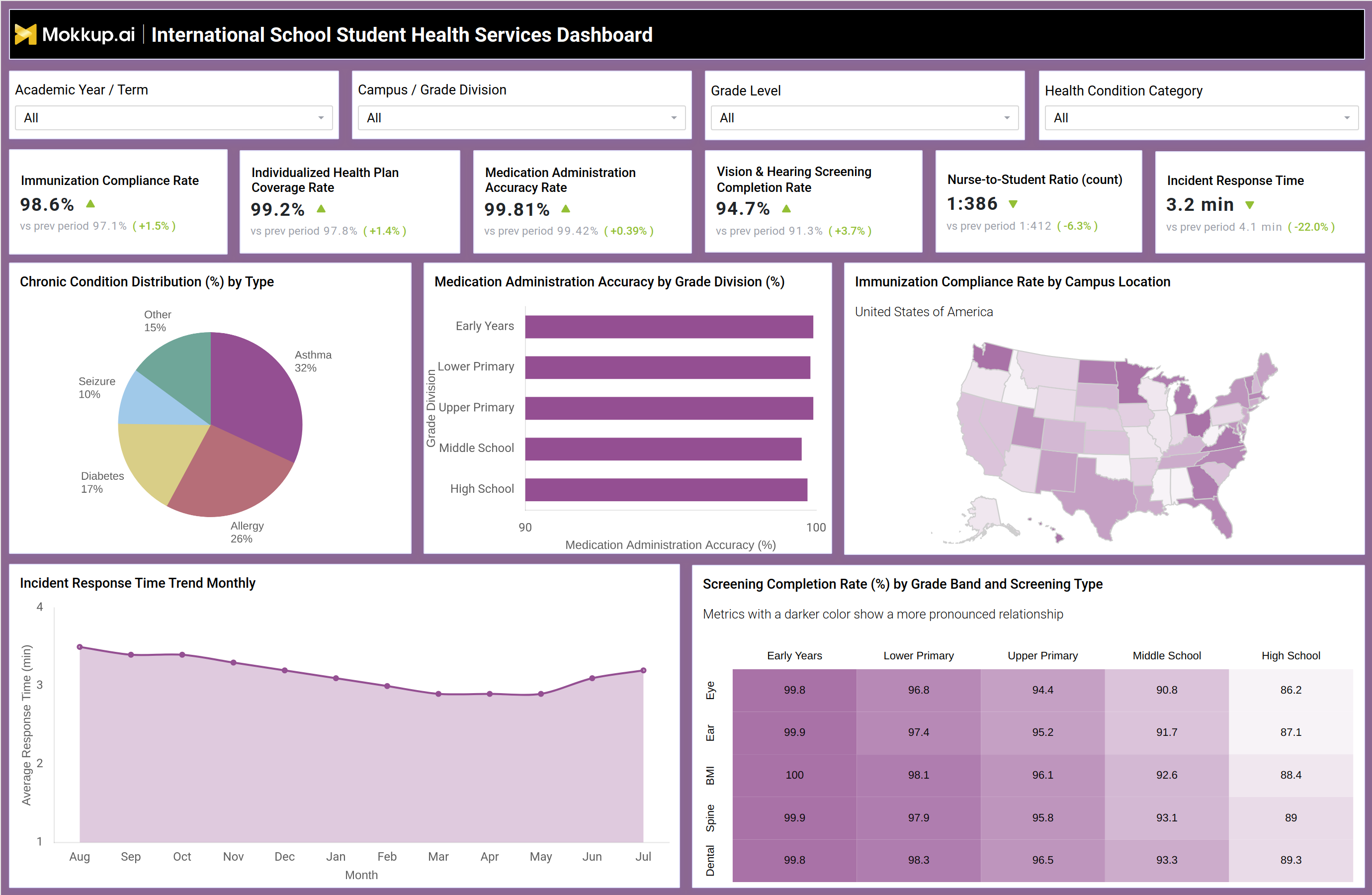
What is an International School Student Health Services Dashboard?
The International School Student Health Services Dashboard is an international school student health services dashboard built for school nurses, health coordinators, and campus administrators who need one view of immunization status, screening progress, medication safety, and incident response across a multi-campus network. It brings together compliance and clinical operations data instead of splitting it across paper logs, spreadsheets, and clinic software, filterable by academic year or term, campus or grade division, grade level, and health condition category.
Nursing leads use it as an immunization compliance rate tracking tool to confirm that vaccination records stay current across every campus, while health coordinators rely on the same view for medication administration accuracy rate tracking dashboard checks tied to grade division. The dashboard also supports chronic condition distribution tracking for school health so teams can see which conditions require the most planning attention before the term begins. Because it is built on a customizable template, schools can adjust filters and metrics to match their own campus structure and health program categories.
How to Create an International School Student Health Services Dashboard
You don't need to build your report from scratch; just start with a ready-to-use dashboard template from Mokkup. Add in your data and export it however you like. Here's how to do it:
1. Create or Log in to Your Mokkup Account
Start by signing up on Mokkup.ai using your email. If you already have an account, just log in, and you'll be good to go.
2. Choose and Customize Your Dashboard Template
Find the International School Student Health Services Dashboard template in the Templates section. Use the drag-and-drop editor to adjust KPIs, edit filters, or add elements based on your data.
3. Export to Your BI Tool
Once your dashboard wireframe is ready, use the BI Tool Export feature to send it directly to Power BI or Tableau for further analysis and enhancements. You can also download the dashboard as a PDF, PNG, or JPEG, embed it on a platform, or invite your team to collaborate.
Note: This is a Pro template. You'll need a Pro subscription on Mokkup to use and customize this dashboard wireframe. Upgrade anytime to unlock full access.
International School Student Health Services Dashboard Example
A school nurse or health services coordinator at an international school opens this dashboard at the start of a term to check whether health compliance and clinic operations are on track across campuses. The first question is usually whether immunization records and individualized health plans are current enough to meet enrollment and accreditation requirements, and whether any campus or grade division is falling behind the rest of the network. From there, the coordinator can compare medication administration accuracy and screening completion across grade divisions to see which campuses need closer support before an audit.
Reviewing the chronic condition mix alongside screening results by grade band helps the team decide where to add clinic staffing or supplies ahead of a term with more students managing conditions such as asthma or allergies. Tracking incident response time trends alongside nurse staffing ratios helps leadership judge whether current coverage is keeping pace with clinic demand, or whether a specific campus needs additional support. The result is a health services view that connects compliance tracking to day-to-day clinic decisions. Instead of pulling separate reports from immunization systems, screening logs, and incident records, health teams get one dashboard that shows where attention is needed most, helping every campus stay compliant and every student's health needs stay covered.
How to Analyze Data in an International School Student Health Services Dashboard
Here is how you can analyze data from this dashboard:
- Filter by academic year/term, campus/grade division, grade level, or health condition category to isolate a specific segment.
- Use the nurse-to-student ratio monitoring for schools view to check staffing coverage against enrollment size.
- Compare medication administration accuracy across grade divisions to spot campuses needing retraining.
- Apply vision and hearing screening completion rate analysis by grade band to identify screening backlogs early.
- Review the chronic condition distribution by type to plan supplies and staffing ahead of the term.
- Check immunization compliance rate by campus location on the map to flag campuses falling behind network averages.
- Track incident response time trend monthly to confirm clinic response speed is improving, not slipping.
- Cross-reference screening completion rates by grade band and screening type to identify which grade divisions need catch-up screenings.
Benefits of an International School Student Health Services Dashboard
The following are the benefits of using this dashboard:
- Combines immunization, screening, medication, and incident data in a single international school student health services dashboard instead of scattered clinic records.
- Functions as a medication administration accuracy rate tracking dashboard that flags accuracy gaps by grade division before they become safety issues.
- Speeds up identification of campuses falling behind on immunization or individualized health plan compliance.
- Supports staffing decisions by showing nurse-to-student ratio and incident response time together.
- Reduces manual reporting effort during health audits and accreditation reviews.
- Gives health teams a consistent view for comparing campuses through the same filters.
- Helps leadership plan clinic supplies and staffing around chronic condition trends.
- Improves accountability by tracking compliance trends over time rather than one-time snapshots.
KPIs to Track in an International School Student Health Services Dashboard
The following key KPIs can be tracked by using this dashboard:
- Immunization Compliance Rate (%): share of enrolled students with immunization records meeting requirements, a core input for immunization compliance rate tracking tool use across campuses.
- Individualized Health Plan (IHP) Coverage Rate (%): percentage of students with documented health conditions who have an active care plan on file.
- Medication Administration Accuracy Rate (%): measures how accurately clinic staff administer prescribed medication relative to protocol.
- Vision & Hearing Screening Completion Rate (%): supports vision and hearing screening completion rate analysis by grade division and campus.
- Nurse-to-Student Ratio: compares clinic staffing headcount against total enrollment to judge coverage adequacy.
- Incident Response Time (minutes): average time between an incident report and clinic response.
Frequently Asked Questions
1. What does the International School Student Health Services Dashboard track?
It tracks immunization compliance, individualized health plans, medication administration accuracy, screening completion, nurse staffing ratios, and incident response time across school campuses. As an international school student health services dashboard, it filters this data by academic year, campus, grade level, and health condition category.
2. How does the dashboard support immunization compliance tracking?
It functions as an immunization compliance rate tracking tool that breaks compliance down by campus location, flagging campuses that fall behind network standards. This helps health teams prioritize outreach before enrollment deadlines or audits.
3. Can the dashboard help with clinic staffing decisions?
Yes, it works as a nurse-to-student ratio monitoring for school resources, pairing staffing ratio data with incident response time trends. This combination helps leadership decide where additional clinic coverage is needed.