
What is an International School Library Management Dashboard
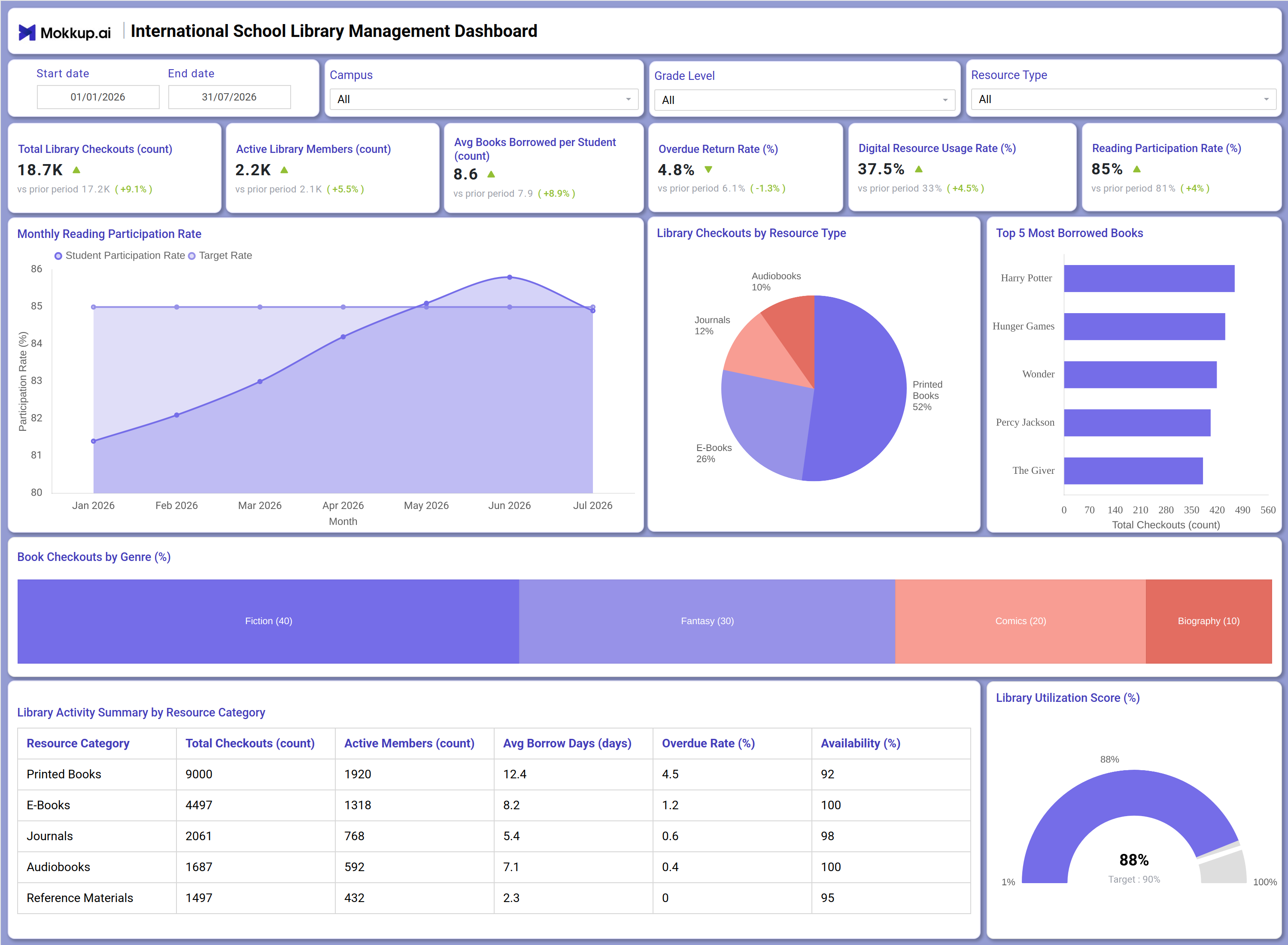
The International School Library Management Dashboard is a single-screen analytics template built for school librarians, academic administrators, and international school leadership teams who need a clear view of how library resources are being used across campuses. It consolidates checkout volume, active membership, and borrowing behavior into one workspace so library staff can track student engagement without maintaining separate spreadsheets for each grade level or resource type.
Because international school libraries typically manage a mix of printed collections, e-books, journals, and audiobooks, this international school library management dashboard brings all of that activity into a single library utilization score dashboard template view that highlights where reading participation is strong and where collection gaps exist. Filters for campus, grade level, and resource type let staff narrow the view to the segment they oversee, making the dashboard useful for both single-campus libraries and multi-campus school networks.
How to Create an International School Library Management Dashboard
You don't need to build your report from scratch-just start with a ready-to-use dashboard template from Mokkup. Add your data and export it as needed. Here's how to do it:
1. Create or Log in to Your Mokkup Account
Start by signing up on Mokkup.ai using your email. If you already have an account, just log in, and you'll be good to go.
2. Choose and Customize Your Dashboard Template
Find the International School Library Management Dashboard template in the Templates section. Use the drag-and-drop editor to adjust KPIs, edit filters, or add elements based on your data.
3. Export to Your BI Tool
Once your dashboard wireframe is ready, use the BI Tool Export feature to send it directly to Power BI or Tableau for further analysis and enhancements. You can also download the dashboard as a PDF, PNG, or JPEG, embed it on a platform, or invite your team to collaborate.
Note: This is a Pro template. You'll need a Pro subscription on Mokkup to use and customize this dashboard wireframe. Upgrade anytime to unlock full access.
International School Library Management Dashboard Example
A school librarian typically opens this dashboard at the start of a new term to check whether reading participation is holding steady against the target the library has set and whether any grade level or campus is falling behind the rest of the school. Filtering by campus or grade level lets the librarian isolate a specific cohort and compare its engagement pattern against the wider student population before deciding whether an intervention is needed.
From there, staff can review the library checkouts by resource type breakdown to judge whether the printed collection still dominates borrowing or whether digital formats such as e-books and audiobooks are gaining ground, which shapes future purchasing decisions. Reviewing which titles and genres are most borrowed helps the library team decide where to expand the collection and which sections need refreshing. Librarians can also compare overdue behavior against availability by resource category, which flags where reminder policies or additional copies would reduce friction for students trying to access popular titles.
Taken together, the dashboard gives library teams a way to move from reactive collection management to a planned, engagement-driven approach, prioritizing purchases and outreach around what students are actually reading rather than assumptions about demand.
How to Analyze Data in an International School Library Management Dashboard
Here is how you can analyze data from this dashboard:
- Filter by Campus / Grade Level: Focus on library performance for a specific school segment or age group.
- Monitor Monthly Reading Participation: Track participation trends to confirm engagement stays above the term target.
- Review Checkouts by Resource Type: See how demand is distributed across printed books, e-books, journals, and audiobooks.
- Identify Top Borrowed Books: Review the top five titles to understand which books drive the most checkouts each term.
- Analyze Checkouts by Genre: Identify the genres students are most interested in across the library collection.
- Track Overdue Return Rate: Compare overdue returns with resource availability to identify collection categories under strain.
- Filter by Resource Type: Compare checkouts, active members, and average borrow days for a specific collection category.
- Monitor Library Utilization Score: Compare the overall utilization score with its target to assess library performance.
Benefits of an International School Library Management Dashboard
The following are the benefits of using this dashboard:
- Centralizes Library Activity Data: Brings checkout volume, membership, and resource circulation into one structured view.
- Analyzes Resource Demand: Shows the checkout split by resource type so purchasing decisions reflect actual student usage.
- Reduces Manual Reporting: Uses pre-built KPI tiles, charts, and a library activity summary table to simplify reporting.
- Tracks Overdue Return Trends: Highlights overdue return patterns before backlogs affect resource availability.
- Monitors Digital Resource Usage: Gives librarians and administrators a shared view of digital resource usage across different formats.
- Enables Campus / Grade Comparisons: Makes it easy to compare library activity across school segments without rebuilding reports.
- Guides Collection Investment: Uses genre and title-level borrowing patterns to help teams prioritize new collection investments.
KPIs to Track in an International School Library Management Dashboard
The following key KPIs can be tracked by using this dashboard:
- Total Library Checkouts (count): Tracks total borrowing activity across all resource types in the international school library management dashboard, showing overall demand for the collection.
- Active Library Members (count): Measures how many students are currently borrowing from the library, a leading signal of program-wide reading engagement.
- Avg Books Borrowed per Student: Quantifies how many titles the typical student checks out during the period, a marker of individual reading habits.
- Overdue Return Rate (%): Feeds this overdue return rate tracking library view, flagging when reminder or renewal policies need adjustment.
- Digital Resource Usage Rate (%): Measures the share of circulation coming from e-books and audiobooks, key to any digital resource usage rate dashboard analysis of format adoption.
- Reading Participation Rate (%): Evaluates the percentage of students actively engaging in reading against school targets, supporting the reading participation rate tracking dashboard view librarians rely on each term.
- Library Utilization Score (%): Evaluates overall operational performance against a target rate, giving library leadership a single-metric dashboard summary.
Frequently Asked Questions
1. What does the International School Library Management Dashboard track?
It tracks checkout volume, active membership, borrowing behavior by resource type and genre, overdue returns, and digital resource adoption. Librarians and administrators use it to monitor collection performance across campuses and grade levels.
2. Can this dashboard compare library performance across multiple campuses?
Yes. The Campus filter lets you isolate checkout volume, reading participation, and overdue trends for a single campus or compare them against the school-wide view.
3. What does the Library Utilization Score measure?
It is a gauge-style metric that evaluates overall library operational performance against a set target, giving leadership a single number to track progress toward collection and engagement goals.