
What is an International School Facility Management & Readiness Dashboard?
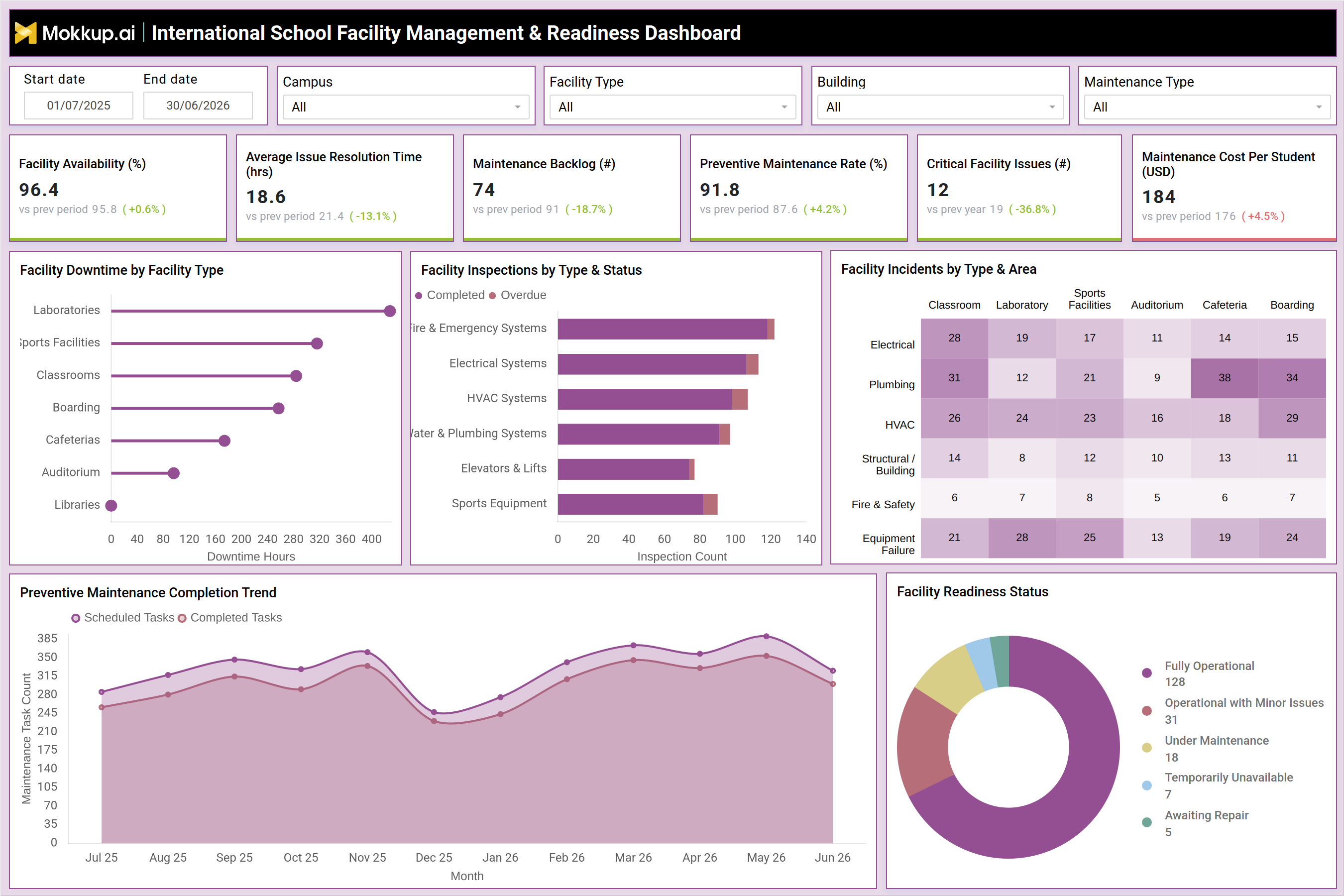
The International School Facility Management & Readiness Dashboard is a school facility management dashboard template built for operations and facilities teams overseeing multi-building international school campuses. It brings together facility availability, maintenance backlog, inspection status, and incident data into a single wireframe so facilities directors can see where campus readiness stands without pulling reports from separate systems. Filters for campus, facility type, building, and maintenance type let teams narrow the view to a specific location or maintenance category, supporting international school maintenance tracking across classrooms, laboratories, sports facilities, boarding houses, cafeterias, and auditoriums. Because the layout is date-range driven, facility managers can also compare readiness and maintenance performance across academic terms. As a wireframe template, it gives school leadership a consistent structure for facility readiness monitoring for schools before wiring in live maintenance data.
How to Create an International School Facility Management & Readiness Dashboard
You don't need to build your report from scratch; just start with a ready-to-use dashboard template from Mokkup. Add in your data and export it however you like. Here's how to do it:
1. Create or Log in to Your Mokkup Account
Start by signing up on Mokkup.ai using your email. If you already have an account, just log in, and you'll be good to go.
2. Choose and Customize Your Dashboard Template
Find the International School Facility Management & Readiness Dashboard template in the Templates section. Use the drag-and-drop editor to adjust KPIs, edit filters, or add elements based on your data.
3. Export to Your BI Tool
Once your dashboard wireframe is ready, use the BI Tool Export feature to send it directly to Power BI or Tableau for further analysis and enhancements. You can also download the dashboard as a PDF, PNG, or JPEG, embed it on a platform, or invite your team to collaborate.
Note: This is a Pro template. You'll need a Pro subscription on Mokkup to use and customize this dashboard wireframe. Upgrade anytime to unlock full access.
International School Facility Management & Readiness Dashboard Example
A facilities director at an international school opens this dashboard at the start of a term to understand how ready the campus is for the weeks ahead. Rather than checking each building separately, they scan the top-level view to see whether facility availability is holding steady and whether the maintenance backlog is growing or shrinking compared to the previous period.From there, the team can identify which facility types are generating the most downtime and prioritize resourcing toward laboratories, sports facilities, or boarding houses accordingly. Reviewing inspection status by system type helps maintenance planners spot which categories, such as fire and emergency systems or HVAC systems, have overdue checks that need to be closed out before they turn into safety concerns.
Looking across the incident breakdown by facility area, managers can compare which locations and issue types repeat most often, a habit that supports preventive maintenance rate tracking schools use to reduce reactive repairs over time. Tracking scheduled versus completed maintenance tasks over the term lets planners judge whether their team is keeping pace with the workload or falling behind.Combining these views gives facilities teams a single reference point for campus facility downtime analysis, incident patterns, and readiness status, helping school leadership decide where to direct maintenance budget and staffing before problems affect students and staff.
How to Analyze Data in an International School Facility Management & Readiness Dashboard
Here is how you can analyze data from this dashboard:
- Compare facility availability against the previous period to confirm campus readiness is improving.
- Filter by campus and building to isolate maintenance backlog for a specific location before escalating.
- Review facility inspections by type and status to catch overdue checks on fire and emergency systems.
- Use the incident breakdown by type and area for school facility incident tracking across buildings.
- Track scheduled versus completed maintenance tasks monthly to spot terms where backlog is likely to grow.
- Monitor the facility readiness status breakdown to see how many spaces are fully operational.
Benefits of an International School Facility Management & Readiness Dashboard
The following are the benefits of using this dashboard:
- Centralizes facility availability, maintenance backlog, and incident data in one wireframe.
- Supports international school maintenance tracking across multiple campuses and buildings.
- Helps facilities teams prioritize preventive maintenance over reactive repairs.
- Improves accountability by making overdue inspections and aging backlog visible to leadership.
- Speeds up budget planning by showing where downtime and incidents are concentrated.
- Gives leadership a ready-to-use school facility management dashboard template to customize.
KPIs to Track in a International School Facility Management & Readiness Dashboard
The following key KPIs can be tracked by using this dashboard:
- Facility Availability (%) - measures the share of campus facilities that are operational and usable at any given time.
- Average Issue Resolution Time (hrs) - tracks how long it takes maintenance teams to close a reported facility issue.
- Maintenance Backlog (#) - counts the open maintenance requests still waiting to be resolved.
- Preventive Maintenance Rate (%) - shows scheduled tasks completed on time, central to preventive maintenance rate tracking schools depend on.
- Critical Facility Issues (#) - counts high-severity issues that need immediate attention to keep the campus safe.
- Maintenance Cost Per Student (USD) - measures maintenance spend allocated per enrolled student for budget planning.
Frequently Asked Questions
1. What is the International School Facility Management & Readiness Dashboard used for?
It is a school facility management dashboard template that helps facilities teams track availability, maintenance backlog, inspections, and incidents across an international school campus. Teams use it for campus facility downtime analysis and to plan maintenance work before problems escalate.
2. Which facilities can this dashboard track?
The dashboard covers classrooms, laboratories, sports facilities, boarding houses, cafeterias, auditoriums, and libraries. Filters for campus, building, and facility type support international school maintenance tracking at any level of detail.
3. How do I get started with this dashboard template?
Log in to Mokkup, open the template in the Templates section, and customize it with your own facility data. It supports facility readiness monitoring for schools once your Pro subscription is active.