
What is a Geothermal Well Asset Health & Action Priorities Dashboard?
A Geothermal Well Asset Health & Action Priorities Dashboard template is an analytics solution designed to monitor the condition, reliability, and performance of geothermal wells across power generation facilities. It functions as a geothermal well asset health monitoring dashboard, providing visibility into asset health scores, production decline, remaining useful life, downtime, and risk exposure.
The dashboard wireframe also serves as a geothermal power plant well health assessment tool, helping operators understand how aging, failure drivers, and maintenance backlogs impact long-term output. By combining health classification, failure analytics, and recovery performance, it acts as a geothermal well condition monitoring system. Its structured insights support data-driven decisions for maintenance, repair, and replacement planning while ensuring stable geothermal production.
How to Create a Geothermal Well Asset Health & Action Priorities Dashboard
You don’t need to build your report from scratch, just start with a ready-to-use Geothermal Well Asset Health & Action Priorities dashboard template from Mokkup. Add in your data and export it however you like. Here’s how to do it:
1. Create or Log in to Your Mokkup Account
Start by signing up on Mokkup.ai using your email. If you already have an account, just log in, and you’ll be good to go.
2. Choose and Customize Your Dashboard Template
Find the Geothermal Well Asset Health & Action Priorities Dashboard template in the Templates section. Use the drag-and-drop editor to adjust KPIs, edit filters, or add elements based on your data.
3. Export to Your BI Tool
Once your dashboard wireframe is ready, use the BI Tool Export feature to send it directly to Power BI or Tableau for further analysis and enhancements. You can also download the dashboard as a PDF, PNG, or JPEG, embed it on a platform, or invite your team to collaborate.
Note: This is a Pro template. You’ll need a Pro subscription on Mokkup to use and customize this dashboard wireframe. Upgrade anytime to unlock full access.
Geothermal Well Asset Health & Action Priorities Dashboard Example
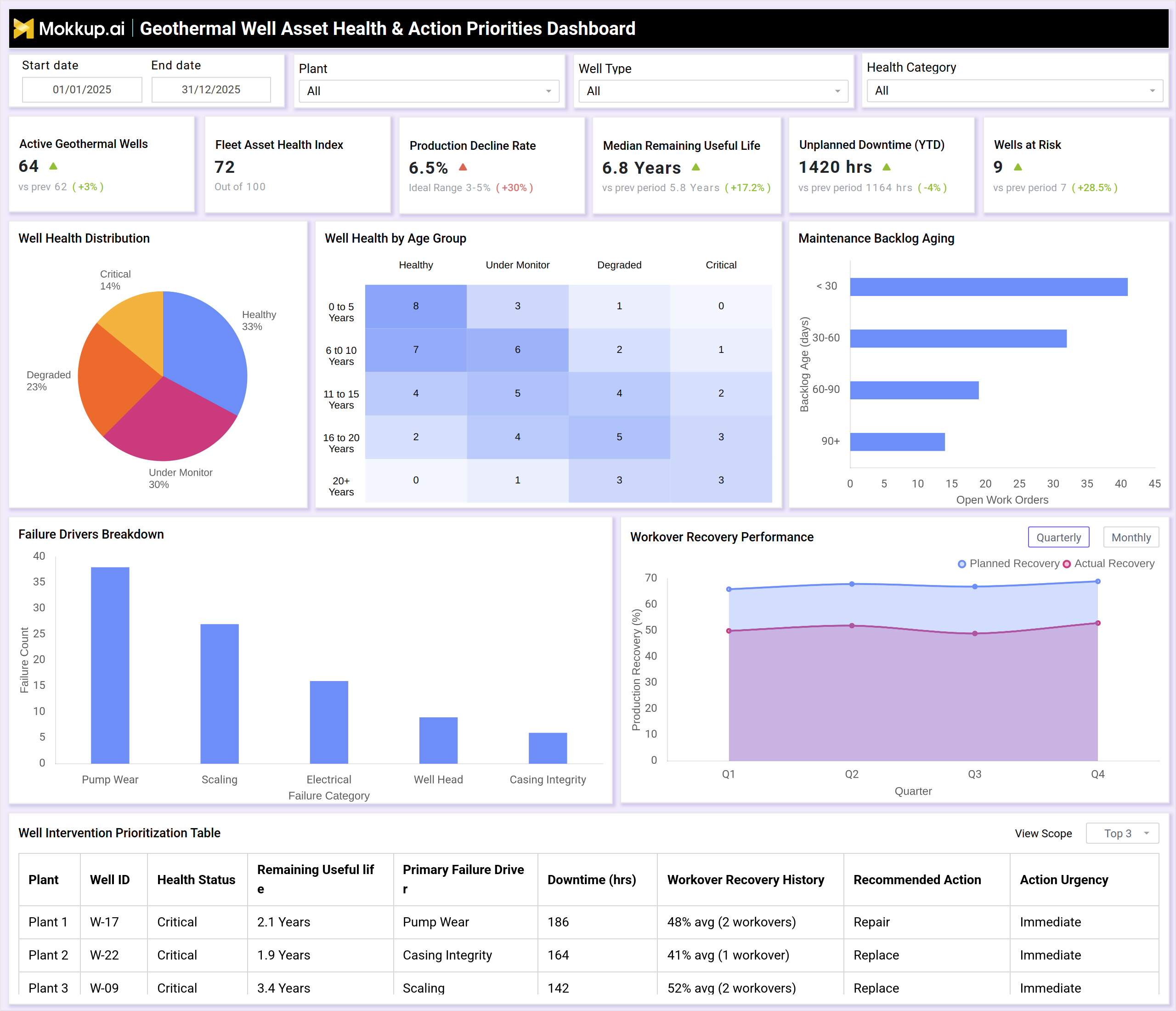
A typical dashboard view starts with high-level KPIs such as active geothermal wells, fleet asset health index, production decline rate, median remaining useful life, unplanned downtime, and wells at risk. These indicators summarize the overall condition of the geothermal well portfolio. Visuals like well health distribution charts categorize wells as healthy, under monitor, degraded, or critical. Heatmaps break down well health by age group, revealing how aging affects reliability.
Maintenance backlog aging highlights overdue work orders, while failure driver charts identify dominant issues such as pump wear, scaling, electrical faults, and casing integrity. Workover recovery trends compare planned versus actual recovery, and a well intervention prioritization table ranks wells by urgency. Together, these views create a geothermal well intervention prioritization dashboard that guides timely corrective actions.
How to Analyze Data in Geothermal Well Asset Health & Action Priorities Dashboard
Here is how you can analyze data from this dashboard:
- Fleet Asset Health Overview: Start with the fleet asset health index to assess the overall condition of the geothermal well portfolio.
- Production Decline Assessment: Review production decline rates to identify wells negatively impacting generation output.
- Remaining Useful Life Forecasting: Analyze remaining useful life to anticipate near-term intervention and replacement needs.
- Unplanned Downtime Monitoring: Monitor unplanned downtime to detect reliability gaps and operational weaknesses.
- Well Health Prioritization: Use well health distribution to prioritize degraded and critical wells for action.
- Lifecycle Risk Analysis: Study health by age group to understand lifecycle-driven degradation and risk patterns.
- Maintenance Backlog Aging Review: Review maintenance backlog aging to identify delayed or overdue work orders.
- Failure Driver Analysis: Analyze failure driver breakdowns to focus on dominant technical and operational issues.
- Intervention Effectiveness Check: Compare planned vs. actual workover recovery to evaluate intervention success.
- Action Priority Scheduling: Use the intervention prioritization table to schedule repairs and replacements based on urgency and impact.
Benefits of Geothermal Well Asset Health & Action Priorities Dashboard
The following are the benefits of using this dashboard:
- Improved Asset Visibility: Improves visibility into geothermal well reliability, condition, and performance trends.
- Proactive Maintenance Enablement: Enables proactive maintenance through early identification of high-risk wells.
- Reduced Downtime: Reduces unplanned downtime and associated production losses.
- Structured Maintenance Planning: Supports structured geothermal well maintenance planning and prioritization.
- Optimized Capital Allocation: Helps prioritize capital and operational interventions more effectively.
- Enhanced Workover Planning: Improves workover planning using recovery and effectiveness insights.
- Extended Well Life: Extends well life through timely and targeted corrective actions.
- Sustainable Asset Management: Enhances long-term geothermal asset sustainability and reliability.
- Data-Driven Decisions: Supports data-driven decision-making for operators and asset managers.
- Improved Plant Stability: Improves overall geothermal power plant performance stability and output consistency.
KPIs to Track in Geothermal Well Asset Health & Action Priorities Dashboard
The following key KPIs can be tracked by using this dashboard:
- Active Geothermal Wells: Total producing and operational wells.
- Fleet Asset Health Index: Overall well health score across the plant.
- Production Decline Rate (%): Rate of output degradation over time.
- Median Remaining Useful Life (Years): Expected operational lifespan of wells.
- Unplanned Downtime (Hours): Total unexpected operational downtime.
- Wells at Risk: Count of wells requiring immediate attention.
- Well Health Distribution (%): Health status classification of wells.
- Maintenance Backlog Aging: Pending work orders by age category.
- Failure Driver Frequency: Common causes of well degradation.
- Workover Recovery Rate (%): Effectiveness of intervention activities.
- Intervention Urgency Level: Priority ranking for corrective actions.
Frequently Asked Questions
Q1. Who should use this dashboard?
Geothermal plant managers, reliability engineers, maintenance teams, and asset managers.
Q2. How does this dashboard improve geothermal reliability?
It identifies failing wells early and prioritizes corrective actions before major failures occur.
Q3. Can it track aging geothermal wells?
Yes, health-by-age analysis highlights lifecycle-related risks.