
What Is a Document Lifecycle & Compliance Intelligence Dashboard?
A Document Lifecycle Management & Performance Dashboard is a centralized analytics tool that tracks the entire journey of business documents from creation to archival or deletion while monitoring compliance, efficiency, and operational performance. This dashboard consolidates key metrics such as document uploads, approvals, archival rates, compliance adherence, and approval cycle times into a single, interactive interface. By providing data-driven insights, it helps organizations optimize document workflows, reduce bottlenecks, and ensure regulatory compliance. Unlike traditional document tracking, this dashboard integrates automated reporting, trend analysis, and KPI monitoring to give stakeholders a real-time view of document health. Whether managing legal contracts, financial records, or operational documents, this tool ensures transparency, accountability, and efficiency in document handling.
How to Create a Document Lifecycle & Compliance Intelligence Dashboard
You don't need to build your report from scratch, just start with a ready-to-use dashboard template from Mokkup. Add in your data and export it however you like. Here's how to do it:
1. Create or Log in to Your Mokkup Account
Start by signing up on Mokkup.ai using your email. If you already have an account, just log in, and you'll be good to go.
2. Choose and Customize Your Dashboard Template
Find the Document Lifecycle & Compliance Intelligence Dashboard template in the Templates section. Use the drag-and-drop editor to adjust KPIs, edit filters, or add elements based on your data.
3. Export to Your BI Tool
Once your dashboard wireframe is ready, use the BI Tool Export feature to send it directly to Power BI or Tableau for further analysis and enhancements. You can also download the dashboard as a PDF, PNG, or JPEG, embed it on a platform, or invite your team to collaborate.
Note: This is a Pro template. You'll need a Pro subscription on Mokkup to use and customize this dashboard wireframe. Upgrade anytime to unlock full access.
Document Lifecycle & Compliance Intelligence Dashboard Example
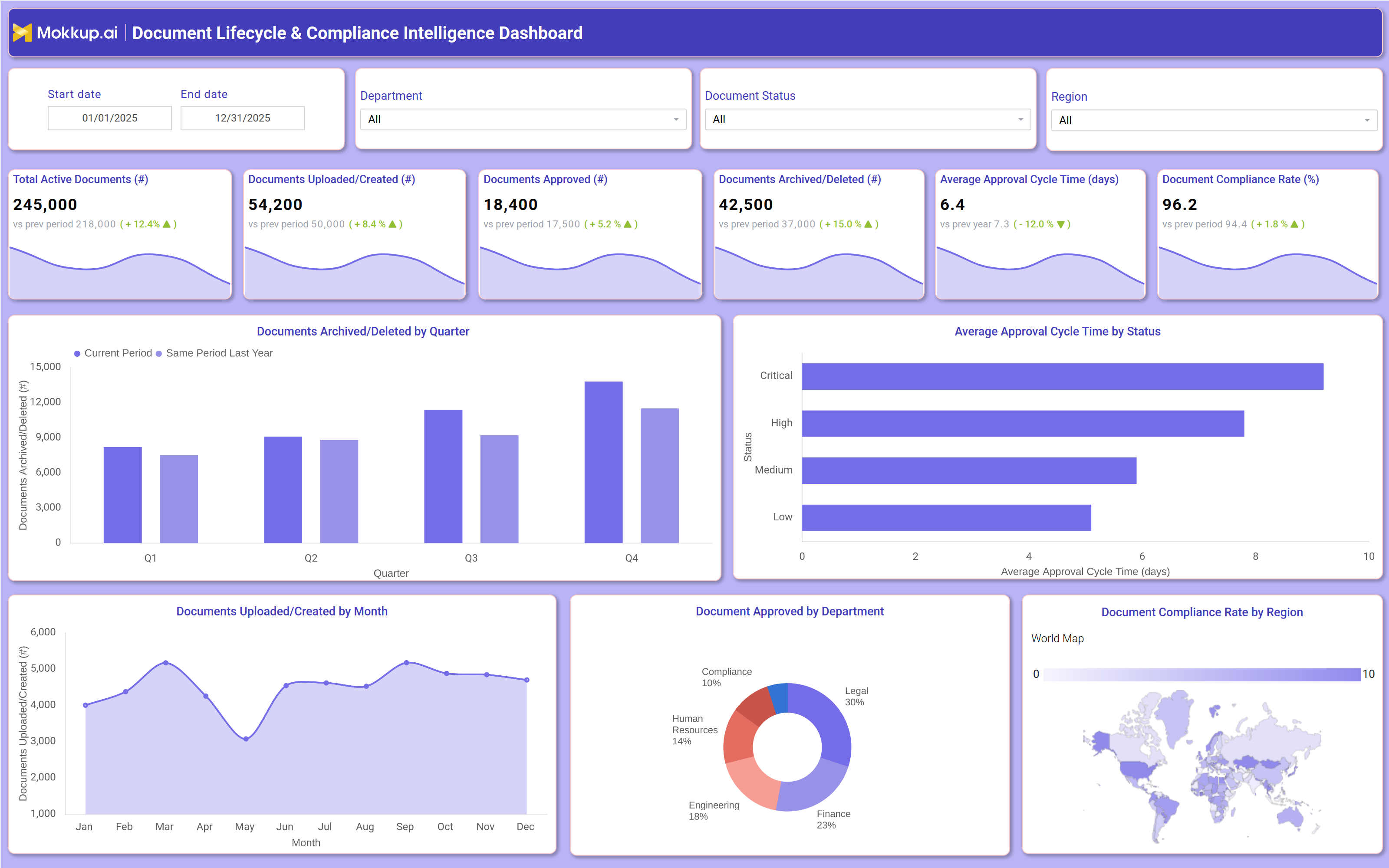
A well-designed Document Lifecycle & Compliance Intelligence Dashboard includes interactive filters (date range, department, document status, and region) to allow users to drill down into specific data segments. Key performance tiles display total active documents, documents uploaded/created, approvals, archival/deletion rates, average approval cycle time, and compliance rates. Trend charts compare current performance against previous periods, helping identify patterns in document processing. For instance, a monthly breakdown of document uploads reveals peak activity periods, while a department-wise approval analysis highlights bottlenecks in specific teams. A geographic compliance heatmap shows regional adherence to document policies, ensuring global consistency.
Additionally, quarterly archival trends help organizations assess retention policies, while approval cycle times by document importance ensure that critical files are processed faster. Together, these components provide a comprehensive view of document lifecycle efficiency, compliance risks, and operational performance.
How to Analyze Data in a Document Lifecycle & Compliance Intelligence Dashboard
Here is how you can analyze data from this document lifecycle management dashboard:
- Review Total Active Documents: Assess the overall volume of active documents to better understand storage requirements and document management capacity.
- Track Document Upload Trends: Monitor upload activity over time to identify peak document creation periods and anticipate resource demands.
- Monitor Approval Rates: Analyze document approval rates to detect delays or bottlenecks in approval workflows and processing cycles.
- Compare Archival and Deletion Trends: Evaluate archival and deletion activities against retention policies to maintain compliance and improve governance.
- Analyze Approval Cycle Times: Measure the time taken for document approvals to identify workflow inefficiencies and improve process speed.
- Evaluate Compliance Rates by Region: Track regional compliance performance to ensure adherence to global document management and retention policies.
- Assess Department-Wise Performance: Compare document handling efficiency across departments to identify operational gaps and improvement opportunities.
- Benchmark Against Historical Trends: Compare current document management metrics with historical data to measure progress, declines, or recurring issues.
Benefits of a Document Lifecycle & Compliance Intelligence Dashboard
The following are the benefits of using this dashboard:
- Enhances Document Workflow Efficiency: Identifies workflow bottlenecks and inefficiencies to improve document processing speed and operational productivity.
- Improves Compliance Tracking: Supports automated retention management and audit trails to strengthen compliance monitoring and governance.
- Reduces Approval Delays: Uses performance monitoring and trend analysis to identify approval slowdowns and optimize workflow timelines.
- Optimizes Storage Costs: Tracks archival and deletion rates to manage storage utilization effectively and reduce unnecessary costs.
- Provides Data-Driven Governance Insights: Delivers actionable analytics to support smarter document governance and management decisions.
- Ensures Global Policy Consistency: Monitors regional compliance performance to maintain consistent adherence to global policies and standards.
- Supports Risk Management: Enhances security oversight by monitoring document access controls, usage patterns, and potential compliance risks.
- Streamlines Reporting: Simplifies reporting processes with automated KPI dashboards and trend visualizations for faster decision-making.
KPIs to Track in a Document Lifecycle & Compliance Intelligence Dashboard
The following key KPIs can be tracked by using this document compliance rate dashboard:
- Total Active Documents (count): Measures the current volume of documents in the system.
- Documents Uploaded/Created (count): Tracks new document creation rates.
- Documents Approved (count): Monitors approval efficiency and workflow speed.
- Documents Archived/Deleted (count): Ensures compliance with retention policies.
- Average Approval Cycle Time (Days): Identifies delays in document processing.
- Document Compliance Rate (%): Measures adherence to regulatory and internal policies.
Frequently Asked Questions
1. Who should use an archival retention tracking dashboard?
Legal teams, compliance officers, HR departments, finance teams, and IT administrators managing enterprise documents.
2. What data sources feed into the compliance intelligence dashboard?
Document management systems, compliance tools, workflow automation platforms, and enterprise content management (ECM) software.
3. How does a document approval cycle dashboard improve document management?
By providing analytics, it helps identify inefficiencies, reduce approval delays, and enforce compliance policies.