
What is a CNG Workforce Certification & Training Compliance Dashboard?
A CNG Workforce Certification & Training Compliance Dashboard is a specialized visualization platform designed to monitor, analyze, and optimize workforce qualifications, certification status, and training compliance across Compressed Natural Gas (CNG) operations. It consolidates critical workforce metrics, including certification rates, attrition rates, training hours delivered, certification cycle time, time-to-certification, and workforce utilization rates, into a unified, real-time interface.
By integrating CNG workforce certification tracking, training compliance monitoring, certification expiration risk management, and workforce utilization analytics, this dashboard enables HR managers, training coordinators, station supervisors, and operations leadership to ensure a fully qualified workforce, maintain regulatory compliance, reduce certification gaps, optimize training investments, and enhance operational readiness across all CNG facilities. It serves as a central command center for strategic workforce development and compliance management.
How to Create a CNG Workforce Certification & Training Compliance Dashboard
You don’t need to build your report from scratch, just start with a ready to use dashboard template from Mokkup. Add in your data and export it however you like. Here’s how to do it:
1. Create or Log in to Your Mokkup Account
Start by signing up on Mokkup.ai using your email. If you already have an account, just log in, and you’ll be good to go.
2. Choose and Customize Your Dashboard Template
Find the CNG Workforce Certification & Training Compliance Dashboard template in the Templates section. Use the drag-and-drop editor to adjust KPIs, edit filters, or add elements based on your data.
3. Export to Your BI Tool
Once your dashboard wireframe is ready, use the BI Tool Export feature to send it directly to Power BI or Tableau for further analysis and enhancements. You can also download the dashboard as a PDF, PNG, or JPEG, embed it on a platform, or invite your team to collaborate.
Note: This is a Pro template. You’ll need a Pro subscription on Mokkup to use and customize this dashboard wireframe. Upgrade anytime to unlock full access.
CNG Workforce Certification & Training Compliance Dashboard Example
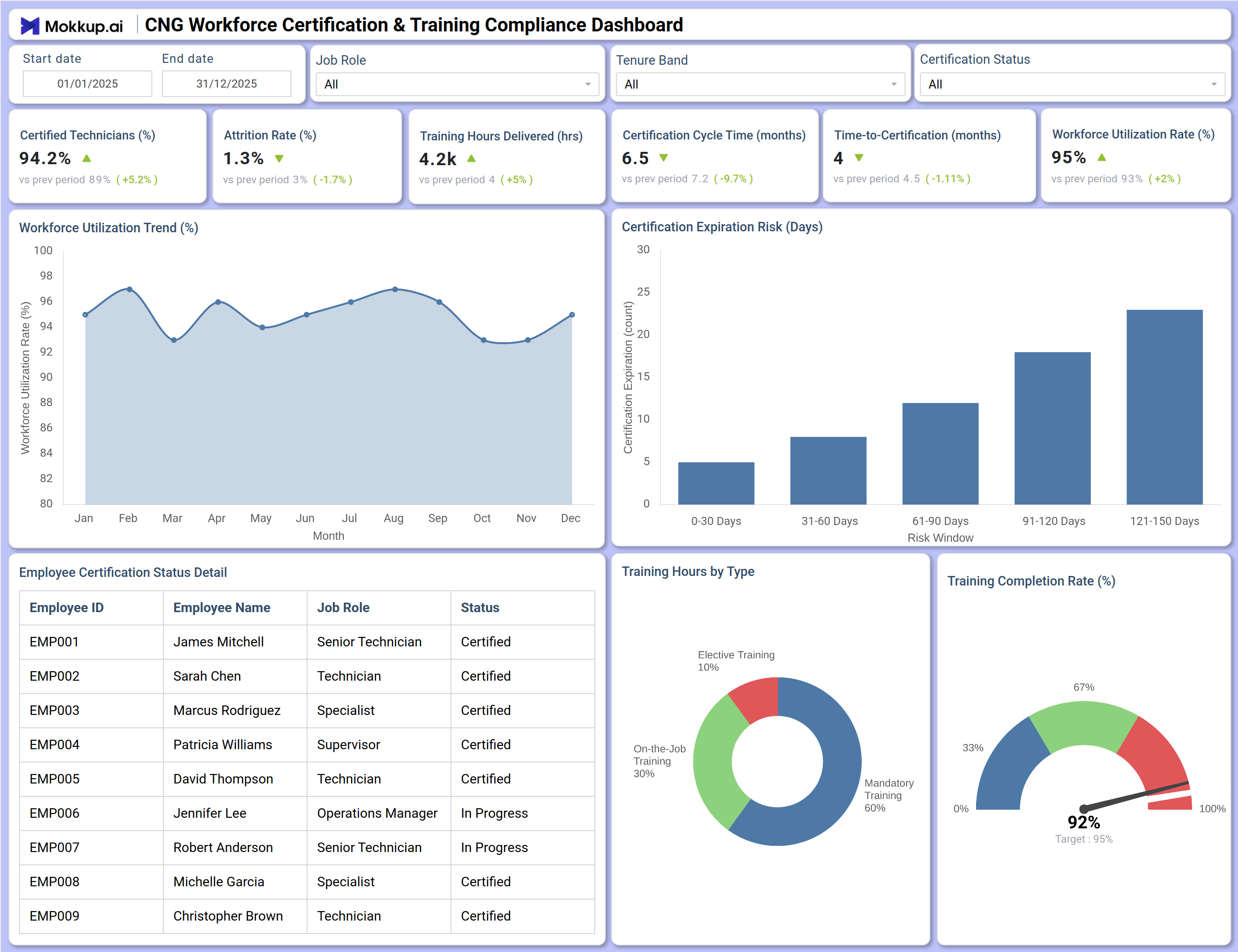
This dashboard delivers a comprehensive view of workforce certification status and training compliance across CNG operations. The Overview screen prominently displays six critical workforce KPIs with trend indicators: Certifications at 94.2% (up 5.2% from prior period), Attrition Rate at 1.3% (improved 1.7 percentage points), Training Hours Delivered at 4.2K hours (5% increase), Certification Cycle Time reduced to 6.5 months (9.7% faster), Time-to-Certification at 4 months (slight improvement), and Workforce Utilization Rate at 95% (2 percentage point gain).
The Workforce Utilization Trend (%) chart tracks monthly utilization rates, revealing patterns and identifying periods of over- or under-utilization requiring attention. Certification Expiration Risk (Days) provides a critical forward-looking view of certifications approaching expiry, categorized by 0-30 days, 31-60 days, 61-90 days, 91-120 days, and 121-150 days—enabling proactive recertification planning before compliance gaps occur.
How to Analyze Data in a CNG Workforce Certification & Training Compliance Dashboard
Here is how you can analyze data from this workforce training dashboard:
- Monitor Certifications (%) over time to ensure overall workforce qualification levels remain high and identify negative trends requiring intervention.
- Track Attrition Rate (%) to assess workforce stability and identify potential knowledge or certification loss risks.
- Review Training Hours Delivered (hrs) to ensure adequate investment in workforce development and identify periods of training shortfall.
- Analyze Certification Cycle Time (months) to evaluate the efficiency of certification processes and identify bottlenecks.
- Examine Time-to-Certification (months) for new hires to assess onboarding effectiveness and time to productive contribution.
- Evaluate Workforce Utilization Rate (%) to ensure optimal staffing levels and identify over-utilization (burnout risk) or under-utilization (inefficiency).
- Use Certification Expiration Risk (Days) to proactively schedule recertification activities and avoid compliance lapses.
- Drill into Employee Certification Status Detail to identify individuals with expiring certifications or "In Progress" status requiring follow-up.
- Analyze Training Hours by Type to ensure an appropriate balance between mandatory compliance training, skills development, and on-the-job learning.
Benefits of a CNG Workforce Certification & Training Compliance Dashboard
The following are the benefits of using this dashboard:
- Provides centralized, real-time visibility into workforce certification status and training compliance across all CNG facilities.
- Enables proactive recertification planning through certification expiration risk tracking.
- Reduces compliance gaps and regulatory exposure by identifying certifications approaching expiry.
- Improves workforce stability by monitoring attrition rates and implementing retention strategies.
- Optimizes training investments by tracking training hours by type and aligning with workforce needs.
- Enhances operational readiness through workforce utilization monitoring and capacity planning.
- Supports regulatory compliance with auditable certification and training records.
- Facilitates data-driven workforce planning and succession management.
KPIs to Track in a CNG Workforce Certification & Training Compliance Dashboard
The following key KPIs can be tracked by using this dashboard:
- Certifications (%): Percentage of workforce holding required, valid certifications.
- Attrition Rate (%): Rate of employee turnover within the reporting period.
- Training Hours Delivered (hrs): Total hours of training delivered to the workforce.
- Certification Cycle Time (months): Average time from certification start to completion.
- Time-to-Certification (months): Average time for new hires to achieve required certifications.
- Workforce Utilization Rate (%) : Percentage of available workforce hours actually utilized.
- Certification Expiration Risk: Number of certifications expiring within defined time windows (0-30, 31-60, 61-90, 91-120, 121-150 days).
- Training Hours by Type: Distribution of training hours across On-the-Job, Mandatory, and Elective categories.
- Certification Status by Employee: Individual employee certification status (Certified, In Progress, Expired).
- Certification Status by Job Role: Breakdown of certification rates by role (Technician, Supervisor, Specialist, Manager).
Frequently Asked Questions
1. What is the purpose of this CNG Workforce Certification & Training Compliance Dashboard?
This dashboard provides a centralized view of workforce certification status, training compliance, and certification expiration risk across CNG operations. It helps HR managers, training coordinators, and operations leaders ensure a fully qualified workforce, maintain regulatory compliance, and optimize training investments.
2. What types of training are tracked in the Training Hours by Type breakdown?
The dashboard tracks three categories: Mandatory Training (compliance-required training, 60% of hours), On-the-Job Training (practical skills development, 10%), and Elective Training (professional development and optional skills, 33%). This breakdown helps optimize training investment allocation.
3. How does workforce utilization impact certification and training planning?
Workforce Utilization Rate (95% in the example) indicates how fully the existing workforce is deployed. High utilization may limit time available for training, while low utilization may indicate capacity for additional development activities. The dashboard enables balancing operational needs with training requirements.
4. How often should workforce data be updated in this dashboard?
Certification status and expiration risk should be updated in real-time or daily to ensure proactive management. Training hours can be updated weekly or monthly, while attrition rate and utilization trends are typically reviewed monthly for workforce planning.
5. Who typically uses this dashboard?
HR managers, training coordinators, operations supervisors, station managers, compliance officers, and workforce planning leaders use this dashboard to oversee certification compliance and drive workforce development.