
What is a Boarding School Residential Life Management Dashboard?
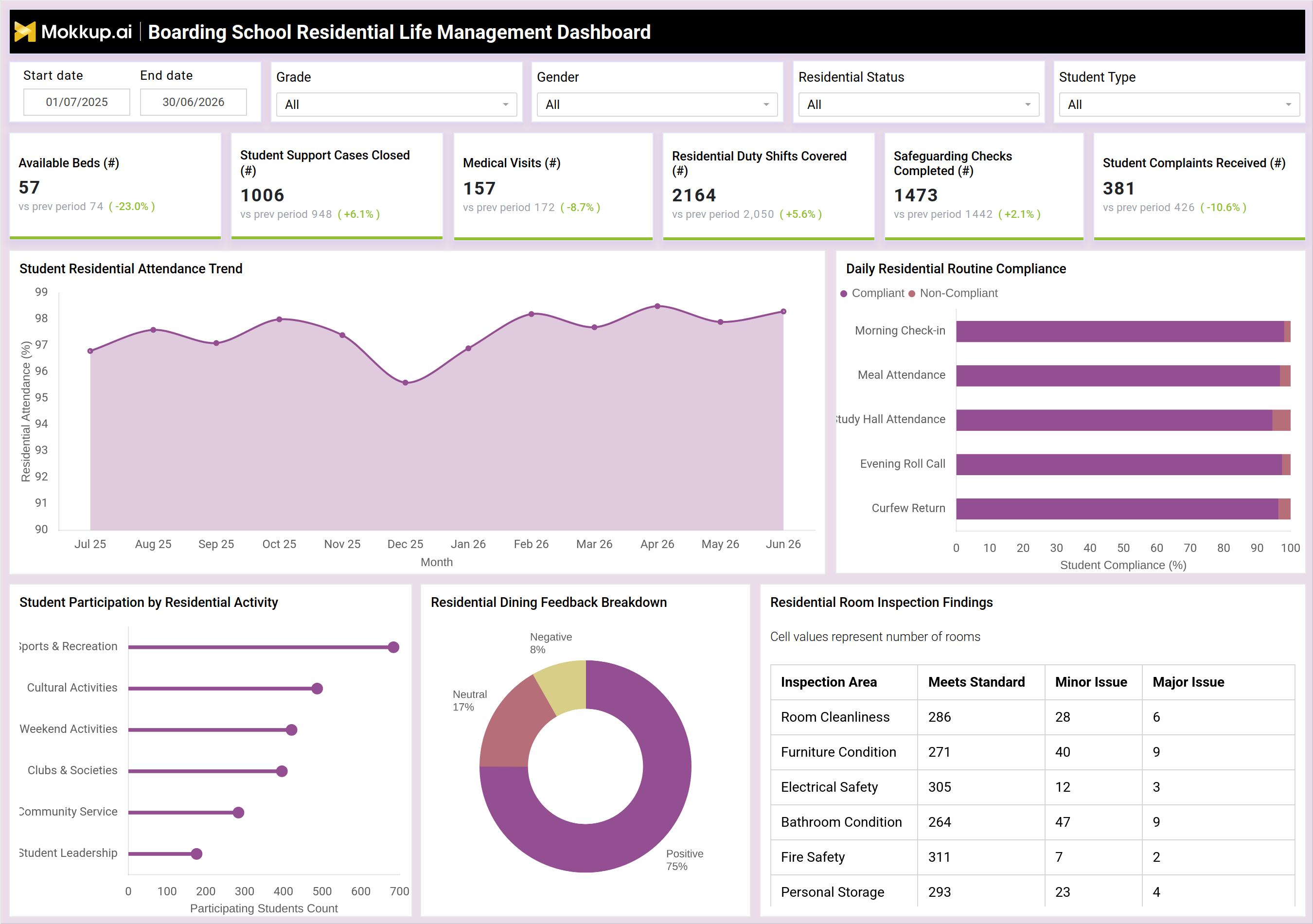
The Boarding School Residential Life Management Dashboard gives house parents, wardens, and residential life coordinators a single view of daily hostel operations across attendance, welfare, dining, and facility upkeep. Built as a boarding school residential life dashboard, it tracks how many beds are available across houses, how many student support cases have been closed, how many medical visits students required, how residential duty shifts were covered, how many safeguarding checks were completed, and how many student complaints came in during the selected period. Filters for grade, gender, residential status, and student type let residential teams narrow the view to a specific boarding house cohort. Instead of piecing together attendance registers, safeguarding logs, and inspection sheets from different sources, teams responsible for boarding school daily routine compliance monitoring can review everything from one screen and act on issues the same day.
How to Create a Boarding School Residential Life Management Dashboard
You don’t need to build your report from scratch; just start with a ready-to-use dashboard template from Mokkup. Add in your data and export it however you like. Here’s how to do it:
1. Create or Log in to Your Mokkup Account
Start by signing up on Mokkup.ai using your email. If you already have an account, just log in, and you'll be good to go.
2. Choose and Customize Your Dashboard Template
Find the Boarding School Residential Life Management Dashboard Template in the Templates section. Use the drag-and-drop editor to adjust KPIs, edit filters, or add elements based on your data.
3. Export to Your BI Tool
Once your dashboard wireframe is ready, use the BI Tool Export feature to send it directly to Power BI or Tableau for further analysis and enhancements. You can also download the dashboard as a PDF, PNG, or JPEG, embed it on a platform, or invite your team to collaborate.
Note: This is a Pro template. You'll need a Pro subscription on Mokkup to use and customize this dashboard wireframe. Upgrade anytime to unlock full access.
Boarding School Residential Life Management Dashboard Example
A house parent or residential life coordinator typically opens this dashboard each morning to check how the boarding house performed against its daily routines. Before addressing individual student needs, they want to know whether check-ins, meals, study hall, roll call, and curfew return were completed as expected, and whether bed availability across houses is under pressure from any particular grade or residential status.From the overview, the team can see how student residential attendance tracking is trending across the term and flag months where attendance dipped so they can trace the cause before it recurs. Staff can compare compliance across the different daily routines to identify which routine is most often missed, then decide whether the gap sits with a particular house or a particular time of day.
Reviewing student participation by activity helps residential coordinators judge whether extracurricular offerings are engaging students across sports, culture, clubs, and leadership, or whether certain activities need to be refreshed to lift turnout. Dining feedback lets the catering and residential team judge whether negative or neutral sentiment is rising and worth investigating before it affects wellbeing, while room inspection findings let facilities staff prioritize which inspection areas need urgent repair versus routine follow-up.Taken together, the dashboard helps residential life teams move from reactive fire-fighting to a structured routine of tracking, safeguarding, and improving day-to-day boarding house life. Coordinators can escalate safeguarding checks and student support cases with confidence, prioritize maintenance where inspection findings show recurring issues, and reassure school leadership that student wellbeing and daily routine compliance are being actively monitored, not just recorded after the fact.
How to Analyze Data in a Boarding School Residential Life Management Dashboard
Here is how you can analyze data from this dashboard:
- Track student residential attendance trends month over month to catch dips early.
- Compare compliance across morning check-in, meals, study hall, roll call, and curfew return.
- Filter by grade, gender, residential status, or student type to isolate specific cohorts.
- Review student participation by activity to spot underused clubs or programs.
- Monitor boarding house safeguarding checks tracking alongside student support case closures.
- Cross-check dining feedback sentiment against complaint volume for early warning signs.
- Support room inspection compliance tracking for schools by reviewing minor and major issues by area.
- Rely on this boarding school residential life dashboard to align routines, safeguarding, and facilities work across houses.
Benefits of a Boarding School Residential Life Management Dashboard
The following are the benefits of using this dashboard:
- Centralizes attendance, safeguarding, dining, and inspection data in one dashboard.
- Supports boarding school daily routine compliance monitoring without manual spreadsheets.
- Speeds up residential dining feedback analysis so catering issues are caught early.
- Helps prioritize safeguarding checks and student support cases by urgency.
- Improves visibility into available beds and residential duty shift coverage.
- Enables faster response to room inspection findings before issues escalate.
- Gives leadership a clear view of student wellbeing across every boarding house.
KPIs to Track in a Boarding School Residential Life Management Dashboard
The following key KPIs can be tracked by using this dashboard:
- Available Beds (#) - Number of unoccupied beds across boarding houses, used to plan intake and reallocations.
- Student Support Cases Closed (#) - Count of welfare or support cases resolved, showing how responsive the residential team is to student needs.
- Medical Visits (#) - Number of student visits to medical or health staff, tracked to spot patterns in student health.
- Residential Duty Shifts Covered (#) - Count of duty shifts staffed by residential team members, confirming supervision coverage is maintained.
- Safeguarding Checks Completed (#) - Number of safeguarding checks carried out, core to boarding house safeguarding checks tracking and student protection.
- Student Complaints Received (#) - Count of complaints logged by students, an early signal of dissatisfaction or unresolved issues.
Frequently Asked Questions
1. What does the Boarding School Residential Life Management Dashboard track?
It tracks bed availability, student support cases, medical visits, safeguarding checks, complaints, attendance, daily routine compliance, dining feedback, and room inspection findings across boarding houses.
2. Who uses this dashboard day-to-day?
House parents, wardens, residential life coordinators, and school leadership use it to monitor student wellbeing, safeguarding, and facility standards across boarding houses.
3. Can I customize this dashboard template for my school?
Yes. The dashboard template can be edited in Mokkup to match your boarding house structure, grade levels, and reporting needs, then exported to Power BI, Tableau, or as an image or PDF.