
What is a Boarding School Hostel Operations Dashboard?
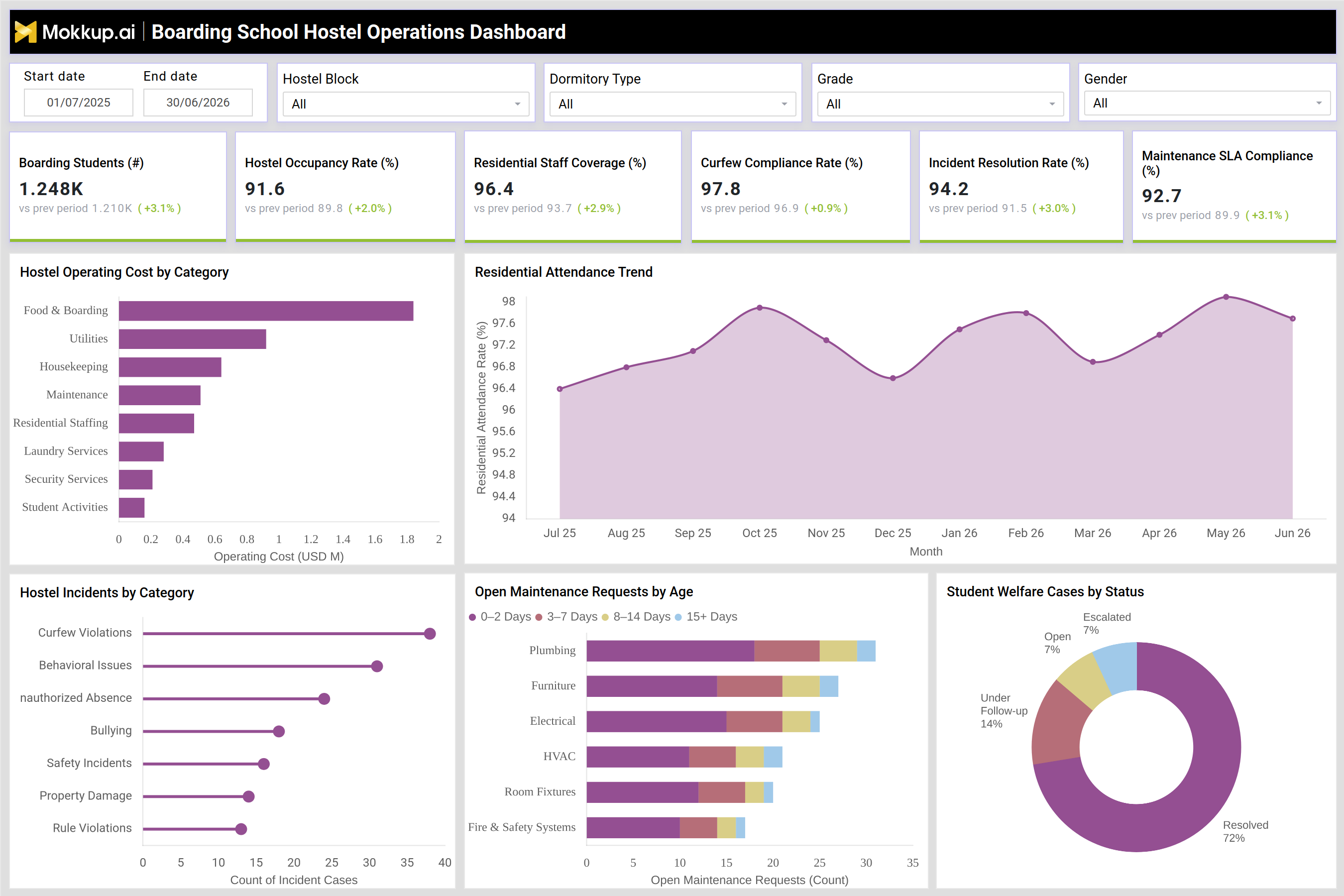
The Boarding School Hostel Operations Dashboard is a reporting template built for hostel wardens, residential life coordinators, and school administrators who manage day-to-day boarding operations. It consolidates occupancy, staffing, discipline, and maintenance data into a single view so residential teams no longer have to pull information from separate registers and spreadsheets. Filters for hostel block, dormitory type, grade, and gender let administrators narrow the view to a specific wing or student segment before comparing it against the wider campus. As a boarding school hostel management dashboard, it is built to support the operating rhythm of a residential campus, where occupancy shifts by term, staffing needs change by season, and maintenance backlogs can quietly grow if left unchecked. Teams evaluating a hostel occupancy tracking dashboard for boarding schools typically want one screen that ties occupancy, compliance, and facility upkeep together, and closing that gap is the purpose of this template.
How to Create a Boarding School Hostel Operations Dashboard
You don’t need to build your report from scratch; just start with a ready-to-use dashboard template from Mokkup. Add in your data and export it however you like. Here’s how to do it:
1. Create or Log in to Your Mokkup Account
Start by signing up on Mokkup.ai using your email. If you already have an account, just log in, and you'll be good to go.
2. Choose and Customize Your Dashboard Template
Find the Boarding School Hostel Operations Dashboard template in the Templates section. Use the drag-and-drop editor to adjust KPIs, edit filters, or add elements based on your data.
3. Export to Your BI Tool
Once your dashboard wireframe is ready, use the BI Tool Export feature to send it directly to Power BI or Tableau for further analysis and enhancements. You can also download the dashboard as a PDF, PNG, or JPEG, embed it on a platform, or invite your team to collaborate.
Note: This is a Pro template. You'll need a Pro subscription on Mokkup to use and customize this dashboard wireframe. Upgrade anytime to unlock full access.
Boarding School Hostel Operations Dashboard Example
A hostel warden typically opens this dashboard at the start of the week to check whether boarding occupancy and residential staffing are aligned before assigning duty rosters. Working within a set date range, the warden narrows the view by hostel block or dormitory type to see if any wing is running above capacity or is short on coverage, since this hostel occupancy tracking dashboard for boarding schools is built to surface exactly that kind of imbalance before it affects supervision quality.From there, the warden relies on curfew compliance monitoring alongside incident resolution figures to understand whether behavioral issues are clustering in a particular block or grade. If unauthorized absences or curfew violations spike in one dormitory, the team can prioritize supervision resources there instead of spreading staff evenly across the campus.
Reviewing the residential attendance trend alongside incident categories such as bullying, safety incidents, or property damage helps administrators decide whether a wing needs added counseling support or stricter evening checks. On the facilities side, planners compare cost categories and pending repair tickets to see which maintenance types, such as plumbing or electrical work, are aging past acceptable resolution windows, and reassign vendors or in-house crews accordingly, an exercise that functions as a practical boarding school incident tracking dashboard for facilities as much as for discipline. Used together, these views help administrators move from reactive fixes to planned interventions, whether that means adjusting staff schedules, escalating aging maintenance tickets, or addressing discipline trends before they affect student wellbeing across the hostel.
How to Analyze Data in a Boarding School Hostel Operations Dashboard
Here is how you can analyze data from this dashboard:
- Filter by hostel block and dormitory type to compare occupancy and staffing across wings.
- Use residential staff coverage monitoring to confirm supervision levels match occupancy in every block.
- Track curfew compliance and incident counts together to spot discipline trends early.
- Review the residential attendance trend month over month to catch seasonal dips.
- Cross-check incident categories against safety and bullying reports to prioritize interventions.
- Sort open maintenance requests by age as part of hostel maintenance request management to flag tickets nearing SLA breach.
- Compare operating cost by category to flag spending spikes in food, utilities, or staffing.
- Apply grade and gender filters to check if compliance or incidents differ by student segment.
Benefits of a Boarding School Hostel Operations Dashboard
The following are the benefits of using this dashboard:
- Combines occupancy, discipline, and maintenance data into one boarding school hostel operations dashboard view.
- Cuts down manual reporting time for hostel wardens and residential coordinators.
- Simplifies hostel maintenance request management by grouping tickets by age and category.
- Surfaces incident patterns before they escalate into safety concerns.
- Keeps maintenance backlogs visible so aging tickets do not go unresolved.
- Supports data-backed decisions on staffing levels and dormitory allocation.
- Standardizes reporting across hostel blocks for consistent term-over-term comparison.
KPIs to Track in a Boarding School Hostel Operations Dashboard
The following key KPIs can be tracked by using this dashboard:
- Boarding Students: total count of students currently residing in the hostel, used to size staffing and resource needs.
- Hostel Occupancy Rate: share of available beds or rooms in use, indicating how close hostel blocks are to capacity.
- Residential Staff Coverage: proportion of required supervisory staff on duty relative to boarding student count, the basis for residential staff coverage monitoring across shifts.
- Curfew Compliance Rate: core metric for curfew compliance monitoring, showing the share of students adhering to curfew timings.
- Incident Resolution Rate: share of reported hostel incidents closed within the expected timeframe.
- Maintenance SLA Compliance: percentage of maintenance requests resolved within the agreed service level.
Frequently Asked Questions
1. What is a Boarding School Hostel Operations Dashboard used for?
It is used to monitor boarding occupancy, residential staffing, discipline, and maintenance activity from a single dashboard. Hostel wardens and administrators use it to catch capacity or compliance issues early and act on them quickly.
2. Who should use this hostel dashboard template?
Hostel wardens, residential life coordinators, and school administrators running a boarding school hostel management dashboard are the primary users. Facilities and safety teams also reference it to track maintenance and incident data by block.
3. Can the dashboard be customized for a specific school?
Yes, since it is a Mokkup template, filters such as hostel block, dormitory type, grade, and gender can be adjusted, and KPIs can be edited to fit a school's own boarding school incident tracking dashboard needs. A Pro subscription is required to customize and export it.