
What is a Boarding School Curriculum Delivery Dashboard
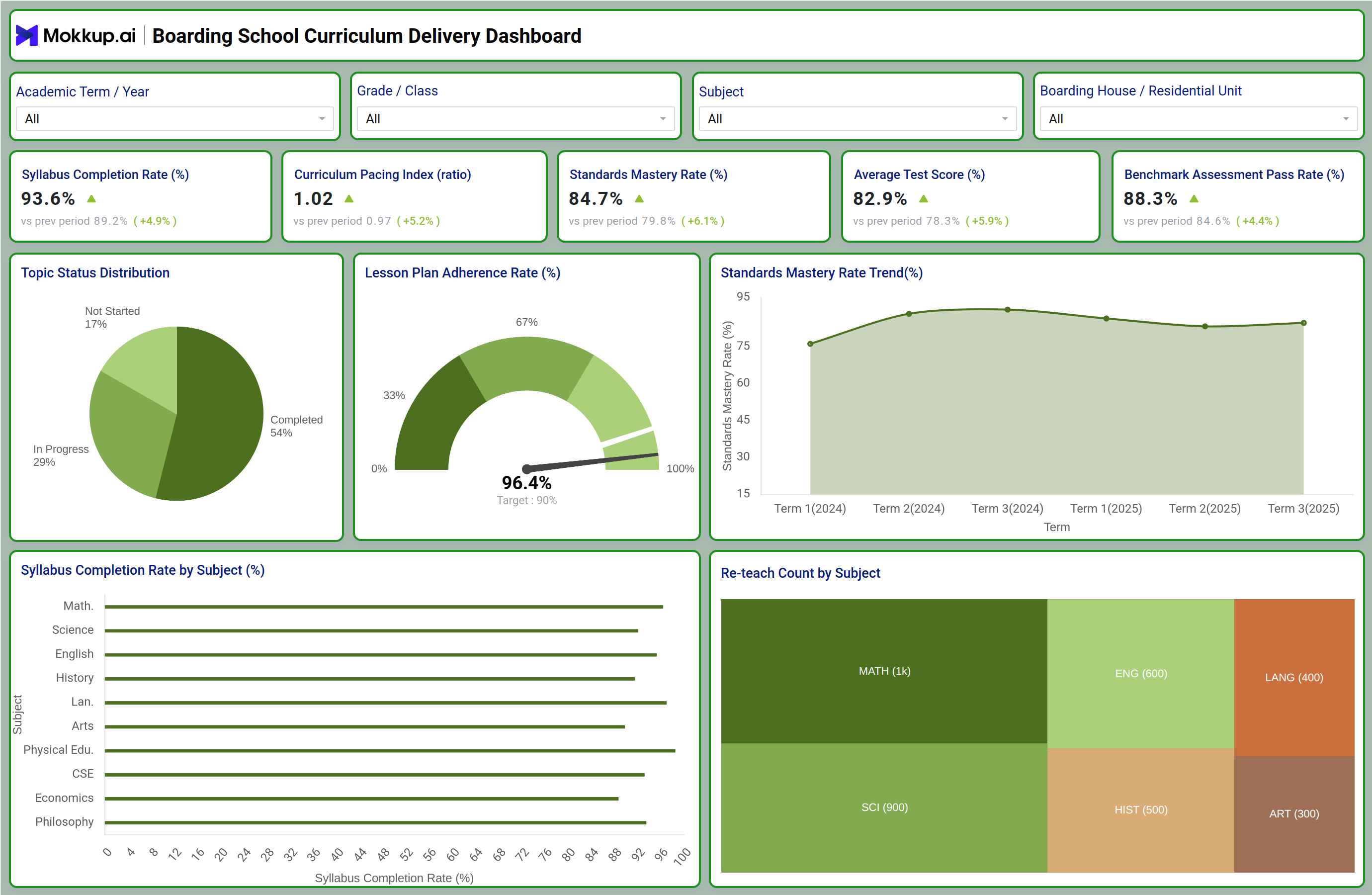
The Boarding School Curriculum Delivery Dashboard gives academic leadership a single view of how teaching plans are progressing across grades, subjects, and residential units. It brings syllabus tracking, lesson plan adherence, and learning outcome data into one boarding school curriculum delivery dashboard so academic deans, heads of department, and curriculum coordinators no longer have to piece together spreadsheets from individual teachers. Because boarding schools run on fixed academic terms with limited catch-up windows, staying ahead of pacing gaps matters more here than in a day school, and this dashboard is built around that constraint. It filters by academic term, grade or class, subject, and boarding house or residential unit, letting a curriculum team narrow in on exactly the segment they are accountable for and act before a pacing gap turns into a learning outcome problem. Academic teams also use it as a curriculum pacing index analysis for boarding schools, comparing planned pace against actual delivery so a subject that is ahead of schedule but weak on comprehension does not get mistaken for one that is on track.
How to Create a Boarding School Curriculum Delivery Dashboard
You don't need to build your report from scratch; just start with a ready-to-use dashboard template from Mokkup. Add in your data and export it however you like. Here's how to do it:
1. Create or Log in to Your Mokkup Account
Start by signing up on Mokkup.ai using your email. If you already have an account, just log in, and you'll be good to go.
2. Choose and Customize Your Dashboard Template
Find the Boarding School Curriculum Delivery Dashboard template in the Templates section. Use the drag-and-drop editor to adjust KPIs, edit filters, or add elements based on your data.
3. Export to Your BI Tool
Once your dashboard wireframe is ready, use the BI Tool Export feature to send it directly to Power BI or Tableau for further analysis and enhancements. You can also download the dashboard as a PDF, PNG, or JPEG, embed it on a platform, or invite your team to collaborate.
Note: This is a Pro template. You'll need a Pro subscription on Mokkup to use and customize this dashboard wireframe. Upgrade anytime to unlock full access.
Boarding School Curriculum Delivery Dashboard Example
A curriculum coordinator typically opens this dashboard at the start of a review cycle to answer one question: is teaching on pace to finish the syllabus with enough time left for revision before assessments? The top-level view lets them scan syllabus progress, pacing, and mastery signals together, so a subject that looks fine on completion percentage but is falling behind on standards mastery does not get overlooked. From there, department heads can compare how consistently lesson plans are being followed against what was scheduled, and this standards mastery rate monitoring for schools view helps them identify which subjects are generating repeated re-teaching, a signal that a topic needs a different instructional approach rather than more time.
Because the view also breaks down subject-level syllabus coverage side by side, academic leaders can prioritize intervention support for the classes that are furthest behind instead of applying the same catch-up plan across the board. Used this way, the dashboard helps a boarding school's academic team catch pacing drift early, focus coaching and resourcing where it is actually needed, and enter each assessment window with confidence that the curriculum was delivered as planned.
How to Analyze Data in a Boarding School Curriculum Delivery Dashboard
Here is how you can analyze data from this dashboard:
- Use this dashboard as a syllabus completion rate tracking tool by filtering academic terms and grades before comparing across subjects.
- Run a curriculum pacing index analysis for boarding schools to catch subjects pacing ahead of comprehension.
- Use the lesson plan adherence rate tracking dashboard view to confirm delivered lessons match what was scheduled.
- Review the standards mastery rate trend by term to spot subjects losing ground across the academic year.
- Compare syllabus completion rate by subject to flag departments falling behind their peers.
- Apply the re-teach count by subject tracking tool view to identify topics that consistently need repeated instruction.
- Segment by boarding house or residential unit to check whether supervised study support is affecting outcomes.
- Watch topic status distribution to gauge how much content is still not started as term deadlines approach.
Benefits of a Boarding School Curriculum Delivery Dashboard
The following are the benefits of using this dashboard:
- Centralizes Curriculum Delivery Data: Gives academic leadership one consolidated view instead of relying on scattered teacher reports.
- Identifies Pacing Gaps Early: Highlights curriculum delays early enough to provide support before they affect student performance.
- Enables Consistent Comparisons: Supports fair comparisons across subjects and grades using standardized metrics.
- Guides Coaching and Resourcing: Helps department heads identify where additional coaching or resources are needed based on evidence.
- Reduces Academic Review Work: Simplifies manual data compilation during academic reviews and accreditation reporting cycles.
- Tracks Re-Teach Requirements: Identifies repeated instructional gaps by subject so they can be addressed rather than repeatedly added to the schedule.
- Confirms Curriculum Coverage: Provides visibility into syllabus and standards coverage ahead of assessment periods.
- Improves Lesson Plan Accountability: Makes it easier to track whether departments are meeting lesson plan adherence expectations.
- Standardizes Delivery Monitoring: Provides a lesson plan adherence rate tracking dashboard so every department is measured against the same delivery standard.
KPIs to Track in a Boarding School Curriculum Delivery Dashboard
Key Performance Indicators (KPIs) are measurable values that show how effectively a curriculum plan is being delivered against its academic targets, and this boarding school curriculum delivery dashboard tracks the following:
- Syllabus Completion Rate (%): measures how much of the planned curriculum has been taught relative to the term schedule.
- Curriculum Pacing Index (ratio): compares actual teaching pace to the planned pace, flagging subjects running ahead of or behind schedule.
- Standards Mastery Rate (%): shows the share of learning standards students have demonstrably mastered, tracked through a standards mastery rate monitoring for schools view.
- Average Test Score (%): reflects overall academic performance across assessments tied to the delivered curriculum.
- Benchmark Assessment Pass Rate (%): tracks the proportion of students clearing standardized benchmark assessments.
Frequently Asked Questions
1. What is a boarding school curriculum delivery dashboard used for?
It consolidates syllabus completion, pacing, and mastery metrics into one boarding school curriculum delivery dashboard so academic leaders can track teaching progress without collecting individual teacher reports. It helps identify pacing gaps and re-teaching needs before they affect assessment outcomes.
2. How often should curriculum pacing data be reviewed?
Most academic teams review pacing at least once per term, filtering by grade and subject to catch drift early. Reviewing more frequently during the middle of a term helps flag subjects that need intervention before the syllabus completion rate tracking tool shows a shortfall close to exams.
3. Which metric best indicates whether teaching quality matches pacing?
Standards mastery rate paired with the curriculum pacing index gives the clearest picture, since a subject can be on pace while mastery still lags. Re-teaching count by subject is a useful secondary signal for where delivery, not just pace, needs attention.