
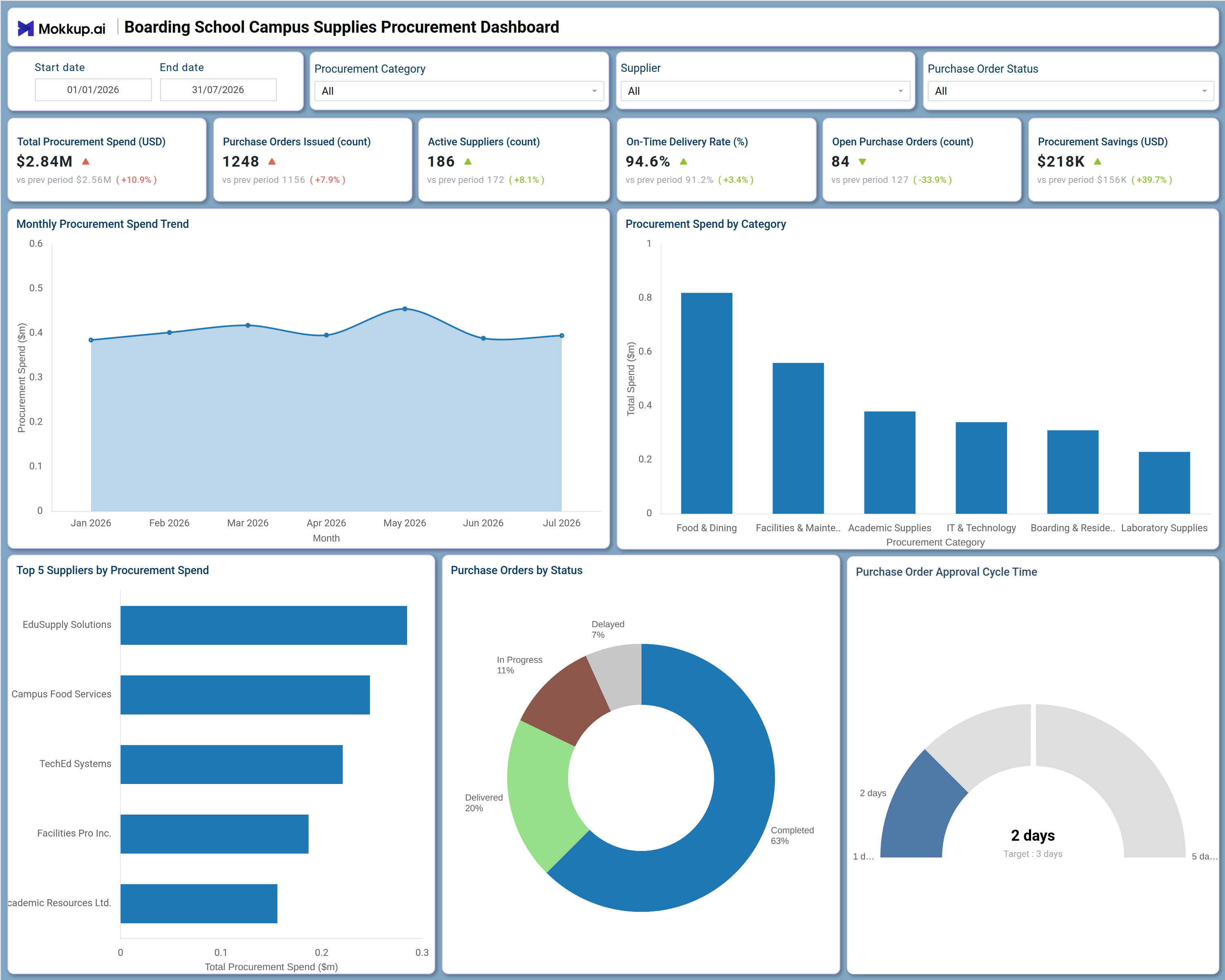
What is a Boarding School Campus Supplies Procurement Dashboard
The Boarding School Campus Supplies Procurement Dashboard is a purpose-built reporting template that gives boarding school administrators and procurement teams one consolidated view of purchasing activity across the institution. It brings together total spend, purchase order volume, supplier performance, and delivery reliability so operations and finance leaders no longer need to reconcile separate spreadsheets from dining, facilities, academic, and IT & Technology suppliers. Built around Start date, End date, Procurement Category, Supplier, and Purchase Order Status filters, the dashboard lets teams narrow their view to any time window, spending category, or vendor relationship in seconds. As a procurement savings tracking tool, it also surfaces how much value the procurement function is generating relative to negotiated budgets, giving leadership a clear signal on cost efficiency alongside operational throughput.
How to Create a Boarding School Campus Supplies Procurement Dashboard
You don't need to build your report from scratch—just start with a ready-to-use dashboard template from Mokkup. Add in your data and export it however you like. Here's how to do it:
1. Create or Log in to Your Mokkup Account
Start by signing up on Mokkup.ai using your email. If you already have an account, just log in, and you'll be good to go.
2. Choose and Customize Your Dashboard Template
Find the Boarding School Campus Supplies Procurement Dashboard template in the Templates section. Use the drag-and-drop editor to adjust KPIs, edit filters, or add elements based on your data.
3. Export to Your BI Tool
Once your dashboard wireframe is ready, use the BI Tool Export feature to send it directly to Power BI or Tableau for further analysis and enhancements. You can also download the dashboard as a PDF, PNG, or JPEG, embed it on a platform, or invite your team to collaborate.
Note: This is a Pro template. You'll need a Pro subscription on Mokkup to use and customize this dashboard wireframe. Upgrade anytime to unlock full access.
Boarding School Campus Supplies Procurement Dashboard Example
A boarding school procurement manager typically opens this dashboard at the start of a review cycle to understand how spending and supplier performance are trending before the next budget conversation. Rather than pulling data from finance, facilities, and dining service systems separately, they start at the top KPI row to gauge overall spend, order volume, and delivery reliability at a glance, then use the Start date, End date, Procurement Category, Supplier, and Purchase Order Status filters to narrow the view to the period or vendor group they care about most.
From there, the manager can identify which categories are absorbing the largest share of the budget and compare that against prior periods to see where costs are accelerating. Reviewing the procurement spend by category tracking view alongside the supplier ranking helps teams recognize which vendor relationships are consuming the most budget and whether that concentration is justified by service quality. Planners can also assess how purchase orders are progressing through the approval and delivery pipeline, distinguishing orders that are completed or delivered from those still in progress or delayed, so they can intervene before a delayed order disrupts campus operations.
The outcome is a procurement function that can defend its decisions with evidence rather than instinct. Finance and operations leaders walk away from this dashboard with a shared understanding of where money is going, which suppliers are performing reliably, and how quickly purchase requests move from submission to delivery, letting the boarding school plan future purchasing cycles with confidence.
How to Analyze Data in a Boarding School Campus Supplies Procurement Dashboard
Here is how you can analyze data from this dashboard:
- Use the Procurement Category filter to isolate spend for Food & Dining, Facilities & Maintenance, Academic Supplies, IT & Technology, Boarding & Residence, or Laboratory Supplies.
- Filter by Supplier to review purchase history and spend concentration for a single vendor.
- Monitor the Monthly Procurement Spend Trend to detect unusual spikes before they strain the budget.
- Review Procurement Spend by Category to identify which category is driving the largest share of total spend.
- Compare the Top 5 Suppliers by Procurement Spend chart to find vendors with the highest cost exposure.
- Use Purchase Orders by Status to track how many orders are completed, delivered, in progress, or delayed.
- Track On-Time Delivery Rate across periods as part of ongoing on-time delivery rate monitoring by supplier.
- Assess the Purchase Order Approval Cycle Time gauge against its target to measure how fast requests move from submission to approval.
Benefits of a Boarding School Campus Supplies Procurement Dashboard
The following are the benefits of using this dashboard:
- Centralizes spend, supplier activity, and order status for a Boarding School Campus Supplies Procurement Dashboard in one connected template.
- Functions as a supplier spend tracking dashboard that flags vendor concentration before renewal negotiations.
- Reduces manual reconciliation across dining, facilities, academic, and IT & Technology purchasing records.
- Surfaces Active Suppliers and Purchase Orders Issued counts to size vendor relationships against order volume.
- Provides a procurement spend by category tracking view that supports budget planning and cost control.
- Highlights Open Purchase Orders so operations teams can prioritize orders still awaiting delivery.
- Acts as a procurement savings tracking tool that shows how savings initiatives compare against prior periods.
KPIs to Track in a Boarding School Campus Supplies Procurement Dashboard
The following key KPIs can be tracked by using this dashboard:
- Total Procurement Spend (USD): Measures the total value of purchases made across all categories and suppliers during the selected period.
- Purchase Orders Issued (count): Tracks how many purchase orders have been raised, indicating overall procurement activity volume.
- Active Suppliers (count): Quantifies how many vendors are currently engaged, supporting supplier spend tracking dashboard analysis of vendor diversity.
- On-Time Delivery Rate (%): Evaluates the share of orders delivered within the agreed timeframe, key to on-time delivery rate monitoring across categories.
- Open Purchase Orders (count): Measures orders that have not yet been completed, helping teams flag orders that need follow-up.
- Procurement Savings (USD): Tracks the value saved against budgeted or negotiated costs, central to any procurement savings tracking tool.
- Purchase Order Approval Cycle Time (days): Measures how long an order takes to move from submission to approval against a target benchmark, the core metric behind purchase order approval cycle time reviews.
Frequently Asked Questions
1. What industries benefit most from this Boarding School Campus Supplies Procurement Dashboard?
Boarding schools, education groups, and residential campus operations teams that manage purchasing across dining, facilities, academics, and IT & Technology all benefit from this template. Procurement, finance, and operations leaders use it to keep spend and supplier performance visible in one place.
2. Can this dashboard track purchase order status?
Yes. The Purchase Orders by Status donut chart breaks orders into Completed, Delivered, In Progress, and Delayed, and the Purchase Order Status filter lets teams isolate any one stage for review.
3. Is this dashboard suitable for supplier performance reviews?
Yes. The Top 5 Suppliers by Procurement Spend chart combined with On-Time Delivery Rate gives teams enough visibility to compare vendors, supporting this Boarding School Campus Supplies Procurement Dashboard's use in renewal and negotiation discussions.