Wireframing involves creating outlines of interactive products to define their structure and design flow, catering to user and business requirements. Whether drawn by hand using a pen and paper or generated using software, these wireframes help teams and stakeholders in brainstorming and creating user-centered prototypes and products by visualizing potential design solutions.
Wireframes are useful tools for communication because they help designers produce ideas, gather input from users, and start discussions with stakeholders. By carrying out user testing in the early stages, the designers are able to receive direct input and pinpoint important pain points which help in the development of the product concept.
Table of Contents
- What is Wireframing?
- Great Wireframes Serve As The Foundation For Robust Prototypes and Captivating Designs.
- The Efficiency Paradigm in Wireframing
- How to Create Wireframes - Step-by-Step Guide
- Choosing the Right Wireframing Tool
- Wireframing in UX
- UX & UI Wireframing Examples
What is Wireframing?
Similar to an architectural blueprint, a wireframe is a basic visual representation of a dashboard wireframe template, highlighting its structure, layout, and key elements like information of the organization, user journey, and functionality. It provides a basic outline without complex styling or graphics, focusing on the fundamental design concept and elements of the product.
What sets wireframes apart is their ability to speed up the process of arriving at a design solution and making it easier for a diverse range of users to have access to it. They support both divergent and convergent processes equally, in contrast to other approaches to design.
Laseau's Funnel demonstrates, in a design process, a large number of ideas are produced early on (divergence) in order to assist uncover opportunities, and as the process progresses, the number of possible choices decreases (convergence). (Source)
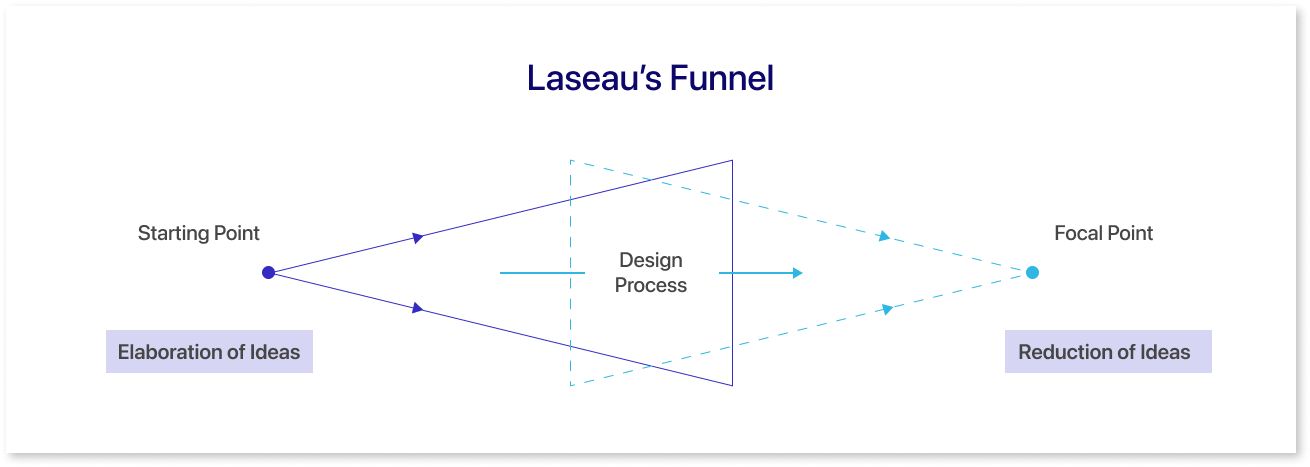
The primary benefit to designers is that wireframes promote experimentation over perfection. The first point we can consider about why designers should take the time to create wireframes is that they promote exploration over refining during the ideation stage. Wireframes can be a useful tool for communicating ideas. In order to increase creativity, wireframes let you dwell in the dark.
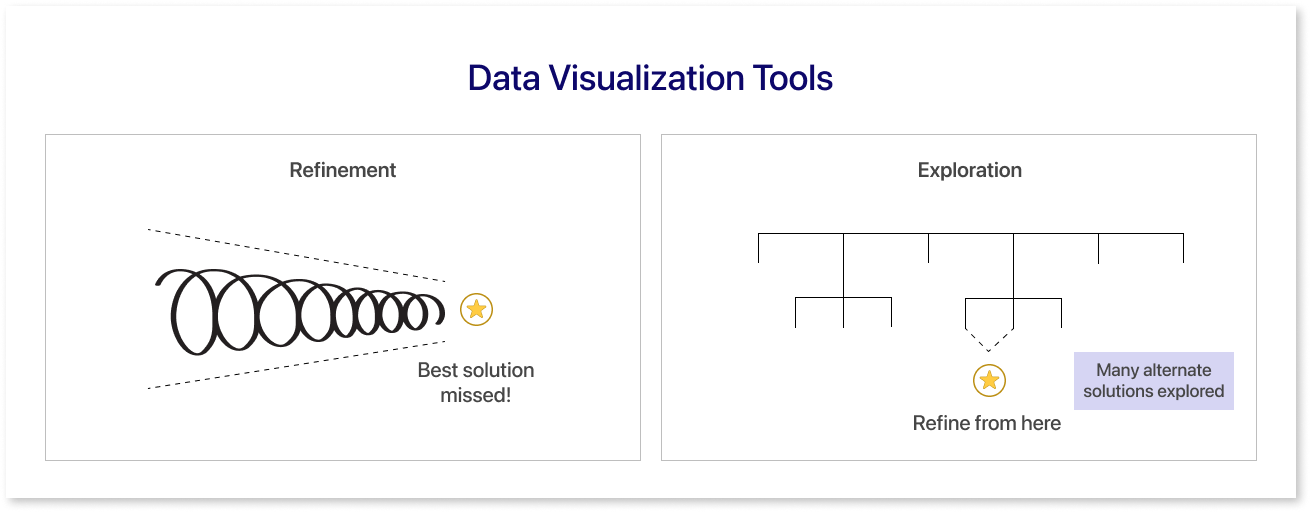
In focused stages, wireframes act as a starting point for the discussions that result in the best possible solution. Although research is important, solving a clearly defined problem is the core of design, which is why designers take the time to create wireframes. They encourage discussion with the goal of identifying the best course of action during convergence stages.
Great Wireframes Serve As The Foundation For Robust Prototypes and Captivating Designs.
The art of effective wireframing is to create layouts that allow your team and stakeholders to decide swiftly whether or not an idea is worth pursuing. Prototyping and wireframing both express concepts and designs in a similar way, but they differ in terms of fidelity and focus.
Prototyping goes beyond wireframing, focusing on testing interactivity and functionality at higher fidelity levels while wireframing primarily focuses on structural layouts and basic functionalities through simpler graphics (such as using boxes and lines).
Wireframing and prototyping are processes that can be carried out manually or with software, enabling the development of designs that range from simple, low-fidelity conceptions to intricate, high-fidelity depictions of the finished product.
Software for wireframing comes in a variety of options that differ in price, functionality (such as click-through interaction), and compatibility with particular platforms (like mobile devices).
Effective wireframing promotes agile development by allowing team members to move forward without waiting for difficult outputs. It also acts as a safeguard, preventing teams from chasing flawed ideas.
The Efficiency Paradigm in Wireframing
The primary goal is to convey the structure of a potential solution to enable your team to create a strong foundation for user experience (UX) design and to gather feedback from clients based on visual representations.
To initiate this process:
- Emphasize functionality, accessibility, layout, and navigation, focusing on essential features rather than nice-to-have elements.
- Create a hierarchical structure, prioritizing elements for each page to clarify the information architecture early on.
- Divide the screen into sizable content blocks and edit them with adding details like links and placeholders for images.
- To improve usability, keep a simple, grid-based layout while following best practices in design.
- Make use of annotations to help other project participants understand wireframes more quickly.
Remember, wireframes are collaborative tools that help to accelerate the creation of better prototypes and products, prioritizing efficiency and functionality over aesthetic details at this stage.
How to Create Wireframes - Step-by-Step Guide
The user experience (UX) design process depends on having a solid understanding of how to construct wireframes. Because they let you see the functions and layout of any website or application, wireframes are the building blocks of any design.
You can guarantee accuracy, save time, and prevent expensive adjustments in the future by using the appropriate procedure. Now let's examine the essential steps for producing wireframes that have an impact.
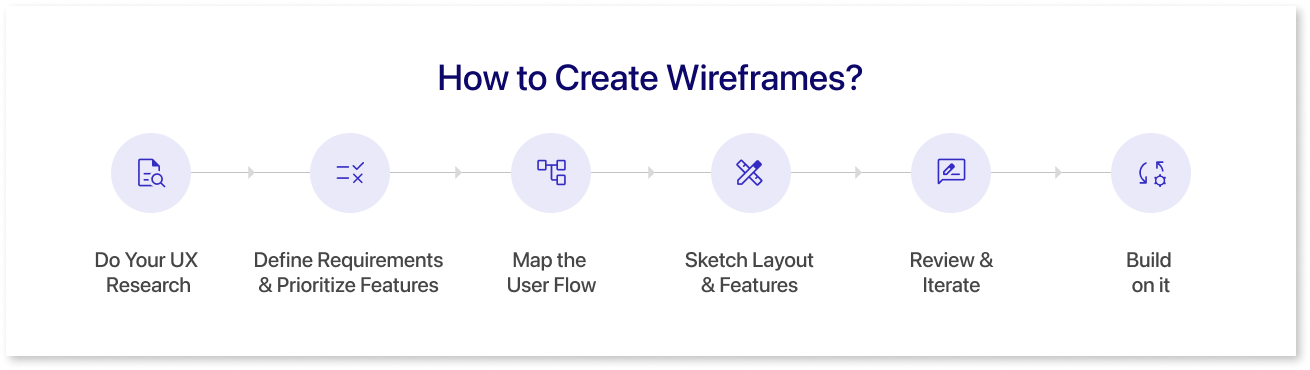
1. Do Your Research:
You must have a solid understanding of your target market and line of work before you begin to sketch. Consider your target audience as you begin your UX research.
- What drives them?
- What is preventing them?
- Which goods appeal to them?
Here, it can be quite helpful to use tools like user personas and the jobs-to-be-done model.
2. Defining Requirements and Prioritizing Features:
The next step after UX research is to fine-tune the project scope. Engage the product owner or stakeholders in order to convert general user requirements into specific features. For example, adding a 'Trending Topics' area could be useful on a social networking site if the goal is to increase user interaction.
This stage plays a pivotal role in determining which components will be incorporated into the wireframe design. Create a prioritized list of features to steer the design trajectory. This guarantees a focused approach on elements crucial for both users and the business.
3. Mapping the User Flow:
The steps a user takes on your platform are mapped out in the user flow. As an example, if we take an e-commerce website, the user's path could start from the homepage and continue through product browsing, selection, payment, and purchase confirmation.
Draw the Layout and Features:
Here are a few things to think about -
- Information Architecture: give consideration to how you arrange the material and rank it in order of importance.
- Interactivity: Highlight links, buttons, drag and drop feature and other elements that can be clicked.
- Static Components: Keep in mind essential elements such as headers, footers, or menus.
- Choosing Level of Fidelity: Choose the level of detail. While broad projects tend toward high-fidelity designs, early stages might use low-fidelity sketches.
4. Review and Iterate:
Share your wireframes. Obtain feedback from all relevant parties, such as developers and business experts.
Make sure your questions are well-framed to contain both precise facts and broad ideas while gathering feedback. Let reviewers select their preferred wireframe versions if you have a variety of them.
5. Build On It:
After review and iteration, the final dashboard takes shape, leveraging insights and refinements to create a polished and user-centric interface. Build upon this foundation to craft the ultimate user-friendly and functional dashboard solution.
Types of Wireframes
Let us look at the different types of wireframes:
1. Low-Fidelity Wireframes: The earliest wireframes you make are low-fidelity. They give the design's essential graphics, but they aren't accurate in terms of pixel size, grid, or scale.
This wireframe includes simple graphics, block shapes, and placeholder text. For example, drawing the layout of an app on paper. This method works well for early evaluation.
2. Mid-Fidelity Wireframes: Mid-fidelity wireframes are the most widely used of the three. They provide a more clear perspective of the layout, but they continue to leave out visual design elements like images or certain fonts. However, features are more noticeable and components are more precise.
Different font weights may be used by designers. It facilitates the separation of body text from titles. Although they do not use colors, elemental importance can be indicated by various hues of gray. Digital technologies, such as Mokkup which is for dashboard wireframing and Figma for creating apps and web pages, are often used by designers even though they are best suited for the initial phases of product development.
3. High-Fidelity Wireframes: High-fidelity wireframes are highly detailed, offering pixel-specific layouts and replacing placeholder text or symbols found in low-fidelity versions with actual images and relevant content.
The complexity of their design is ideal for analyzing and recording difficult ideas, as in the case of complex menu systems or maps with interactive elements. High-fidelity wireframes are usually used by designers to establish and improve concepts later in the design cycle.
When to Use Wireframes
At every phase of a project, wireframes are essential because they help with planning, collecting input, giving clarity, and enabling testing. But their use is particularly beneficial in several situations. This is where having wireframes created can be really helpful.
- Initial Idea: Wireframes help in the initial design visualization of initial concepts.
- Gathering Feedbacks: Wireframes facilitate the collection of early feedback before getting into details of a design. Designers and users can give meaningful insights before moving onto the next step.
- Functionality: The positions of functional elements, like buttons or interactive features, are marked out in wireframes. It helps in gaining an understanding of how to build an interaction for usability.
- Structure: Wireframes assist in organizing the placement of elements. For example, it is simpler to position text, images, or multimedia.
- Customer Journey Mapping: User journeys can be plotted using wireframes. They let designers see how people will interact with a website or application.
- Usability Testing: Usability tests can be performed on wireframes prior to final designs. It assists in locating and fixing usability problems early on.
Choosing the Right Wireframing Tool
You may sketch out the general flow, layout, and user experience with the help of wireframing tools. It guarantees that everyone is in agreement and streamlines the design process. We'll discuss some of the best wireframing tools that are setting the standard for the industry in this section.
Moreover, choosing a tool also depends on what your end product would be. Some tools are specifically designed for a certain ui.
1. Mokkup.ai
Mokkup.ai is a cloud-based dashboard wireframing tool that lets the users create wireframes from scratch or select from a wide range of pre-built customizable templates across eight industry-wide categories. With Mokkup, you can create dashboard wireframes that can help you idealize as well as finalize your dashboard designs.
2. Figma
Figma is a prototyping tool which is used for creating user interfaces, app prototypes, and web designs. It allows multiple users to work simultaneously on a project, enabling real-time collaboration, prototyping, and sharing of design mockups and resources.
3. Mockflow
MockFlow is a platform used for wireframing, prototyping, and creating UI/UX designs for websites and applications. It offers various tools and features to streamline the design process, allowing designers to create mockups, collaborate, and visualize their ideas before implementation.
4. Miro
Miro is a collaborative online whiteboarding tool that may be used for ideation, project planning, brainstorming, workshops, and visual collaboration, etc. Teams can collaborate in real-time while producing flowcharts, mind maps, diagrams, and other visualizations to promote creativity and facilitate communication in distant or remote settings.
5. Balsamiq
Balsamiq is a wireframing tool that is used for quickly developing low-fidelity user interface sketches and mockups for apps and websites. It's perfect for rapidly prototyping and refining design ideas without getting weighed down in fine details.
Wireframing in UX
In user experience, wireframing is the process of designing a digital product's basic layout. It serves as the model or basis around which the design is built. Consider it the digital platform's or website's architectural blueprint.
There are particular wireframe screen sizes for each platform. These are the following:
- Smartphone: 1080 pixels by 1920 pixels
- 8-inch Tablet: 800 x 1280 pixels
- 10" Tablet display: 1200 x 1920 pixels
- Desktop Display: 768 by 1366 pixels
Before going too far into design or development, wireframe testing provides an actual result for user interaction, which makes it important for testing. This initial round of testing assists in identifying any possible layout problems, usability problems, or confusing navigation routes.
Wireframes are a great tool for testing since they ensure that the final product will meet user goals and business objectives while also being user-friendly.
UX & UI Wireframing Examples
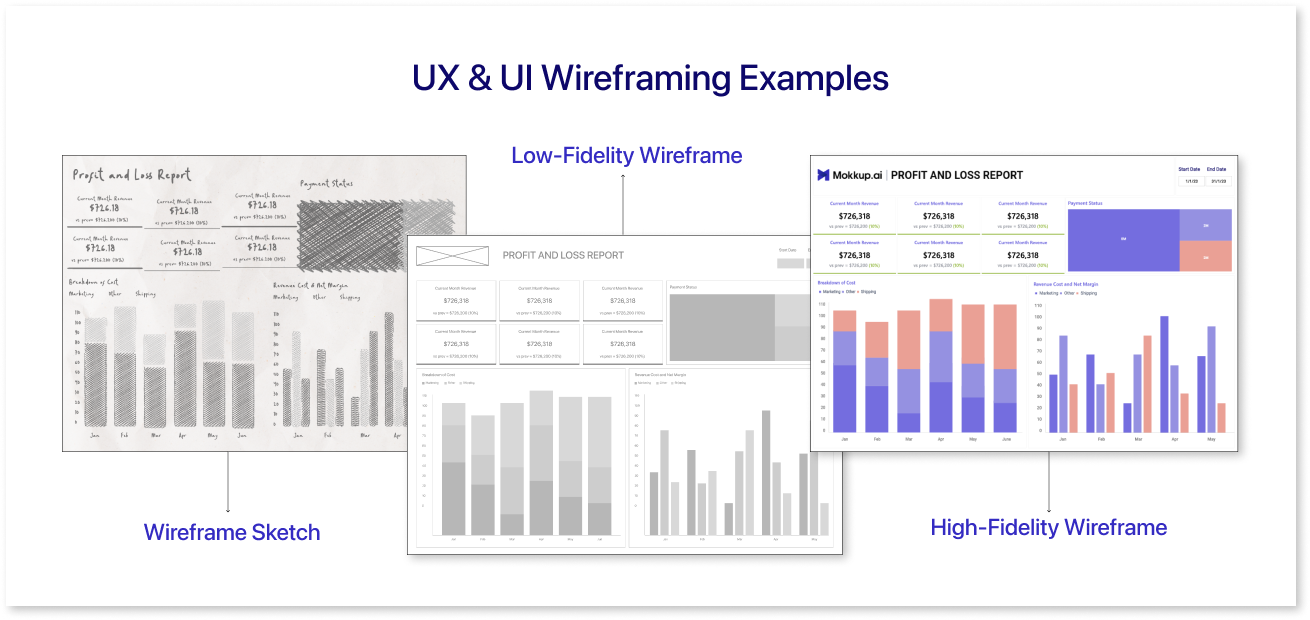
Let's explore some of the wireframing examples given below for your reference.
Low-Fidelity Dashboard Wireframe
A low-fidelity dashboard wireframe presents a basic, simplified layout of a dashboard interface, focusing on structure and functionality rather than visual design. It typically involves simple shapes, placeholders, and minimal details to outline the arrangement of key elements like data visualizations, navigation menus, and widgets.
Medium-Fidelity Wireframe
A mid-fidelity dashboard wireframe maintains a balance between detail and simplicity. It includes more specific design elements than a low-fidelity wireframe, offering a clearer representation of the dashboard's structure, content placement, and functionalities.
High-Fidelity Wireframe
A high-fidelity dashboard wireframe is a detailed and visually refined representation of a dashboard design, featuring polished graphics, accurate layouts, and realistic content. It includes precise data visualizations, exact interface elements, and often incorporates actual content instead of placeholders.
Conclusion
Developing a keen eye for design offers numerous advantages. Constant exposure to digital products allows you to differentiate well-crafted designs from less refined ones, and you'll start observing their impact on product usability.
This refined eye for detail significantly enhances your wireframing skills, enabling you to pinpoint important elements. Consequently, users of your wireframes will better grasp and appreciate them, fostering clearer communication and understanding.
For quick and easy dashboard wireframing, check out Mokkup.ai.
Prompt it. Wireframe it with Mokkup.ai.