
What is a Specialized Program School Digital Learning Dashboard?
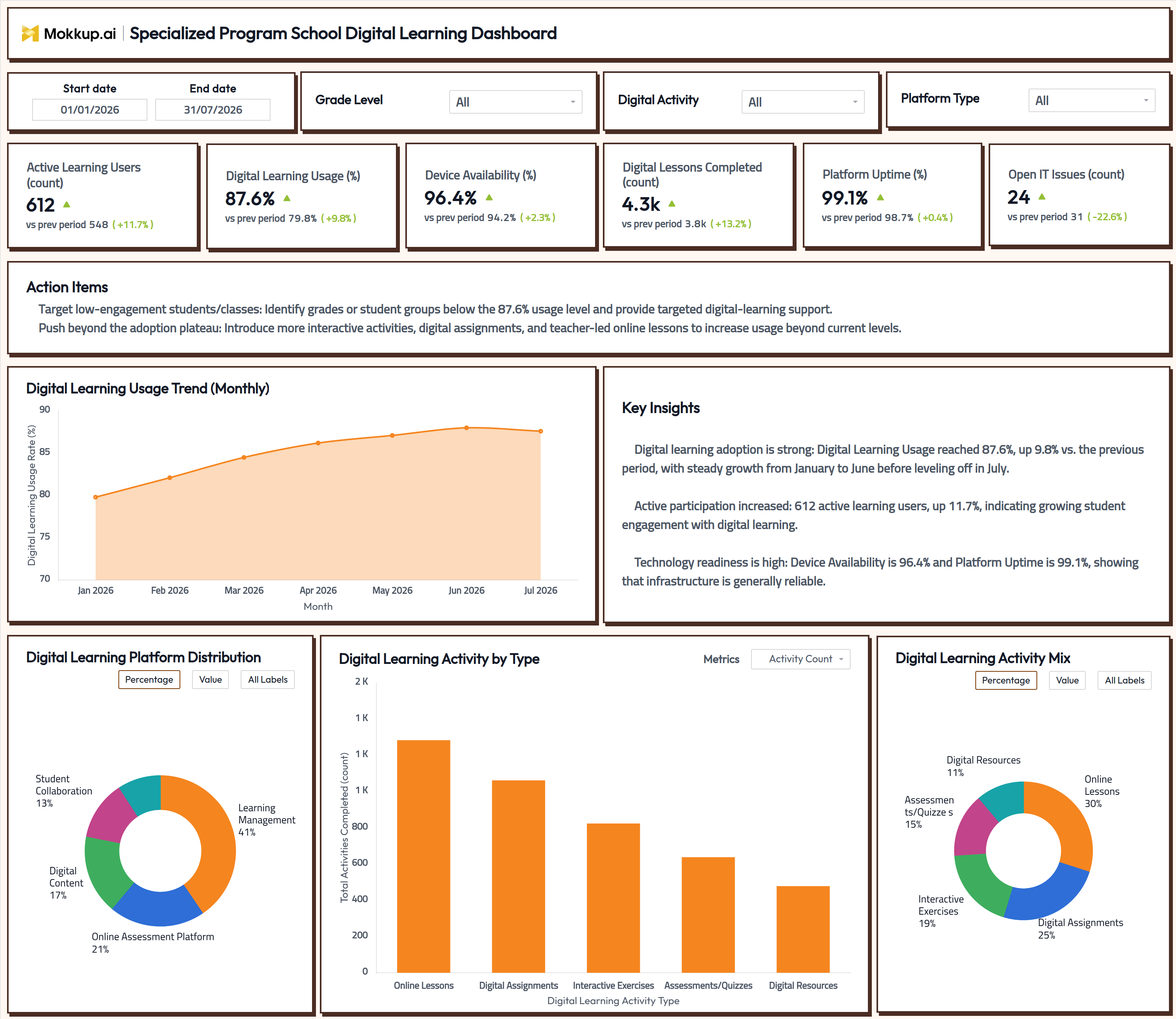
The Specialized Program School Digital Learning Dashboard helps program administrators, special education coordinators, and instructional technology teams monitor how students engage with digital learning tools across a specialized program school. As a specialized program school digital learning dashboard, it brings active user counts, digital learning usage rate tracking, dashboard trends, device readiness, and platform stability into a single view instead of scattered reports pulled from separate systems. Teams use it to confirm that digital lessons, assessments, and interactive activities reach students consistently, and to stay on top of platform uptime and IT issues before they create technology barriers that affect instruction. The result is a faster, clearer way to judge digital learning health across a specialized program school without switching between learning management, assessment, and IT systems separately.
How to Create a Specialized Program School Digital Learning Dashboard
You don't need to start from scratch. Just begin with a ready-to-use dashboard template from Mokkup. Here's how:
1. Create or Log in to Your Mokkup Account
Start by signing up on Mokkup.ai using your email. If you already have an account, just log in, and you'll be good to go.
2. Choose and Customize Your Dashboard Template
Find the Specialized Program School Digital Learning Dashboard template in the Templates section. Use the drag-and-drop editor to adjust KPIs, edit filters, or add elements based on your data.
3. Export to Your BI Tool
Once your dashboard wireframe is ready, use the BI Tool Export feature to send it directly to Power BI or Tableau for further analysis and enhancements. You can also download the dashboard as a PDF, PNG, or JPEG, embed it on a platform, or invite your team to collaborate.
Note: This is a Pro template. You'll need a Pro subscription on Mokkup to use and customize this dashboard wireframe. Upgrade anytime to unlock full access.
Specialized Program School Digital Learning Dashboard Example
A digital learning coordinator at a specialized program school opens this dashboard at the start of a review cycle to answer whether digital learning is reaching students or has engagement plateaued. Filtering by grade level, digital activity, or platform type narrows the view to the specific group they are responsible for, whether that is one grade band or a single learning platform rolled out school-wide. From there, the coordinator can filter by grade to see platforms driving strong participation and which need additional support, using the usage trend to judge whether growth is continuing or has leveled off.
Running a digital learning platform distribution analysis lets them compare how much activity flows through the learning management system versus assessment tools, digital content, and collaboration platforms. In contrast, a parallel digital learning activity-by-type tracking view shows whether instructional time leans too heavily on one activity, such as online lessons, at the expense of interactive exercises or assessments. Checking a device availability rate monitoring tool alongside platform uptime lets the team rule out technology barriers before assuming a participation drop is instructional rather than technical. Ultimately, the dashboard helps specialized program school teams move from reacting to problems toward planning ahead, giving instructional leaders and IT staff a shared, current picture of adoption, device readiness, and platform stability they can act on together.
How to Analyze Data in a Specialized Program School Digital Learning Dashboard
Here is how you can analyze data from this dashboard:
- Filter by Grade Level to compare digital learning usage rate tracking dashboard trends across grade bands.
- Use the Digital Activity filter to isolate performance for a single activity type before drawing conclusions.
- Monitor the Digital Learning Usage Trend to catch adoption plateaus before they widen into a decline.
- Apply the Platform Type filter to run a focused digital learning platform distribution analysis by tool.
- Review the Digital Learning Activity by Type bar chart to see which activities drive completed lesson volume.
- Compare the Digital Learning Activity Mix donut to judge whether activity variety matches instructional goals.
- Track Device Availability and Platform Uptime together as a device availability rate monitoring tool check.
- Watch Open IT Issues alongside usage trends to separate technology barriers from engagement problems.
Benefits of a Specialized Program School Digital Learning Dashboard
The following are the benefits of using this dashboard:
- Centralizes active user counts, usage trends, and technology readiness in one specialized program school digital learning dashboard.
- Supports digital learning activity by type tracking so teams see, where digital learning activity is concentrated
- Reduces manual reporting by combining learning platform, assessment, and IT data in pre-built KPI tiles.
- Enables grade-level analysis of engagement to guide where additional digital-learning support is needed.
- Provides a platform distribution breakdown for planning tool adoption and licensing decisions.
- Functions as a device availability rate monitoring tool that flags readiness gaps before they disrupt lessons.
- Gives instructional leaders and IT staff a shared view of digital learning performance and stability.
KPIs to Track in a Specialized Program School Digital Learning Dashboard
The following key KPIs can be tracked by using this dashboard:
- Active Learning Users (count): Measures how many students are actively using digital learning tools in the period.
- Digital Learning Usage (%): The core digital learning usage rate tracking dashboard metric, showing adoption across the school.
- Device Availability (%): A device availability rate monitoring tool metric tracking how often devices are ready for use.
- Digital Lessons Completed (count): Quantifies total lesson completions, reflecting instructional delivery volume.
- Platform Uptime (%): Tracks platform reliability as part of platform uptime and IT issues tracking.
- Open IT Issues (count): Tracks unresolved technology issues that can affect digital learning access.
Frequently Asked Questions
1. What industries benefit most from this Specialized Program School Digital Learning Dashboard?
Specialized program schools, special education departments, and instructional technology teams benefit most. It also supports school IT staff who need visibility into device and platform reliability.
2. Can this dashboard track digital learning activity by type?
Yes. The Digital Learning Activity by Type chart and the Digital Learning Activity Mix donut both break down completed activities by category, including online lessons, digital assignments, interactive exercises, assessments, and digital resources.
3. Is this dashboard suitable for monitoring device and platform readiness?
Yes. Device Availability, Platform Uptime, and Open IT Issues give teams a device availability rate monitoring tool view alongside platform uptime and IT issues tracking, so technology gaps are visible early.
4. How does the Digital Learning Platform Distribution chart work?
It shows the share of digital activity flowing through each platform category, such as learning management, online assessment, digital content, and student collaboration tools, supporting a clear digital learning platform distribution analysis.
5. What does the Digital Learning Usage metric measure?
It measures the percentage of students actively engaging with digital learning tools over the selected period, making it the primary digital learning usage rate tracking dashboard metric for adoption.