
What is a Special Education Procurement Management Dashboard?
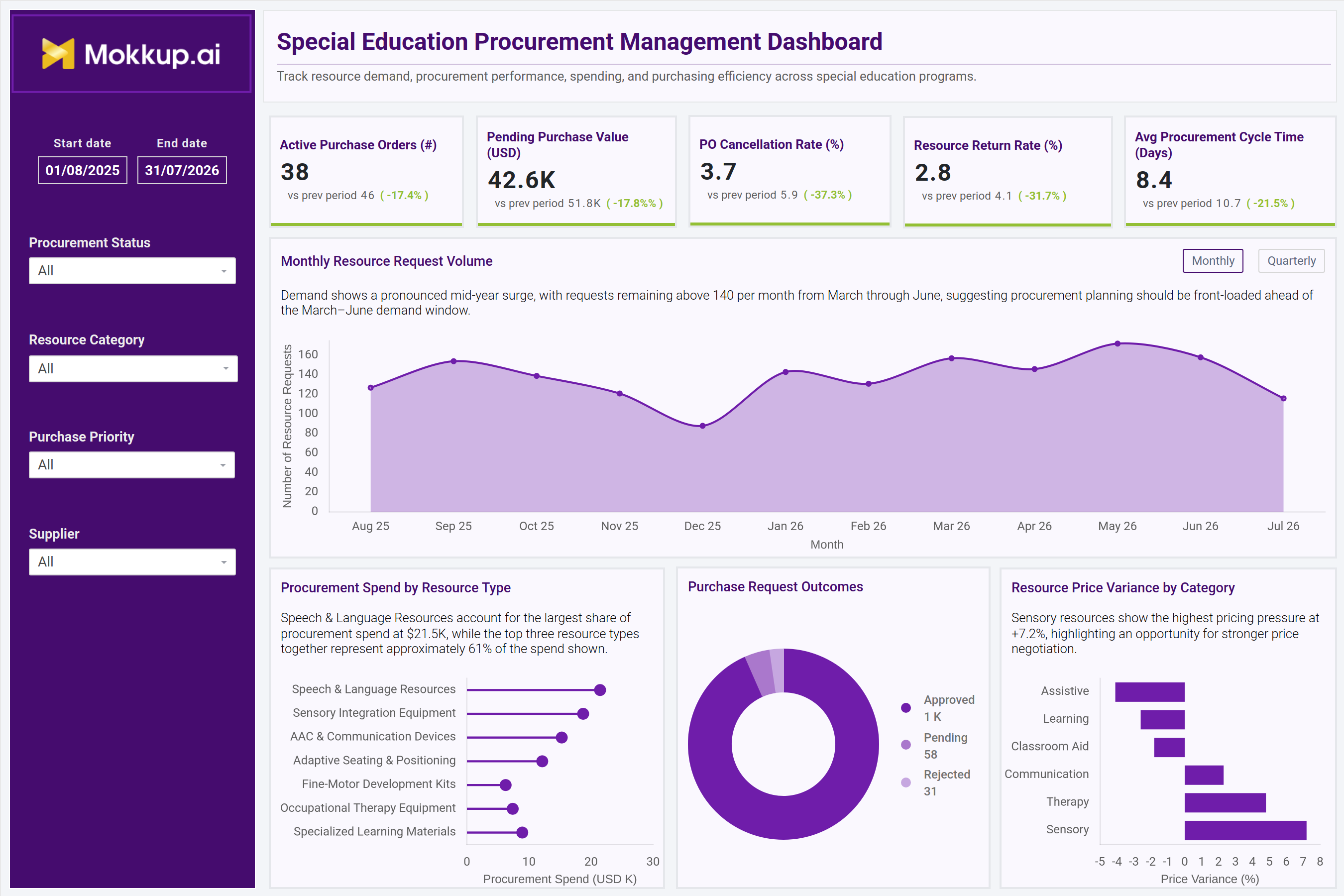
The Special Education Procurement Management Dashboard is a ready-to-use dashboard template. It gives special education administrators and procurement teams one workspace to track how instructional and therapy resources are requested, purchased, and delivered across programs. Built as a special education procurement management dashboard, it brings together active purchase orders, pending purchase value, cancellation trends, resource returns, and procurement cycle time. Leaders no longer have to reconcile separate spreadsheets from suppliers, therapy teams, and finance. Each KPI shows the previous period's value and the % change, so teams can see at a glance whether purchasing performance is improving.
The layout supports special education resource procurement tracking by showing how spend is split across seven resource types, including speech and language resources, sensory integration equipment, AAC and communication devices, and adaptive seating and positioning. Price variance by category keeps special education supplier performance tracking in the same view. Every chart has a short insight line that points out the key pattern. Filters for date range, procurement status, resource category, purchase priority and supplier let teams narrow the view to the segment that matters most in a given planning cycle.
How to Create a Special Education Procurement Management Dashboard
You don't need to start from scratch. Just begin with a ready-to-use dashboard template from Mokkup. Here's how:
1. Create or Log in to Your Mokkup Account
Start by signing up on Mokkup.ai using your email. If you already have an account, just log in, and you'll be good to go.
2. Choose and Customize Your Dashboard Template
Find the Special Education Procurement Management Dashboard template in the Templates section. Use the drag-and-drop editor to adjust KPIs, edit filters, rename resource categories, or add elements based on your data.
3. Export to Your BI Tool
Once your dashboard wireframe is ready, use the BI Tool Export feature to send it directly to Power BI or Tableau for further analysis and enhancements. You can also download the dashboard as a PDF, PNG, or JPEG, embed it on a platform, or invite your team to collaborate.
Note: This is a Pro template. You'll need a Pro subscription on Mokkup to use and customize this dashboard wireframe. Upgrade anytime to unlock full access.
Special Education Procurement Management Dashboard Example
A special education procurement coordinator opens the dashboard at the start of a planning cycle. They want to know whether resource requests are outpacing purchasing capacity. The KPI cards show whether active orders, cancellations, returns and cycle time have improved since the last period. The Monthly Resource Request Volume chart, viewed monthly or quarterly, shows when demand peaks, so orders can be placed ahead of the busy months.
Next, the team compares Procurement Spend by Resource Type to see where budget is concentrated. They check Purchase Request Outcomes to see how many requests were approved, are still pending, or were rejected. When Resource Price Variance by Category shows rising costs in a category, planners use it to renegotiate with a supplier or find an alternative. Cycle time figures and the Purchase Priority filter feed into special education procurement cycle time monitoring, so urgent requests are not stuck behind routine ones.
The result is a procurement team that plans purchases ahead of demand instead of reacting to shortages, negotiates better supplier terms, and keeps resources reaching classrooms and therapy rooms on time.
How to Analyze Data in a Special Education Procurement Management Dashboard
Here is how you can analyze data from this dashboard:
- Set the Review Period: Use the Start and End date filter to match your planning cycle or academic year.
- Read Period-over-Period KPI Changes: Check the "vs prev period" value and % change on each KPI card. For cancellation rate, return rate, and cycle time, a decrease is a positive sign.
- Spot Demand Surges: Use the Monthly Resource Request Volume chart, and switch between Monthly and Quarterly views, to spot seasonal peaks before they strain procurement capacity.
- Track PO Cancellations: Use the Procurement Status filter together with PO Cancellation Rate for school purchase order cancellation tracking during status reviews.
- Find Spend Concentration: Compare Procurement Spend by Resource Type to see which of the seven resource types take up the most budget and where you have room to negotiate.
- Review Request Outcomes: Use Purchase Request Outcomes to separate approved requests from those still pending or rejected.
- Flag Price Pressure: Use Resource Price Variance by Category to see which categories are costing more (positive variance) and which are delivering savings (negative variance).
- Prioritize Urgent Requests: Apply the Purchase Priority filter to make sure urgent requests are not delayed behind routine purchases.
- Compare Suppliers: Filter by Supplier to compare pricing and fulfillment consistency across vendors.
Benefits of a Special Education Procurement Management Dashboard
The following are the benefits of using such a Procurement Spend Analysis Dashboard:
- Centralized Procurement View: Brings purchase order, spend and pricing data together in one special education procurement management dashboard.
- Clear Performance Direction: Shows the previous-period comparison and % change on every KPI, so teams can instantly see if procurement is improving.
- Faster Approvals: Supports special education procurement cycle time monitoring so approval bottlenecks are caught early.
- Less Manual Tracking: Cuts down on manual spreadsheets for tracking resource requests across programs.
- Hidden Patterns Surfaced: Brings out cancellation and return patterns that stay hidden in separate supplier and finance systems.
- Proactive Demand Planning: Monthly and quarterly request trends help teams place orders before peak demand periods.
- Leadership-Ready Review: Gives leadership one wireframe to review resource spend before requests go to finance for approval.
- Supplier Accountability: Improves special education supplier performance tracking by showing both price increases and savings for each resource category.
- Better Contract Negotiations: Strengthens resource price variance tracking for schools ahead of supplier contract renewals.
KPIs to Track in a Special Education Procurement Management Dashboard
The following key KPIs can be tracked by using this Special education procurement dashboard template. Key Performance Indicators (KPIs) are measurable values that show how efficiently a procurement program is meeting its purchasing and resource-delivery goals.
- Active Purchase Orders (#): number of purchase orders currently open across special education resource categories, compared with the previous period.
- Pending Purchase Value (USD): dollar value of purchase orders awaiting approval or fulfillment.
- PO Cancellation Rate (%): share of purchase orders cancelled before completion, a core input for school purchase order cancellation tracking. A lower rate than last period signals a more reliable ordering process.
- Resource Return Rate (%): percentage of delivered resources sent back because of defects, mismatch or over-ordering.
- Avg Procurement Cycle Time (Days): average number of days from request to fulfillment, the basis for procurement cycle time monitoring. A fall here means resources reach classrooms faster.
- Monthly Resource Request Volume: number of resource requests raised per month or quarter, used to forecast demand.
- Purchase Request Outcomes: split of purchase requests into approved, pending, and rejected.
- Resource Price Variance (%): price change for each resource category, showing where costs are rising or falling.
Frequently Asked Questions
1. Who should use the Special Education Procurement Management Dashboard?
Special education procurement coordinators, program administrators, and finance partners who manage resource purchasing across therapy and instructional categories. It also supports district leaders who need visibility into supplier performance and spend without pulling data from multiple systems.
2. What data does this dashboard track?
It tracks active purchase orders, pending purchase value, cancellation and return rates, procurement cycle time, resource request volume, spend by resource type, purchase request outcomes, and price variance by category. Each KPI is compared with the previous period.
3. Can I customize the dashboard for my district's procurement categories?
Yes. The Mokkup editor lets you rename resource categories, adjust filters such as supplier or purchase priority, and edit KPI tiles to match your district's own special education resource procurement tracking needs before exporting.
4. What does a negative price variance mean?
A negative price variance means a resource category costs less than its expected price, which is a saving. A positive variance means costs are rising. Categories with the highest positive variance are the best candidates for price negotiation.