
What is a Pediatric Facility Resource Dashboard?
A pediatric facility resource management dashboard is a centralized analytics platform that provides hospital administrators with real-time visibility into pediatric resource allocation, equipment availability, and operational efficiency. It enables pediatric departments to monitor the readiness of beds, staff, and equipment, ensuring that critical resources are available when needed. This healthcare resource tracking dashboard for pediatrics consolidates key operational data from multiple hospital systems. It measures essential metrics such as staff coverage, equipment utilization, supply chain efficiency, and resource downtime. By converting raw operational data into visual insights, the dashboard helps healthcare leaders make informed decisions to optimize pediatric care delivery and maintain consistent readiness across all facilities.
How to Create a Pediatric Facility Resource Dashboard
You don’t need to build your report from scratch; just start with a ready-to-use dashboard template from Mokkup. Add in your data and export it however you like. Here’s how to do it:
1. Create or Log in to Your Mokkup Account
Start by signing up on Mokkup.ai using your email. If you already have an account, just log in, and you’ll be good to go.
2. Choose and Customize Your Dashboard Template
Find the Pediatric Facility Resource Dashboard template in the Templates section. Use the drag-and-drop editor to adjust KPIs, edit filters, or add elements based on your data.
3. Export to Your BI Tool
Once your dashboard wireframe is ready, use the BI Tool Export feature to send it directly to Power BI or Tableau for further analysis and enhancements. You can also download the dashboard as a PDF, PNG, or JPEG, embed it on a platform, or invite your team to collaborate.
Note: This is a Pro template. You’ll need a Pro subscription on Mokkup to use and customize this dashboard wireframe. Upgrade anytime to unlock full access.
Pediatric Facility Resource Dashboard Example
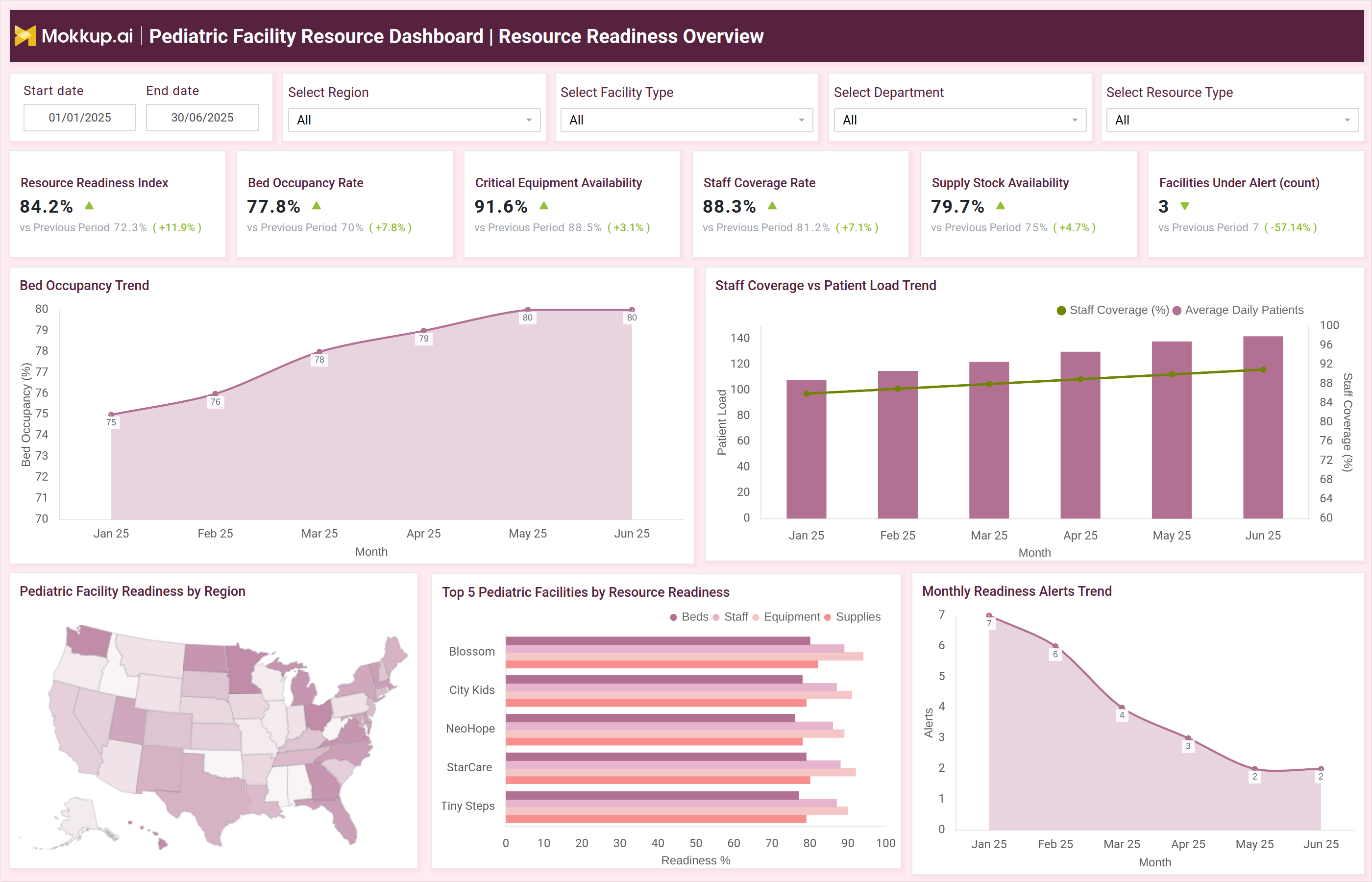
The example above illustrates two comprehensive dashboard views: Resource Readiness Overview and Resource Efficiency & Turnaround Insights. The Resource Readiness Overview dashboard highlights metrics like Resource Readiness Index (%), Bed Occupancy Rate (%), Critical Equipment Availability (%), Staff Coverage Rate (%), and Supply Stock Availability (%). It also visualizes trends such as Bed Occupancy by Month, Staff Coverage vs Patient Load, and Monthly Readiness Alerts. Regional and facility-level breakdowns show readiness variations across different pediatric centers.The Resource Efficiency & Turnaround Insights view focuses on performance indicators such as Equipment Utilization Rate (%), Average Bed Turnover Time (hrs), Reorder Fulfillment Time (days), and Ambulance Response Time (min). Charts such as Equipment Utilization Trend and Resource Downtime Analysis reveal operational bottlenecks and highlight improvement areas. This makes the dashboard an effective pediatric hospital resource utilization dashboard, allowing teams to track system efficiency and manage resources proactively.
How to Analyze Data in Pediatric Facility Resource Dashboard
Here’s how Pediatric centres can leverage the dashboard:
- Monitor Resource Readiness Index: Track overall readiness across staff, beds, and supplies to ensure operational stability.
- Assess Bed Occupancy Trends: Identify utilization rates and plan capacity expansion or reallocation.
- Evaluate Equipment Availability: Use the pediatric care equipment monitoring dashboard to check if critical medical devices are accessible and functional.
- Measure Staff Coverage vs Patient Load: Balance workforce allocation and workload across shifts to prevent overstaffing or shortages.
- Track Supply Chain Efficiency: Review reorder fulfillment times and stock levels to maintain optimal inventory flow.
- Analyze Downtime by Category: Understand whether equipment, staff, or transport factors contribute most to resource downtime.
- Benchmark Regional Facility Performance: Compare readiness and efficiency across centers to guide improvement plans.
Benefits of Pediatric Facility Resource Dashboard
A Pediatric facility resource dashboard offers below benefits:
- Optimized Resource Utilization: Ensures all pediatric resources beds, staff, and equipment are efficiently allocated.
- Enhanced Operational Efficiency: The pediatric center operational efficiency dashboard identifies inefficiencies and improves overall hospital throughput.
- Data-Driven Decision Making: Helps healthcare managers plan capacity and forecast future resource requirements.
- Improved Equipment Maintenance: Continuous tracking of utilization and downtime helps reduce equipment-related delays.
- Better Staff Management: The pediatric staff allocation and workload dashboard allows HR teams to monitor workload balance and improve workforce scheduling.
- Reduced Wastage and Delays: Tracks supply stock levels, reorder times, and expiry rates to minimize waste and stockouts.
- Faster Response and Turnaround: By monitoring bed turnover, response time, and supply chain speed, facilities achieve higher readiness and patient satisfaction.
KPIs to Track in Pediatric Facility Resource Dashboard
- Resource Readiness Index (%): Composite measure of overall resource preparedness across facilities.
- Bed Occupancy Rate (%): Tracks utilization of inpatient capacity across pediatric units.
- Critical Equipment Availability (%): Indicates operational status and readiness of essential pediatric medical devices.
- Staff Coverage Rate (%): Measures staff-to-patient ratio and workload balance.
- Supply Stock Availability (%): Ensures sufficient availability of consumables and medical supplies.
- Equipment Utilization Rate (%): Tracks how effectively pediatric equipment is being used.
- Average Bed Turnover Time (hrs): Measures efficiency in preparing beds for new patients.
- Reorder Fulfillment Time (days): Monitors procurement and delivery efficiency of medical supplies.
- Resource Downtime per Week (hrs): Evaluates lost hours due to equipment, staff, or transport issues.
- Ambulance Response Time (min): Assesses emergency response efficiency.
- Wastage/Expiry Rate (%): Tracks material wastage in pediatric care inventory.
Frequently Asked Questions
Q1. What is the main purpose of a Pediatric Facility Resource Dashboard?
It helps hospitals monitor and optimize pediatric resources such as staff, beds, equipment, and supplies to ensure readiness and operational efficiency.
Q2. Who uses this dashboard?
It is primarily used by pediatric administrators, operations managers, and hospital resource planners for data-driven facility management.
Q3. How does it improve pediatric operations?
By tracking utilization, downtime, and readiness, the pediatric facility resource management dashboard improves resource forecasting, minimizes delays, and enhances patient care quality.