
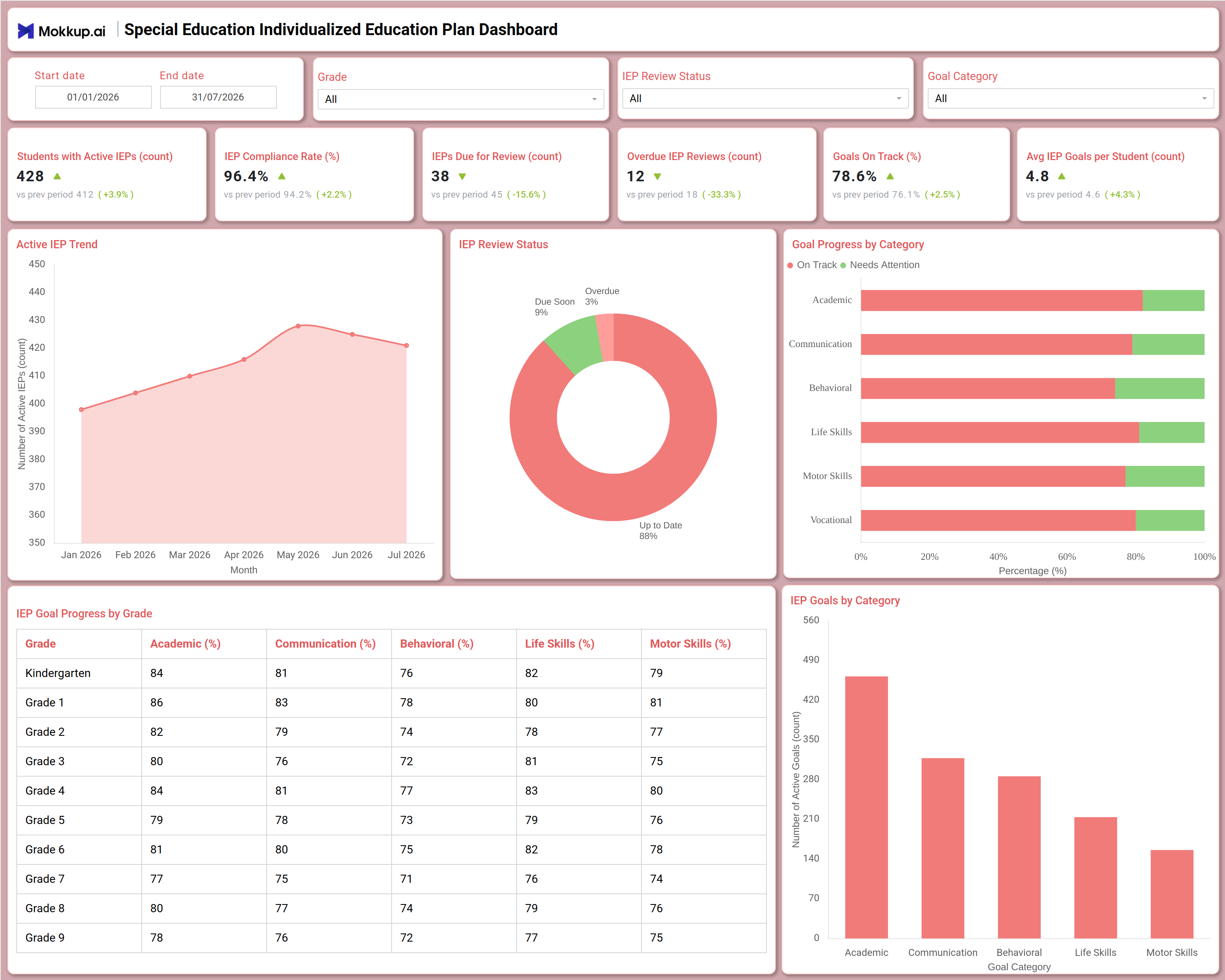
What is a Special Education Individualized Education Plan Dashboard
The Special Education Individualized Education Plan Dashboard is a single-screen reporting template built for special education directors, IEP case managers, and school administrators who track compliance, goal progress, and review timelines across every active IEP on campus. This special education individualized education plan dashboard consolidates active IEP counts, compliance standing, and goal outcomes into one view, replacing scattered case files and manual review logs that teams currently juggle across grades. At its core, the template serves as an IEP compliance rate tracking dashboard, pairing a compliance percentage with a monthly trend of active IEPs so leaders can see whether caseloads and adherence are moving in the right direction. A companion review view also serves as a special education IEP dashboard template, flagging reviews due soon or already overdue before they lapse. Start date, End date, Grade, IEP Review Status, and Goal Category filters let users narrow the entire view down to a single grade band, review stage, or goal type.
How to Create a Special Education Individualized Education Plan Dashboard
You don't need to build your report from scratch—just start with a ready-to-use dashboard template from Mokkup. Add in your data and export it however you like. Here's how to do it:
1. Create or Log in to Your Mokkup Account
Start by signing up on Mokkup.ai using your email. If you already have an account, just log in, and you'll be good to go.
2. Choose and Customize Your Dashboard Template
Find the Special Education Individualized Education Plan Dashboard template in the Templates section. Use the drag-and-drop editor to adjust KPIs, edit filters, or add elements based on your data.
3. Export to Your BI Tool
Once your dashboard wireframe is ready, use the BI Tool Export feature to send it directly to Power BI or Tableau for further analysis and enhancements. You can also download the dashboard as a PDF, PNG, or JPEG, embed it on a platform, or invite your team to collaborate.
Note: This is a Pro template. You'll need a Pro subscription on Mokkup to use and customize this dashboard wireframe. Upgrade anytime to unlock full access.
Special Education Individualized Education Plan Dashboard Example
A special education director typically opens this dashboard at the start of a monthly review cycle to understand how many students currently have active IEPs and whether compliance is holding steady across grades. Coming in with the Grade or IEP Review Status filter set to a specific band, the director wants a fast read on whether reviews are staying current before a lapse turns into a compliance finding.
From the single screen, case managers use this IEP review status tracking dashboard to see the split between plans that are up to date, due soon, and already overdue, then drill straight into the grade or review stage driving the overdue count. Comparing goal progress by category lets coordinators identify which domain- academic, communication, behavioral, life skills, motor skills, or vocational- has the largest share of goals still needing attention rather than progressing on schedule. The grade-level table lets administrators cross-check whether a particular grade is lagging across multiple goal categories at once, pointing them toward classrooms or caseloads that need additional support before the next formal review.
Taken together, the dashboard helps special education departments move from reactive file-checking to proactive caseload management, giving directors the evidence needed to reassign case managers, prioritize overdue reviews, and demonstrate to district leadership that every student's individualized education plan is being actively monitored rather than filed and forgotten.
How to Analyze Data in a Special Education Individualized Education Plan Dashboard
Here is how you can analyze data from this dashboard:
- Use the Grade filter to compare IEP compliance and goal progress for a single grade band, from Kindergarten through Grade 9.
- Apply the IEP Review Status filter to isolate plans that are due soon or already overdue for a required review.
- Filter by Goal Category to focus the entire dashboard on Academic, Communication, Behavioral, Life Skills, Motor Skills, or Vocational goals.
- Monitor the Active IEP Trend chart alongside this IEP compliance rate tracking dashboard to confirm caseload growth is not outpacing compliance.
- Review the IEP Review Status donut to track the share of plans that are up to date, due soon, and overdue at a glance.
- Compare the IEP Goals by Category bar chart to identify which goal category has the highest volume of active goals.
- Analyze the Goal Progress by Category stacked bar to see which domains carry the largest share of goals needing attention.
- Cross-reference the IEP Goal Progress by Grade table to spot grades lagging across multiple goal categories at once.
Benefits of a Special Education Individualized Education Plan Dashboard
The following are the benefits of using this dashboard:
- Centralizes active IEP counts, compliance standing, and goal outcomes for an entire campus in one special education individualized education plan dashboard template.
- Functions as an IEP compliance rate tracking dashboard that flags declining compliance before it becomes a district-level finding.
- Works as an IEP goal progress by category dashboard that turns scattered goal-tracking spreadsheets into one visual report.
- Reduces manual compilation of case manager logs and review calendars into a single structured view.
- Surfaces overdue and due-soon reviews early, giving coordinators an IEP review status tracking dashboard that prevents compliance lapses.
- Supports grade-level planning by comparing goal progress across Kindergarten through Grade 9 in one table.
- Gives special education directors and case managers a shared special education IEP dashboard template for weekly and monthly reporting.
KPIs to Track in a Special Education Individualized Education Plan Dashboard
The following key KPIs can be tracked by using this dashboard:
- Students with Active IEPs (count): Tracks the total number of students currently enrolled in an individualized education plan across all grades.
- IEP Compliance Rate (%): The centerpiece of this IEP compliance rate tracking dashboard, showing the share of active IEPs meeting required documentation and review standards.
- IEPs Due for Review (count): Flags plans approaching their scheduled review date so case managers can act before they lapse.
- Overdue IEP Reviews (count): Quantifies reviews that have already passed their due date, helping teams prioritize the most urgent compliance gaps.
- Goals On Track (%): Shows the share of active IEP goals progressing as expected versus those needing additional attention.
- Avg IEP Goals per Student (count): Supports average IEP goals per student tracking by showing typical goal load, useful for benchmarking caseload intensity across case managers.
Frequently Asked Questions
1. What industries benefit most from this Special Education Individualized Education Plan Dashboard?
Special education departments, school district administrators, and IEP case management teams benefit most from this template. Multi-campus districts also use it to compare compliance and goal progress across schools.
2. Can this dashboard track overdue IEP reviews?
Yes, the Overdue IEP Reviews KPI tile and the IEP Review Status donut chart both surface plans past their review date, giving this template built-in function as an IEP review status tracking dashboard. Combined with the IEP Review Status filter, teams can isolate exactly which plans need immediate attention.
3. Is this dashboard suitable for tracking goal progress by category?
Yes, the Goal Progress by Category and IEP Goals by Category charts break every active goal down by Academic, Communication, Behavioral, Life Skills, Motor Skills, and Vocational domains. This makes it a practical IEP goal progress by category dashboard for identifying which domain needs added instructional support, and it also supports average IEP goals per student tracking when paired with the Avg IEP Goals per Student KPI.