
What is Social Media Sentiment Analysis?
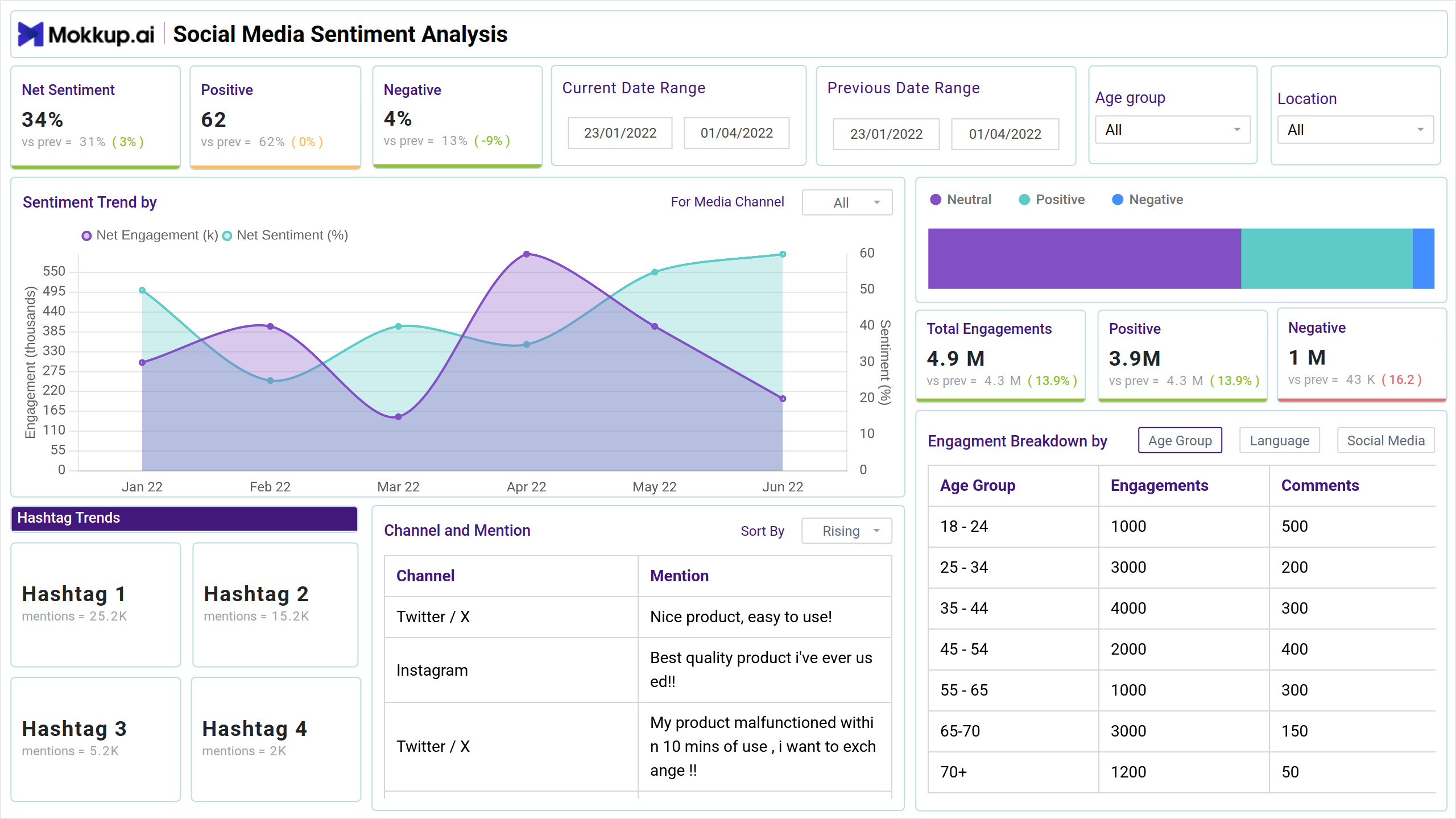
The Social Media Sentiment Analysis Dashboard clearly shows public perception and engagement across social media platforms. It helps businesses understand customer sentiment, notice engagement patterns, and review performance across different demographics and channels.
Best Dashboard For Social Media Sentiment Tracking
Build your own sentiment analysis dashboard with a layout designed to organize key perception and engagement data in one place. The Mokkup Social Media Sentiment Analysis Dashboard gives you a clear structure to explore audience responses across platforms. With flexible filters for dates, demographics, and channels, you can shape the view to match your reporting needs. Once your data is added, the wireframe can be exported to Power BI or Tableau for deeper analysis and reporting. This makes it a practical starting point for teams aiming to understand brand sentiment and audience behavior more clearly.
How To Analyse Social Media Sentiments Data Using Dashboard
The dashboard combines sentiment metrics with engagement data to provide deep insights into how audiences interact with and perceive the brand across social media platforms. The interface presents sentiment analysis alongside historical trends and demographic breakdowns.
This social media sentiment tracker dashboard is thoughtfully designed to display sentiment metrics, such as positive, negative, and net sentiment, alongside patterns in user engagement. It lets you see not only what people are saying but also how they’re interacting with your content. You’ll find visual panels that highlight sentiment trends over time, offering a side-by-side view of peaks in engagement and shifts in perception. These trends are further broken down by demographics, such as age and location, giving you the full context behind the data.
Template For Social Media Sentiment Analysis
You don’t need to build your sentiment dashboard from scratch—just start with a ready-made Social Media Sentiment Analysis Dashboard template from Mokkup. Add your own data and export it in the format you prefer. Here’s how to get started:
1. Create or Log in to Your Mokkup Account
To access the dashboard templates, sign up on Mokkup.ai using your email. If you already have an account, just log in and jump right in.
2. Choose and Customize Your Social Media Sentiment Dashboard
Head to the Templates section and select the Social Media Sentiment Analysis Dashboard. Use the drag-and-drop editor to modify metrics, apply demographic filters, or add elements that align with your reporting needs.
3. Export to Your BI Tool
Once your dashboard is set, use the BI Tool Export feature to move it to Power BI or Tableau for deeper insights. You can also download it as a PDF, PNG, or JPEG, embed it where needed, or share it with your team for easy collaboration.
By using this template, you’re on your way to achieving the best sentiment analysis of social media data, ensuring that your insights are structured, comprehensive, and easy to understand.
Note: This is a Pro template. To use and customize this dashboard wireframe, you’ll need a Pro subscription on Mokkup. Upgrade anytime to unlock full access.
Social Media Sentiment Analysis Metrics To Track
A well-designed social media sentiment analysis tool includes essential metrics that provide clear insights into how your audience perceives your brand across various platforms. By tracking key sentiment and engagement metrics, you can effectively evaluate brand reputation and customer interactions.
Key KPIs to Track:
- Net Sentiment: Measures the overall brand perception by calculating the difference between positive and negative sentiment.
- Sentiment Trend: Visualizes how brand perception changes over time with both engagement volume and sentiment percentage
- Total Engagements: Measures overall interaction volume across platforms
- Positive/Negative Engagement Breakdown: Quantifies the nature of interactions
- Channel Performance: Monitors activity across different social media platforms
Tracking these metrics in a single social media sentiment dashboard allows you to gain valuable insights and refine your social media strategy.
Frequently Asked Questions
Q1. How to measure social media sentiment effectively?
Social media sentiment can be measured by tracking positive, negative, and neutral mentions, calculating net sentiment, and analyzing trends over time across platforms.
Q2. What tools are best for brand monitoring dashboards?
Popular tools include Mokkup.ai for dashboard wireframes, along with Power BI, Tableau, and social media monitoring platforms like Sprout Social or Brandwatch.
Q3. How to track customer feedback across social platforms?
Customer feedback can be tracked by integrating platform data, applying demographic filters, monitoring sentiment categories, and visualizing feedback in a centralized dashboard.
Q4. Best metrics for social media engagement analysis?
Key metrics include total engagements, engagement trends, sentiment breakdown, channel performance, and positive vs. negative interaction ratios.
Q5. What features should sentiment analysis tools include?
Essential features include real-time monitoring, sentiment classification, demographic breakdowns, trend analysis, customizable dashboards, and export options for reporting.