
What is a Secondary Schools Teacher Workforce Management Dashboard?
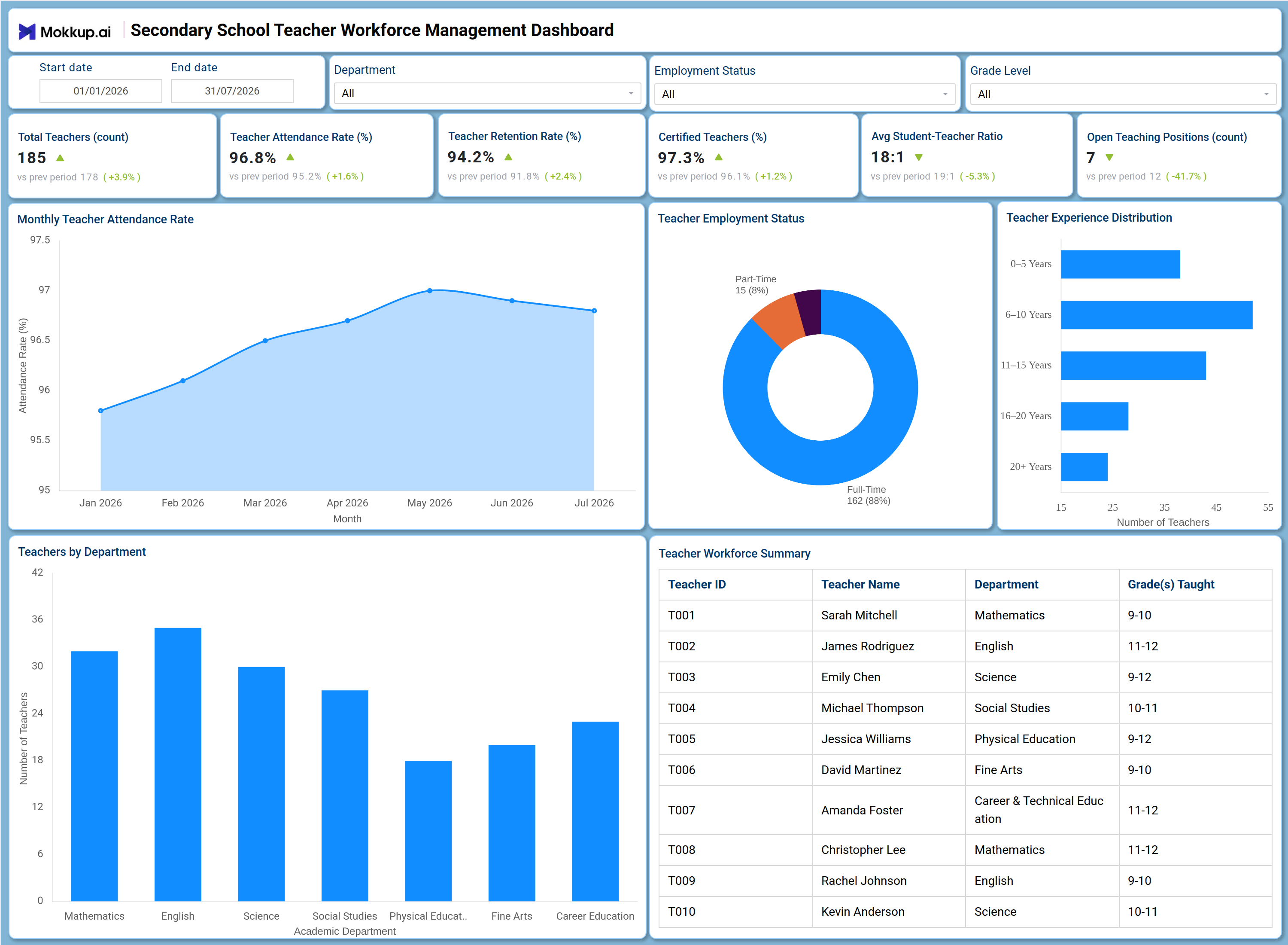
The Secondary Schools Teacher Workforce Management Dashboard is a secondary school teacher workforce dashboard designed for school administrators, HR coordinators, and academic leadership who need one consolidated view of teaching staff strength and stability. Filters for date range, department, employment status, and grade level let administrators narrow workforce data down to the exact segment under review. The dashboard tracks headcount, attendance, retention, certification, staffing ratios, and open positions on a single screen, replacing scattered HR spreadsheets with one reference point for staffing decisions. As a teacher experience distribution dashboard, it also gives leadership visibility into how tenure is spread across departments, supporting long-term succession planning alongside day-to-day scheduling needs.
How to Create a Secondary Schools Teacher Workforce Management Dashboard
You don't need to build your report from scratch; just start with a ready-to-use dashboard template from Mokkup. Add in your data and export it however you like. Here's how to do it:
1. Create or Log in to Your Mokkup Account
Start by signing up on Mokkup.ai using your email. If you already have an account, just log in, and you'll be good to go.
2. Choose and Customize Your Dashboard Template
Find the Secondary Schools Teacher Workforce Management Dashboard template in the Templates section. Use the drag-and-drop editor to adjust KPIs, edit filters, or add elements based on your data.
3. Export to Your BI Tool
Once your dashboard wireframe is ready, use the BI Tool Export feature to send it directly to Power BI or Tableau for further analysis and enhancements. You can also download the dashboard as a PDF, PNG, or JPEG, embed it on a platform, or invite your team to collaborate.
Note: This is a Pro template. You'll need a Pro subscription on Mokkup to use and customize this dashboard wireframe. Upgrade anytime to unlock full access.
Secondary Schools Teacher Workforce Management Dashboard Example
A school HR coordinator opens this teacher retention rate monitoring dashboard at the start of a term to check whether current staffing levels are keeping pace with enrollment and subject coverage needs. Before assigning new sections or approving leave requests, they want to know how many teachers are currently active, how attendance has trended in recent months, and whether any grade level or department is running short on staff. On this screen, administrators can track how attendance is holding across the term and flag any decline before it affects classroom coverage. Comparing certified staff against total headcount confirms the school is meeting accreditation requirements without manually auditing personnel files.
Filtering by department surfaces where teaching capacity is concentrated and where it is thin, so leadership can prioritize recruitment toward departments running lean instead of spreading hiring budget evenly. Reviewing how staff is distributed by tenure supports succession planning, since a department leaning heavily on early-career teachers often needs more mentoring support, while one dominated by long-tenured staff needs a hiring pipeline in place before retirements create a gap. Altogether, the dashboard helps school leadership move from reactive staffing fixes to proactive workforce planning, keeping student-teacher ratios stable and reducing the risk of unfilled teaching positions disrupting the academic calendar.
How to Analyze Data in a Secondary Schools Teacher Workforce Management Dashboard
Here is how you can analyze data from this dashboard:
- Use the Department filter to isolate staffing levels and attendance trends for a specific academic department.
- Apply the Employment Status filter to compare full-time, part-time, and contract patterns in the Teacher Employment Status chart.
- Filter by Grade Level to confirm student-teacher ratio dashboard template metrics hold steady across grade bands.
- Adjust the Start date and End date filters to review workforce trends across a specific term or reporting period.
- Track the Monthly Teacher Attendance Rate line chart as part of a teacher attendance rate tracking dashboard routine to catch dips early.
- Compare bars in Teachers by Department to identify which departments are understaffed relative to others.
- Use the Teacher Experience Distribution dashboard view to see whether the school is over-reliant on early-career or veteran staff.
- Monitor Certified Teachers alongside Total Teachers to confirm accreditation coverage as headcount changes.
Benefits of a Secondary Schools Teacher Workforce Management Dashboard
The following are the benefits of using this dashboard:
- Consolidates headcount, attendance, retention, and certification data into a single secondary school teacher workforce dashboard.
- Gives HR leaders a certified teachers percentage tracking tool that flags accreditation gaps before they reach an audit.
- Reduces manual reconciliation between attendance registers, HR records, and staffing spreadsheets.
- Surfaces understaffed departments early, guiding recruitment budget toward the areas that need it most.
- Highlights shifts in the employment status mix, supporting workforce cost and coverage planning.
- Supports succession planning by revealing how staff experience is distributed across tenure bands.
- Helps leadership track open teaching positions so vacancies are filled before they affect scheduling.
KPIs to Track in a Secondary Schools Teacher Workforce Management Dashboard
The following key KPIs can be tracked by using this dashboard:
- Total Teachers (count): Measures the current headcount of active teaching staff across all departments and grade levels.
- Teacher Attendance Rate (%): Tracks how consistently teaching staff are present, a core input for any teacher attendance rate tracking dashboard view of classroom coverage.
- Teacher Retention Rate (%): Quantifies how many teachers remain employed over a given period, the central metric in a teacher retention rate monitoring dashboard.
- Certified Teachers (%): The certified teachers percentage tracking tool metric that confirms how much of the workforce holds required credentials.
- Average Student-Teacher Ratio (ratio): Evaluates class size pressure by comparing enrolled students against active teaching staff, the basis for any student teacher ratio dashboard template.
- Open Teaching Positions (count): Tracks unfilled roles that need to close before they affect scheduling and subject coverage.
Frequently Asked Questions
1. What industries benefit most from a secondary school teacher workforce dashboard?
Secondary schools, school districts, and education HR teams benefit most, since the dashboard centralizes attendance, retention, and certification tracking for teaching staff. Academic leadership and staffing coordinators also use it to plan recruitment and coverage each term.
2. Can this dashboard track student teacher ratio dashboard template metrics by grade level?
Yes. The Grade Level filter lets administrators check the Average Student-Teacher Ratio KPI and other workforce metrics for a specific grade band instead of the whole school. This helps confirm staffing stays balanced as enrollment shifts across grades.
3. How does the Teacher Experience Distribution chart work?
It groups active teaching staff into tenure bands, from newer teachers to those with over 20 years of experience. Reviewing this breakdown helps leadership plan mentoring programs and anticipate hiring needs before senior staff retire.