
What is a Preschools & Daycare Centers Procurement Dashboard
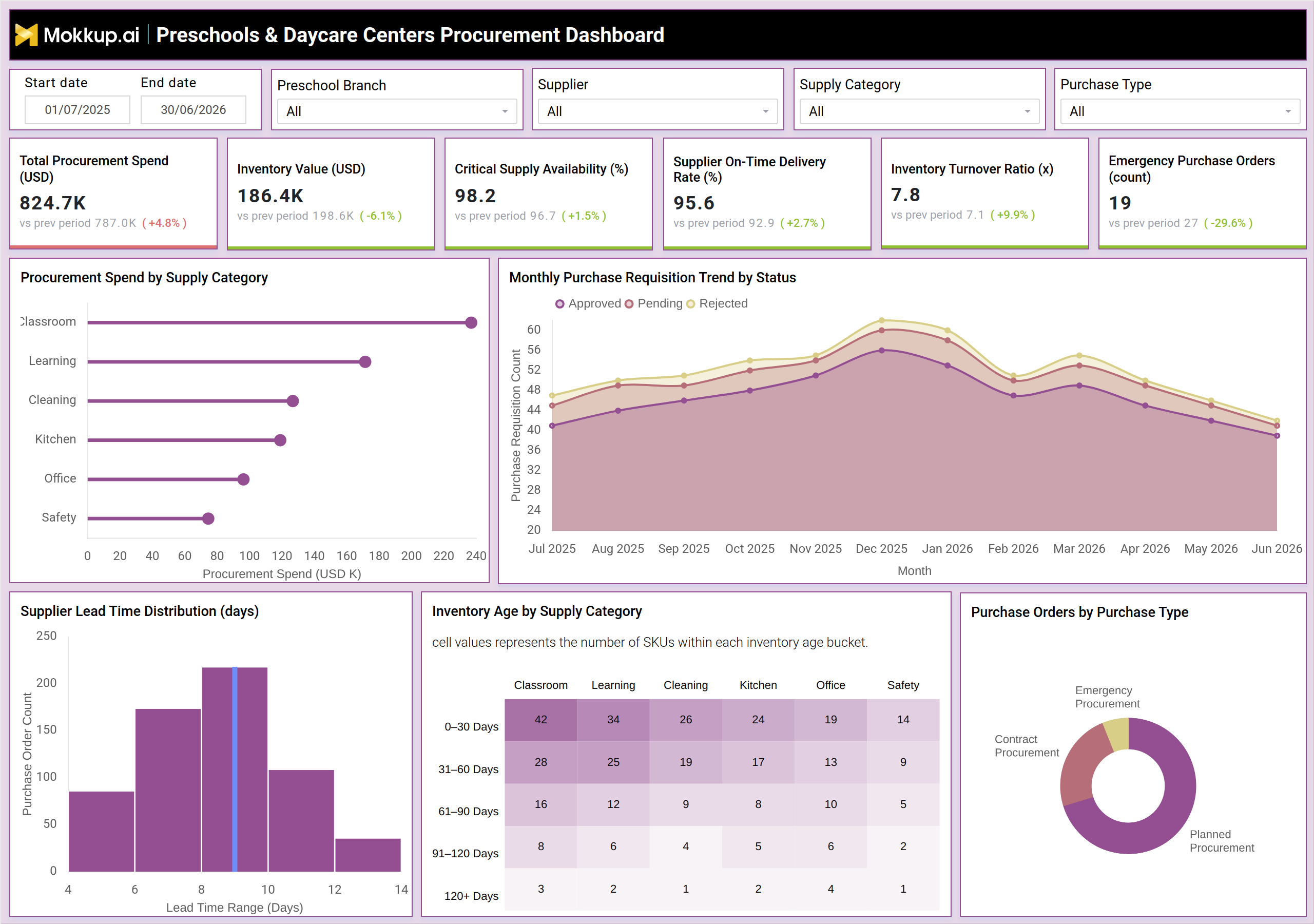
The Preschools & Daycare Centers Procurement Dashboard gives childcare administrators and procurement teams a single view of purchasing activity across preschool branches, suppliers, and supply categories. Built around preschool procurement spend tracking, it consolidates purchase requisitions, inventory levels, and supplier delivery performance into one workspace so finance and operations leaders no longer reconcile numbers across spreadsheets and supplier invoices. Filters for branch, supplier, supply category, and purchase type let users narrow the view to a specific classroom category or vendor relationship within seconds.
The dashboard supports daycare center supplier performance monitoring by surfacing on-time delivery patterns and lead time behavior alongside spend and inventory figures, connecting cost decisions to vendor reliability. Because childcare centers depend on a steady supply of classroom materials, cleaning products, and kitchen essentials, the dashboard also anchors childcare-critical supply availability monitoring so shortages get caught before they disrupt daily operations. Whether reviewing a single branch or the full network, procurement leaders get a consistent, structured view of how money moves through the supply chain.
How to Create a Preschools & Daycare Centers Procurement Dashboard
You don't need to build your report from scratch; just start with a ready-to-use dashboard template from Mokkup. Add in your data and export it however you like. Here's how to do it:
1. Create or Log in to Your Mokkup Account
Start by signing up on Mokkup.ai using your email. If you already have an account, just log in, and you'll be good to go.
2. Choose and Customize Your Dashboard Template
Find the Preschools & Daycare Centers Procurement Dashboard template in the Templates section. Use the drag-and-drop editor to adjust KPIs, edit filters, or add elements based on your data.
3. Export to Your BI Tool
Once your dashboard wireframe is ready, use the BI Tool Export feature to send it directly to Power BI or Tableau for further analysis and enhancements. You can also download the dashboard as a PDF, PNG, or JPEG, embed it on a platform, or invite your team to collaborate.
Note: This is a Pro template. You'll need a Pro subscription on Mokkup to use and customize this dashboard wireframe. Upgrade anytime to unlock full access.
Preschools & Daycare Centers Procurement Dashboard Example
A procurement coordinator at a preschool network opens this dashboard each week to check whether spending is staying on plan and whether critical supplies are on hand across every branch. Before reviewing individual purchase orders, they want a quick read on spend, available inventory, and supplier reliability so they know where to focus attention first. From the main view, the coordinator can identify which supply categories are consuming the largest share of the procurement budget and compare that against typical seasonal demand. They can track how purchase requisitions move through approval, pending, and rejected stages month over month, which helps them spot bottlenecks before classroom or kitchen restocking gets delayed.
When supplier delivery performance dips, teams can pinpoint which vendors are contributing to lead time variability and prioritize follow-up conversations with the ones causing the most disruption. Reviewing inventory aging alongside supply category lets planners decide where to slow future orders and where to accelerate replenishment before stock runs low. Ultimately, the dashboard helps procurement and operations teams balance cost discipline with supply continuity. Instead of reacting to shortages or emergency orders after the fact, teams can plan ahead, negotiate with suppliers from a position of data-backed insight, and keep every preschool branch stocked without overspending.
How to Analyze Data in a Preschools & Daycare Centers Procurement Dashboard
Here is how you can analyze data from this dashboard:
- Analyze procurement by location: Filter by Preschool Branch and Supplier to evaluate spending and delivery performance for a specific location or vendor.
- Identify major cost drivers: Compare Procurement Spend by Supply Category to determine which supply categories contribute the most to overall costs.
- Monitor inventory performance: Use the childcare inventory management dashboard to track changes in inventory value and turnover over the selected date range.
- Track requisition status: Review the Monthly Purchase Requisition Trend by Status to identify growing volumes of pending or rejected requests.
- Evaluate supplier reliability: Cross-check Supplier Lead Time Distribution with on-time delivery rates to identify inconsistent vendors.
- Identify aging inventory: Review the Inventory Age by Supply Category table to detect stock exceeding acceptable age thresholds.
- Analyze purchasing patterns: Segment Purchase Orders by Purchase Type to compare planned, contract-based, and emergency spending.
- Plan inventory replenishment: Combine preschool purchase requisition data with supplier lead time trends to restock supplies before shortages occur.
Benefits of a Preschools & Daycare Centers Procurement Dashboard
The following are the benefits of using this dashboard:
- Centralize procurement data: Track preschool purchase requisitions across branches, suppliers, and supply categories in a single dashboard.
- Reduce manual reporting: Combine procurement spend, inventory, and supplier data into one centralized view.
- Control supply chain costs: Identify spending concentration across supply categories to improve daycare procurement planning.
- Monitor supplier performance: Evaluate supplier performance to support vendor negotiations or replacement decisions.
- Prevent supply shortages: Track critical supply availability trends to identify potential classroom and kitchen shortages early.
- Speed up approvals: Identify bottlenecks in pending and rejected requisitions to streamline the approval process.
- Support budget planning: Monitor inventory turnover and aging stock to make more informed budgeting decisions.
- Standardize procurement reviews: Provide preschool leadership with a consistent framework for tracking procurement spend across review cycles.
KPIs to Track in a Preschools & Daycare Centers Procurement Dashboard
The following key KPIs can be tracked by using this Preschool purchase requisition tracking dashboard:
- Total Procurement Spend (USD) - the total value of purchases made across all branches and supply categories in the selected period.
- Inventory Value (USD) - the current worth of on-hand stock, used to balance capital tied up against operational readiness.
- Critical Supply Availability (%) - the share of essential classroom, kitchen, and safety supplies that remain in stock.
- Supplier On-Time Delivery Rate (%) - the percentage of supplier orders delivered within the agreed timeframe.
- Inventory Turnover Ratio (x) - how many times inventory is used and replenished over the period, reflecting daycare supply chain cost control.
- Emergency Purchase Orders (count) - the number of unplanned purchases triggered by stockouts or urgent needs.
Frequently Asked Questions
1. Who should use the Preschools & Daycare Centers Procurement Dashboard?
Preschool and daycare procurement coordinators, operations managers, and finance leaders who oversee purchasing across multiple branches should use this dashboard. It also supports supplier relationship owners who need visibility into delivery performance.
2. What data does this dashboard need to function?
It needs purchase order records, supplier delivery timestamps, inventory stock levels, and supply category tags. Once this data is connected, the dashboard updates its views for spend, inventory, and supplier performance automatically.
3. Can this dashboard support childcare critical supply availability monitoring across multiple branches?
Yes, the Preschool Branch filter lets teams isolate a single location or view all branches together. This makes it straightforward to compare supply availability and spend patterns network-wide.