
What is a Pediatric Staff Allocation Dashboard?
A Pediatric Staff Allocation Dashboard is a comprehensive analytics tool designed for HR managers in pediatric hospitals to monitor, evaluate, and optimize workforce performance. It consolidates data from multiple HR and clinical systems to present a real-time view of staff utilization, patient load per pediatrician, training progress, and recruitment efficiency.
Using a pediatric workforce management dashboard template, HR teams can quickly identify overworked staff, skill gaps, and areas needing additional resources. It also helps align staffing levels with patient demand and service capacity. The dashboard wireframe helps with evidence-based decision-making in workforce planning by tracking utilization, turnover, and competency data over time.
This type of hospital HR dashboard for pediatrics enables HR and operations leaders to visualize workforce distribution, control labor costs, and enhance pediatric care delivery by ensuring optimal staff-to-patient ratios.
How to Create a Pediatric Staff Allocation Dashboard
You don’t need to build your report from scratch—just start with a ready-to-use Pediatric Staff Allocation dashboard template from Mokkup. Add in your data and export it however you like. Here’s how to do it:
1. Create or Log in to Your Mokkup Account
Start by signing up on Mokkup.ai using your email. If you already have an account, just log in, and you’ll be good to go.
2. Choose and Customize Your Dashboard Template
Find the Pediatric Staff Allocation Dashboard template in the Templates section. Use the drag-and-drop editor to adjust KPIs, edit filters, or add elements based on your data.
3. Export to Your BI Tool
Once your dashboard wireframe is ready, use the BI Tool Export feature to send it directly to Power BI or Tableau for further analysis and enhancements. You can also download the dashboard as a PDF, PNG, or JPEG, embed it on a platform, or invite your team to collaborate.
Note: This is a Pro template. You’ll need a Pro subscription on Mokkup to use and customize this dashboard wireframe. Upgrade anytime to unlock full access.
Pediatric Staff Allocation Dashboard Example
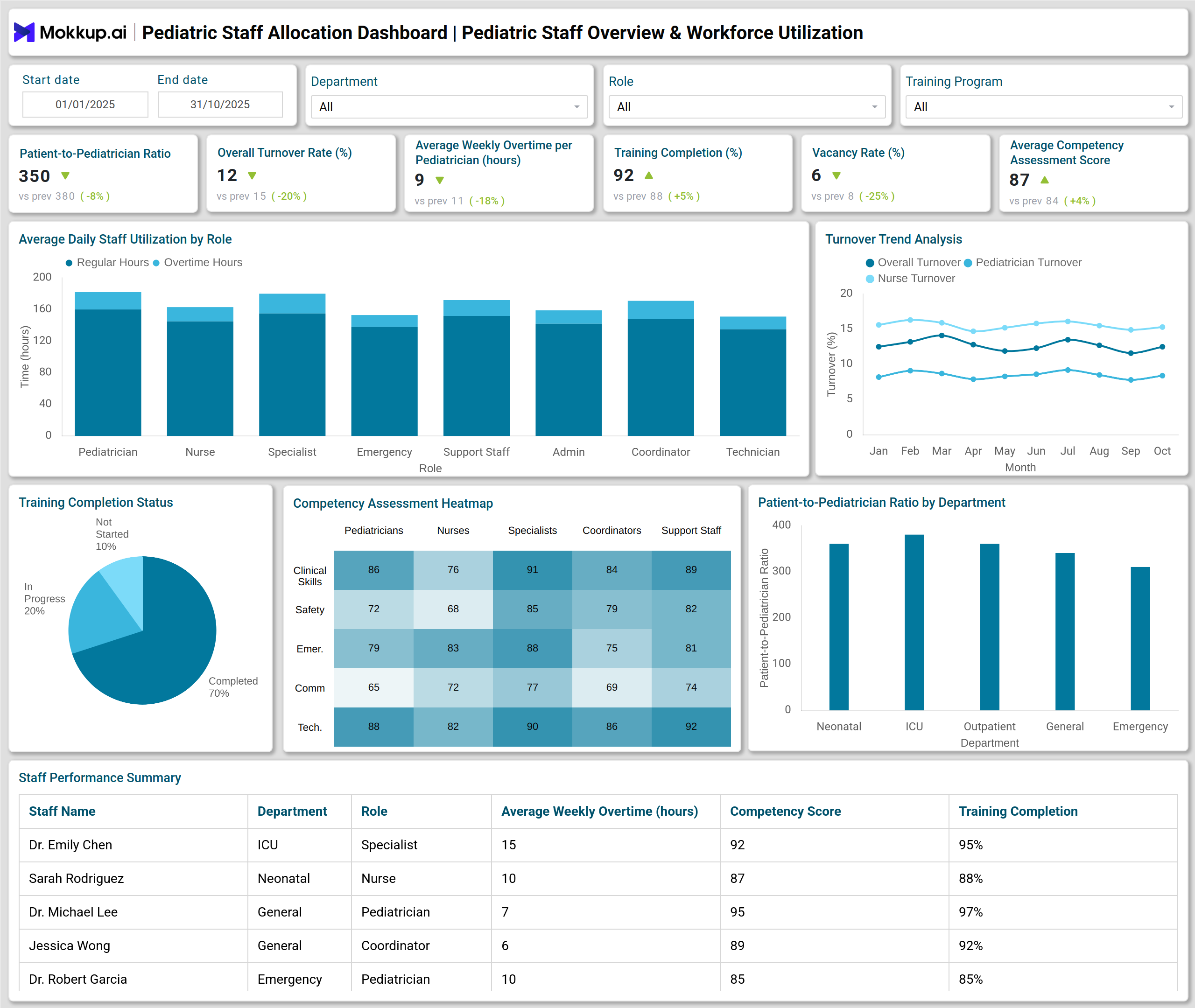
A Pediatric Staff Allocation Dashboard for HR managers can feature a series of insightful visualizations that turn workforce data into actionable intelligence. For example, a Stacked Column Chart can show staff utilization by role, distinguishing between regular and overtime hours. A Line Chart can display turnover trends by staff category over time, while a Pie Chart can summarize training completion statuses, completed, in-progress, or not started.
A Heatmap can visualize competency scores across staff and skill areas, helping HR teams identify where training or mentoring is needed. A Column Chart can compare the number of patients per pediatrician across departments, while another Column Chart can track recruitment cost versus time-to-fill trends. To analyze recruitment effectiveness, a Funnel Chart can outline the conversion from applicants to hires, and a Table can list recruitment source performance in terms of cost per hire and average time-to-fill. Finally, a Waterfall Chart can break down turnover costs into components like separation, replacement, and onboarding expenses. Together, these visuals provide a detailed overview of pediatric workforce efficiency, cost control, and training outcomes.
How to Analyze Data in Pediatric Staff Allocation Dashboards
Pediatric staff allocation dashboards help hospital leaders monitor workforce performance, balance workloads, and optimize staffing across pediatric units. Hospitals can ensure efficient operations by analyzing key metrics while maintaining high-quality patient care:
- Monitor Utilization Efficiency: Evaluate patients per pediatrician and overtime hours to detect workload imbalances.
- Track Retention and Turnover: Use turnover trend data to identify departments with high attrition and plan targeted retention measures.
- Assess Training Impact: Review training completion rates and competency scores to gauge staff development and readiness.
- Optimize Recruitment: Analyze recruitment costs, time-to-fill, and conversion rates to identify the most effective hiring channels.
- Control Costs: Use turnover cost breakdowns to monitor financial impacts and justify investments in retention or training programs.
- Align Staffing with Demand: Cross-check patient volumes and staff availability to ensure optimal allocation for pediatric units.
Benefits of Pediatric Staff Allocation Dashboards
A pediatric staff allocation dashboard gives hospitals a clear view of workforce performance, enabling smarter HR decisions and better aligning staff with patient needs:
- Improved Workforce Utilization: Helps maintain the right balance of pediatricians, nurses, and support staff.
- Data-Driven HR Decisions: Consolidates workforce metrics for accurate and timely insights.
- Enhanced Staff Performance Visibility: Tracks productivity and competency scores across roles.
- Reduced Turnover and Recruitment Cost: Identifies retention challenges early and improves recruitment ROI.
- Better Training Outcomes: Monitors completion rates and training effectiveness across staff categories.
- Optimized Staffing Efficiency: Aligns staffing levels with patient needs to ensure high-quality pediatric care.
KPIs to Track in Pediatric Staff Allocation Dashboards
Tracking the right KPIs ensures optimal staffing, improved workforce performance, and efficient pediatric care delivery:
- Patients per Pediatrician: Measures workload and patient care distribution.
- Overall Turnover Rate (%): Tracks retention across departments.
- Average Overtime Hours per Pediatrician: Evaluates staff workload and burnout risk.
- Training Completion (%): Indicates staff development and training compliance.
- Vacancy Rate (%): Shows unfilled positions affecting operational efficiency.
- Average Competency Assessment Score: Reflects skill proficiency across the pediatric workforce.
- Time-to-Fill (Average Days): Measures recruitment process speed
Frequently Asked Questions
Q1. Who uses the Pediatric Staff Allocation Dashboard?
HR managers, department heads, and hospital administrators in pediatric institutions use the dashboard to monitor workforce utilization and performance.
Q2. How often should the dashboard be updated?
Ideally, it should be updated in real time or daily to ensure decisions are based on the latest workforce and patient data.
Q3. What is the key benefit of tracking pediatric workforce utilization?
It helps prevent staff overload, improves patient outcomes, and enhances operational efficiency through better workforce balance.
Q4. How does training ROI help HR managers?
It quantifies the value of staff training programs, helping justify budgets and ensuring learning initiatives drive measurable results.