
What is an International School Workforce Management Dashboard?
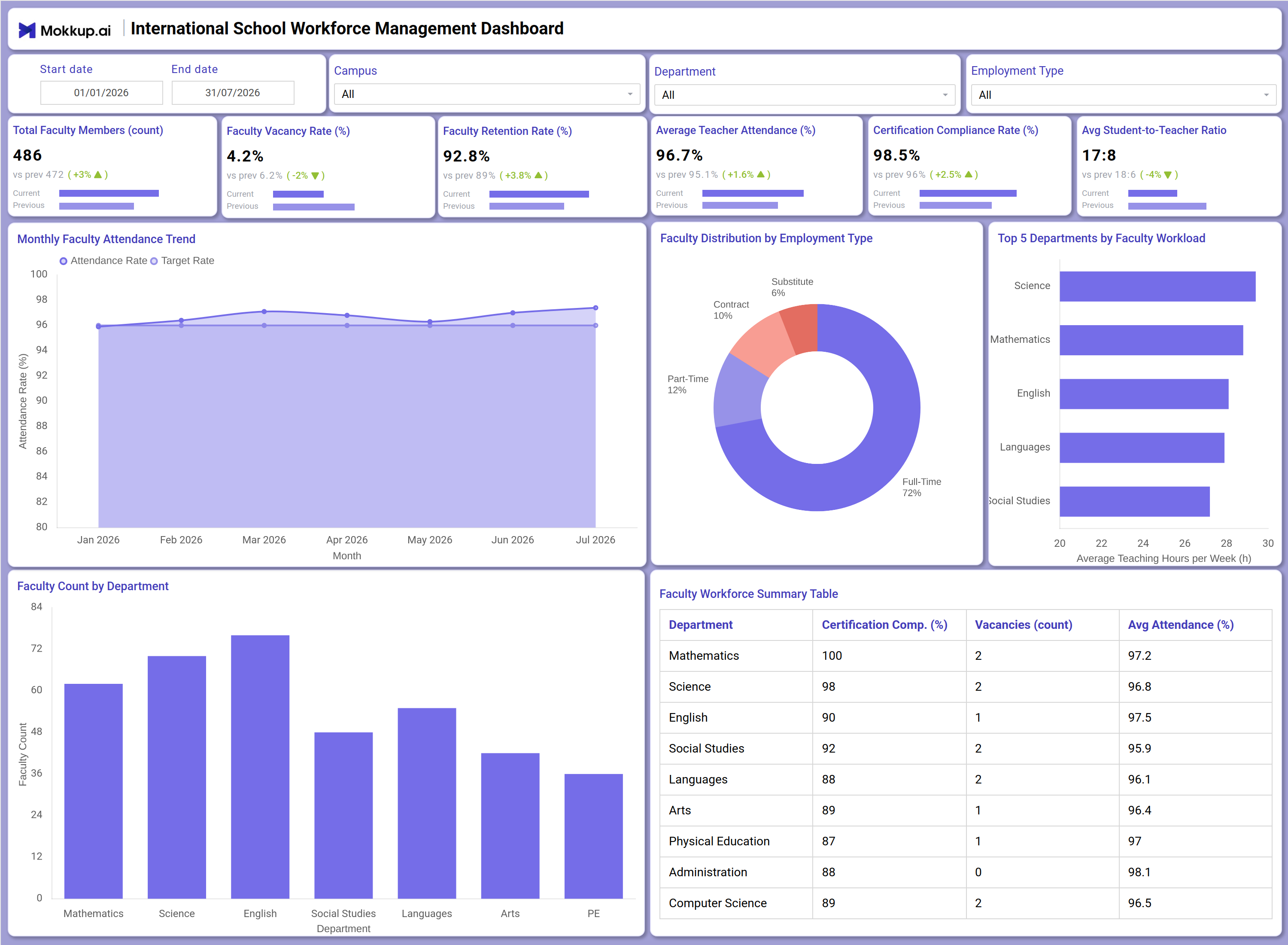
The International School Workforce Management Dashboard is a workforce analytics template built for international school administrators, HR leads, and academic coordinators who need a single view of teaching staff across campuses and departments. This international school workforce management dashboard consolidates headcount, attendance, retention, certification, and workload data so leadership teams can monitor staffing health without pulling numbers from multiple systems. It tracks metrics such as total faculty members, faculty vacancy rate, retention, average teacher attendance, certification compliance, and student-to-teacher ratio, alongside a view of faculty workload distribution by department that highlights where teaching hours are concentrated. Built on Mokkup's dashboard template library, it gives school leadership a structured starting point for reporting on faculty operations across campuses and employment types.
How to Create an International School Workforce Management Dashboard
You don’t need to build your report from scratch; just start with a ready-to-use dashboard template from Mokkup. Add in your data and export it however you like. Here’s how to do it:
1. Create or Log in to Your Mokkup Account
Start by signing up on Mokkup.ai using your email. If you already have an account, just log in, and you'll be good to go.
2. Choose and Customize Your Dashboard Template
Find the International School Workforce Management Dashboard template in the Templates section. Use the drag-and-drop editor to adjust KPIs, edit filters, or add elements based on your data.
3. Export to Your BI Tool
Once your dashboard wireframe is ready, use the BI Tool Export feature to send it directly to Power BI or Tableau for further analysis and enhancements. You can also download the dashboard as a PDF, PNG, or JPEG, embed it on a platform, or invite your team to collaborate.
Note: This is a Pro template. You'll need a Pro subscription on Mokkup to use and customize this dashboard wireframe. Upgrade anytime to unlock full access.
International School Workforce Management Dashboard Example
A school HR director or campus principal typically opens this dashboard at the start of a term to understand how faculty staffing is holding up across departments and campuses. Using the Start date, End date, Campus, Department, and Employment Type filters, they narrow the view to a specific term, site, or subject area before reviewing overall staffing health. The goal is usually to answer a simple question: are teaching positions adequately filled, and are teachers being retained and supported well enough to stay through the year? From there, the dashboard supports several concrete decisions. Leadership can treat the retention trend as a faculty retention rate tracking dashboard view, checking whether retention is improving or slipping term over term, and cross-check that trend against attendance data using the chart as a teacher attendance rate monitoring tool to see whether dips align with departments carrying heavier vacancy counts.
The Faculty Distribution by Employment Type view helps HR planners judge whether the balance of full-time, part-time, contract, and substitute staff matches the school's staffing strategy, while the Top 5 Departments by Faculty Workload comparison lets academic coordinators identify which subject areas are carrying the most teaching hours and are candidates for additional hires. The Faculty Workforce Summary Table lets department heads compare certification compliance, vacancies, and attendance side by side to prioritize where to focus recruitment or support first. The overall outcome is a workforce view that helps international school leadership balance staffing levels, protect certification compliance, and act on retention or workload issues before they affect classroom continuity, rather than discovering problems only once a term is already underway.
How to Analyze Data in an International School Workforce Management Dashboard
Here is how you can analyze data from this dashboard:
- Use the Campus and Department filters to isolate staffing performance for a specific site or subject area.
- Treat the Monthly Faculty Attendance Trend chart as a teacher attendance rate monitoring tool to catch dips against the Target Rate before they affect classroom coverage.
- Review the trend line on this faculty retention rate tracking dashboard to assess whether retention initiatives are working term over term.
- Use the Faculty Distribution by Employment Type donut chart to identify how reliant a campus is on part-time, contract, or substitute staff.
- Compare the Top 5 Departments by Faculty Workload bar chart to find subject areas with the highest average teaching hours per week.
- Analyze the Faculty Count by Department bar chart alongside faculty workload distribution by department to spot understaffed subject areas.
- Filter by Employment Type to align workforce planning with contract renewal or hiring cycles.
- Cross-reference the Faculty Workforce Summary Table to spot departments where certification compliance or vacancies need attention.
Benefits of a International School Workforce Management Dashboard
The following are the benefits of using this dashboard:
- Centralizes faculty headcount, attendance, retention, and certification metrics for an international school workforce management dashboard in one structured template.
- Supports certification compliance rate tracking across every department without compiling spreadsheets manually.
- Reduces manual reporting effort with pre-built KPI tiles and department-level breakdowns for HR reviews.
- Enables campus- and department-level analysis of faculty workload distribution by department to guide hiring and scheduling decisions.
- Provides a Faculty Distribution by Employment Type donut breakdown to support workforce composition planning.
- Functions as a ready-to-use faculty vacancy rate dashboard template so schools can act on staffing gaps early.
- Gives principals, HR leads, and department heads a shared view of faculty performance across campuses.
KPIs to Track in a International School Workforce Management Dashboard
The following key KPIs can be tracked by using this dashboard:
- Total Faculty Members (count): Tracks total teaching staff onboarded across all campuses and departments, the baseline for every other metric on the dashboard.
- Faculty Vacancy Rate (%): Central to this faculty vacancy rate dashboard template, it quantifies the share of unfilled teaching positions relative to approved roles.
- Faculty Retention Rate (%): Measures the percentage of faculty retained over a period, a core metric for this faculty retention rate tracking dashboard and staff pipeline planning.
- Average Teacher Attendance (%): Tracks how consistently faculty are present for scheduled teaching duties across the selected term.
- Certification Compliance Rate (%): Supports certification compliance rate tracking by measuring the share of faculty holding required credentials.
- Avg Student-to-Teacher Ratio: Evaluates classroom staffing adequacy by comparing enrolled students against available faculty per department.
Frequently Asked Questions
1. What industries benefit most from the International School Workforce Management Dashboard?
International school networks, multi-campus school groups, and HR teams overseeing certified teaching staff benefit most from this international school workforce management dashboard. It also suits academic coordinators comparing staffing levels across departments and campuses.
2. Can this dashboard track faculty vacancy rates across multiple campuses?
Yes. The Campus filter combined with the Faculty Vacancy Rate KPI lets HR teams compare openings across sites, making this a practical faculty vacancy rate dashboard template for multi-campus school networks.
3. Does the dashboard support certification compliance monitoring by department?
Yes, the Faculty Workforce Summary Table breaks down certification compliance percentage, vacancies, and attendance by department, supporting certification compliance rate tracking without extra spreadsheet work.