
What is an Employee Safety Dashboard?
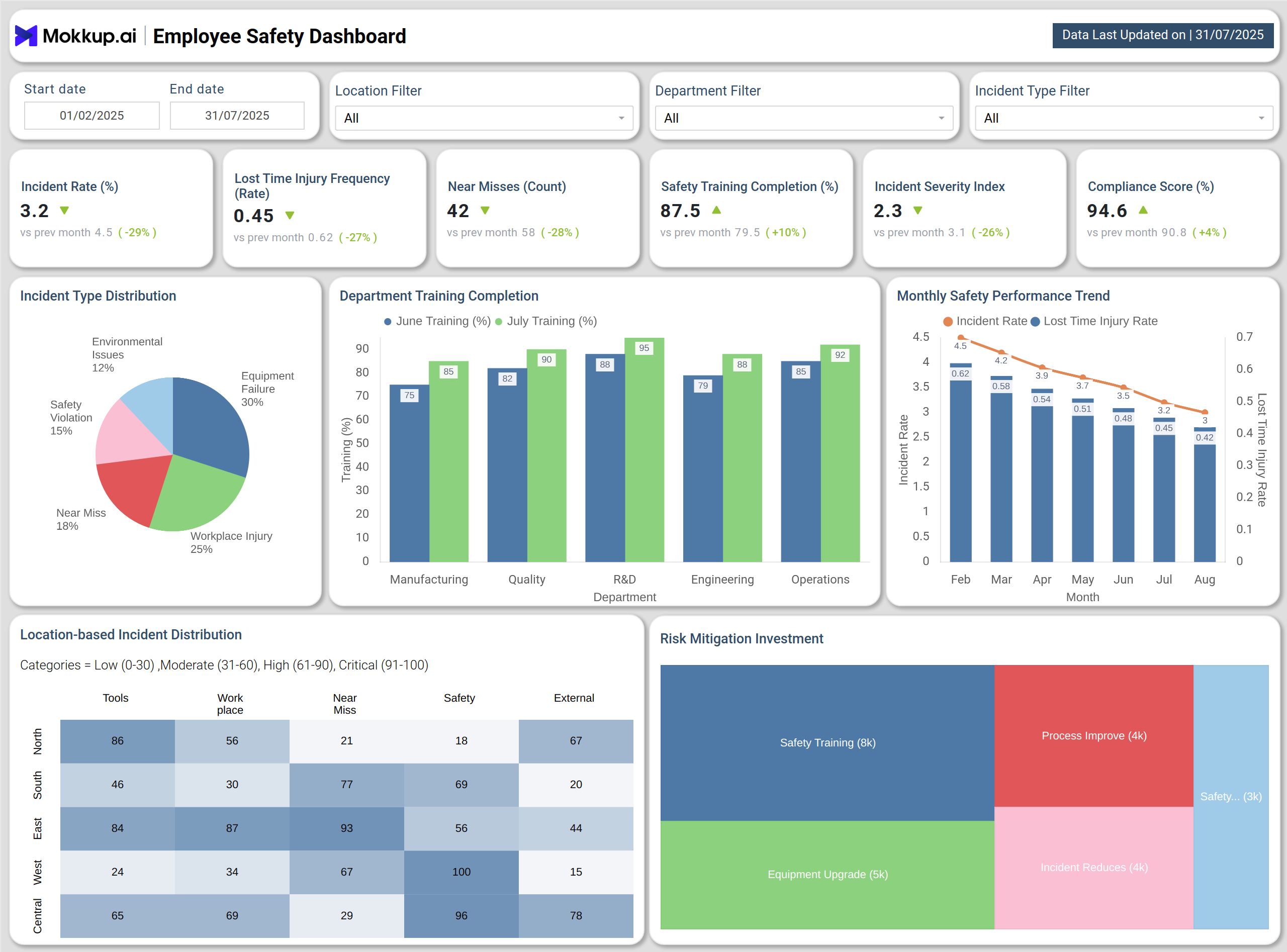
An Employee Safety Dashboard is a workplace safety analytics tool that provides a centralized view of safety KPIs across locations and departments. It tracks metrics such as Incident Rate, Lost Time Injury Frequency, Near Misses, Safety Training Completion, Incident Severity, and Compliance Score. By consolidating this data into one platform, safety managers can monitor workplace risks, ensure compliance with safety regulations, and implement proactive safety measures. This dashboard helps organizations build a culture of safety while reducing incidents and operational risks.
How To Create Employee Safety Dashboards
You don’t need to build your report from scratch—just start with a ready-to-use Employee safety dashboard template from Mokkup. Add in your data and export it however you like. Here’s how to do it:
1. Create or Log in to Your Mokkup Account
Start by signing up on Mokkup.ai using your email. If you already have an account, just log in, and you’ll be good to go.
2. Choose and Customize Your Dashboard Template
Find the Employee Safety Dashboard template in the Templates section. Use the drag-and-drop editor to adjust KPIs, edit filters, or add elements based on your data.
3. Export to Your BI Tool
Once your dashboard wireframe is ready, use the BI Tool Export feature to send it directly to Power BI or Tableau for further analysis and enhancements. You can also download the dashboard as a PDF, PNG, or JPEG, embed it on a platform, or invite your team to collaborate.
Note: This is a Pro template. You’ll need a Pro subscription on Mokkup to use and customize this dashboard wireframe. Upgrade anytime to unlock full access.Employee
Employee Safety Dashboard Example
Create your personalized safety KPI dashboard, bringing all employee safety data into one structured view. The Mokkup Employee Safety Dashboard wireframe includes visualizations such as Incident Type Distribution, Department Training Completion, Monthly Safety Performance Trend, Location-Based Incident Distribution, and Risk Mitigation Investment. Filters for date, location, department, and incident type allow teams to analyze safety metrics at both macro and micro levels. Once populated, this dashboard can be exported to BI tools like Power BI or Tableau for deeper analysis and compliance reporting.
How to Analyze Data in Employee Safety Dashboard
To effectively use the Employee Safety Dashboard template , follow these steps:
- Track Incident Rate and Lost Time Injury Frequency to measure workplace safety performance.
- Monitor Near Misses to identify risks before they escalate.
- Review Incident Type Distribution to detect recurring hazards such as equipment failures or workplace injuries.
- Analyze Department Training Completion to ensure readiness across all teams.
- Check Monthly Safety Trends for improvements in KPIs.
- Use Location-Based Distribution to target high-risk areas.
- Evaluate Risk Mitigation Investments for their impact on outcomes.
By analyzing data this way,, companies transform the dashboard into an incident tracking and compliance dashboard, ensuring complete visibility into safety operations. At the same time, a safety training completion dashboard strengthens training effectiveness across departments.
Benefits of Employee Safety Dashboard
An Employee Safety Dashboard provides several organizational benefits:
- Reduce Incidents: Monitor safety KPIs in real time to act quickly.
- Enhance Compliance: A workplace safety KPI dashboard helps track compliance scores and regulatory standards.
- Improve Training Outcomes: A safety training completion dashboard ensures department-level training is properly completed.
- Target Risk Areas: Use heatmaps to address high-risk locations.
- Data-Driven Insights: An incident tracking and compliance dashboard guides resource allocation toward training and equipment upgrades.
- Real-Time Monitoring: A real-time employee safety monitoring dashboard enables proactive intervention before risks escalate.
Overall, this dashboard simplifies safety tracking and helps organizations create a more secure, compliant, and productive workplace.
KPIs to Track in Employee Safety Dashboard
A strong Employee Safety Dashboard tracks key KPIs including:
- Incident Rate (%): Tracks all reported incidents, helping assess overall safety performance.
- Lost Time Injury Frequency (Rate): Monitors accidents leading to lost work hours, showing productivity impact.
- Near Misses (Count): Identifies unsafe events that nearly caused harm, supporting risk prevention.
- Safety Training Completion (%): A safety training completion dashboard highlights coverage across staff.
- Incident Severity Index: Shows average severity of incidents to prioritize response.
By monitoring these KPIs, organizations can reduce risks, improve employee well-being, and build a safer workplace.
Frequently Asked Questions
1. Why is an Employee Safety Dashboard important?
It provides real-time visibility into workplace safety KPIs, helping organizations reduce incidents, improve compliance, and create safer environments. Many businesses rely on a
2. Which KPIs are most critical for monitoring?
Key KPIs include Incident Rate, Lost Time Injury Frequency, Near Misses, Training Completion, Incident Severity, and Compliance Score. These are best tracked in a workplace safety KPI dashboard.
3. Can this dashboard improve compliance and training?
Yes. The dashboard highlights compliance scores and regulatory gaps while tracking training completion across teams. This ensures staff readiness, prevents costly penalties, and strengthens the organization’s overall safety culture.