
What is a Dermatology and Cosmetology Staff Performance Dashboard?
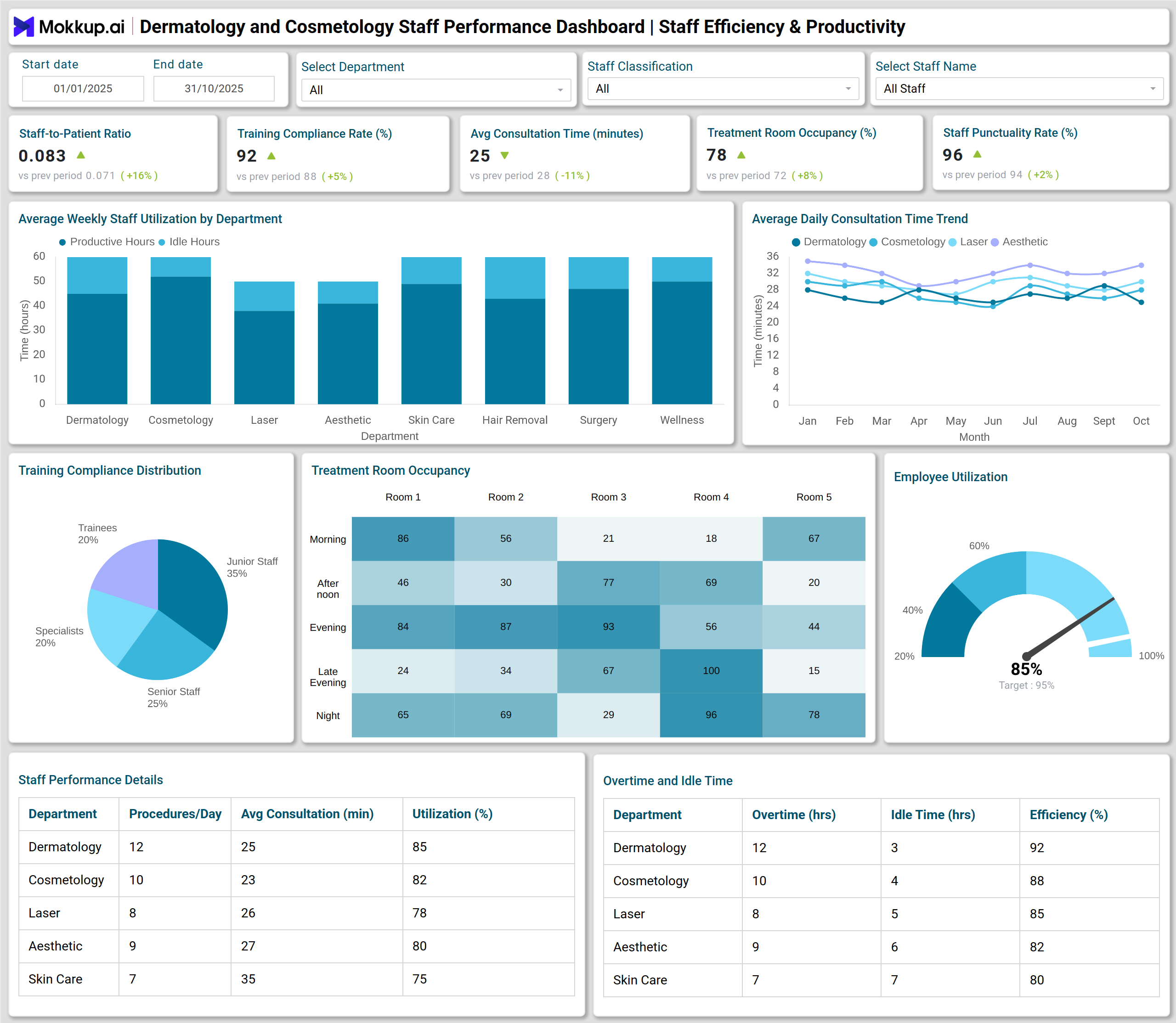
A staff performance dashboard for dermatology clinics is a centralized tool that monitors, measures, and analyzes the efficiency and productivity of healthcare staff. It provides real-time insights into workforce operations, enabling dermatology and cosmetology centers to optimize employee performance, reduce operational inefficiencies, and improve patient satisfaction. This type of healthcare staff performance analytics dashboard tracks critical metrics, including consultation time, training compliance, appointment no-shows, and treatment completion rates. By consolidating key data points into visually intuitive charts and tables, managers can make informed decisions that enhance both staff efficiency and the quality of patient care.
How to Create a Dermatology and Cosmetology Staff Performance Dashboard
You don’t need to build your report from scratch—just start with a ready-to-use dashboard template from Mokkup. Add in your data and export it however you like. Here’s how to do it:
1. Create or Log in to Your Mokkup Account
Start by signing up on Mokkup.ai using your email. If you already have an account, just log in, and you’ll be good to go.
2. Choose and Customize Your Dashboard Template
Find the Dermatology and Cosmetology Staff Performance Dashboard template in the Templates section. Use the drag-and-drop editor to adjust KPIs, edit filters, or add elements based on your data.
3. Export to Your BI Tool
Once your dashboard wireframe is ready, use the BI Tool Export feature to send it directly to Power BI or Tableau for further analysis and enhancements. You can also download the dashboard as a PDF, PNG, or JPEG, embed it on a platform, or invite your team to collaborate.
Note: This is a Pro template. You’ll need a Pro subscription on Mokkup to use and customize this dashboard wireframe. Upgrade anytime to unlock full access.
Dermatology and Cosmetology Staff Performance Dashboard Example
A typical cosmetology staff productivity tracking tool showcases multiple visualizations to provide a clear view of team efficiency. For instance, a stacked column chart can display staff utilization across different departments, highlighting productive versus idle hours. Multiple line charts track average consultation time trends to pinpoint bottlenecks or delays. Heatmaps reveal treatment room occupancy patterns, enabling the optimization of scheduling.
Additionally, this clinical staff performance metrics dashboard includes pie charts and donut charts that can be used to display training compliance and patient rebooking rates by staff category or department. Combining these visuals with performance metrics, such as staff-to-patient ratio and employee utilization rate, allows clinic managers to evaluate team effectiveness comprehensively and identify areas for improvement.
How to Analyze Data in Dermatology and Cosmetology Staff Performance Dashboards
Here is how you can analyze data:
- Compare staff-to-patient ratios across departments to ensure balanced workload distributio
- Track employee utilization rates with gauge charts to identify underused resources.
- Monitor training compliance using pie charts to ensure adherence to regulatory and professional standards.
- Evaluate average consultation times and follow trends over time to improve patient throughput.
- Analyze appointment no-show rates by staff role to address gaps in scheduling or patient communication.
- Utilize heatmaps for treatment room occupancy to optimize facility utilization and minimize patient wait times.
- Examine Net Promoter Scores (NPS) weekly to measure patient satisfaction per department.
- Assess rebooking rates with donut charts to track patient retention and loyalty.
Benefits of Staff Performance Dashboards
These are the benefits of using this Dermatology and Cosmetology Staff Performance Dashboard template:
- Enhanced Workforce Efficiency: Identify idle time, optimize staff allocation, and improve productivity.
- Improved Patient Experience: Monitor follow-up response times, consultation durations, and treatment completion rates.
- Data-Driven Decisions: Managers gain actionable insights to streamline operations and resource utilization.
- Compliance Tracking: Ensure staff complete necessary training and certifications on schedule related to hair and scalp treatments.
- Performance Benchmarking: Compare team performance across departments and roles.
- Reduced Operational Losses: Lower appointment no-shows, cancellations, and drop-offs with better planning.
- Higher Staff Accountability: Transparent tracking encourages responsibility and continuous improvement.
KPIs to Track in Staff Performance Dashboards
You can track the following KPIs from this dermatologist team efficiency monitoring dashboard:
- Staff-to-Patient Ratio (decimal) – Ensures balanced workload distribution.
- Employee Utilization Rate (%) – Measures staff productivity against available hours.
- Training Compliance Rate (%) – Tracks completion of mandatory courses and certifications.
- Average Consultation Time per Patient (minutes) – Evaluates efficiency in patient interactions.
- Treatment Room Occupancy (%) – Monitors space usage for optimal scheduling.
- Staff Punctuality / Attendance Rate (%) – Ensures reliability of team operations.
Frequently Asked Questions
1. Why is a staff performance dashboard important for dermatology clinics?
It provides real-time insights into workforce efficiency, patient care quality, and operational gaps, helping managers make informed decisions.
2. Can a dashboard track patient satisfaction metrics?
Yes, metrics like Net Promoter Score (NPS) and rebooking rates help monitor patient experience and retention.
3. Can this dashboard help reduce no-shows and cancellations?
Yes, by analyzing staff roles, appointment patterns, and follow-up processes, clinics can implement strategies to minimize no-shows and drop-offs.