
What is a Dentist Clinic Staffing Report Dashboard?
Mokkup’s Dentist Clinic Staffing Report dashboard template makes it easy by consolidating essential clinic data, helping managers optimize staff allocation, improve patient care, and enhance overall clinic efficiency.
Best Staffing Report Dashboard Example
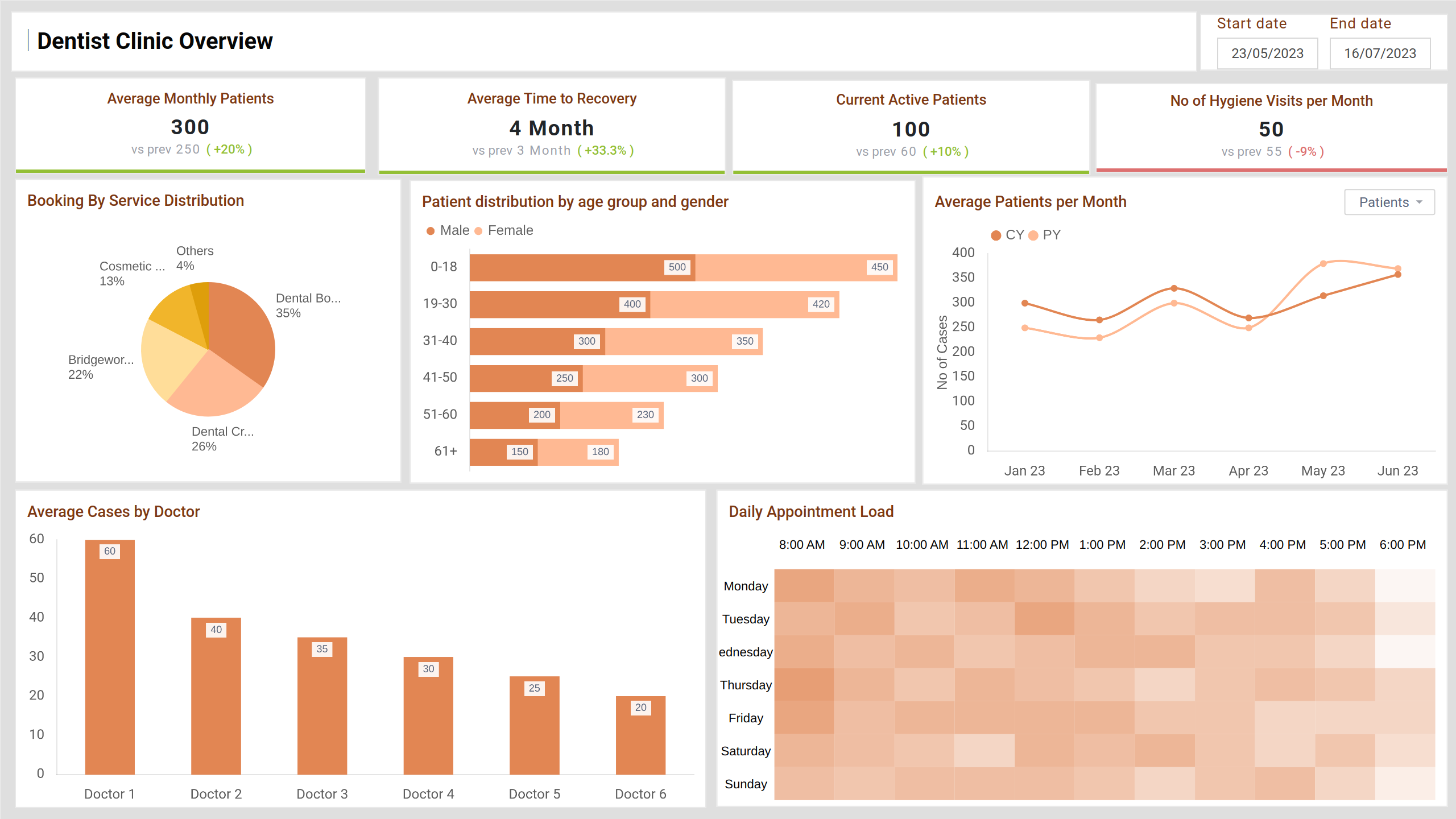
The Staffing Report Dashboard wireframe provides a centralized view of clinic operations, combining patient activity, staff workload, and treatment trends into a clear and actionable layout. Designed for clinic managers and healthcare administrators, this template simplifies tracking staff allocation, patient flow, and service demand to ensure efficient, quality care delivery.
How to Analyze Data in Staffing Dashboards
Dentist Clinic Staffing dashboard wireframe provides a clear view of operational trends, enabling better decision-making. Here's how to effectively analyze the data they offer:
- Monitor patient flow patterns: Track appointment volume over time to identify peak days and hours for smarter scheduling.
- Compare staff workload: Evaluate the number of cases handled per staff member to ensure balanced task distribution.
- Review patient demographics: Use age and gender breakdowns to tailor staffing and services based on patient needs.
- Identify service demand: Analyze which treatments or services are booked most to allocate staff accordingly.
- Track recovery and follow-up timelines: Ensure patients are progressing well and receiving timely care.
Regularly reviewing these key points helps maintain smooth operations, reduce staff burnout, and improve patient satisfaction.
How to Create a Dentist Clinic Staffing Report Dashboard
You don’t need to build your report from scratch—just start with a ready-to-use sample Dentist Clinic Staffing Report dashboard template from Mokkup. Add in your data and export it however you like. Here’s how to do it:
1. Create or Log in to Your Mokkup Account
Start by signing up on Mokkup.ai using your email. Already have an account? Just log in, and you’re good to go.
2. Choose and Customize Your Dashboard Template
Find the Dentist Clinic Staffing Report dashboard template in the Templates section. Use the drag-and-drop editor to adjust KPIs, edit filters, or add elements based on your data.
3. Export to Your BI Tool
Once your dashboard wireframe is ready, use the BI Tool Export feature to send it directly to Power BI or Tableau for further analysis and enhancements. You can also download the dashboard as a PDF, PNG, or JPEG, embed it on a platform, or invite your team to collaborate.
Note: This is a Pro template. To use and customize this dashboard wireframe, you’ll need a Pro subscription on Mokkup. Upgrade anytime to unlock full access.
Benefits of Dentist Clinic Staffing Dashboards
Staffing dashboards help healthcare and clinic managers keep operations efficient by offering real-time visibility into staff performance, patient load, and appointment schedules. Here are some key benefits:
- Optimized Staff Allocation: Identify over or underutilized staff and balance workloads effectively.
- Improved Patient Care: Ensure the right staff are available at the right time to reduce wait times and enhance patient satisfaction.
- Enhanced Scheduling: Use data to plan ahead for high-demand periods and avoid appointment bottlenecks.
- Performance Monitoring: Track productivity metrics for each staff member and make informed training or resource planning decisions.
- Better Resource Management: Align staffing with service demand to reduce operational inefficiencies and cut costs.
- Data-Driven Decision-Making: Spot trends and patterns to improve long-term planning and staffing strategies.
In summary, staffing dashboards help clinics run smoothly, improve patient care, and support better workforce decisions with real-time data.
KPIs to Track in Staffing Dashboards
Tracking the right KPIs ensures efficient clinic operations and high-quality patient care. Staffing analytics dashboard wireframe combines key performance indicators to help managers monitor employee productivity, appointment load, and patient engagement.
The following KPIs offer a comprehensive snapshot of the clinic’s performance:
- Average Monthly Patients: Tracks the average number of patients visiting the clinic per month.
- Average Time to Recovery: Measures the average recovery time for patients after treatment, ensuring timely follow-ups.
- Current Active Patients: Shows the number of ongoing treatments and the active patient load.
- Number of Hygiene Visits per Month: Provides insight into the number of hygiene visits, helping assess preventive care engagement.
Frequently Asked Questions
1. What is a staffing dashboard used for?
It helps track staff performance, patient load, and clinic efficiency in one place.
2. Who can use a staffing dashboard?
Clinic managers, HR teams, and healthcare admins use it to make better staffing and scheduling decisions.