
What is a Digital Marketing Dashboard?
A digital marketing analytics dashboard shows all your online marketing data in one place. It pulls together metrics like SEO traffic, ad performance, cost per acquisition, and conversion rates so you can see what’s working and what’s not. It’s great for tracking progress across different channels and making better decisions without switching between tools.
Digital Marketing Dashboard Example
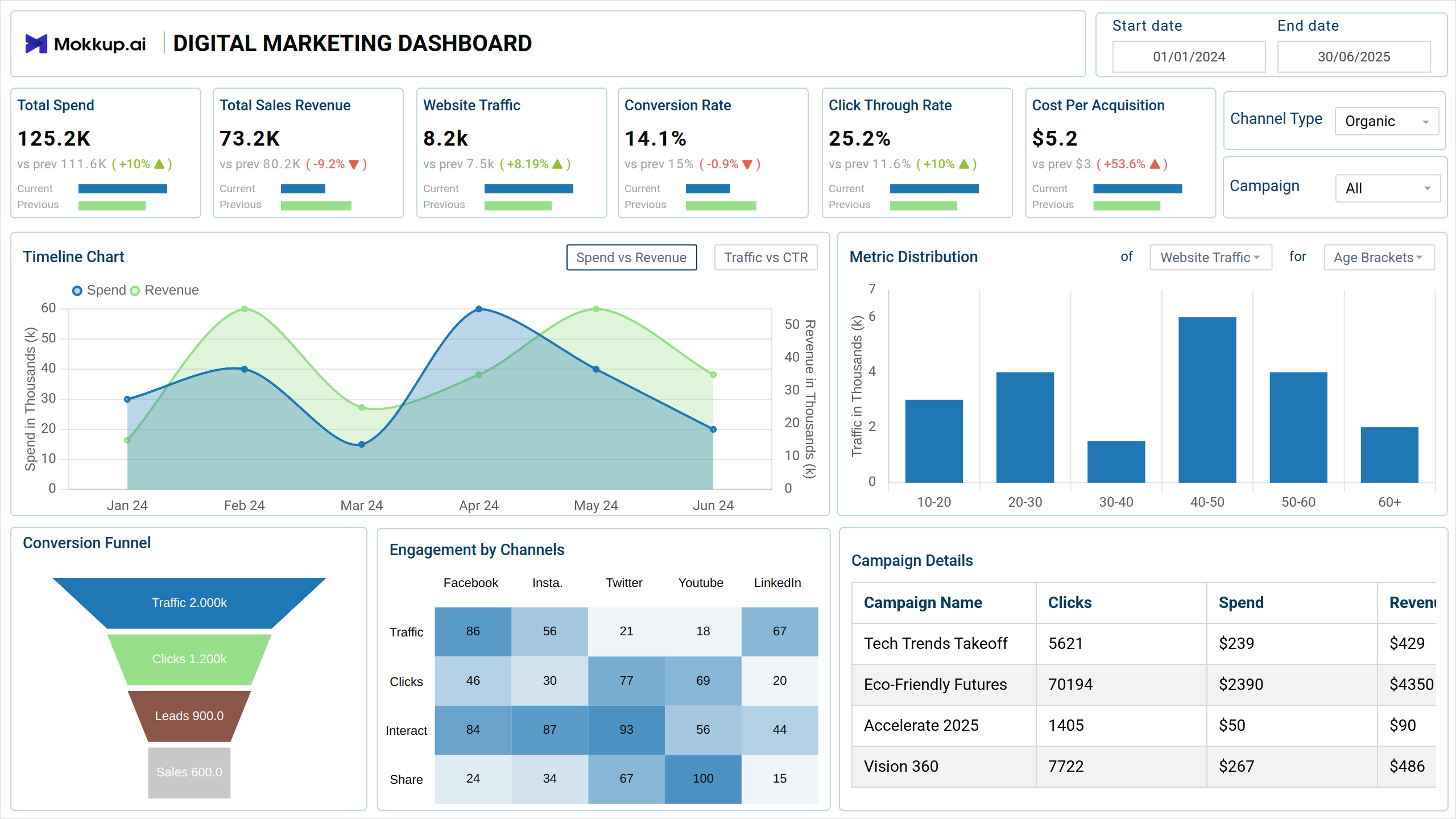
Create your personalized marketing KPI dashboard, bringing all of your key metrics into one view. The Mokkup Digital Marketing Dashboard wireframe provides a structured layout to help you visualize and organize your data. With the flexibility to modify elements and filters, you can tailor it to your needs. Once you've entered your data, the wireframe can be easily exported to BI tools like Power BI or Tableau for further analysis and enhancement. This allows you to seamlessly take your design to the next level with dynamic, data-driven insights & makes it the ideal dashboard for digital marketing reports.
How To Create Digital Marketing Dashboards
You don’t need to build your report from scratch—just start with a ready-to-use sample digital marketing dashboard template from Mokkup. Plug in your own data and export it however you like. Here’s how to do it:
1. Create or Log in to Your Mokkup Account
Start by signing up on Mokkup.ai using your email. Already have an account? Just log in, and you’re good to go.
2. Choose and Customize Your Dashboard Template
Find the Digital Marketing Dashboard template in the Templates section. Use the drag-and-drop editor to adjust KPIs, edit filters, or add elements based on your data.
3. Export to Your BI Tool
Once your dashboard is ready, use the BI Tool Export feature to send it directly to Power BI or Tableau for further analysis and enhancements. You can also download the dashboard as a PDF, PNG, or JPEG, embed it on a platform, or invite your team to collaborate.
Note: This is a Pro template. To use and customize this dashboard wireframe, you’ll need a Pro subscription on Mokkup. Upgrade anytime to unlock full access.
Benefits of Digital Marketing Dashboard
A digital marketing dashboard offers several key advantages. It helps you bring together all your marketing data in one place, making it easier to track and analyze performance. With Mokkup’s customizable dashboard templates, you can:
- Simplify Reporting: Showcase your marketing results clearly and effectively to clients.
- Enhance Transparency: Keep clients informed and build trust by presenting data in an easy-to-understand format.
- Customizable Layouts: Easily modify the dashboard to suit your specific needs and preferences with simple data input.
Overall, a digital marketing dashboard helps you make data-driven decisions while presenting your results in a simple and professional way. This dashboard is the best digital marketing dashboard for those seeking clarity and ease in their analytics.
KPIs to Track in the Digital Marketing Dashboard
A good digital marketing dashboard includes essential KPIs from multiple channels, such as Google Analytics, social media, and email marketing. It provides a clear overview of marketing performance without overwhelming you with too many details. Most dashboards track around 20 key metrics.
Key KPIs to Track:
- Conversion Rate: Tracks the percentage of visitors who complete a desired action, like making a purchase or signing up.
- Website Traffic: Measures the number of visitors to the website during the selected period.
- Click-Through Rate (CTR): Shows the ratio of clicks to impressions for marketing campaigns.
- Cost Per Acquisition (CPA): Represents the average cost incurred to acquire one customer or lead.
- Total Sales Revenue: Acts as a direct measure of campaign success, allowing teams to evaluate ROI and the effectiveness of various campaigns.
By keeping all of these KPIs in one easy-to-use dashboard, you can track performance and make smarter marketing decisions.
Frequently Asked Questions
1. Best platforms for digital marketing dashboard creation
Mokkup is a great platform for creating customized digital marketing dashboards. It offers a variety of templates that you can modify to display key performance metrics, although data needs to be entered manually. You can also export your dashboard to BI tools like Power BI and Tableau for further analysis.
2. How do you analyze data in a digital marketing dashboard?
In Mokkup, enter your data and adjust KPIs as needed. Use filters to explore trends, then export to BI tools for deeper analysis.