
Data visualization involves converting raw data into visual formats such as charts, graphs, maps, and dashboards to make it easier to understand and interpret. Rather than looking at hundreds of numbers in a spreadsheet, a good visualization lets you quickly see patterns, trends, outliers, and relationships. It is data storytelling, with visuals used to convey crucial information clearly and effectively.
For example:
- A line chart can show how revenue increased over time.
- A bar graph allows you to compare product performance side by side.
- A heatmap can identify the locations with the highest client activity.
In short, data visualization makes complex data understandable, usable, and meaningful. However, not all visualizations are equal; some are powerful and easy to understand, while others are confusing, misleading, or too complex.
In this blog, we will look at various real-world data visualization examples, highlighting what makes some visualizations so powerful and where others fall short. You'll also discover unique ideas for your projects and insights into how mockup tools can help you create clear, compelling visualizations from the start.
Table of Contents
- Good Data Visualization Examples to Inspire Your Next Project
- Bad Data Visualization Examples and Why They Fail
- Creative Data Visualization Ideas
- How Mockup Tools Can Help in the Visualization Process
Good Data Visualization Examples to Inspire Your Next Project
Need ideas for your next data project? Here are some of the best data visualization examples to help you present information clearly and effectively.
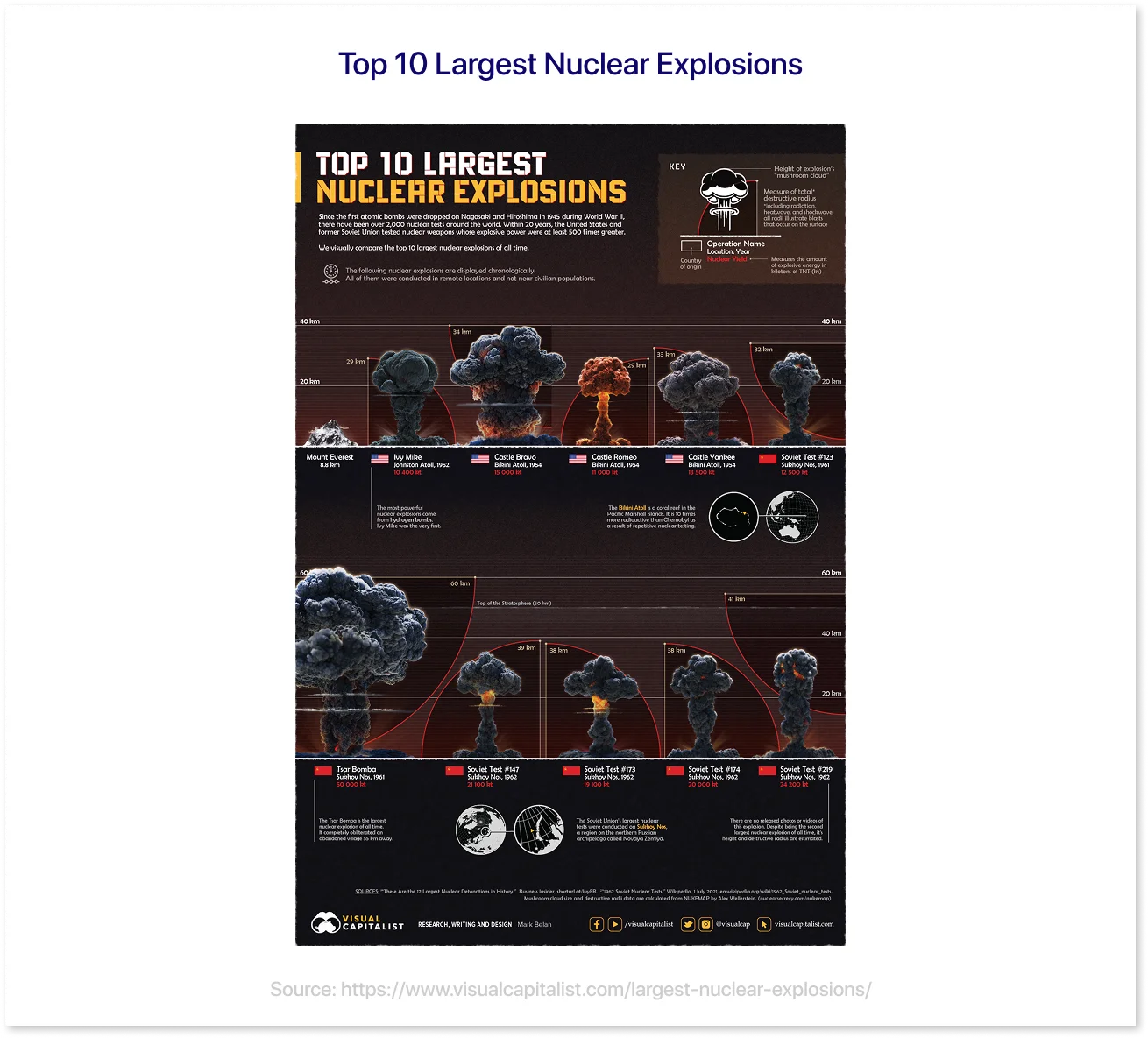
1. Top 10 Largest Nuclear Explosions
Source: https://www.visualcapitalist.com/largest-nuclear-explosions/
This visualization highlights the top 10 largest nuclear explosions in history, comparing their explosive power using an easy-to-understand visual format. By presenting the data through scaled visuals, it effectively conveys the magnitude of each detonation, making it easier for viewers to grasp the immense power behind these historical events.
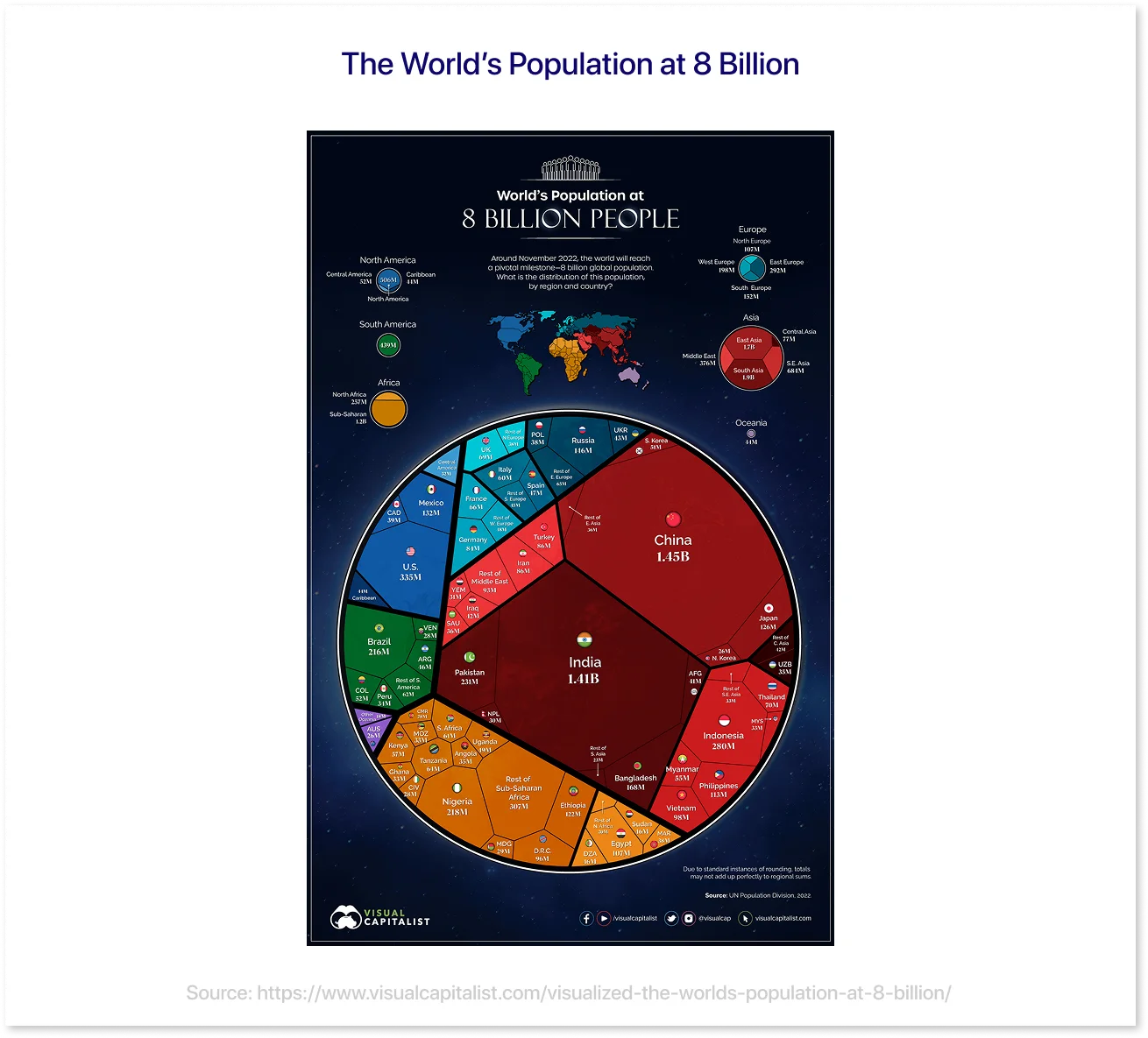
2. The World’s Population at 8 Billion
Source: https://www.visualcapitalist.com/visualized-the-worlds-population-at-8-billion/
The visualization depicts the global population reaching 8 billion, providing a comprehensive view of how humanity has evolved. By displaying data in engaging charts and maps, it effectively illustrates historical patterns, regional population distributions, and future predictions. The visual style simplifies complex demographic data, providing significant insights into the dynamics of global population growth.
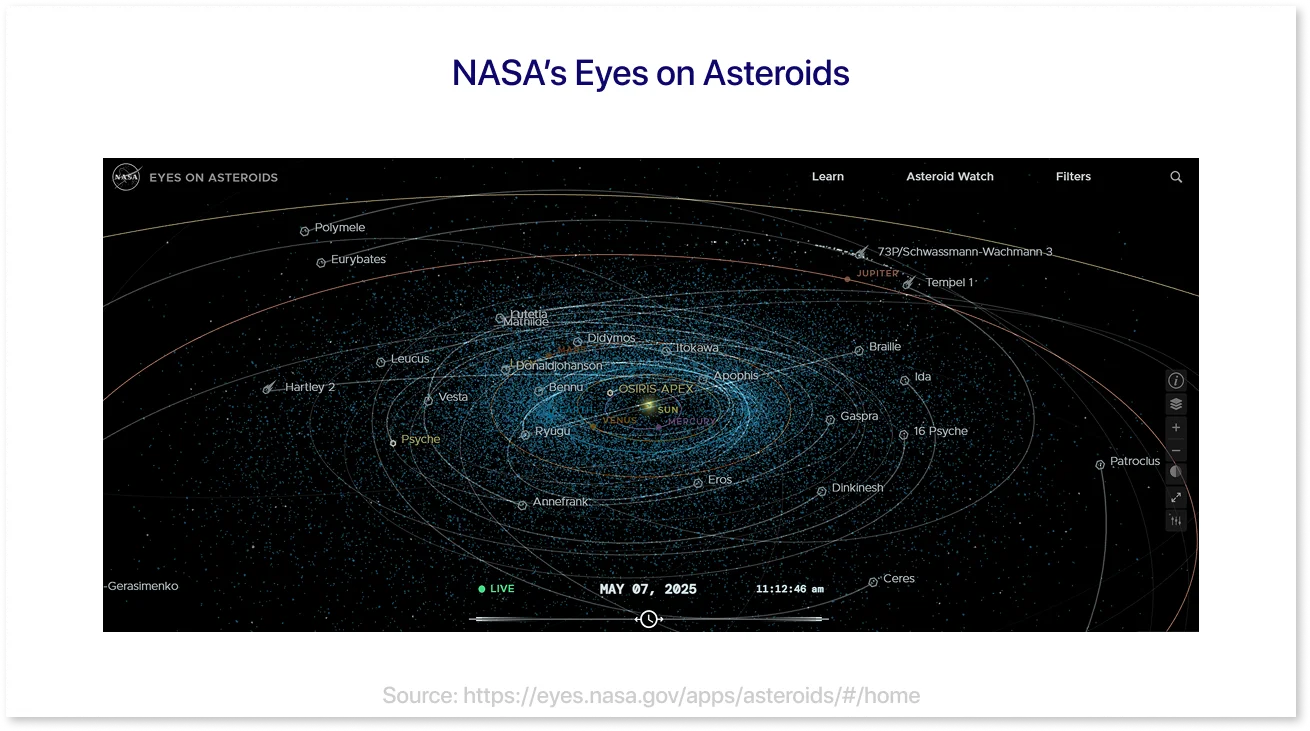
3. NASA’s Eyes on Asteroids
Source: https://eyes.nasa.gov/apps/asteroids/#/home
NASA's interactive visualization provides a real-time look at asteroids and other objects traveling through our solar system. Its 3D model and user-friendly interface allow viewers to explore asteroid positions and trajectories, making complex space data more accessible and interesting.
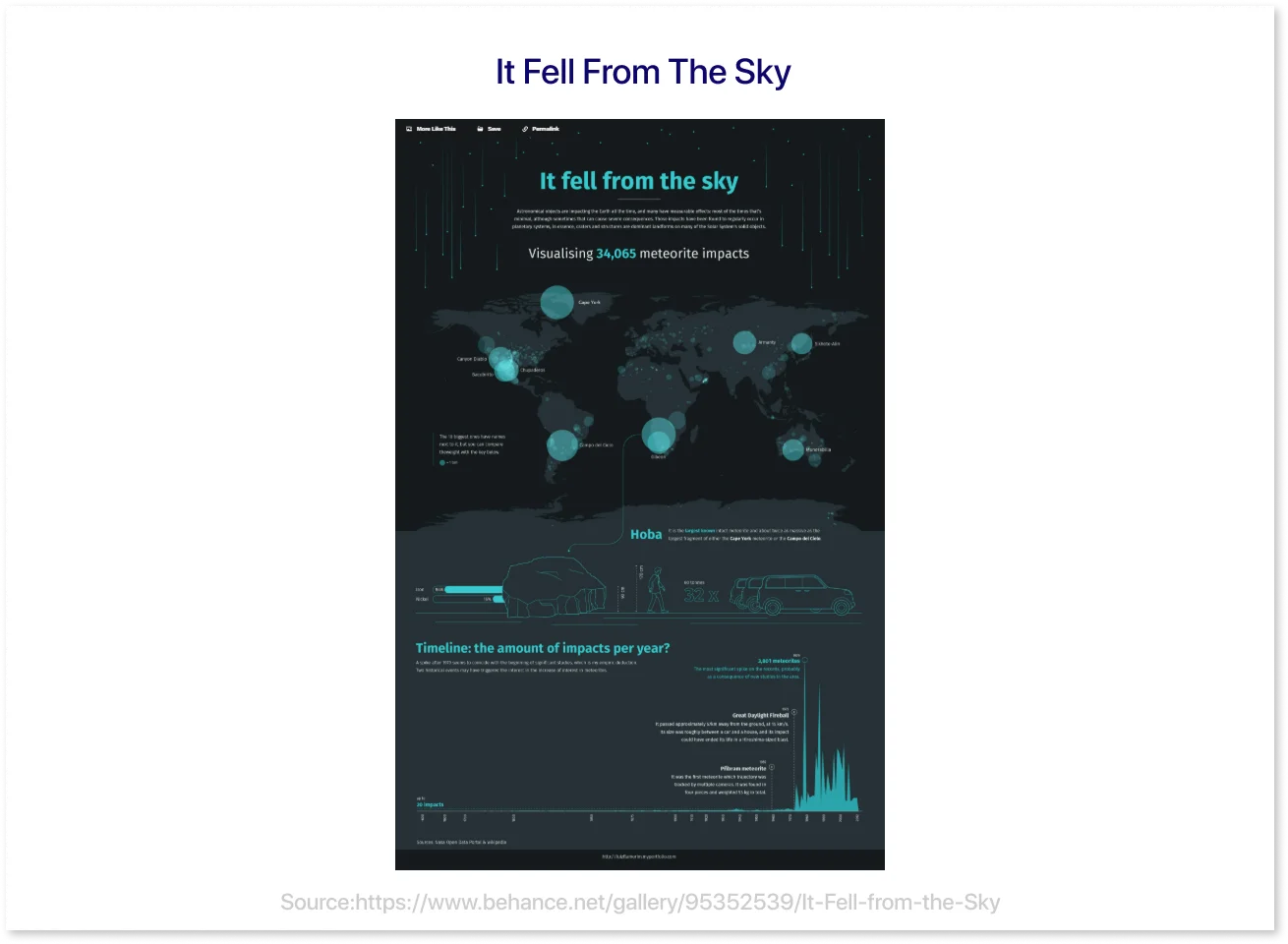
4. It Fell From The Sky
Source: https://www.behance.net/gallery/95352539/It-Fell-from-the-Sky
This visualization depicts over 34,000 meteorite falls worldwide, combining geographical information with a history of hits. Its simple design and smart arrangement allow you to efficiently study patterns, highlight spikes in recorded events, and compare the sizes of the largest meteorites.
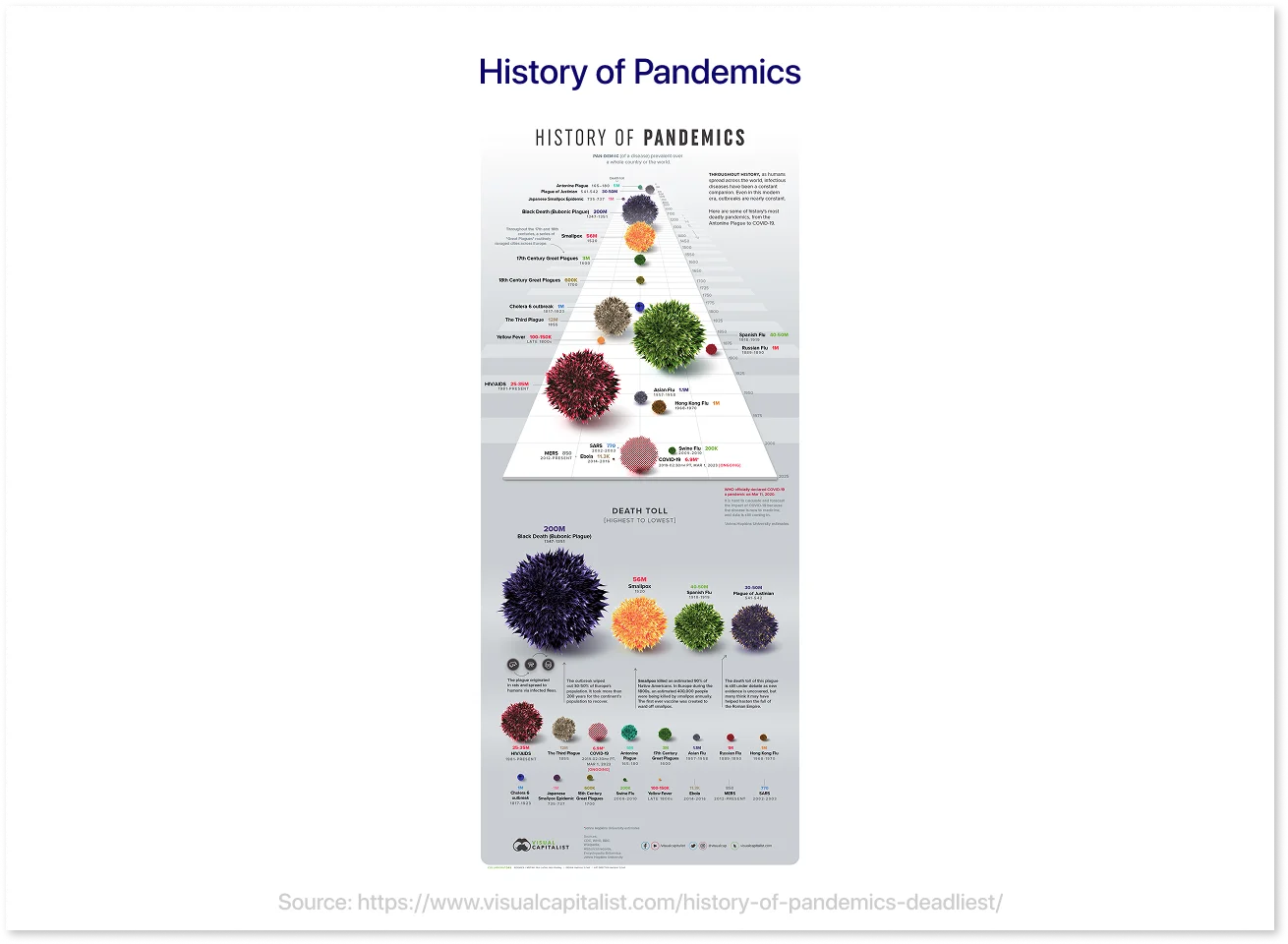
5. History of Pandemics
Source: https://www.visualcapitalist.com/history-of-pandemics-deadliest/
This visualization offers a historical overview of the world’s deadliest pandemics, comparing their death tolls and timelines in a clear, understandable format. By combining magnitude, chronology, and impact, viewers can quickly grasp the intensity and scope of each outbreak throughout history.
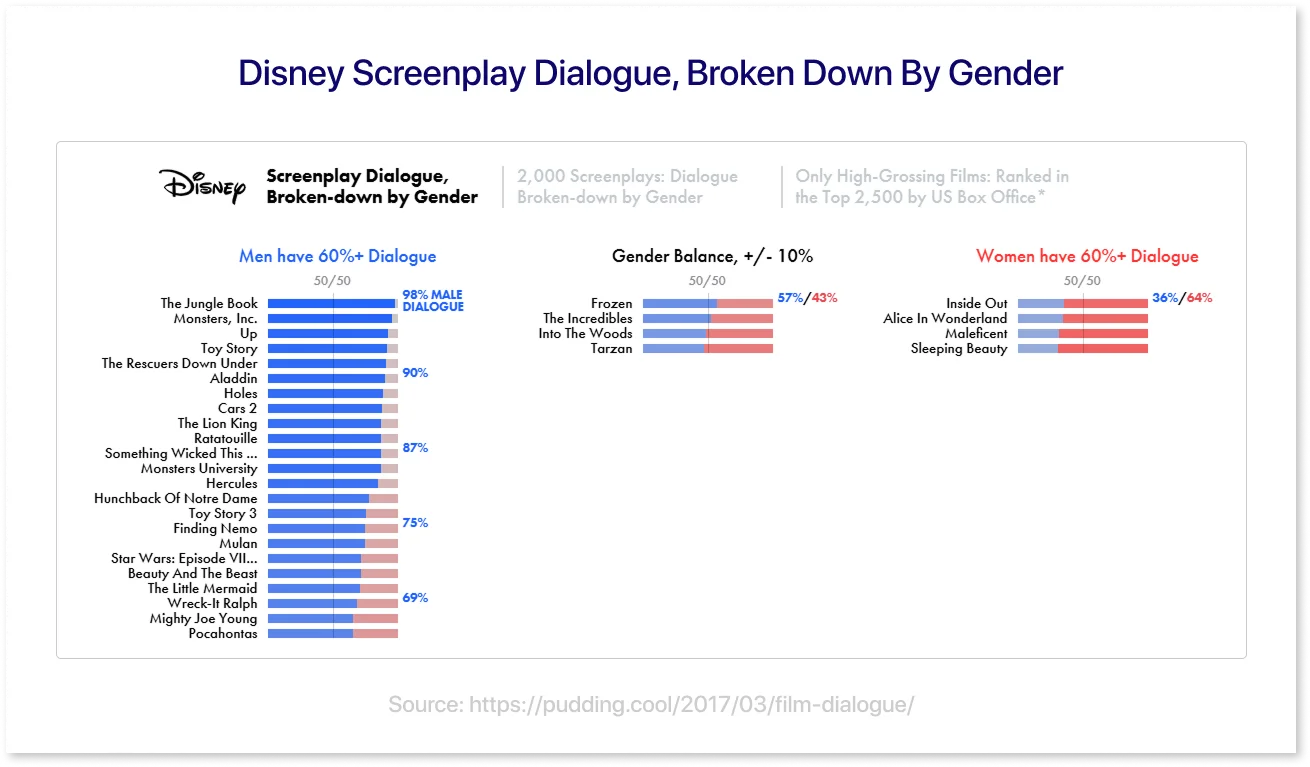
6. Disney Screenplay Dialogue, Broken Down By Gender
Source: https://pudding.cool/2017/03/film-dialogue/
This data-driven project visualizes gender disparities in movie scripts by analyzing dialogue from over 2,000 films, particularly Disney films. It uses clear images and interactive components to show the gap in male vs. female speaking positions across genres and age groups, making complicated social trends more straightforward to understand and explore.
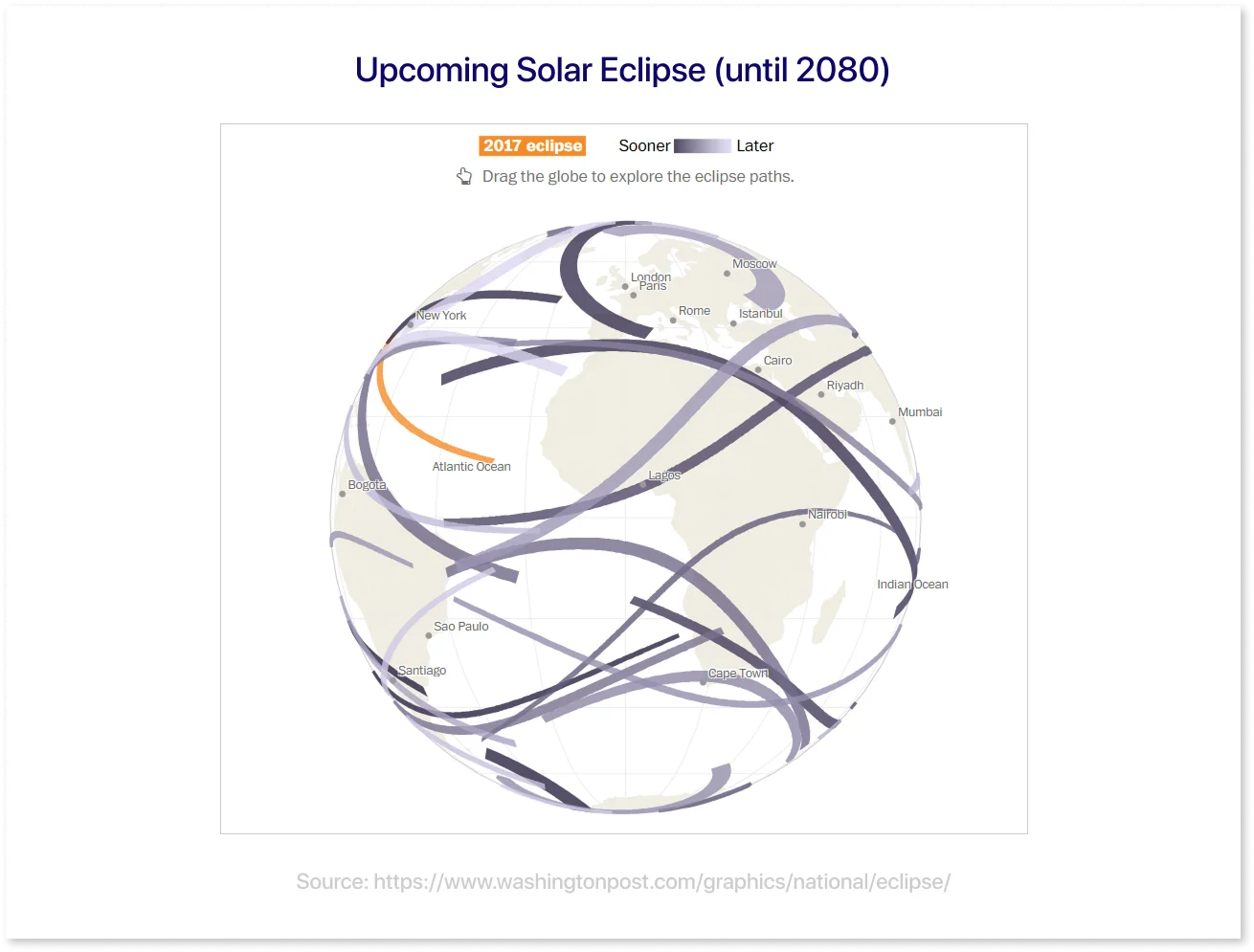
7. Upcoming Solar Eclipse (until 2080)
Source: https://www.washingtonpost.com/graphics/national/eclipse/
This interactive globe illustration shows the trajectories of total solar eclipses throughout the Earth from 2017 to 2080. By allowing users to explore when and where each eclipse will occur, it makes complex astronomical facts more engaging and personal. It even allows you to see how many eclipses you might see in your lifetime.
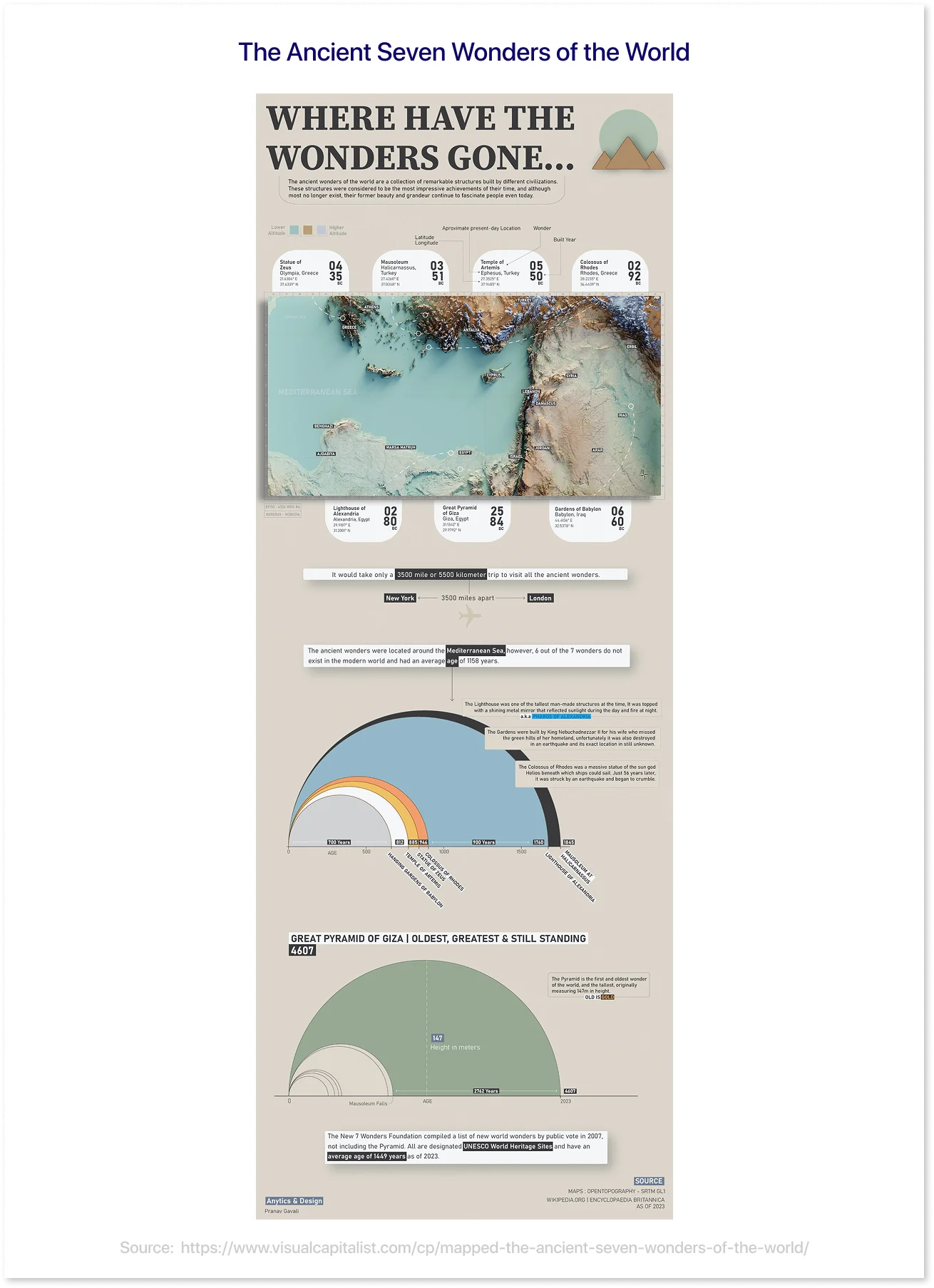
8. The Ancient Seven Wonders of the World
Source: https://www.visualcapitalist.com/cp/mapped-the-ancient-seven-wonders-of-the-world/
This visualization maps out the locations of the ancient Seven Wonders of the World, combining historical context with engaging visuals. It provides a clear overview of where each wonder was built, its unique architectural features, and its historical significance, making ancient history more accessible and visually appealing.
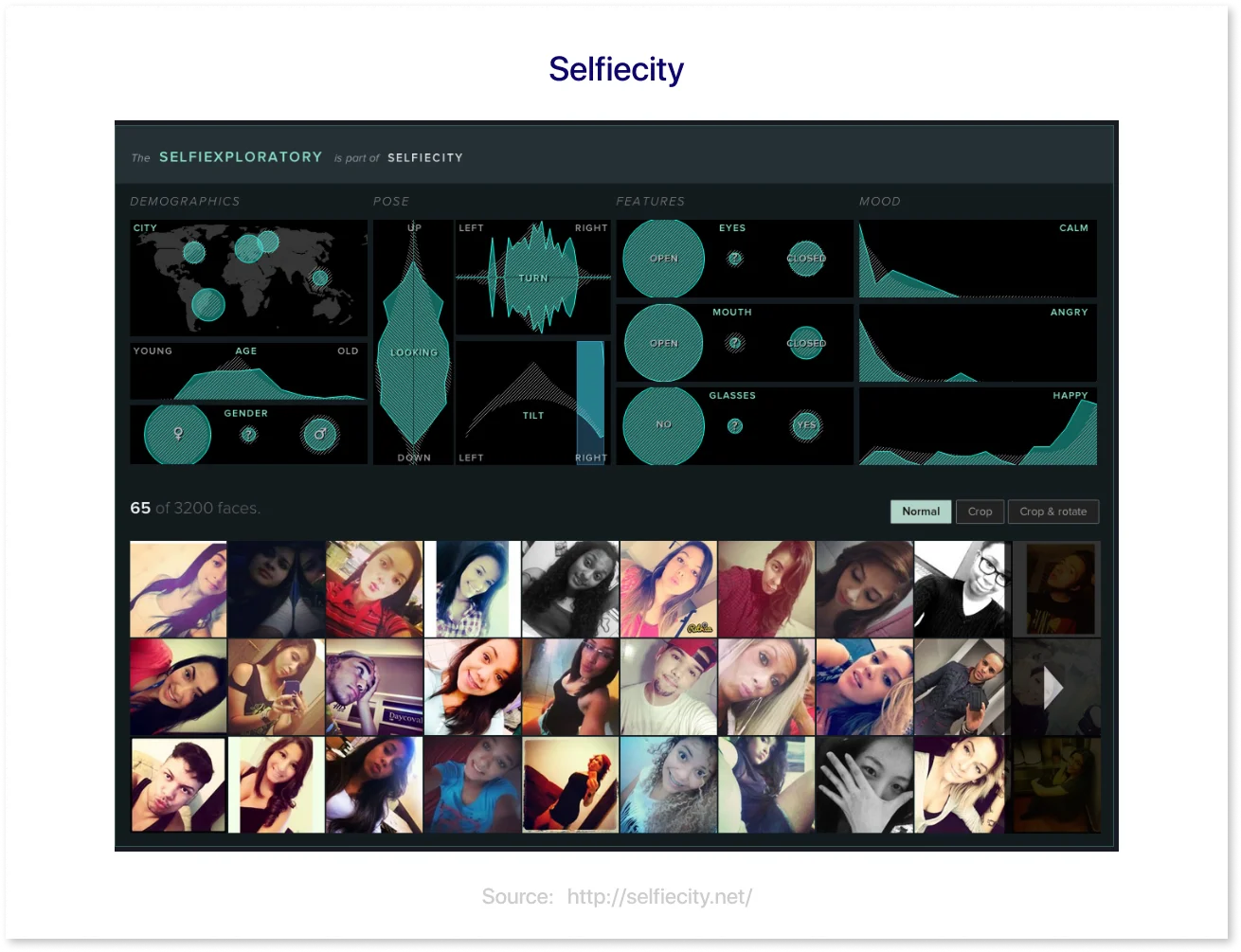
9. Selfiecity
Source: http://selfiecity.net/
This unique visualization explores 120,000 selfies from cities worldwide to identify trends in how individuals snap and present selfies. It provides a deep look at cultural and social trends, like head tilts and smile frequency by age and gender, as well as interactive features that make data exploration both enjoyable and informative.
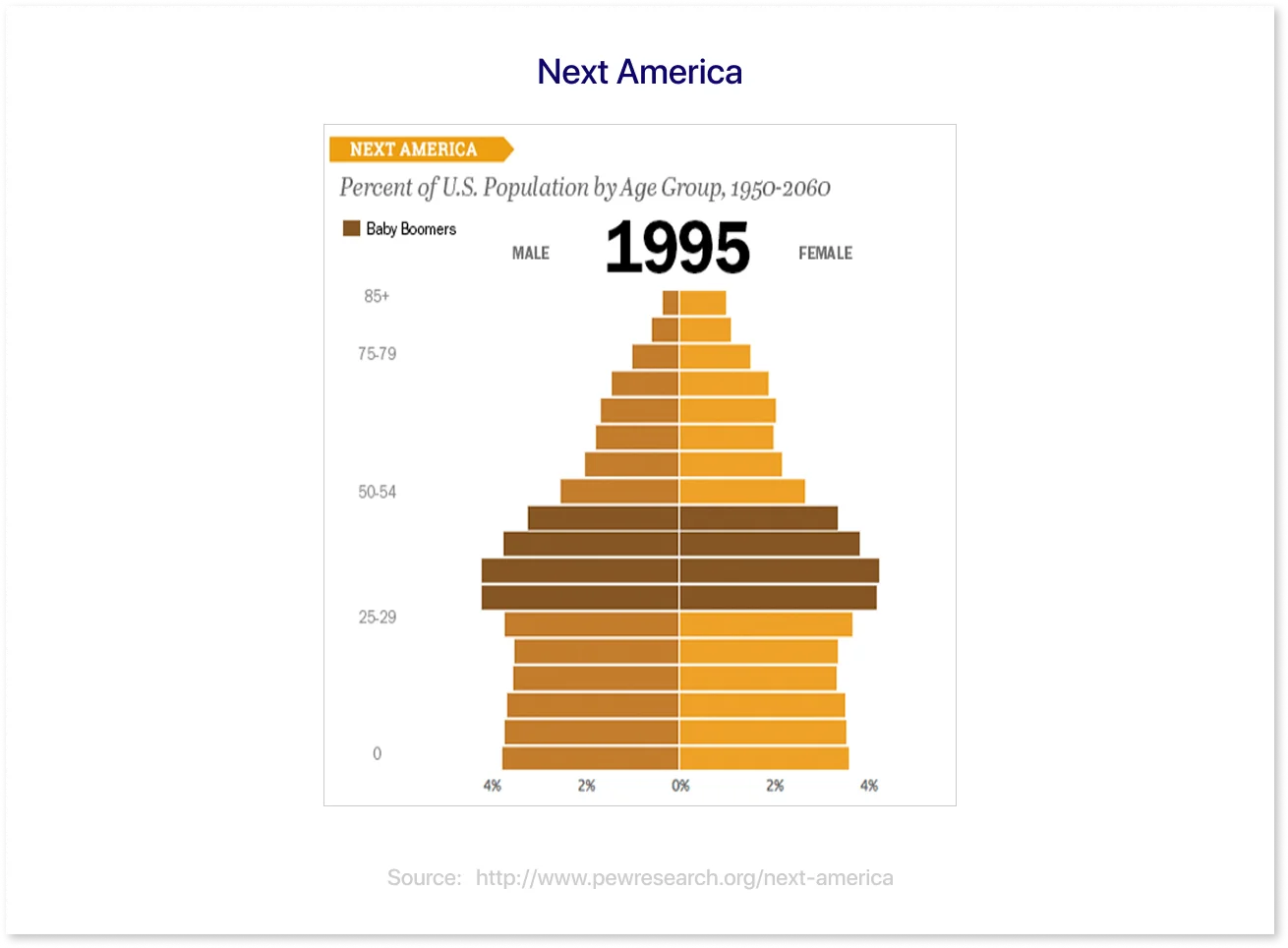
10. Next America
Source: http://www.pewresearch.org/next-america
This interactive project explores demographic changes in the U.S. through a series of engaging visualizations. From shifts in age and gender to trends in diversity and marriage, it combines historical data with future projections to give a clear picture of how the country evolves over time.
These examples show how powerful data visualizations can be—clear, engaging, and meaningful. Use them as inspiration to create visuals that look good and tell a compelling story with your data.
Now, let’s examine some examples of bad data visualizations and what they can teach us.
Bad Data Visualization Examples and Why They Fail
Not all charts are equal; some visualizations confuse, mislead, or entirely misrepresent the facts. In this section, we’ll explore examples of poor data visualizations, break down what went wrong, and highlight the key takeaways to help you avoid similar mistakes in your work. Source: Good Data
1. When the Chart Doesn’t Fit the Data
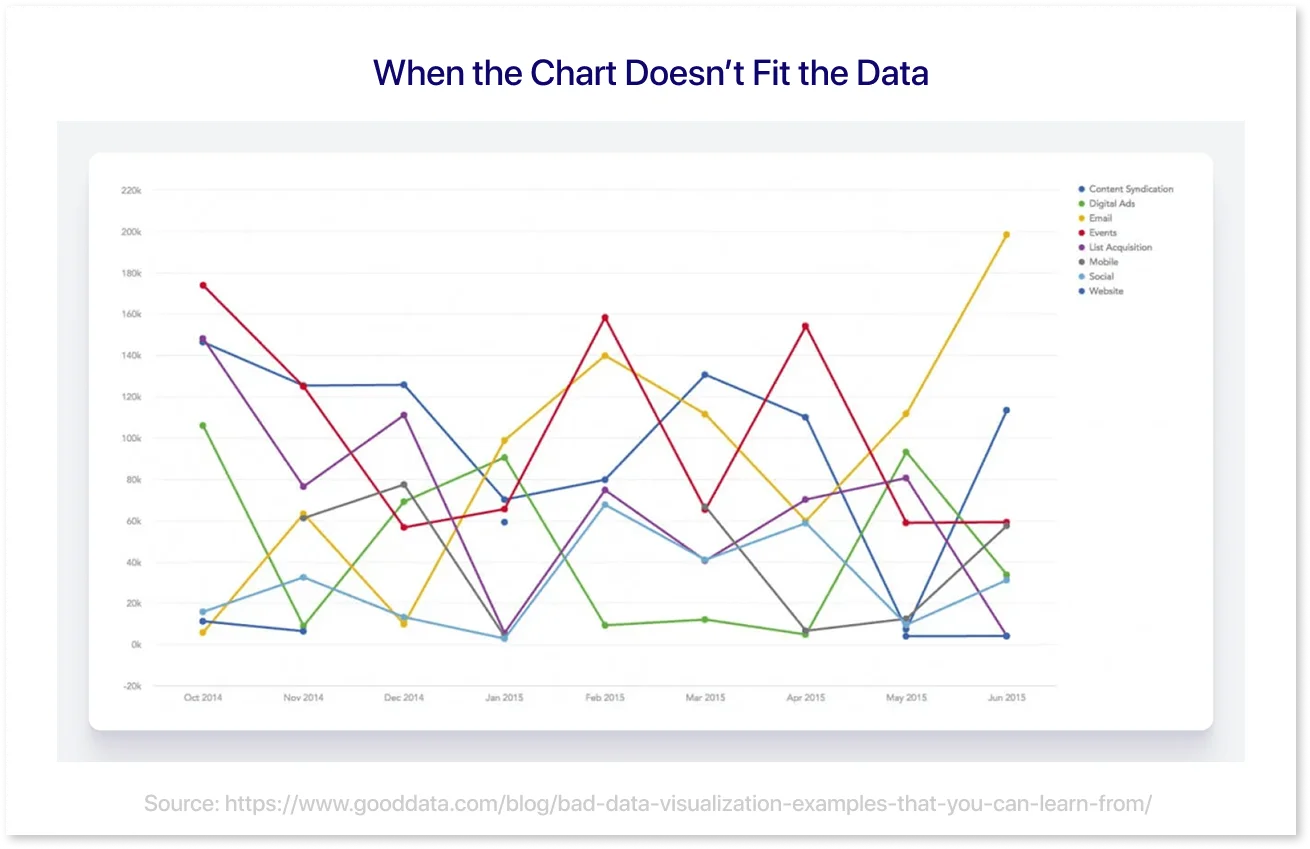
Using the incorrect chart type can distort your message and confuse your viewers. In this example, a complex web of overlapping lines makes it nearly impossible to identify data trends, correlations, or patterns.
How to Avoid: Always select an appropriate chart type for your data. Question: Are you comparing categories, showing change across time, or illustrating proportions? Try out multiple visual representations to see which makes your data the easiest to read.
2. When Visuals Overwhelm Instead of Inform

This is a classic example of poor data visualization, with too much information squeezed into a single display. Without interactive elements such as filters or drilldowns, users get flooded with all the data at once, resulting in cluttered visuals that hide rather than convey the story. Even great insights become lost in the noise without simplification or user control.
How to Avoid: Break complex data into smaller, digestible visuals or add interactive features that allow users to explore the data at their own pace.
3. Visuals That Fail to Connect the Dots
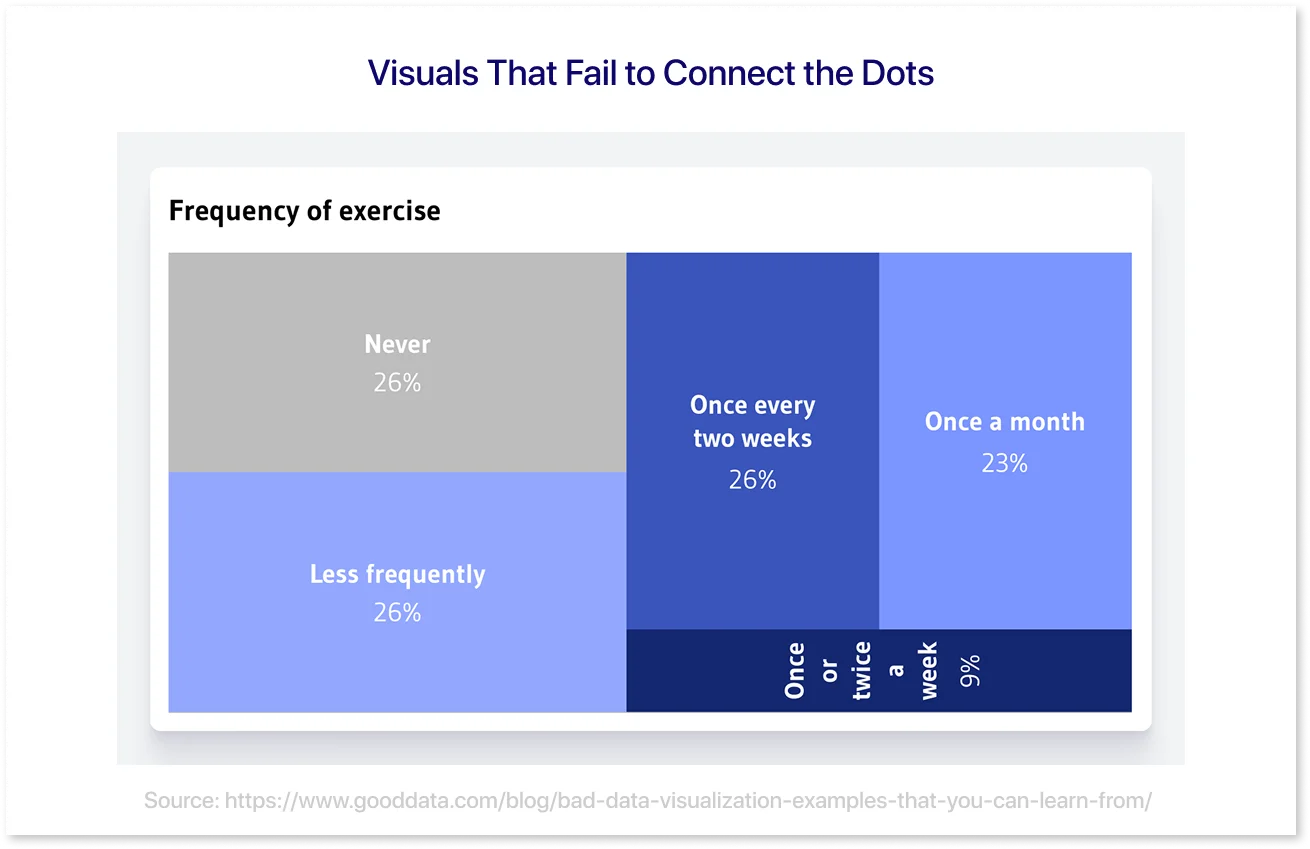
In this bad chart example, it’s hard to tell what the audience is supposed to take away. The visualization lacks a clear focus or message, making it difficult for viewers to interpret or find value in the data. Without a guiding narrative, it feels more like a jumble of numbers and shapes than a meaningful insight. At that point, you could just list the raw data; it would have the same result.
How to Avoid: Begin by identifying the key message you want your data to convey. Highlight the most significant points in your story, and use layout, labels, and visual flow to assist your audience. A compelling story helps to turn basic knowledge into something valuable and memorable.
4. Pie Charts Done Wrong
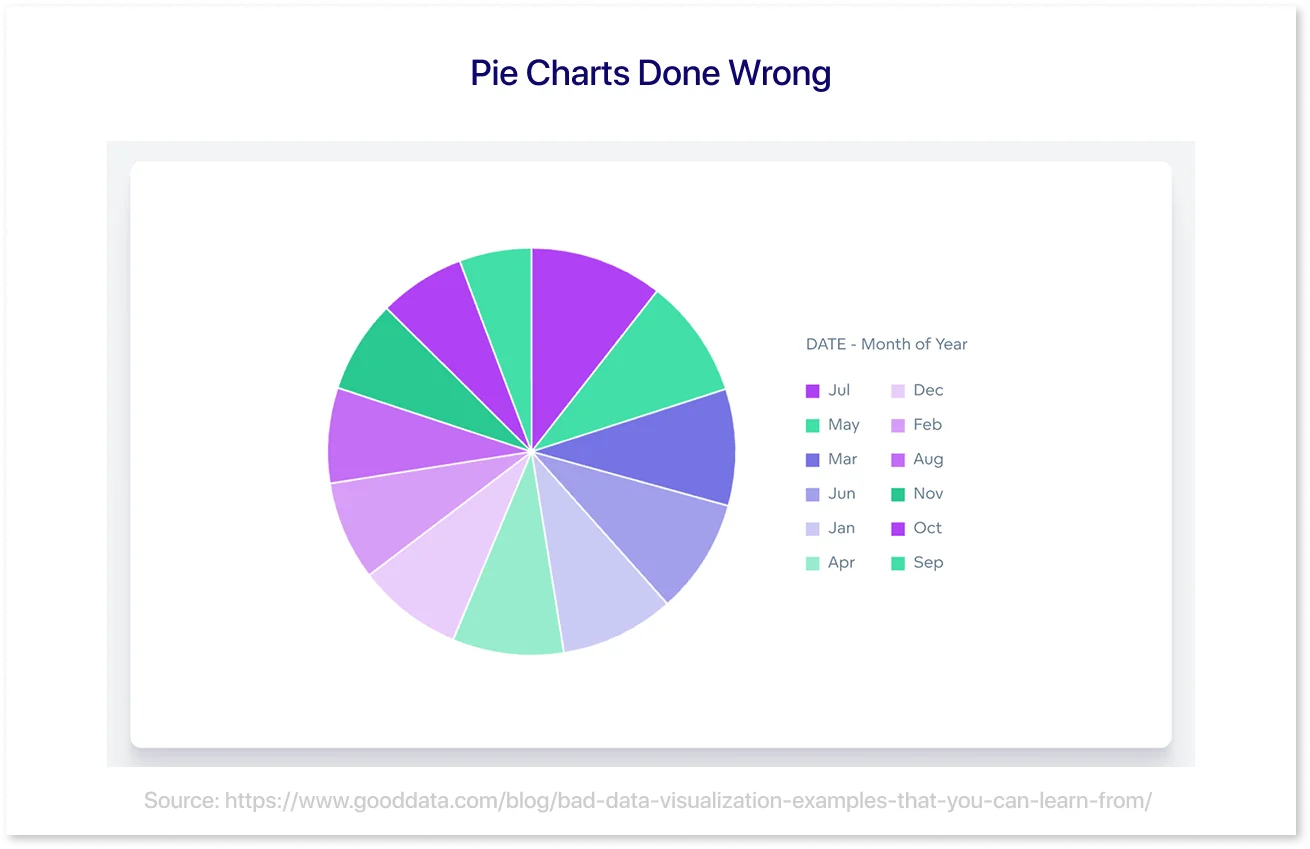
When it comes to inaccurate data visualizations, pie charts are frequently the worst culprits. In this case, the chart fails because it has too many segments, making it challenging to compare sizes and derive significant insights. With too many slices crammed into a circle, the visual becomes chaotic and confusing rather than helpful.
How to Avoid: Use pie charts sparingly and only for data with a few categories. Consider using bar charts or donut charts for more intricate comparisons, as they allow for more transparent labeling and simpler comprehension.
5. Misusing Color in Data Visualizations
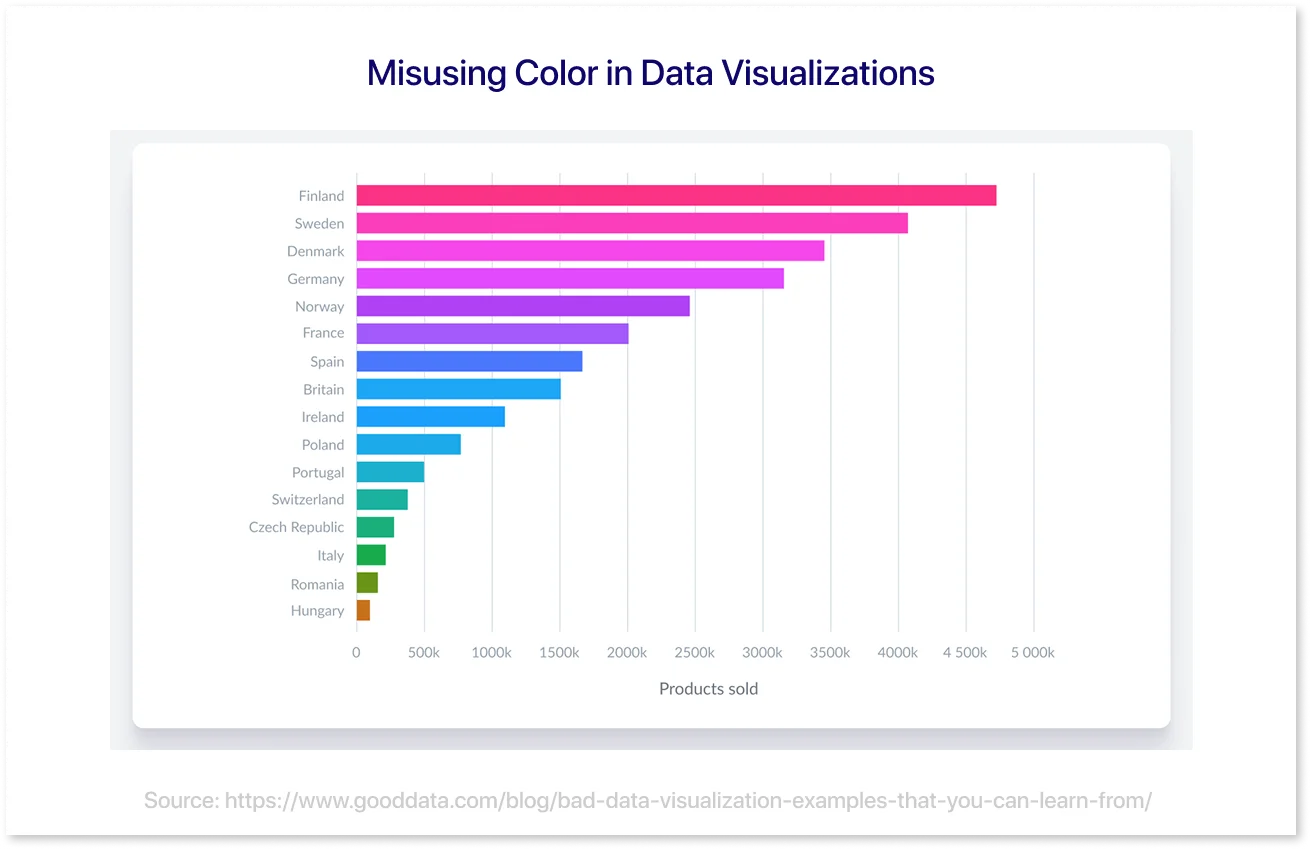
In this bad example, colors are randomly chosen for different countries. While it might look nice, the colors don't help us understand the data. Instead, they make the chart more confusing.
How to Avoid: Use color to highlight important information or categories, and avoid using too many colors just for decoration.
To wrap up, bad data visualizations can hinder understanding and lead to misinterpretations. By avoiding common pitfalls such as poor chart selection, overwhelming visuals, and misuse of color, you can create clearer, more effective data presentations.
Creative Data Visualization Ideas
If you're looking to go beyond traditional bar charts and pie graphs, these creative data visualization ideas offer innovative ways to present complex information clearly and engagingly.
- Animated Scatter Plots: Perfect for showing progress or trends over time, such as sales growth, economic indicators, or performance metrics.
- Infographic Resumes: A unique way to visually present your career path, skills, and achievements—ideal for creative or tech roles.
- Minimalistic Dashboards: Clean, simplified visuals focusing on key metrics—great for executive summaries and high-level reporting.
- Real-Time Social Media Dashboards: Monitor and visualize trending topics across platforms to stay updated with audience interests and digital conversations.
- Big Data Visualizations: Showcase massive datasets like global energy consumption, shipping routes, or climate patterns with clarity and impact.
- Interactive Storytelling: Engage users by letting them explore data on their terms—great for surveys, case studies, or learning tools.
Exploring these formats can enhance data understanding and deliver more impactful, visually compelling insights.
How Mockup Tools Can Help in the Visualization Process
Mockup tools help to improve the planning and implementation of data dashboards. By allowing teams to visualize the layout and flow of dashboards before any data is linked, these technologies help avoid costly design errors and guarantee that everyone is on the same page from the start.
- Fast Prototyping: Quickly create a visual prototype to test ideas before final development.
- Client Approvals: Share early drafts with stakeholders to finalize structure, design, and layout.
- Error Prevention: Identify issues such as visual clutter or poorly chosen chart types early in the process.
- Visual Consistency: Standardize elements such as fonts, colors, and spacing to maintain a cohesive look.
- Better Collaboration: Keep cross-functional teams aligned by using a shared visual reference.
Tool Examples:
Several tools can help with the wireframing and prototyping phase of dashboard development. Each has unique strengths depending on the project’s focus—whether it's BI-specific functionality or general design flexibility.
- Mokkup.ai: Built specifically for BI mockups; allows users to export designs to Tableau and Power BI files.
- Figma: Popular for UI/UX design; supports collaborative design but needs manual setup for BI visuals.
- Adobe XD: Ideal for prototyping interfaces with design precision, though not tailored for BI dashboards.
These tools help teams validate ideas early and maintain alignment throughout the design process. Choosing the right one can significantly streamline BI dashboard development.
Conclusion
Good data visualizations communicate stories, whereas bad ones add to the confusion. To ensure your visuals are impactful, always keep your audience in mind, simplify complex information, and explore creative ways to present insights. Mockup tools like Mokkup.ai can further help refine your design before going live.
Most importantly, don’t be afraid to experiment and iterate—great visualizations are rarely built in one go.
Frequently Asked Questions
An effective data visualization clearly communicates insights, uses the right chart type for the data, maintains visual hierarchy, and avoids clutter or misleading design.
Common mistakes include using the wrong chart type, poor color choices, 3D effects that distort data, cluttered layouts, and a lack of context or labels.
Focus on user needs, choose the right KPIs, use consistent design elements, limit distractions, and test your dashboard for clarity and usability.
Prompt it. Wireframe it with Mokkup.ai.