
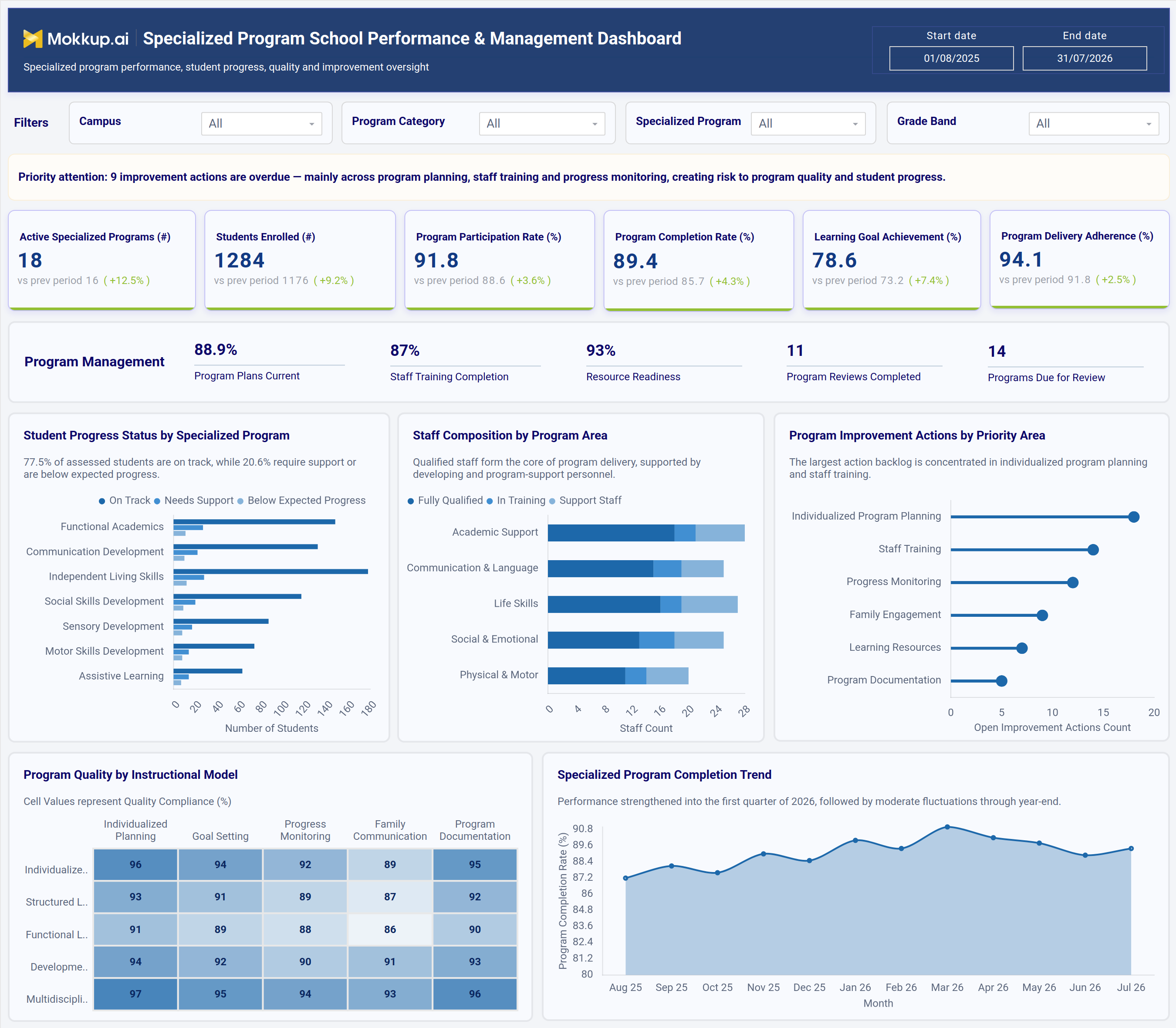
What is a Specialized Program School Performance & Management Dashboard?
The Specialized Program School Performance & Management Dashboard is a specialized program school performance dashboard for special education leaders, program coordinators, and district administrators who oversee individualized programs across several campuses. It brings enrollment, participation, completion, and learning outcome data together in one view. This covers programs such as functional academics, communication development, independent living skills, and sensory development and supports special education program management tracking without switching between separate program logs and staff records. Each KPI shows the previous period's value and the % change. A Priority Attention banner at the top flags overdue improvement actions so leaders see risks first.
A Program Management strip tracks program plans, current staff training completion, resource readiness, program reviews completed, and programs due for review. Filters for date range, campus, program category, specialized program, and grade band let leadership narrow the view to one site or program type while keeping the full picture available. The dashboard works as a student progress monitoring dashboard for schools and a staff and delivery oversight tool. Program leads no longer have to reconcile enrollment, completion, and staff readiness data from separate spreadsheets before a review meeting.
How to Create a Specialized Program School Performance & Management Dashboard
You don't need to start from scratch. Just begin with a ready-to-use dashboard template from Mokkup. Here's how:
1. Create or Log in to Your Mokkup Account
Start by signing up on Mokkup.ai using your email. If you already have an account, just log in, and you'll be good to go.
2. Choose and Customize Your Dashboard Template
Find the Specialized Program School Performance & Management Dashboard template in the Templates section. Use the drag-and-drop editor to adjust KPIs, edit filters, rename programs or instructional models, or add elements based on your data.
3. Export to Your BI Tool
Once your dashboard wireframe is ready, use the BI Tool Export feature to send it directly to Power BI or Tableau for further analysis and enhancements. You can also download the dashboard as a PDF, PNG, or JPEG, embed it on a platform, or invite your team to collaborate.
Note: This is a Pro template. You'll need a Pro subscription on Mokkup to use and customize this dashboard wireframe. Upgrade anytime to unlock full access.
Specialized Program School Performance & Management Dashboard Example
A special education program director opens this dashboard before a quarterly review to check whether programs across campuses are on track. The Priority Attention banner shows at once how many improvement actions are overdue and in which areas. The KPI cards show whether enrollment, participation, completion, goal achievement, and delivery adherence have improved since the last period. The Program Management strip confirms whether program plans are current, staff training is complete, and programs are due for review.
Next, program leads use Student Progress Status by Specialized Program to find programs with more students needing support or below expected progress. They compare this with Staff Composition by Program Area to spot areas that rely heavily on in-training or support staff. The Program Quality by Instructional Model heatmap shows where compliance is weakest, for example, in family communication. Program Improvement Actions by Priority Area shows where the action backlog is largest.
The result is a structured, ongoing review process instead of spreadsheet-driven check-ins. Leaders can use the Specialized Program Completion Trend to confirm results are improving month over month and focus action where risk is highest.
How to Analyze Data in a Specialized Program School Performance & Management Dashboard
Here is how you can analyze data from this dashboard:
- Start with Priority Attention: Read the banner first to see how many improvement actions are overdue and which areas they affect.
- Compare KPIs with the Previous Period: Check the "vs prev period" value and % change for Active Specialized Programs, Students Enrolled and the other KPIs to judge growth across the program portfolio.
- Spot Engagement Gaps: Use the Program Participation Rate and Program Completion Rate tiles to catch drops early.
- Review Program Management Readiness: Use the Program Management strip to check program plans current, staff training completion, resource readiness and upcoming reviews.
- Isolate Underperforming Segments: Filter by date range, Campus, Program Category, specialized program, or Grade Band to isolate underperforming sites in this special education program management tracking view.
- Find Students Needing Support: Review Student Progress Status by Specialized Program to see where students need support or are below expected progress.
- Check Staff Coverage: Use Staff Composition by Program Area to confirm that fully qualified staff coverage matches program demand, which is central to staff training completion tracking for schools.
- Prioritize the Action Backlog: Read Program Improvement Actions by Priority Area to tackle the areas with the most open actions first.
- Compare Quality by Instructional Model: Use the Program Quality by Instructional Model heatmap to compare compliance across individualized planning, goal setting, progress monitoring, family communication, and documentation.
- Track Completion Over Time: Use the Specialized Program Completion Trend to confirm the completion rate is improving month over month, as part of your program completion rate tracking dashboard.
Benefits of a Specialized Program School Performance & Management Dashboard
The following are the benefits of using this dashboard:
- Consolidated Program View: Brings enrollment, participation, completion, and delivery data together in one specialized program school performance dashboard.
- Risks Flagged Up Front: The Priority Attention banner shows overdue improvement actions before anyone opens a chart.
- Clear Performance Direction: Previous-period comparisons on every KPI show at a glance whether programs are improving.
- Action Tracking by Area: Supports school program improvement action tracking by showing open actions by priority area.
- Less Manual Reconciliation: Cuts down on matching up program logs, staff rosters, and review schedules by hand.
- Targeted Reviews: Campus, program, and grade band filters make reviews faster and more focused.
- Early Staffing Alerts: Highlights staff coverage gaps before they affect student progress.
- Quality Accountability: A compliance heatmap across instructional models makes quality gaps easy to see.
- Planning Readiness in One Place: The Program Management strip gives coordinators one reference for plans, training, resources, and review schedules during planning cycles.
KPIs to Track in a Specialized Program School Performance & Management Dashboard
The following key KPIs can be tracked by using this dashboard:
- Active Specialized Programs (#): number of specialized programs currently running across campuses. Compared with the previous period.
- Students Enrolled (#): total number of students enrolled in specialized programs.
- Program Participation Rate (%): percentage of enrolled students actively taking part in program activities.
- Program Completion Rate (%): percentage of enrolled students completing their specialized program, a core measure for any program completion rate tracking dashboard.
- Learning Goal Achievement (%): percentage of individualized learning goals met by enrolled students.
- Program Delivery Adherence (%): percentage of program sessions delivered as planned.
- Program Plans Current (%): share of programs with up-to-date individualized plans.
- Staff Training Completion (%): share of program staff who have completed required training, a key input for staff training completion tracking for schools.
- Resource Readiness (%): share of programs with the resources they need in place.
- Program Reviews Completed / Programs Due for Review (#): number of program reviews done and number coming up for review.
Frequently Asked Questions
1. Who should use the Specialized Program School Performance & Management Dashboard?
Special education directors, program coordinators, and campus administrators who oversee individualized programs use this dashboard. It supports both day-to-day monitoring and quarterly program reviews.
2. Can this dashboard be customized for a specific district or program mix?
Yes. The template can be adjusted in the Mokkup editor to reflect your program categories, campuses, grade bands, or instructional models. KPIs, filters and chart labels can all be edited to match your data.
3. Can this student progress monitoring dashboard for schools be used beyond specialized programs?
The layout is built around individualized program tracking, but the same structure works for any school program that monitors goal achievement, participation, and delivery adherence. Filters can be relabeled to fit a broader school program improvement action tracking initiative.
4. What does the Priority Attention banner show?
It sums up the most urgent issue on the dashboard, such as the number of overdue improvement actions and the areas they fall in, so leaders know what to address first.