
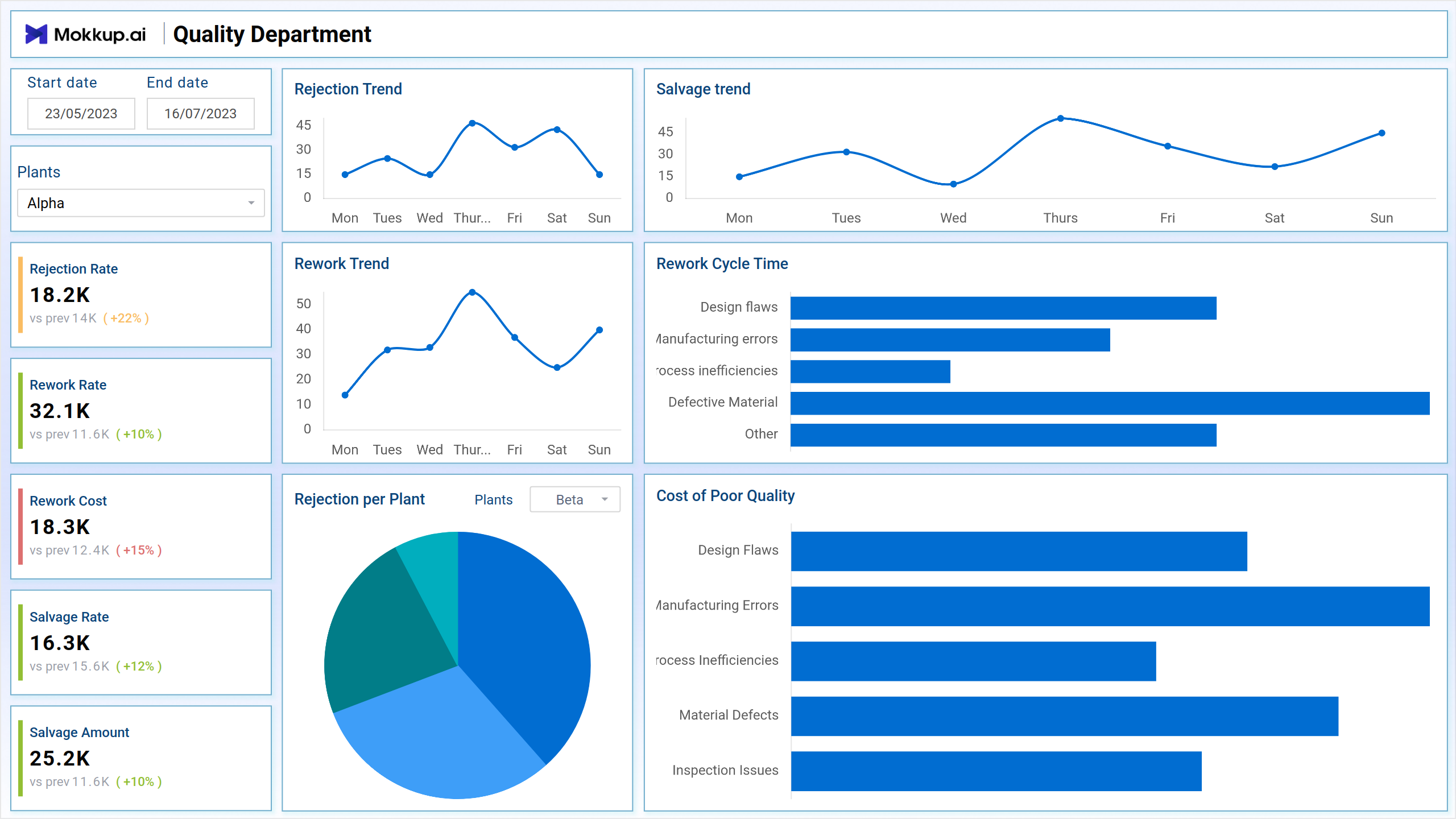
The Quality Department template is a central hub for monitoring and analyzing crucial quality metrics. It empowers teams to identify and address potential issues, ultimately fostering continuous improvement across the organization.
Screen 1: Overview
This screen offers a real-time snapshot of quality performance, enabling stakeholders to make informed decisions based on data-driven insights.
Key Terms to Consider:
- Rejection Trend - Track the trend of rejected items with the Rejection Trend analysis.
- Salvage Trend - Monitor the Salvage Trend to assess the efficiency of salvaging processes.
- Rework Trend - Evaluate the efficiency of reworking processes with the Rework Trend analysis.
- Rejection per Plant - Examine the Rejection per Plant metric to identify specific areas for improvement.
- Cost of Poor Quality - Quantify the overall financial impact with the Cost of Poor Quality analysis.
- Salvage Rate - Determine the success of salvaging efforts by analyzing the Salvage Rate.
- Salvage Amount - Calculate the monetary value saved through salvage efforts with the Salvage Amount.
- Reword Cost - Assess the rework expenses with the Reword Cost analysis.
Screen 2: Customer Complaints
It acts as a central hub for monitoring and analyzing essential quality metrics and empowers teams to proactively identify and address potential issues, fostering continuous improvement across the organization. This screen focuses explicitly on Customer Complaints, providing insights to enhance customer satisfaction and refine processes for ongoing quality enhancement.
Key Terms to consider:
- Customer Complaints Counts - Gain insights into the total number of customer complaints received within a specified timeframe.
- Priority Type - Categorize customer complaints based on their priority level to streamline response and resolution efforts.
- Complaints Trend - Track the trajectory of customer complaints over time to identify patterns and potential areas for improvement.
- Customer Complaint Details - Dive deep into individual customer complaints to understand specific issues, contexts, and resolutions.
Dashboard Template Insights
- The Quality Department template serves as a pivotal dashboard wireframe.
- It enables teams to proactively address potential issues and drive continuous improvement.
- The template achieves this by monitoring key quality metrics.
- Real-time insights provided include rejection trends, salvage efficiency, rework effectiveness, and customer complaints.
- It acts as a centralized platform for data-driven decision-making.
- The overall effect is an enhancement of product quality and organizational success.
Conclusion
In today's competitive environment, ensuring product quality is crucial for user satisfaction and brand reputation. The Quality Department Dashboard wireframe is pivotal in this endeavor, providing the insights and tools needed to achieve and maintain excellence. It is an invaluable wireframe for enhancing quality management within an organization. The dashboard wireframe empowers the Quality Department to make data-driven decisions, achieve continuous improvement, and ultimately drive business success by providing a centralized platform for monitoring key metrics and identifying trends.