
What is a Pediatrics Hospital Pharmacy Dashboard?
A Pediatrics Hospital Pharmacy Dashboard is a comprehensive analytics template designed to monitor and visualize key aspects of pediatric pharmacy operations. It helps hospitals track medication usage, fulfillment accuracy, and stock movement to enhance efficiency, safety, and patient outcomes.
By centralizing these insights, this pediatric pharmacy dashboard template streamlines workflows, minimizes medication errors, and aids in data-driven decision-making for both clinical and administrative teams.
How to Create a Pediatrics Hospital Pharmacy Dashboard
You don’t need to build your report from scratch—just start with a ready-to-use Pediatrics Hospital Pharmacy dashboard template from Mokkup. Add in your data and export it however you like. Here’s how to do it:
1. Create or Log in to Your Mokkup Account
Start by signing up on Mokkup.ai using your email. If you already have an account, just log in, and you’ll be good to go.
2. Choose and Customize Your Dashboard Template
Find the Pediatrics Hospital Pharmacy Dashboard template in the Templates section. Use the drag-and-drop editor to adjust KPIs, edit filters, or add elements based on your data.
3. Export to Your BI Tool
Once your dashboard wireframe is ready, use the BI Tool Export feature to send it directly to Power BI or Tableau for further analysis and enhancements. You can also download the dashboard as a PDF, PNG, or JPEG, embed it on a platform, or invite your team to collaborate.
Note: This is a Pro template. You’ll need a Pro subscription on Mokkup to use and customize this dashboard wireframe. Upgrade anytime to unlock full access.
Pediatrics Hospital Pharmacy Dashboard Example
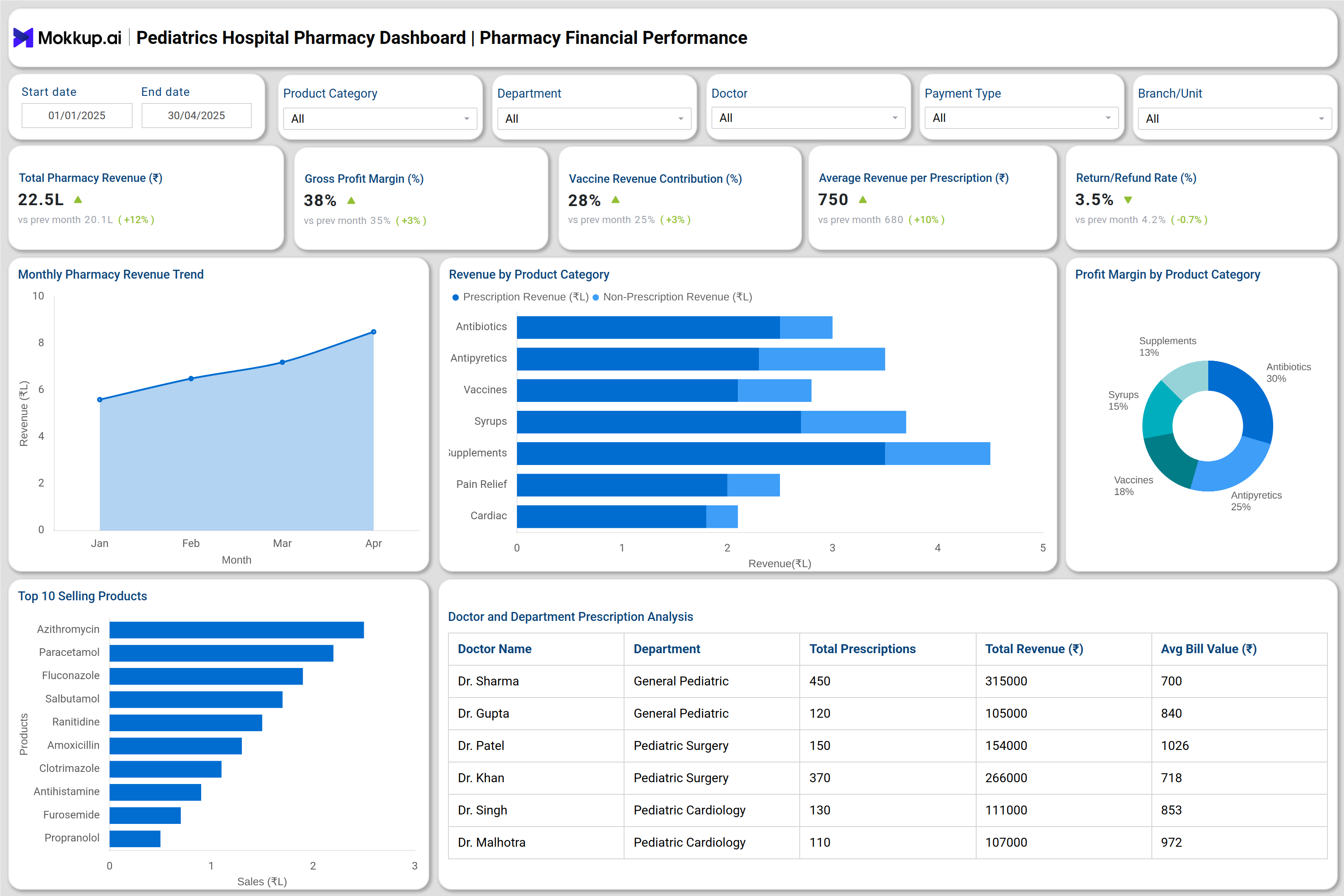
A Pediatrics Hospital Pharmacy Dashboard example typically visualizes key pharmacy operations, covering prescription fulfillment, inventory status, and financial performance, in one interactive view. It includes metrics like fulfillment rate, dispensing time, expiry losses, and vaccine storage compliance, displayed through charts and tables for quick analysis.
For instance, administrators can instantly spot delayed prescriptions, pharmacists can monitor stock levels for pediatric-specific medicines, and finance teams can track revenue and profit margins. This example dashboard helps both clinical and administrative users make data-backed decisions to enhance accuracy, efficiency, and patient care outcomes.
How to Analyze Data in Pediatrics Hospital Pharmacy Dashboard
To make the most of the dashboard, users should follow a structured approach to data analysis:
- Monitor Prescription Fulfillment: Track daily and monthly fulfillment rates to ensure patients receive complete prescriptions without delay.
- Assess Dispensing Efficiency: Review average dispensing time and identify patterns that slow down the workflow in pediatric OPD or NICU.
- Evaluate Inventory Turnover: Analyze how fast drugs are being used and replenished to prevent overstocking or expiry losses.
- Identify High-Performing Pharmacists: Compare individual pharmacist performance by fulfillment rate, average dispense time, and error percentage.
- Review Revenue Contribution: Examine product category-wise revenue to find high-margin pediatric medicines or supplements.
- Track Vaccine Management: Use the dashboard’s vaccine storage compliance and near-expiry alerts to maintain safety and cold-chain integrity.
- Forecast Demand Trends: Leverage historical prescription and sales data to predict future inventory needs and reduce emergency procurement costs.
Benefits of Pediatrics Hospital Pharmacy Dashboard
Using a specialty pediatric pharmacy metrics dashboard provides multiple operational and financial advantages:
- Better Stock Visibility: Real-time monitoring of stock levels across branches ensures uninterrupted drug availability.
- Reduced Wastage & Expiry: Automated alerts for near-expiry items help minimize financial loss and maintain safety.
- Enhanced Financial Oversight: Administrators can view revenue and profit trends, enabling data-driven pricing and purchasing decisions.
- Optimized Pharmacist Productivity: Performance comparisons identify training needs and ensure consistent service quality.
- Regulatory Compliance: The dashboard supports audit readiness by maintaining traceable data on cold-chain vaccines and controlled substances.
- Patient-Centered Insights: The hospital pharmacy analytics tool helps ensure that pediatric patients receive accurate prescriptions promptly.
KPIs to Track in Pediatrics Hospital Pharmacy Dashboard
Some key performance indicators (KPIs) every hospital should monitor include:
- Prescription Fulfillment Rate (%): Indicates operational accuracy and patient satisfaction.
- Average Dispensing Time (mins): Measures workflow speed and service quality.
- Stockout Incidents (count): Tracks missed supply situations for critical pediatric drugs.
- Expiry Losses (₹): Helps control financial losses from expired stock.
- Inventory Turnover (days): Reflects how quickly stock is used and replenished.
- Gross Profit Margin (%): Shows overall financial performance of the pharmacy.
Frequently Asked Questions
Q1. Why do pediatric hospitals need a pharmacy dashboard?
Pediatric drug management demands precision and real-time visibility. A pharmacy dashboard template helps monitor stock availability and fulfillment performance to ensure safe and efficient care delivery.
Q2. What departments benefit the most with this dashboard?
Pediatric OPD, NICU, PICU, and Immunization clinics see the highest impact, improving turnaround time and reducing dispensing errors.
Q3. Can the dashboard track financial KPIs too?
Absolutely. It includes modules for revenue analysis, profit margins, and category-wise financial insights for complete pharmacy oversight.
Q4. Can multiple branches or units use the same template?
Yes. The pediatric pharmacy dashboard template is fully customizable, users can edit, upload, and visualize their own data for different branches or departments. This allows centralized tracking and easy comparison of pharmacy performance across multiple hospital locations.