
What is a Maternity & Child Health (MCH) Patient Registry Dashboard?
A MCH Patient Registry Dashboard Template is a specialized digital solution designed to track, manage, and analyze maternal and pediatric patient data in real-time. It consolidates patient registrations, demographics, maternal risk profiles, child health indicators, and socio-economic details into one centralized platform. Hospitals and mother & child care centers use this tool to streamline pediatric health tracking, improve patient outcomes, and support compliance with healthcare standards. By leveraging visualizations, healthcare teams gain actionable insights into patient flow, high-risk pregnancy rates, immunization coverage, and geographic health patterns.
How to Create a Maternity & Child Health (MCH) Patient Registry Dashboard
You don’t need to build your report from scratch—just start with a ready-to-use MCH sample patient registry dashboard template from Mokkup. Add in your data and export it however you like. Here’s how to do it:
1. Create or Log in to Your Mokkup Account
Start by signing up on Mokkup.ai using your email. If you already have an account, just log in, and you’ll be good to go.
2. Choose and Customize Your Dashboard Template
Find the MCH Patient Registry Dashboard in the Templates section. Use the drag-and-drop editor to adjust KPIs, edit filters, or add elements based on your data.
3. Export to Your BI Tool
Once your dashboard wireframe is ready, use the BI Tool Export feature to send it directly to Power BI or Tableau for further analysis and enhancements. You can also download the dashboard as a PDF, PNG, or JPEG, embed it on a platform, or invite your team to collaborate.
Note: This is a Pro template. You’ll need a Pro subscription on Mokkup to use and customize this dashboard wireframe. Upgrade anytime to unlock full access.
Maternity & Child Health (MCH) Patient Registry Dashboard Example
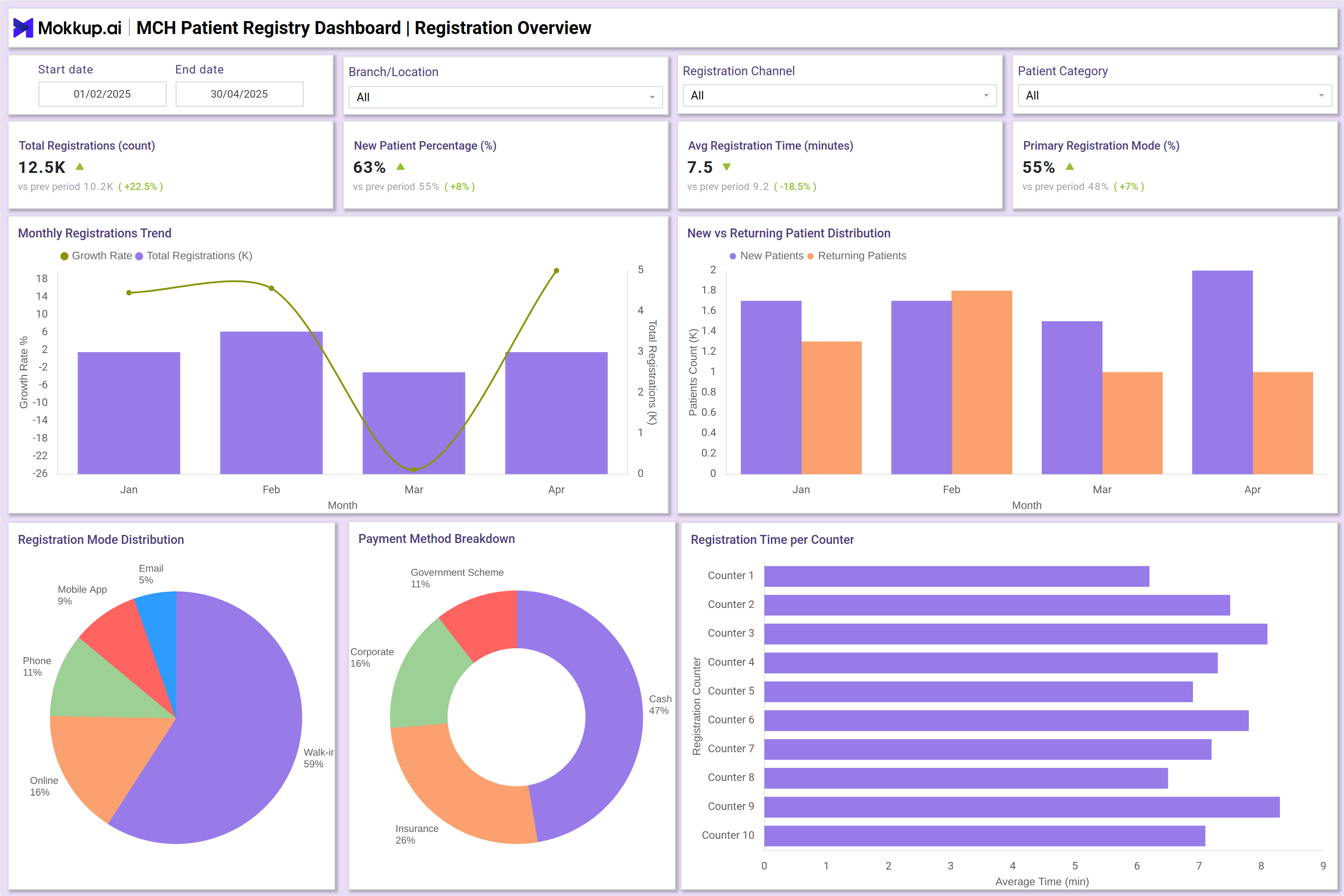
You can create an MCH Patient Registry Dashboard with multiple views to cover different healthcare areas. The Registration Overview screen displays KPIs like total registrations, new vs. returning patients, registration mode distribution, and average registration time. The Maternal Demographics view displays age distribution, trimester registrations, high-risk pregnancy percentages, and regional spread, utilizing heatmaps and trend lines to ensure maternal health monitoring.
The Child Demographics section tracks pediatric registrations, immunization coverage, gender split, and premature birth rates. Finally, the Socioeconomic & Geographic Profile view monitors urban-rural patient distribution, the mix of mothers’ education and occupation, and referral sources. Together, these insights provide a comprehensive picture of maternal and child healthcare delivery.
How to Analyze Data in Maternity & Child Health (MCH) Patient Registry Dashboard
From this Maternal and Child Health Dashboard, you can analyze data in the following ways:
- Track registration trends → Compare new vs. returning patients across months.
- Monitor maternal health risks → Identify high-risk pregnancies and trimester-wise registrations.
- Evaluate child health → Assess immunization coverage, premature birth rates, and pediatric age group splits.
- Measure service accessibility → Analyze urban vs. rural coverage and district-wise patient distribution.
- Understand payment flows → Review payment method mix, including insurance, government schemes, and corporate tie-ups.
- Check patient demographics → Study education level, occupation categories, and referral source contributions.
Benefits of Maternity & Child Health (MCH) Patient Registry Dashboard
Here are the benefits of using the MCH dashboard:
- Provides a real-time dashboard for tracking maternal and pediatric patients.
- Helps hospitals monitor child demographics and maternal registration data online.
- Improves decision-making with patient data visualization and reporting dashboards for maternity hospitals.
- Enhances care quality by analyzing patient profiles of mothers and children, which significantly supports child wellness.
- Supports compliance reporting for healthcare institutions and government programs.
- Reduces manual errors and delays by automating patient registration workflows.
KPIs to Track in Maternity & Child Health (MCH) Patient Registry Dashboard
The key KPIs include:
- Total Registrations → Overall patient volume per period.
- New vs. Returning Patients (%) → Patient retention vs. acquisition.
- Registration Mode Split → Walk-in, online, phone, mobile app share.
- Average Registration Time (mins) → Efficiency of registration counters.
- Payment Mix (%) → Cash, insurance, government scheme, corporate.
- Age Distribution of Mothers (%) → Breakdown of maternal age groups.
- High-Risk Pregnancy Rate (%) → Percentage of mothers flagged as high-risk.
Frequently Asked Questions
1. Who should use an MCH Patient Registry Dashboard?
Hospitals, maternity centers, and pediatric clinics can use it to manage patient demographics and outcomes.
2. Can the dashboard help identify high-risk pregnancies?
Yes, it highlights high-risk pregnancy percentages and trends across trimesters.
3. How does the dashboard support pediatric care?
It tracks immunization coverage, premature births, and age distributions within the pediatric age group.