
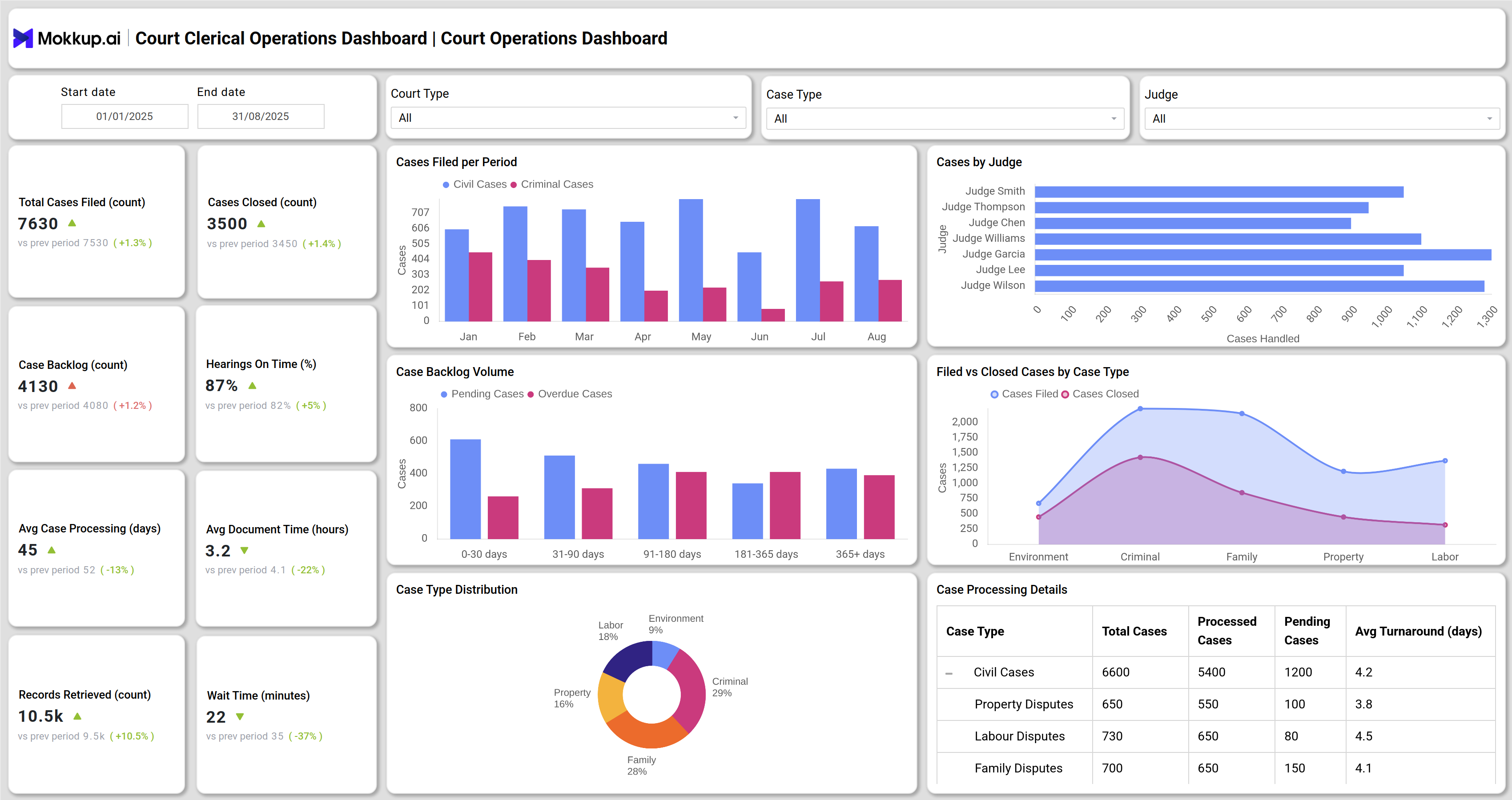
What is a Court Clerical Operations Dashboard?
A Court Clerical Operations Dashboard is a centralized tool designed to monitor and manage daily clerical activities in courts. Instead of depending on static reports, this real-time court operations monitoring tool gives clerks, judges, and administrators a clear view of case filings, hearings, document processing, and backlog status. It works as a court clerical workflow and case tracking dashboard, improving efficiency and ensuring statutory deadlines are met.
How to Create a Court Clerical Operations Dashboard
You don’t need to build your report from scratch—just start with a ready-to-use dashboard template from Mokkup. Add in your data and export it however you like. Here’s how to do it:
1. Create or Log in to Your Mokkup Account
Start by signing up on Mokkup.ai using your email. If you already have an account, just log in, and you’ll be good to go.
2. Choose and Customize Your Dashboard Template
Find the Court Clerical Operations Dashboard template in the Templates section. Use the drag-and-drop editor to adjust KPIs, edit filters, or add elements based on your data.
3. Export to Your BI Tool
Once your dashboard wireframe is ready, use the BI Tool Export feature to send it directly to Power BI or Tableau for further analysis and enhancements. You can also download the dashboard as a PDF, PNG, or JPEG, embed it on a platform, or invite your team to collaborate.
Note: This is a Pro template. To use and customize this dashboard wireframe, you’ll need a Pro subscription on Mokkup. Upgrade anytime to unlock full access.
Court Clerical Operations Dashboard Example
Create your Best clerical operations dashboard for courts with two main views: the Court Operations Dashboard and the Court Workload & Audit Dashboard. The Court Operations view highlights key metrics such as case filings, closures, backlog volumes, hearings completed on time, and average case processing times. Visuals like backlog aging charts, case type distribution, and cases by judge reveal workload distribution patterns. The Court Workload & Audit view focuses on clerical performance and compliance, tracking absenteeism rates, statutory deadlines met, error correction workload, and financial outcomes. Together, these views provide a complete dashboard for tracking court case progress and ensuring operational accountability.
How to Analyze Data in Court Clerical Operations Dashboards
When analyzing a clerical operations dashboard for courts, focus on:
- Track Case Filings vs Closures: Identify whether new filings are balanced with resolved cases.
- Monitor Case Backlog and Aging: Use stacked charts to spot delays in civil, criminal, or family cases.
- Measure Hearing Punctuality: Check the percentage of hearings held on time to assess scheduling efficiency.
- Evaluate Document Processing: Track average document turnaround and error rates to improve clerical quality.
- Check Staff Performance: Monitor absenteeism, overtime, and workload distribution by judge or clerk team.
- Assess Financial Insights: Compare filing fees collected, fines, and cost per case processed to ensure budget utilization.
Benefits of Court Clerical Operations Dashboards
- Improves efficiency: Automates case tracking and reduces manual reporting.
- Increases transparency: Provides real-time updates on case progress and clerical activities.
- Reduces delays: Identifies backlog trends and helps allocate resources.
- Enhances compliance: Tracks statutory deadlines and audit findings.
- Supports decision-making: Provides actionable insights through data visualization.
KPIs to Track in Court Clerical Operations Dashboards
Key performance indicators for a clerical operations dashboard for courts include:
- Total Cases Filed and Closed – Measures court throughput.
- Case Backlog Volume – Tracks pending and overdue cases.
- Hearings on Time (%) – Assesses punctuality and efficiency.
- Average Case Processing Time – Evaluates overall case resolution speed.
- Document Processing Time & Error Rate – Monitors clerical accuracy.
- Absenteeism & Overtime Hours – Reflects staff workload balance.
Frequently Asked Questions
1. What is the purpose of a Court clerical operations dashboard for courts?
It provides consolidated visibility into case progress, clerical workload, compliance, and finances, helping courts improve accountability and efficiency.
2. Can this dashboard reduce court backlogs?
Yes. By analyzing backlog aging, clearance rates, and statutory deadlines, courts can reallocate resources to speed up case resolution.
3. Who benefits most from this dashboard?
Dashboards for tracking court case progress and compliance benefit court administrators, clerks, judges, and policymakers.