
What is a Booking Performance Monitor Dashboard in Healthcare?
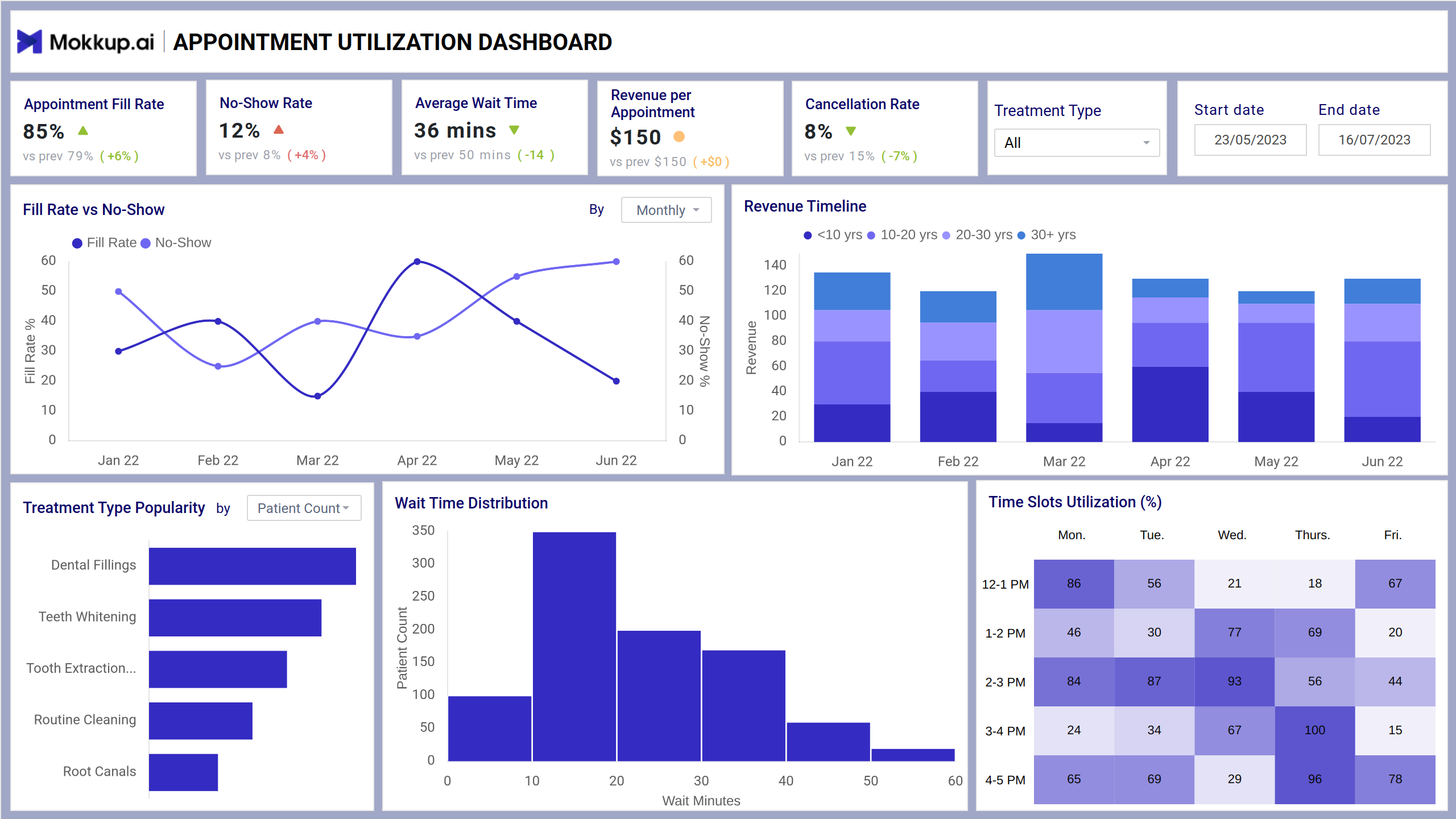
The Healthcare booking performance dashboard template offers a comprehensive view of patient appointment data for a dental clinic. Designed for practice managers, the medical appointment tracking dashboard provides real-time insights into appointment trends, patient behavior, and operational efficiency. This single-screen dashboard wireframe offers valuable insights to help the clinic optimize patient scheduling and resource allocation.
Healthcare Booking Dashboard Example
This dashboard provides patient scheduling analytics to improve the efficiency of the booking process. It is designed with user-centric navigation in mind, and the drill-down filters provide granular insights to targeted segments. It tracks the revenue and measures the wait time with intuitive charts and graphs to give sense to the operational decision-making.
How to Analyze Data in Healthcare Booking Dashboards
You can track patient flow, scheduling trends, and treatment effectiveness with healthcare analytics. To analyze data from this Patient flow optimization dashboard, you must dive into the visual elements to understand what each metric delivers. You can use bar charts to track booking trends, missed appointments can be tracked with no-show rates, and with cancellation rates, you can dig deep into the key reasons for cancellation and schedule the appointments accordingly.
How to Create a Medical Appointment Booking Dashboard
You don’t need to build your report from scratch—just start with a ready-to-use dashboard template from Mokkup. Add in your data and export it however you like. Here’s how to do it:
1. Create or Log in to Your Mokkup Account
Start by signing up on Mokkup.ai using your email. If you already have an account, just log in, and you’ll be good to go.
2. Choose and Customize Your Dashboard Template
Find the Booking Performance Monitor Dashboard template in the Templates section. Use the drag-and-drop editor to adjust KPIs, edit filters, or add elements based on your data.
3. Export to Your BI Tool
Once your dashboard wireframe is ready, use the BI Tool Export feature to send it directly to Power BI or Tableau for further analysis and enhancements. You can also download the dashboard as a PDF, PNG, or JPEG, embed it on a platform, or invite your team to collaborate.
Note: This is a Pro template. You’ll need a Pro subscription on Mokkup to use and customize this dashboard wireframe. Upgrade anytime to unlock full access.
Benefits of Booking Dashboards in Healthcare
Mokkup.ai healthcare booking dashboard provides a centralized view of booking data, including revenues, trends, and conversion rates. Here are the key benefits of this dashboard:
- Get real-time insights into the weekly, monthly, and seasonal booking trends.
- Manage pricing strategies and revenue with visibility into the key metrics.
- Improve operational efficiency by forecasting the upcoming check-ins/ check-outs through clinic scheduling insights.
- Analyze why users abandon the booking process to promote the hospital OPD booking efficiency.
KPIs to Track in Appointment Booking Dashboards
With this dashboard, you can track the following real-time appointment performance metrics:
- Average Wait Time: This metric displays the average time patients spend waiting for their appointments, a crucial factor in patient satisfaction and experience.
- Revenue per Appointment: This statistic explains the average revenue generated per scheduled appointment.
- Cancellation Rate: The percentage of canceled appointments, enabling the clinic to analyze the reasons for cancellations and implement strategies to reduce them.
- Revenue Timeline: It showcases the monthly revenue trends, helping the clinic understand seasonal patterns and plan for resource requirements accordingly.
- Wait Time Distribution: The histogram depicts the distribution of wait times, enabling the clinic to identify improvement areas and set appropriate patient expectations.
- Time Slots Utilization: The heatmap showcases the hourly utilization of appointment slots throughout the week.
FAQs
1. How can this tool help reduce booking drop-offs?
By identifying when users abandon the booking process, the monitor helps uncover friction points.
2. Is the dashboard customizable?
Yes, the dashboard is typically fully customizable to show the metrics most relevant to your business goals. You can also set alerts, goals, and benchmarks.