
From device status and date selection to bandwidth usage trends and speed analysis, each functionality offers valuable insights into network operations. Explore key terms such as download-to-upload ratio, network uptime, packet loss rate, and top applications by usage to gain a deeper understanding of your network environment. Whether you're troubleshooting network errors or optimizing bandwidth usage, this blog will equip you with the knowledge and tools needed for effective network management.
Screen 1: Bandwidth Speed Analysis Chart
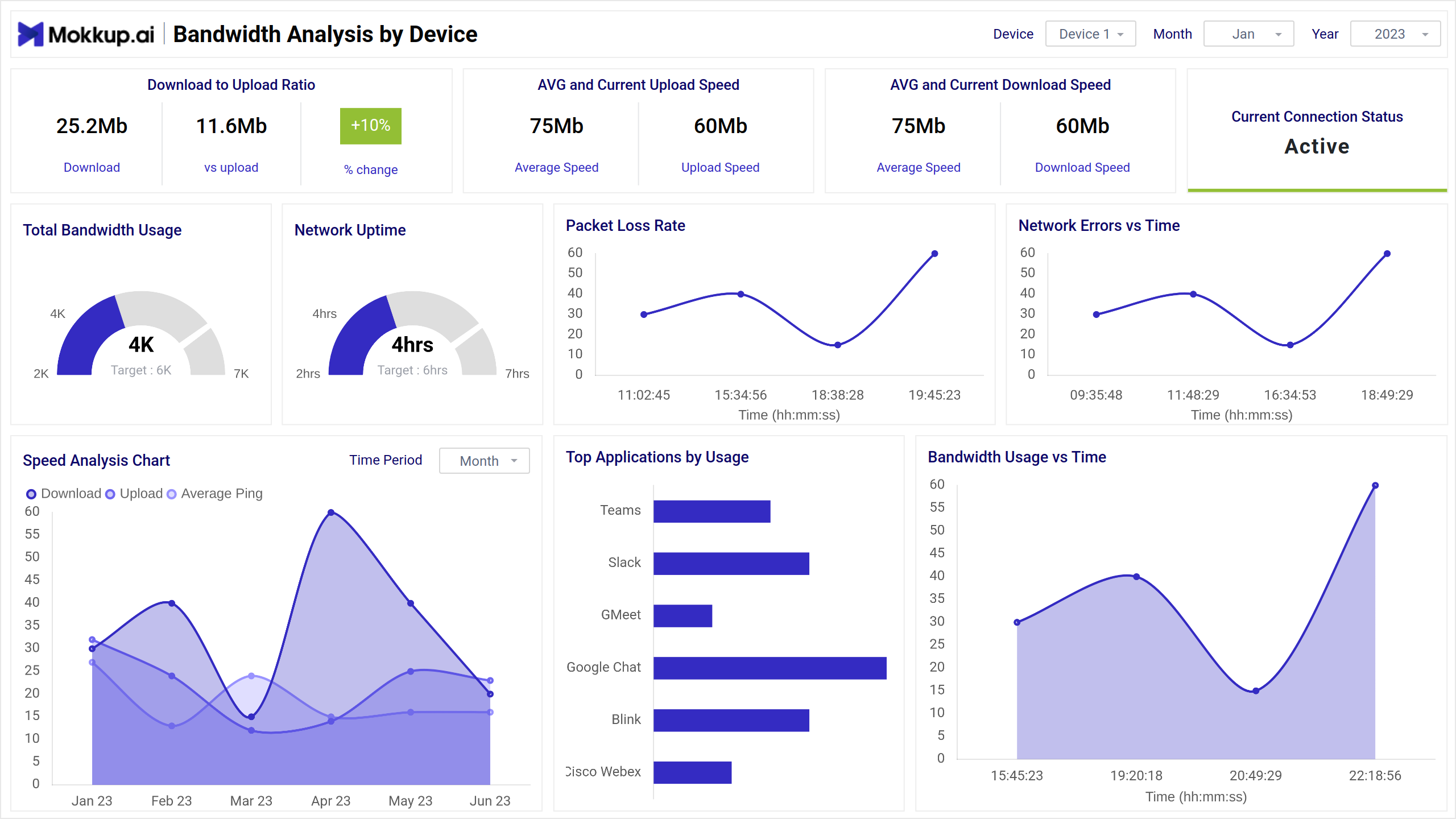
This screen offers an array of functionalities, including device status, date selection, download-to-upload ratio, current connection status, average and current upload/download speeds with percentage change, total bandwidth usage, network uptime, network error trends over time, packet loss rate, top applications by usage, bandwidth usage trends over time, and a speed analysis chart.
Key Terms to consider:
- Device Status: Indicates the operational status of devices connected to the network.
- Start Date/End Date: Allows users to specify the timeframe for analysis.
- Download-to-Upload Ratio: Measures the ratio of download speed to upload speed.
- Current Connection Status: Displays the current status of the network connection.
- Average and Current Upload/Download Speeds: Provides information on the average and current data transfer speeds, with a percentage change indicator.
- Total Bandwidth Usage: This shows the cumulative bandwidth utilized over a given period.
- Network Uptime: Indicates the time the network has been operational without interruption.
- Network Error vs Time: Tracks network errors over time to identify patterns or trends.
- Packet Loss Rate: Measures the percentage of data packets lost during transmission.
- Top Applications by Usage: Lists the most resource-intensive applications based on bandwidth usage.
- Bandwidth Usage vs Time: Displays trends in bandwidth usage over time.
- Speed Analysis Chart: A visual representation of network speed fluctuations and trends.
Dashboard Template Insights
This blog introduces a powerful dashboard for effective network management, offering insights into device status, bandwidth usage trends, and speed analysis. Key terms like download-to-upload ratio and packet loss rate are explained, aiding in a deeper understanding of network operations. With features including device status updates and visual representations like the Speed Analysis Chart, users can troubleshoot errors and optimize bandwidth usage for enhanced network performance.
Conclusion
In conclusion, this dashboard is a powerful tool for effective network management. With features like bandwidth speed analysis and key metric tracking, it provides invaluable insights for troubleshooting and optimization. Whether monitoring errors or analyzing usage trends, this tool equips users with the knowledge needed for optimal network performance.