
What is an Ecommerce Sales Forecasting Dashboard?
The ecommerce forecasting dashboard template enables businesses to predict future sales trends, helping them make informed decisions on resources, marketing strategies, and overall planning. Sales forecasting plays a crucial role in budgeting, production, advertising, and business development by providing accurate insights into the company's future outlook.
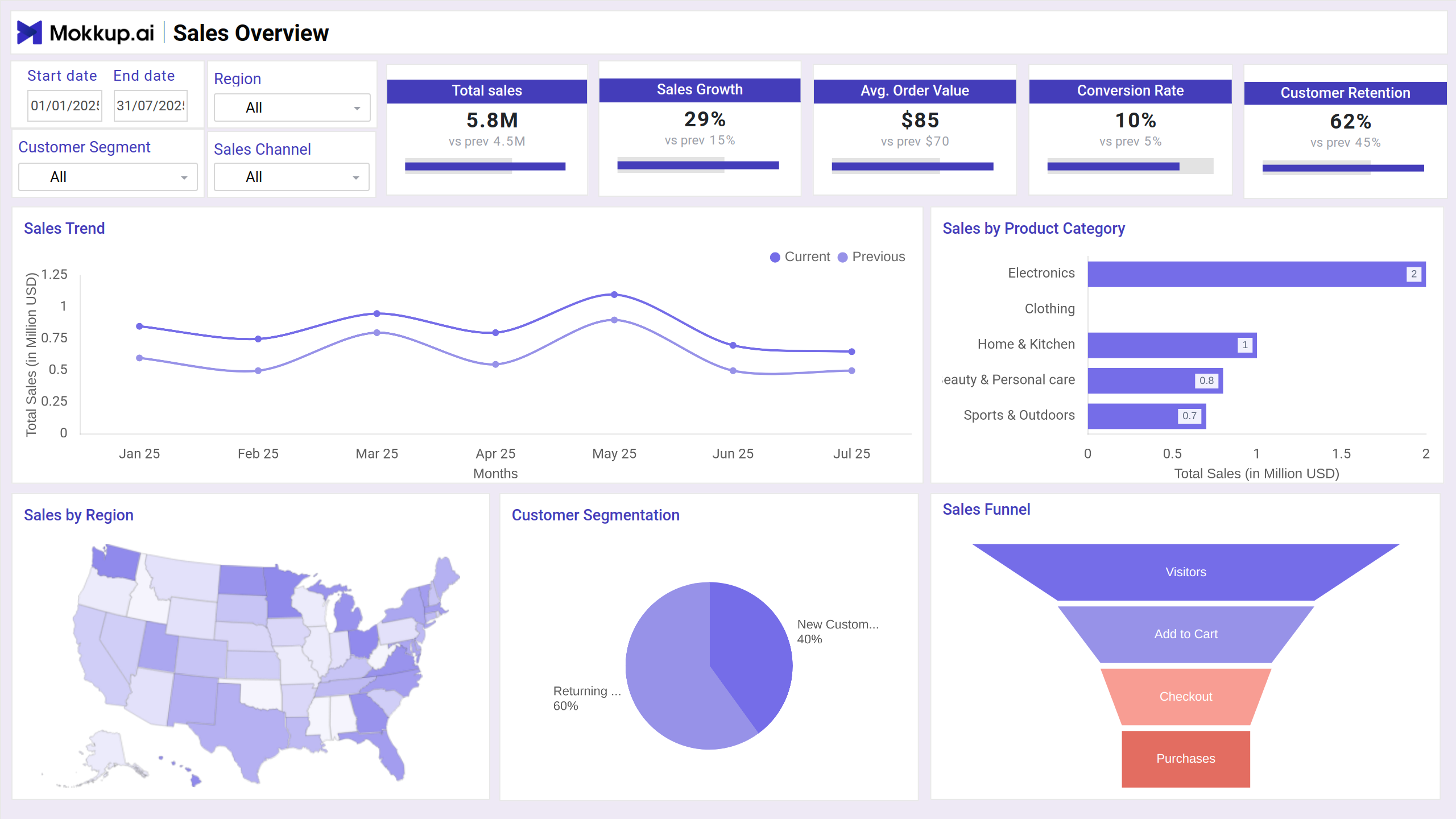
Ecommerce Forecasting Dashboard Example
This sales prediction dashboard allows you to precisely predict future sales, demand, and inventory needs while structurally presenting the key metrics. The dashboard is highly customizable, allowing users to adjust forecasting models, set target metrics, and choose between different timeframes like weekly, monthly, or quarterly views. It features interactive filters for product categories, regions, customer segments, and promotional periods, enabling users to drill down into specific areas of interest.
Benefits of Ecommerce Sales Forecasting Dashboards
You can use this online sales forecast dashboard for operating business efficiently and strategically. Here are a few benefits:
- Accurate sales projections for better planning and goal setting
- Data-driven decision-making based on real-time trends and customer behavior
- Better financial planning with clearer visibility into expected revenue and costs
- Quick identification of sales patterns and seasonal trends
- Optimized marketing and sales strategies by forecasting campaign impacts
- Cross-departmental alignment with consistent, insight-backed forecasting
KPIs to Track in Sales Forecasting Dashboards
This KPI allows you to track primary sales metrics. Some of them are:
- Sales Growth: Measures the rate at which sales revenue is increasing or decreasing over a specific period
- Average Order Value: Calculates the average amount of money spent each time a customer places an order.
- Sales by Region: Represents the projected or actual revenue generated from different geographic regions over a specific period.
- Sales Funnel: This section helps track users' progress through the various stages of the buying journey, from awareness to purchase.
- Total Forecasted Sales: It is the projected revenue your online store is expected to generate over a specific future time.
- Forecast Accuracy: Measures how close your predicted sales (or other forecasted metrics) are to the actual observed values.
- Projected Sales Growth: Provides a forward-looking estimate of how much sales are expected to increase or decrease over a specific future period
- Projected Customer Retention Rate: It estimates the percentage of existing customers who are expected to continue buying from your store over a future time period.
How to Create an Ecommerce Forecasting Dashboard
You do not need to develop the dashboard from scratch, as there is a ready-to-use sample ecommerce forecasting dashboard available to get started. Just plug in your details, and you will be good to go. Here is a step-by-step guide:
- Create or Log in to Your Mokkup Account
- Choose and customize your retail forecasting analytics dashboard with a drag-and-drop editor.
- Export to your BI Tool or download it as a PDF, PNG, or JPEG
Note: This is a Pro template. You’ll need a Pro subscription on Mokkup to use and customize this dashboard wireframe. Upgrade anytime to unlock full access.
How to Analyze Data in Ecommerce Forecasting Dashboard
Now that you have decided to move forward with this best ecommerce sales dashboard, let’s understand how you can analyze data in this dashboard wireframe:
- Start with focusing on the most critical metrics that drive your business.
- Break down forecasts by relevant dimensions: customer segments, product categories, channels, and geography.
- Compare forecasted vs. actual data
- Look for seasonality & trends
- If a forecast is significantly higher or lower, understand the “why” behind a situation.
Frequently Asked Questions
1. What is the purpose of an eCommerce forecasting dashboard?
The primary purpose is to predict future sales, customer behavior, inventory needs, and overall performance.
2. How can I use a sales forecasting dashboard for inventory planning?
By predicting the expected sales volume for each product, a sales forecasting dashboard can help you avoid stockouts by predicting demand, prevent overstocking by identifying slow-moving products, and align inventory with forecasted demand by making purchasing decisions early.